We’re opening this AMA (Ask Me Anything) thread for all your questions to the Flipper Zero team about the future of the project. The thread is open now, so please leave your questions here.
The Flipper team will start answering on Friday, July 3, at 15:00 BST (UTC+1) and finish on Monday, July 6.
Welcome to the Flipper Zero subreddit! This pinned post is here to help new and advanced users. Please check it first for FAQs, tips, and important information.
This post will be updated regularly, so be sure to check back from time to time for the latest tips and information :)
You can purchase Flipper Zero from our official store at https://flipper.net/products/ or from our official partners: Joom and Lab401. Always purchase from the official sellers, and verify any links shared by others. Find stores available for your country at our resellers page: https://flipper.net/pages/resellers
We do not sell via direct messages on social networks, on Amazon, AliExpress, or elsewhere besides the official channels. Devices purchased from unofficial resellers do not come with our official warranty.
Search Before Posting. Many questions have been answered before. Please search for your question first as duplicate posts are against our rules. This will both help keep the community focused on high-quality posts and help you find the answer faster.
And remember: a wise dolphin once said, Have you tried turning it off and on again? (Both your PC and Flipper)
Getting started
SD Card Recommendations: Flipper Zero devices don’t come with a microSD card, so you need to purchase one separately. It’s important to use a high quality brand such as SanDisk or Kingston.
What card size should you choose? Since Flipper Zero uses tiny files, 4GB will be enough. 16-32GB is usually easiest to find and doesn’t cost much.
Check out Flipper Docs to learn about all of your Flipper Zero's capabilities
Explore our official Apps Catalog (available on the web and mobile)
Check out our Discord and social media for inspiration — links below.
Can Flipper Zero read this?
Welcome to the classic question we’re all facing from time to time. Here is your action plan:
Determine what signal your item uses. → Learn more below.
Try reading your item with Flipper Zero and see if it works.
If it didn’t work, reach out for help from our community. However, please make sure to provide as much detail as possible. → Learn more about getting help from the community below.
What signal does my item use?
To scan your item’s signal, you need to select the right Flipper’s app. For that, you need to determine the signal type.
Infrared: Remotes for TVs, Lights and Audio/Video boxes tend to use Infrared. More modern TVs and Streaming boxes may use Bluetooth though. As such, Flipper may only be able to record the power button. (If it has a button for a microphone/speech input, then it’s Bluetooth.) Worst case just try all and see.
Sub-GHz: Garage Doors and some lights. Use the frequency analyzer to see if Flipper picks up a signal.
NFC / RFID: Test for both if you’re unsure of the signal type. If it’s NFC, you may have to use the PicoPass app. (https://lab.flipper.net/apps/picopass )
Find the FCC ID
Every device transmitting a signal will have an FCC ID. The FCC ID often indicates the type of signal a device uses. You can look this up at FCC ID Search. The ID is usually on the back side, or behind the batteries in the remote.
People in tech circles and engineering in general appreciate curiosity and effort above all else. To effectively seek help, frame your question clearly and provide all technical details, including the device’s brand, model, what computers/systems it works with, and any steps you’ve already taken.
Avoid vague or overly simplistic questions, as they qualify as low-effort posts and may be removed according to our subreddit rules. Moreover, they are unlikely to yield satisfactory answers. As much as we’d like to help, it's super hard to answer questions like this.
I am a generic nerd and I carry a mesh-core node all the time. Been finding myself using the flipper zero more and more, and I've decided I need to edc it as well. All of the current flipper LoRa modules are not super pocketable, so I am thinking I will give building one with a folding antenna and slim packaging a shot. I am wondering if this is a project/product that is actually viable, and if anyone else would be interested in it? I will have an email list on my website that you can sign up on if you are interested. https://racecarsarered.com/flipper-lora
Scope creep is definitely a consideration of mine, but I am also toying with the idea of a module that can monitor meshcore and meshtastic at the same time via two radios. This is fully just an idea for now.
I am planning on using the Seeed XIAO nRF52840 as the chip to prototype with
Everything will be open sourced
The pics are just some basic renders based around the chips I would be planning on prototyping with. I am planning to keep the same style and design language the same as the original flipper, and similar to these renders. I would love any and all community feedback here, as that is what makes these devices so great!
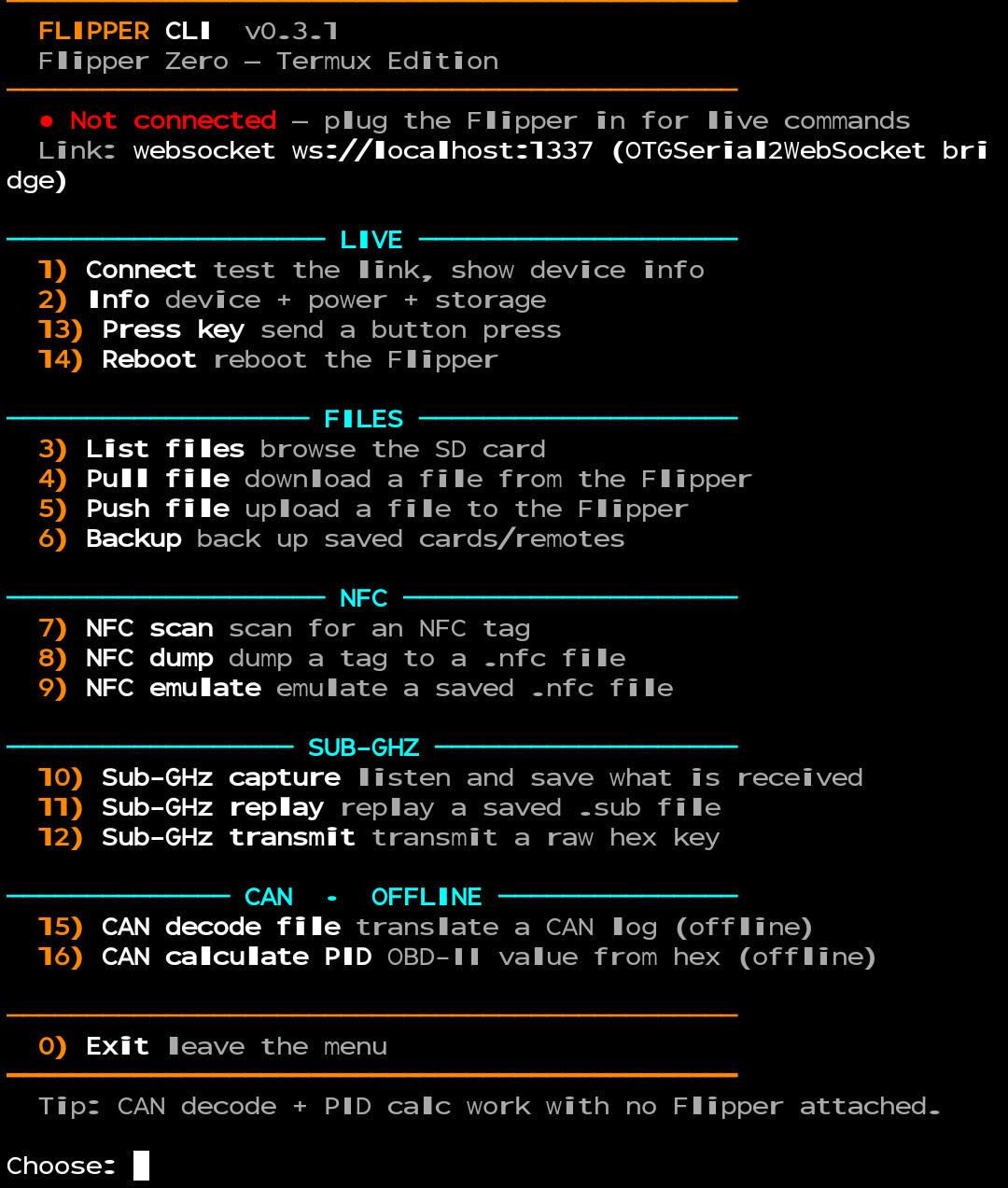
I got tired of needing a laptop every time I wanted to do something with my Flipper, so I built a command-line tool that runs in Termux on my phone.
It drives the Flipper over USB (OTG cable + the OTGSerial2WebSocket bridge app). Type `flipper` and you get a menu — back up your saved cards and remotes, scan/dump/emulate NFC tags, capture and replay Sub-GHz remotes, press the Flipper's buttons, reboot it. All the usual stuff, from your phone, no laptop.
The part I'm most happy with doesn't need the Flipper at all. It translates CAN bus hex:
`flipper can decode capture.log` — turns a CAN log into readable frames: the ID, the data bytes in hex/decimal/ASCII, and the decoded OBD-II value when it's a diagnostic response (RPM, coolant temp, speed, all the standard PIDs).
`flipper can calc 0C 1A F8` — give it a PID and some hex bytes and it spits out the value (that one is 1726 rpm).
So if you've got a CAN log sitting around, you can play with the decoder right now without plugging anything in.
It's Python, MIT licensed, and it installs with pip. Repo:
He's metnioned the F0 a few times and now I see theres a F1 coming out at some point but its $400 to secure one on Kickstarter. If I get the F0, will it be outdated in a few months? I can build a PC but that's about where my computer knowledge ends. He's really into this stuff and I just want to make the smart decision. Can you guys convince me to buy the F0? Or should I hold out for the F1?
I'm 15 and from Sweden, and I've been really interested in getting a Flipper Zero lately. I'd love to learn more about radio signals, programming, and how everyday technology works.
I have a few questions before buying one:
- Is the Flipper Zero a good starting point for someone who's relatively new to this stuff?
- Do you still use yours regularly, or did the excitement wear off after a few weeks?
- What's the coolest, funniest, or most useful thing you've done with your Flipper Zero?
- Is there anything you wish you'd known before buying one?
My biggest concern is spending the money and then barely using it. It looks really fun, but I'd love to hear some honest opinions from people who actually own one.
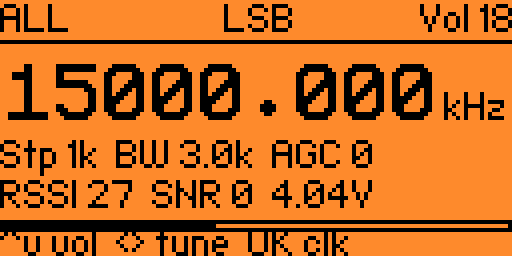
Whilst it's a fairly nifty thing, its only has a rotary control knob, so it feels a little clunky. However, it can be controlled using WiFi or USB. Thus, I thought an F0 app might be a fun way to control it, but I know nothing of writing such an app, and used Claude.
So now, if you have an F0 with a WiFi module, then it can control the volume, frequency, band and mode.
I'm aiming to publish the app as a binary so you don't need to build it yourself.
I wanted the tiny monochrome menu feel of a Flipper Zero on my N900, so I used Claude (Anthropic's AI) to build gothi under my direction. It runs on Maemo 5 and on a PC, and works on a real N900. It is an interface inspired by the Flipper's look, not an emulator.
The UI draws a 128×64 one-bit screen with the Flipper firmware's graphics and animations, then scales it to the N900 display. The current MVP has a menu, clock, battery view, key test, animation player, the Dolphin desktop and stats, and settings for colour, screen size and happy mode.
With the keyboard slid out, use the arrows, Enter and Backspace. With it closed, the app switches to a touch layout with a directional pad and Back button.
The bundled modules cover simple N900 controls such as volume, brightness, Bluetooth and Wi-Fi (the Wi-Fi entry appears when wifi-switcher is installed). Separately installable modules add things like GPS status, time sync, an SSH-server switch and a file-server switch.
The Dolphin uses the firmware animations and has its own XP, levels and mood. The app is still an MVP; most of the ideas on the list (FM and USB OTG, for example) are not there yet.
Important: this does not add Flipper hardware or its Sub-GHz, NFC or RFID features. It uses the N900's own hardware and services. The app code is MIT-licensed; the Flipper graphics are GPL-3.0, and gothi is not affiliated with Flipper Devices.
Hi all, i’m looking at getting the Masta Blasta from Rabbit Labs and I noticed that they sell a multi-pack of multiple IR sensors.
Is there any reason to get the multipack? I understand the masta blasta is the strongest of the bunch, but the slim shady is slimmer. why would I want one of the IR sensors in this pack over another?
made a mouse jiggler for my flipper bc the one i used every day had zero ✨personality✨
so now there's harold, a rubber debugging duck. he lives on the flipper and walks the cursor around while i'm away, so the laptop doesn't sleep and teams doesn't snitch. then he puts it back where it was. usb or bluetooth, nothing to install on the pc
Hi! I'm excited to share a Flipper Zero firmware I've been working on called Eddy along with a spotify app.
I have been struggling to find a good everyday use for my Flipper Zero, and wanted to set up an app that works similar to the Spotify Car Thing directly on the Flipper Zero. After lots of brainstorming, I finally came up with a way to connect Spotify to the flipper zero using only bluetooth and a companion app for the iPhone or Mac. On your flipper zero, you can queue songs, add songs to a playlist, and even select songs from your playlist to play! I also revamped the firmware on the Flipper Zero (adapted from the Momentum firmware) to make choosing the apps you want and flashing simple and easy.
I'm also pretty tired of people requiring payments or subscription models, so I made everything open source and free to use. The link to install is here: https://mht3.github.io/eddy-firmware/ . I hope you enjoy and I am very open to feedback on both the spotify app and the firmware itself!
Eddy Firmware App ScreenSpotify App
For the moderators: I made sure all firmware features follow your rules!
Is there an HSM module for flipper zero that can provide hardware-backed encryption with the screen lock as well as securely store sensitive data i.e. passkeys, smart card data, u2f keys, wireless garage door opener keys, nfc codes, pgp and ssh keys, TOTP secrets, etc?
I envision a flipper zero that's been made into a universal key of sorts, but it can't securely do that without an HSM to back the lock screen, to back the encryption of the data in storage, and to securely store secrets.
I was thinking of buying a device that emulates Amiibos for particular Nintendo games. Instead of spending $30-50, I decided to use my under-utilized Flipper Zero.
I used an AI app development tool (Cursor) to create exactly what I wanted, and it works extremely well! The next step is to see if anyone else is interested in using it, purely as a gaming assistant tool. I used to program like 30 years ago, but after a brain injury in the military, I just can't teach myself the newer programming languages.
Anyway.. I have it posted on GitHub if anyone would like to try it out. It got rejected from the Flipper Application Catalog for direct installation, due to copyrighted names like Amiibo, and Nintendo.
If you have Amiibos, it will backup their information in its database. If you download an existing library it will use those as well. The key here is that it will create new UIDs, so it will bypass the single daily use on games like Legend of Zelda Ocarina of Time. The "Blast" feature will create a new UID, transmit it, and then repeat.. So in the game you can just activate the Amiibo feature over and over, and watch the loot drop all around you, endlessly.
It's just been a neat thing to play around with, as a fun little toy to use with Switch / Switch 2, 3DS, etc.
EDIT: I am adding a couple links. Here is a link to the page with the pre-compiled Flipper app (flipper_amiibo.fap) that can be dropped right into your SD card's NFC folder:
And here is a complete Amiibo repository with every known Amiibo, including the two new Ocarina of Time remake Amiibos. Unzip it and drop this in \apps_data\flipper_amiibo\db. This contains the necessary key files as well:
This might sound strange but I can't get any parts for my flipper at all in the UK. I tried other sites and still nothing. Anyone has an alternative or a site I can use to order repair parts for my flipper?
The part I am looking for is a glass panel for the case (not the screen for the case)