r/Windhawk • u/MolodoyStaric • 7h ago
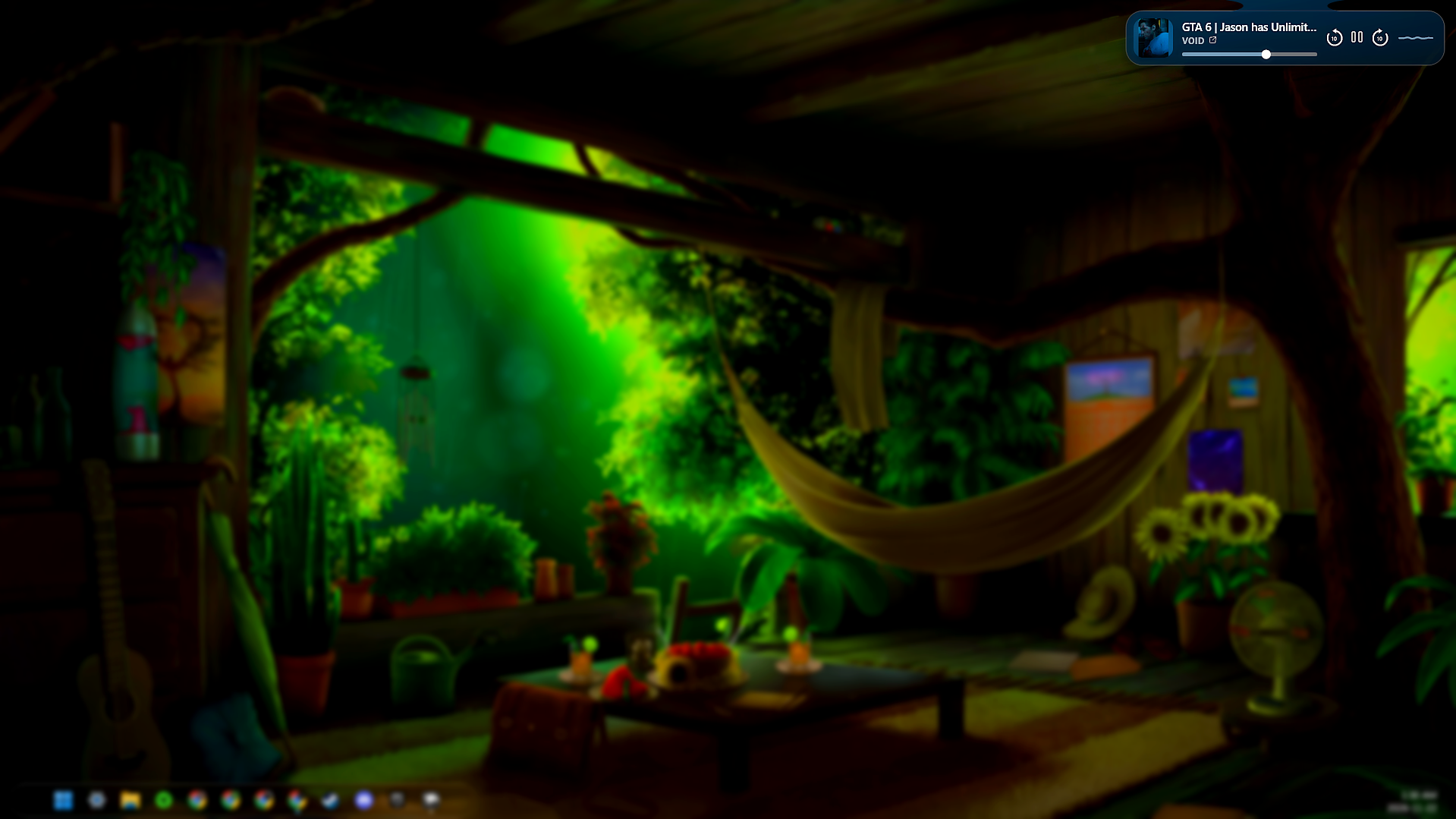
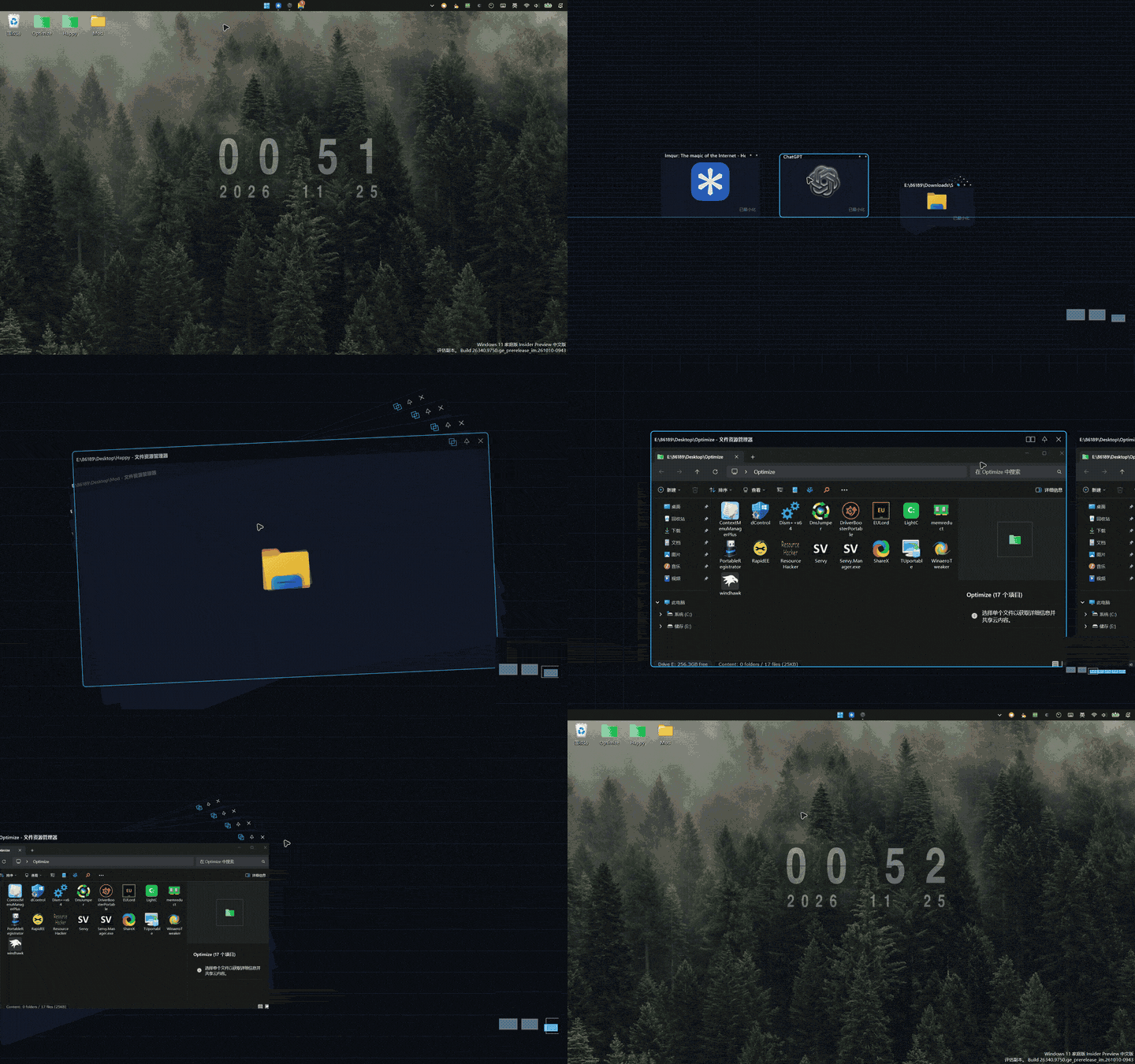
Attempts to make something gaymer-themed
Think I still need to work on the animation for now. Overall, curious to hear your thoughts
Can't attach 2 more videos(
r/Windhawk • u/MolodoyStaric • 7h ago
Think I still need to work on the animation for now. Overall, curious to hear your thoughts
Can't attach 2 more videos(
r/Windhawk
•
u/wh-updates
•
1d ago
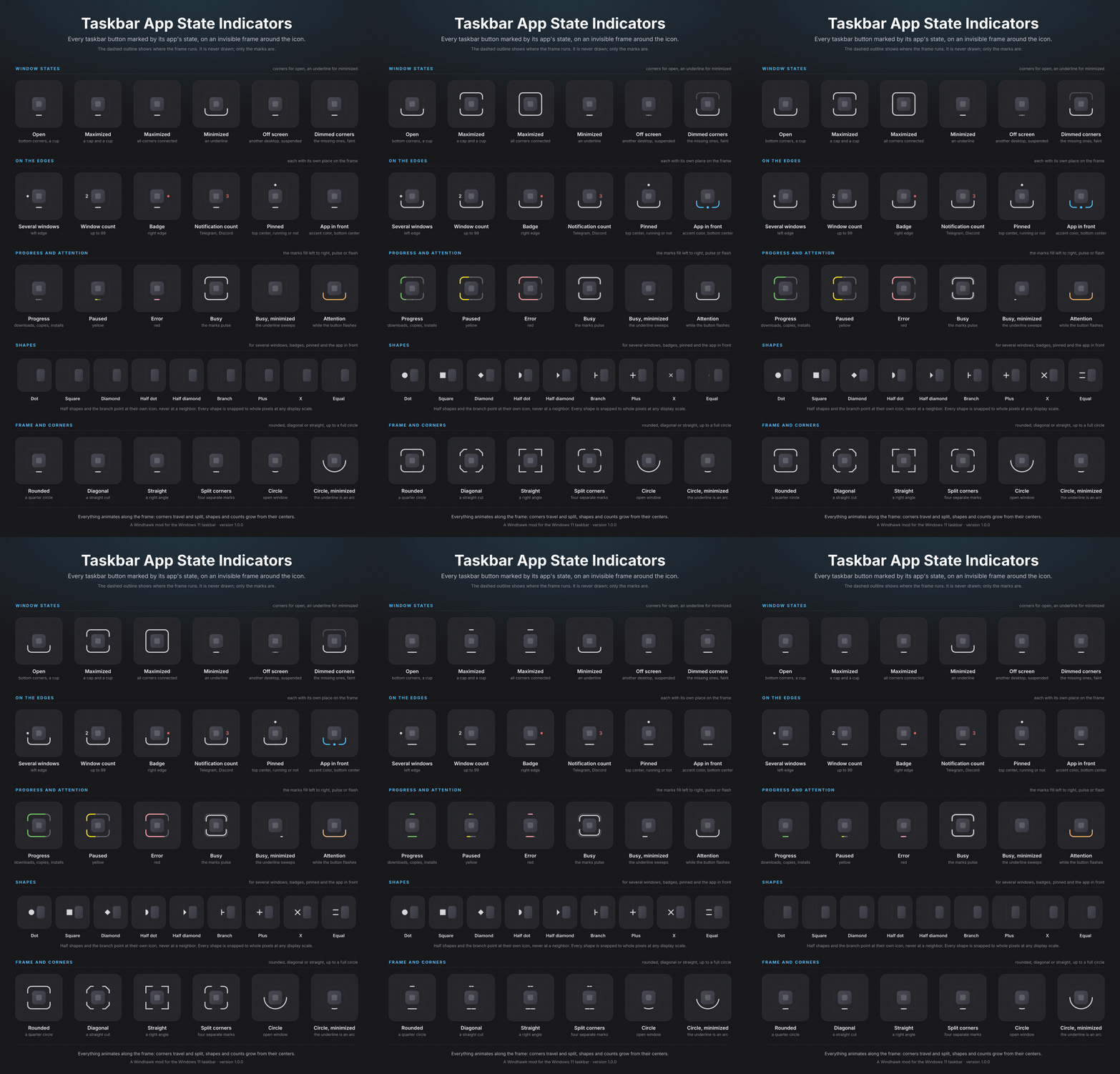
Taskbar App State Indicators 1.0.0
See at a glance which taskbar apps are open, maximized, minimized, busy or waiting for you. Small marks are drawn on an invisible rounded frame around each icon, and they move along that frame whenever something changes.
The half dot and half diamond keep only the half facing the icon: their flat side lies on the frame's line. The branch is a plus without its outer arm: a line along the frame's edge with one arm towards the icon. All three point at their own icon, never at a neighbor's. The equal sign is the square's two edges that cross the frame's line, so its lines run towards the icon whichever edge it sits on.
Counts go up to 99. Counts of one digit read normally; 10 and up turn vertical along the edge, so they don't run into the icon.
The taskbar's own running indicator and progress bar are replaced by these marks. Its multi-window mark and badges are replaced too while the matching indicator is on. Everything comes back when the mod is disabled.
A minimized app's underline splits into the corners when it's restored, a maximized window's top corners travel up from the top center, and the dots, signs and counts grow from their centers. When the mod is turned on, the marks animate in; when it's turned off, they animate out while the taskbar's own indicators fade back in. Animations are controlled by the mod's own setting only, whatever the Windows animation setting is. Progress keeps moving even with them off, like the native progress bar.
#Light|#Dark sets a color per theme, and #FF0000,#00FF00 a gradient.How it works, in short: each button's windows are found through the taskbar's view models and judged with IsIconic, IsZoomed, DWM cloaking and the virtual desktop manager, refreshed on window events. Progress, attention and badges are read from the button's own XAML (an overlay icon's count from the button's help text, where the taskbar puts the icon's description). The marks are composition shapes on a Direct2D path around the icon (two: the corners' follows the active app's thickness, the dots' keeps the frame's), moved by animating their trims along it on the render thread. The other shapes are composition lines, rectangles and small paths snapped to the screen's pixels, and the counts small XAML text blocks, all in the same host. The only layout change is the icon background's right margin, set to 0 while the mod's multi-window indicator takes the place of the native mark (restored when it doesn't). On builds where the needed symbols can't be resolved, the mod stays inactive and the log says so.
r/Windhawk • u/wh-updates • 8h ago
Floating Taskbar 2.1.16
r/Windhawk • u/wh-updates • 8h ago
Text Capitalization 0.3.13
r/Windhawk • u/wh-updates • 8h ago
Virtual Desktop Helper 2.6.0
r/Windhawk • u/wh-updates • 1d ago
Taskbar Zones 1.0.3
r/Windhawk • u/wh-updates • 1d ago
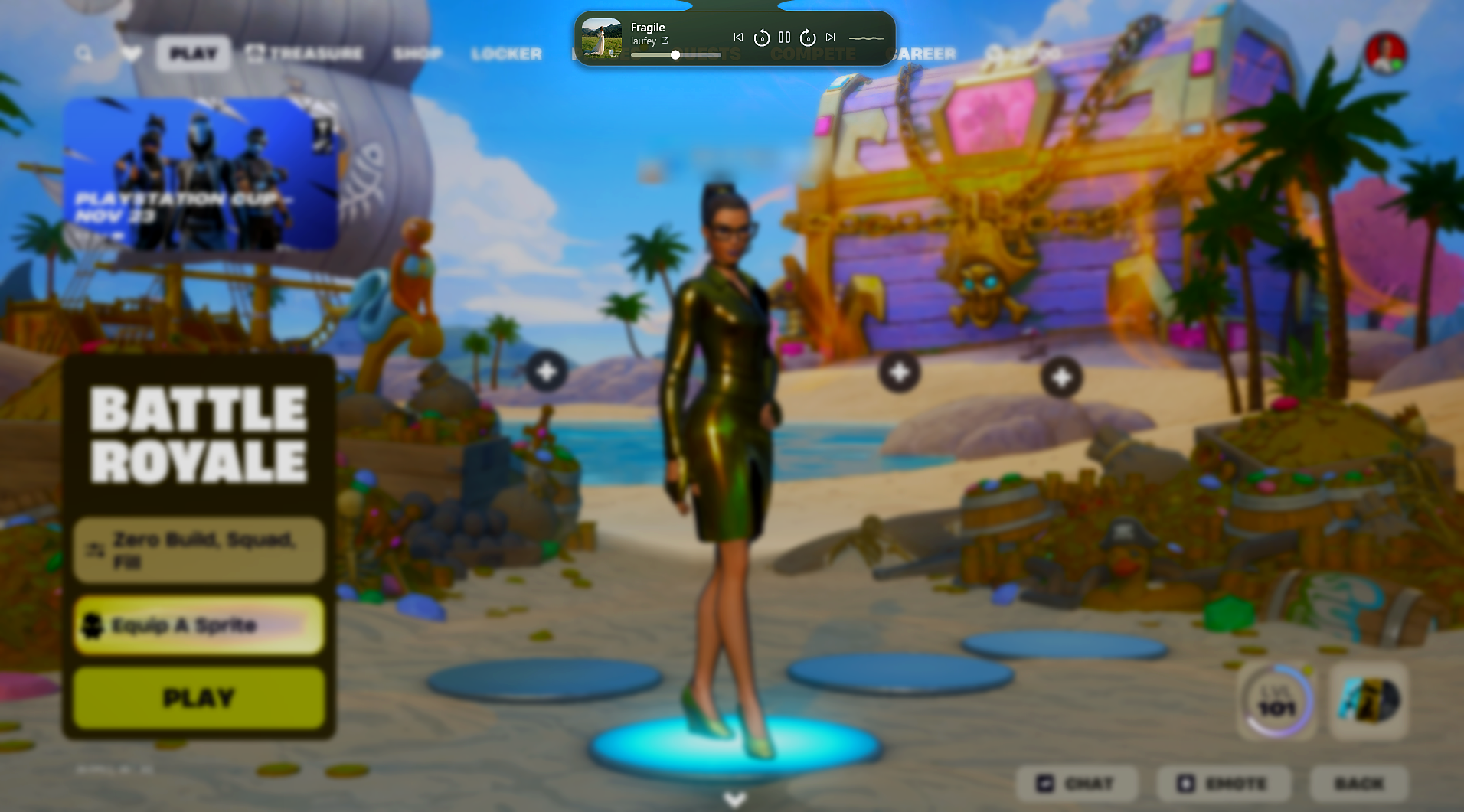
Now Playing... 1.0.0
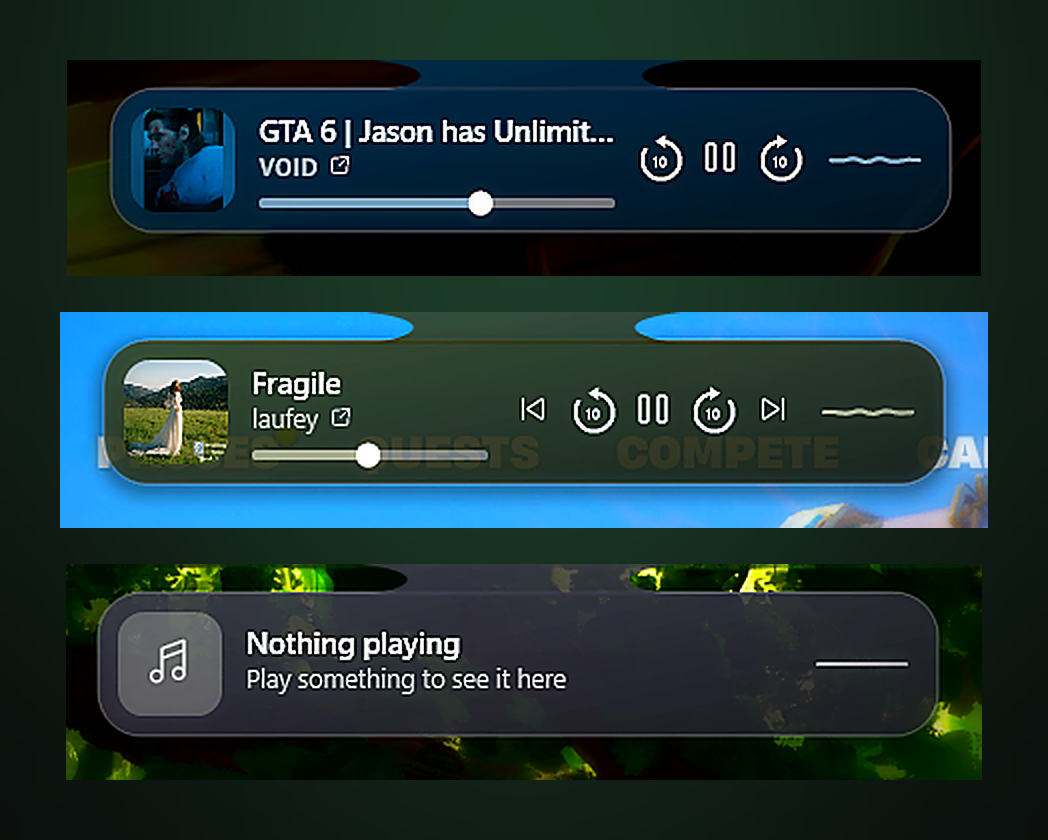
Push your mouse to the top of your screen and a now-playing bar drops down, kind of like the taskbar popping up but upside down. It shows whatever you're listening to: Spotify, SoundCloud, YouTube in your browser, Apple Music, VLC, pretty much anything that shows up in Windows' media controls.
It stays hidden over full screen stuff by default so it won't get in the way of your games or videos (use Persistent mode if you want it in a game).
There's a lot more in the Settings tab to play around with: size, width, corner roundness, animation speed, hover delays, colours, the visualizer style and more. Tweak it however you like, everything applies straight away.
r/Windhawk • u/iamfromreallife • 1d ago
The mod is in the process of approval to be on the official catalog but, if anyone want's it already, this is the windows 10 virtual desktop animations ported to windows 11, with all of their glorious smoothness and speed. With an added "Disable virtual desktop indicator popup" option thrown in.
Pretty proud of this one because windows 11 virtual desktop animations are atrocious. And, for the life of me, I couldn't find a way to fix them besides disabling the whole animation itself.
This isn't a custom renderer, a replica or a recreation of the Windows 10 animation.
It turns out that the original Windows 10 virtual desktop animation engine is still present within Windows 11's DWM. The mod intercepts Explorer's desktop switching mechanism and invokes the original legacy DWM transition functions instead.
No custom overlays, no additional processes, no background workers and no injection into DWM itself. Just Windows using its own native animation mechanism again.
When (and if) the mod is accepted, it will be at: https://windhawk.net/mods/win10vd-in-win11vd
Just enable developer settings on windhawk and create a new mod, and paste the text from this:
r/Windhawk • u/wh-updates • 1d ago
Desktop Clock & Weather 1.0.8
r/Windhawk • u/wh-updates • 1d ago
Explorer Extras 1.0.22
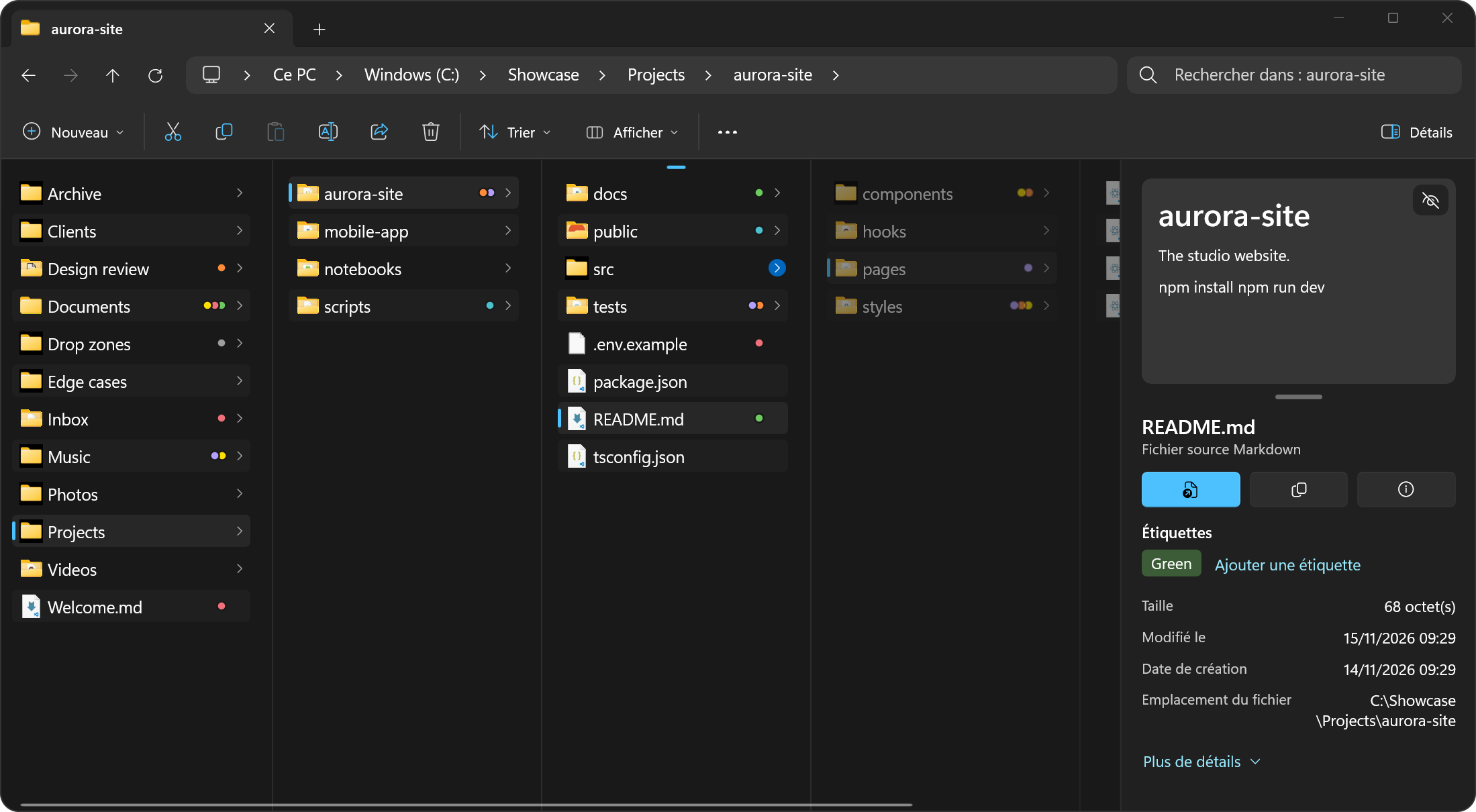
Extra features for File Explorer on Windows 11, one switch per feature.
Explorer Extras: the Columns layout, the details pane and colour labels in File Explorer
A 40-second tour is at the top of the project page: https://github.com/AristideBH/windhawk-lib/tree/main/explorer-extras#readme
Explorer Extras adds three independent features to File Explorer. Each has its own section and its own off switch on this page: turn on what you like, and the rest stays out of the way.
Browse folders the way you do on a Mac: one column per folder level, side by side. Open the View menu of a File Explorer window and choose Columns.
One pane that replaces Explorer's Details and Preview panes, in Columns and in every view. Press Alt+P, or use the View menu or the toolbar button, to show or hide it.
Colour labels, like the tags of macOS, on files and folders.
Bug reports and ideas: https://github.com/AristideBH/windhawk-lib/issues (the issue forms ask for the mod's version and the log).
If you like it, you can support the work on Ko-fi: https://ko-fi.com/aristidebh
r/Windhawk • u/wh-updates • 1d ago
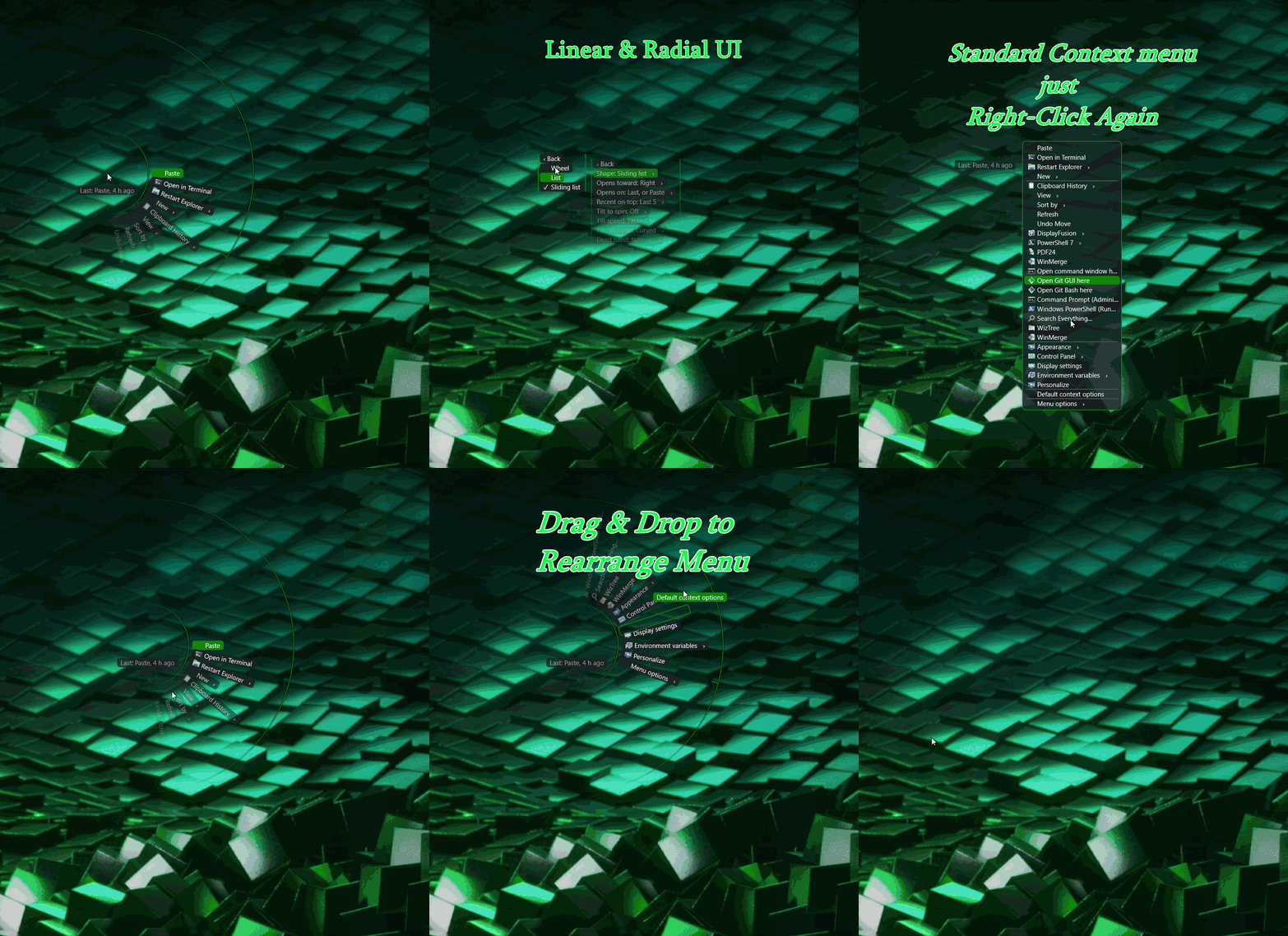
Shows classic (Win32) context menus as a half wheel around the cursor. The item on the centre line, or the one under the cursor, is highlighted; items fade out toward the top and bottom of the arc.
Mouse
Keyboard
Shape can be changed from the wheel to a straight menu that keeps every feature: "List" is a regular box, "Sliding list" is the wheel straightened into a column.
Last choice note (off by default) shows what you last chose from a wheel, and how long ago, as a greyed entry at the top or bottom of the list or in the centre of the wheel. Handy after an accidental click.
Menu options (last entry in the menu) changes most settings on the spot. A change made there holds until you next change the mod's settings in Windhawk, which then take over again.
Explorer's modern context menu is not a classic menu, so the wheel only appears where the classic one would: after "Show more options", with Shift + right-click, or everywhere if you restore the classic menu (for example with the "Classic context menu on Windows 11" mod).
Only explorer.exe is targeted by default. Any program that shows classic menus through TrackPopupMenu can be added from the mod's Advanced tab. Programs that draw their own menus (browsers, Office, most Electron apps) are not affected. A program that is not per-monitor DPI aware may misjudge clicks on a scaled display.
Mods that replace the same menus, such as Custom Cached Context Menu, hook the same functions. With two of them enabled, whichever hook runs first takes the menu, so use one at a time.
r/Windhawk • u/wh-updates • 1d ago
Native Windows Screen Recorder 2.0.4
ℹ️ Compatibility Note (Smart App Control) / Lưu ý tương thích:
- 🌐 English: Like all Windhawk mods, this mod is compiled locally into an unsigned
.dllfile. It runs in a dedicated Windhawk tool process. If Windows Smart App Control is active on your PC, Windows will block the compiled.dlland the mod will not load.- 🇻🇳 Tiếng Việt: Giống như mọi bản mod trên Windhawk, mod này được biên dịch cục bộ thành tệp
.dllkhông có chữ ký số và chạy trong một tiến trình công cụ độc lập của Windhawk. Nếu máy đang bật Smart App Control (Kiểm soát Ứng dụng Thông minh), Windows sẽ chặn tệp.dllnày khiến mod không thể hoạt động.
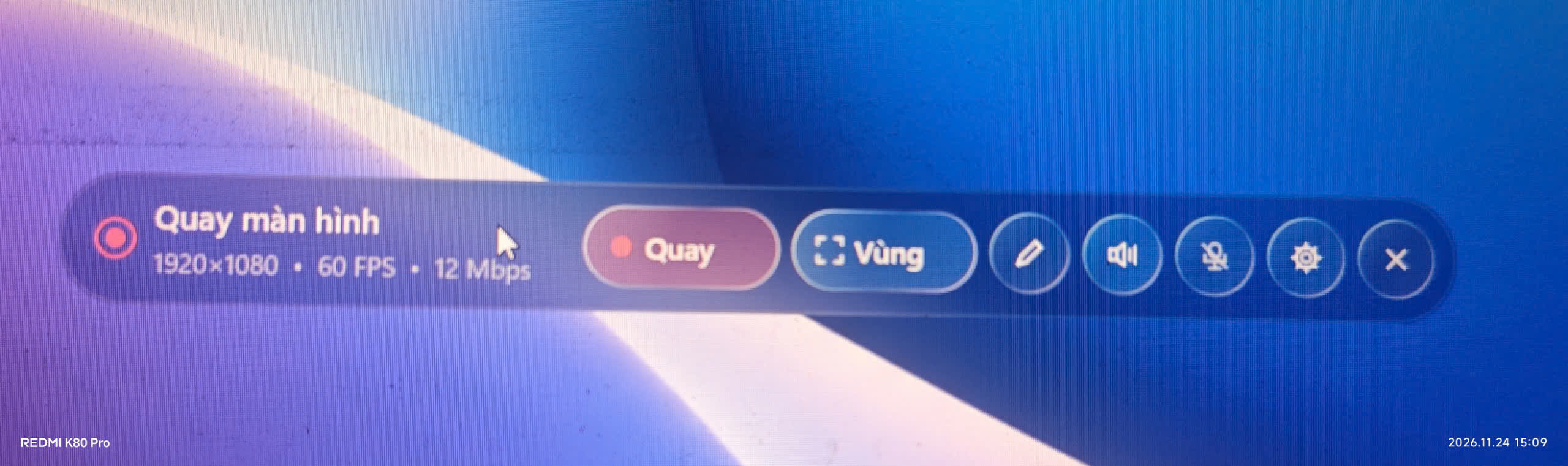
Native Windows Screen Recorder Preview (Floating Pill Bar)
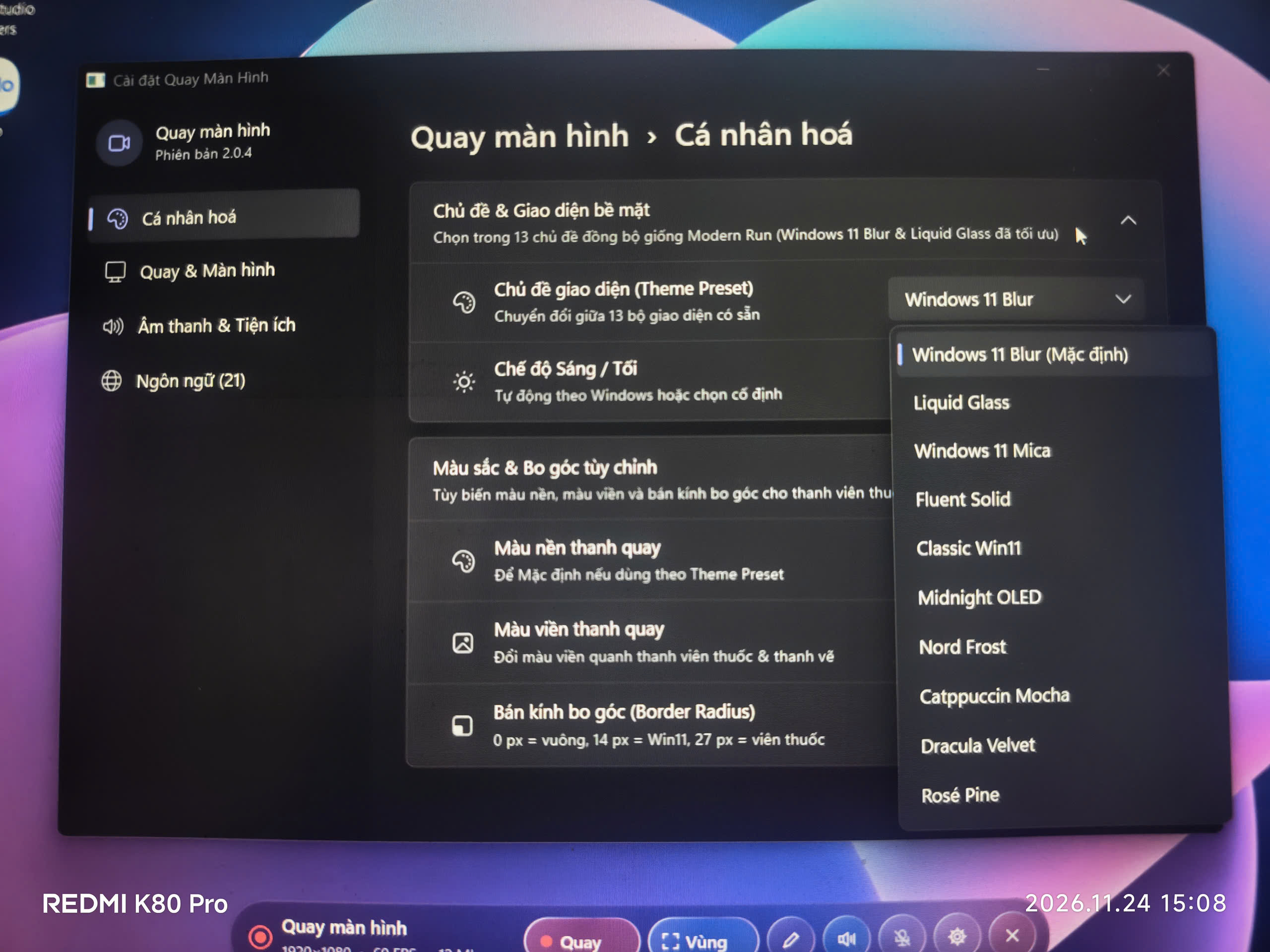
Floating Pill Bar (13 Themes & Windows 11 Blur / Liquid Glass)
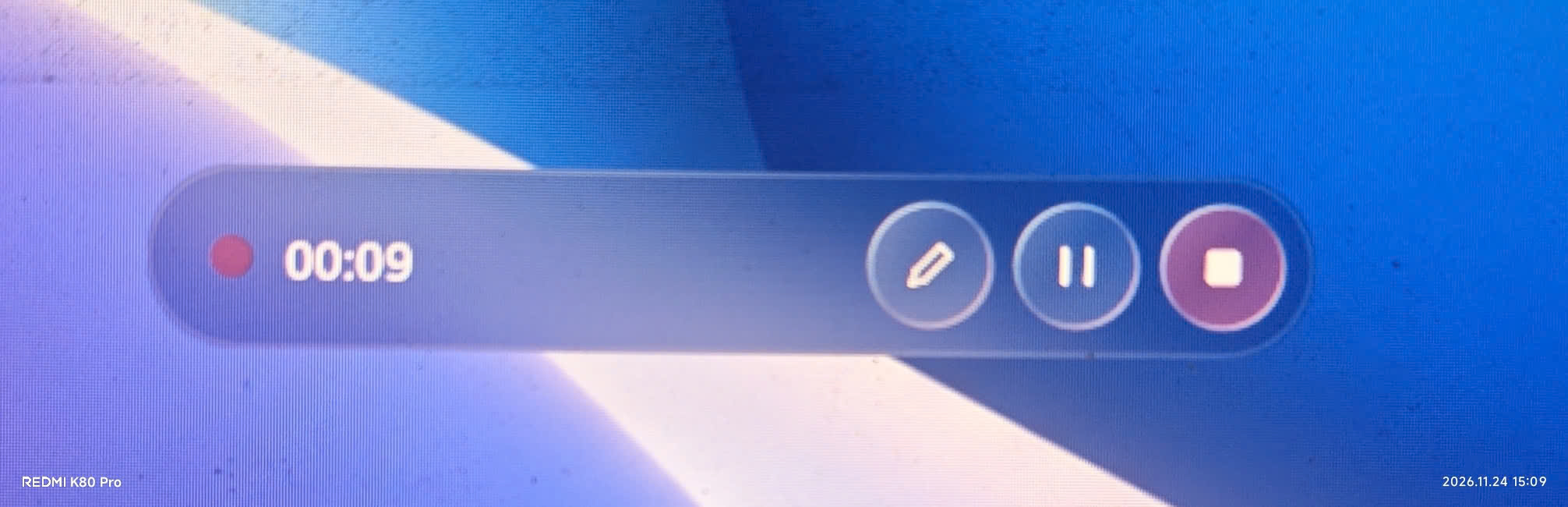
Native Windows Screen Recorder Preview (Active Recording HUD)
Active Recording HUD
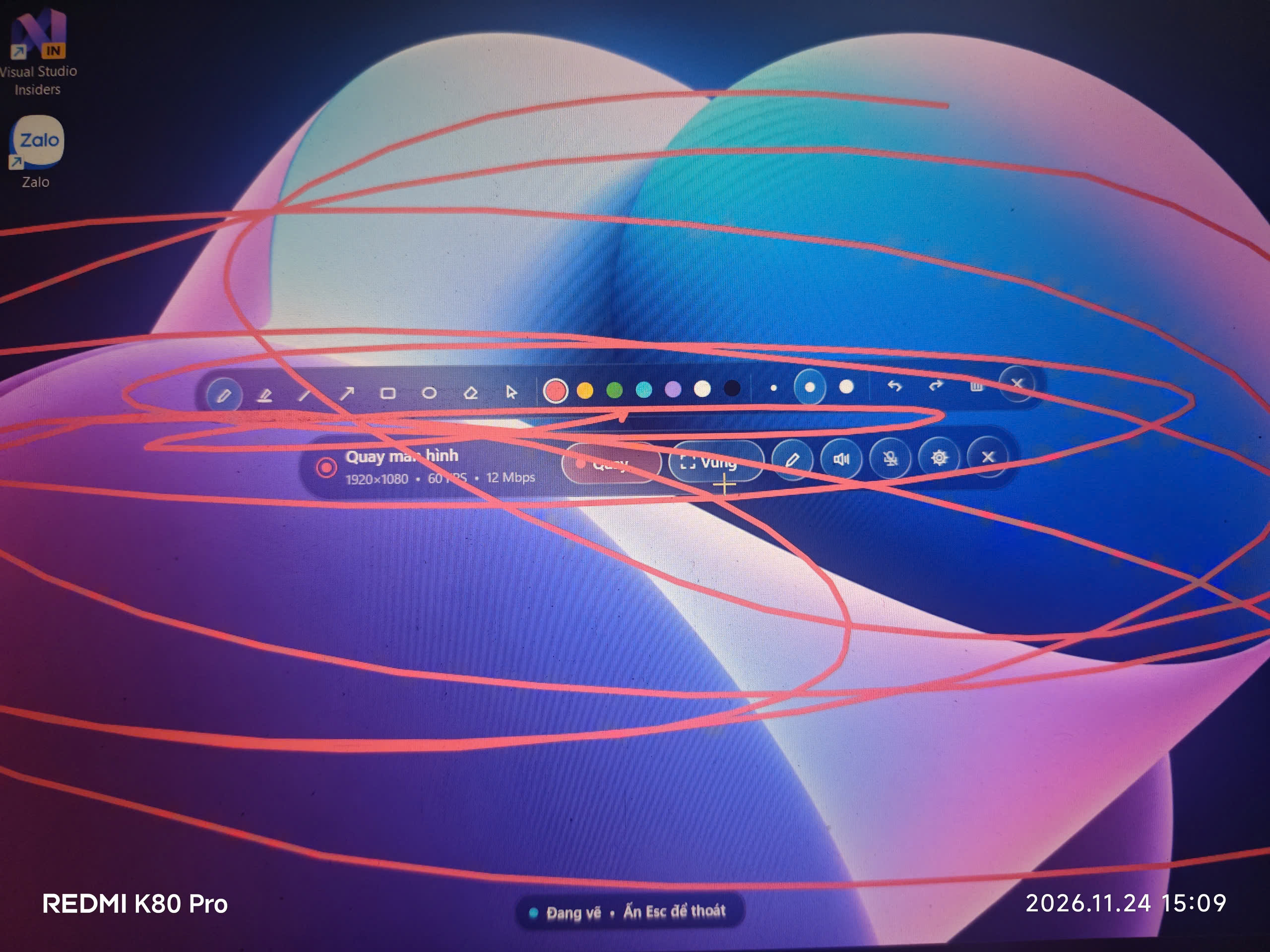
Native Windows Screen Recorder Preview (Live Screen Drawing)
Live Screen Drawing / Annotation Toolbar & Esc Hint Pill
Native Windows Screen Recorder Preview (WinUI 3 Settings Window)
Dedicated WinUI 3 Settings Window (Hosted in windhawk.exe)
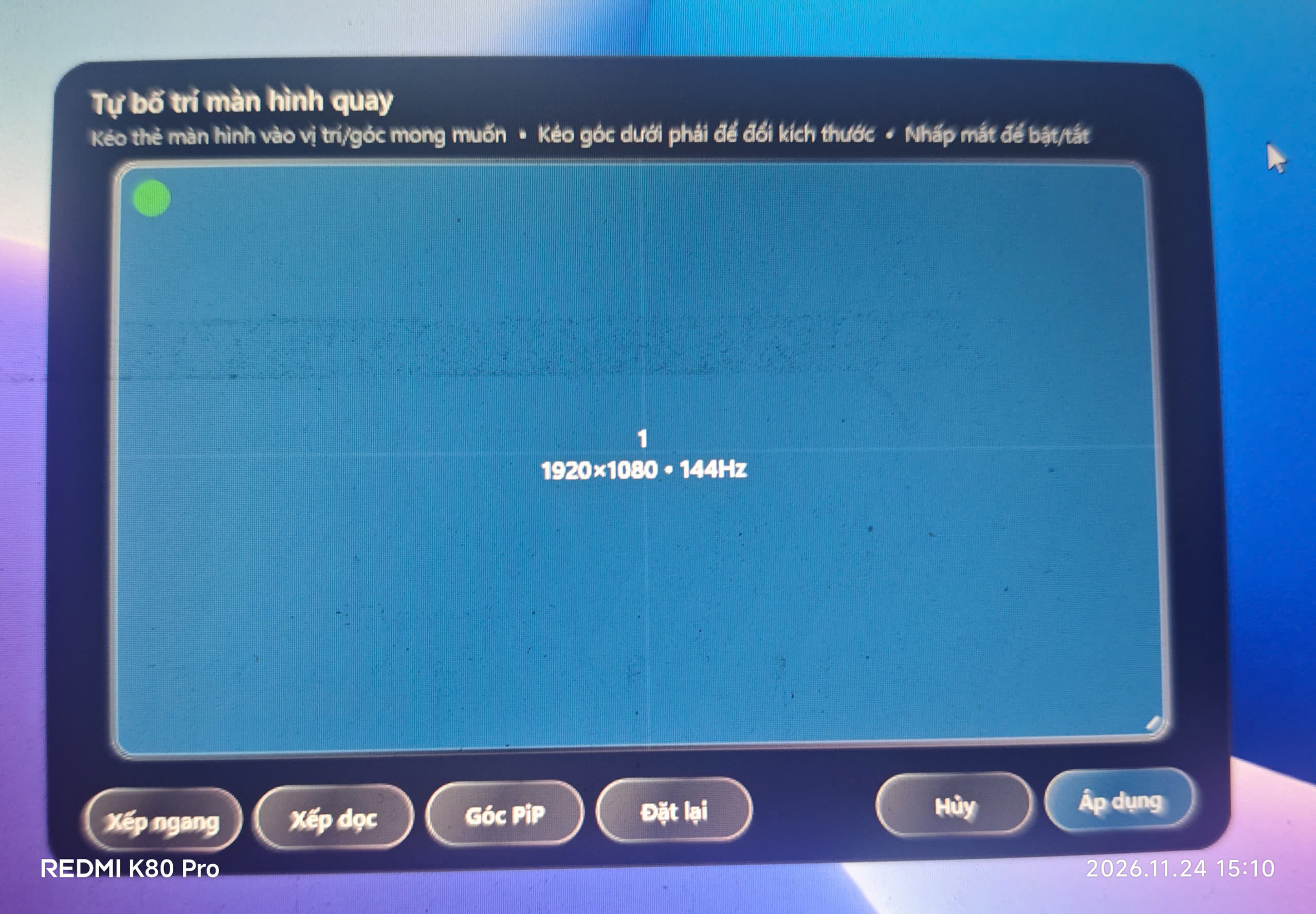
Native Windows Screen Recorder Preview (Multi-Monitor Layout Arranger)
Interactive Multi-Monitor Custom Layout Arranger
A lightweight, native Windows screen recorder running in an isolated Windhawk tool process (windhawk.exe / windhawk-mod.exe — never injecting into explorer.exe) with 13 built-in visual themes, a dedicated WinUI 3 Settings window, hardware-capped resolution & active refresh-rate FPS selector, live screen drawing/annotation toolbar, multi-monitor custom layout arranger, and 21-language support — no third-party apps required.
Dedicated WinUI 3 Settings Window & Isolated Tool Process:
windhawk.exe / windhawk-mod.exe), keeping explorer.exe completely untouched. Clicking ⚙️ on the floating pill bar opens the built-in Windows 11 Settings–style window for themes, resolution, FPS, monitor layout, audio, and language.13 Built-In Themes & Full Visual Customization:
0–28 px) across the pill bar, drawing toolbar, and layout arranger, excluded from recorded video via WDA_EXCLUDEFROMCAPTURE.Hardware-Capped Resolution & Active Refresh-Rate FPS:
ENUM_CURRENT_SETTINGS), only exposing presets up to your current hardware limits (e.g., 60 Hz caps at 60 FPS; 144 Hz unlocks up to 144 FPS; 240 Hz unlocks up to 240 FPS) with automatic GPU H.264 encoder step-down fallback.Multi-Monitor Capture & Interactive Custom Layout Arranger:
Monitor 1, Monitor 2, ...), record All Monitors Combined, or open the Custom Monitor Layout arranger directly from Settings to drag, snap, resize, and toggle monitors into any corner or Picture-in-Picture layout.Live Screen Drawing / Annotation (✏️), WASAPI Audio & 21 Languages:
"Press Esc to exit" hint pill.Trình quay màn hình native gọn nhẹ cho Windows chạy trong tiến trình công cụ độc lập của Windhawk (windhawk.exe / windhawk-mod.exe, không can thiệp vào explorer.exe) với 13 chủ đề giao diện, cửa sổ Cài đặt WinUI 3 tích hợp, tùy chỉnh độ phân giải & FPS giới hạn theo tần số quét thực tế của phần cứng, bộ công cụ vẽ trực tiếp lên màn hình khi quay, trình tự bố trí đa màn hình trực quan và hỗ trợ 21 ngôn ngữ — không cần cài thêm phần mềm bên thứ 3.
Cửa sổ Cài đặt WinUI 3 & Tiến Trình Công Cụ Độc Lập:
windhawk.exe / windhawk-mod.exe), an toàn tuyệt đối cho explorer.exe. Bấm nút ⚙️ trên thanh viên thuốc để mở cửa sổ Cài đặt Quay Màn Hình phong cách Windows 11.13 Chủ Đề Giao Diện & Tùy Chỉnh Màu Sắc, Bo Góc:
0–28 px) đồng bộ trên toàn bộ thanh viên thuốc, thanh vẽ và trình bố trí màn hình, tự ẩn khỏi video quay nhờ WDA_EXCLUDEFROMCAPTURE.Độ Phân Giải & FPS Giới Hạn Thông Minh Theo Phần Cứng:
ENUM_CURRENT_SETTINGS), chỉ mở khóa mức FPS tương ứng (60Hz tối đa 60 FPS; 144Hz mở lên 144 FPS; 240Hz mở lên 240 FPS) kèm cơ chế tự hạ bậc an toàn theo bộ mã hóa H.264 của GPU.Quay Đa Màn Hình & Tự Bố Trí Màn Hình Trực Quan:
Màn hình 1, Màn hình 2, ...), quay tất cả màn hình cùng lúc, hoặc mở trình Tự bố trí màn hình ngay từ cửa sổ Cài đặt để kéo thả, phóng to/thu nhỏ và sắp xếp các màn hình (Xếp ngang, Xếp dọc, Góc PiP).Vẽ Trực Tiếp Lên Màn Hình (✏️), Thu Âm WASAPI & 21 Ngôn Ngữ:
"Đang vẽ • Ấn Esc để thoát".r/Windhawk • u/wh-updates • 1d ago
Notepad Pro 1.1.0
r/Windhawk • u/wh-updates • 1d ago
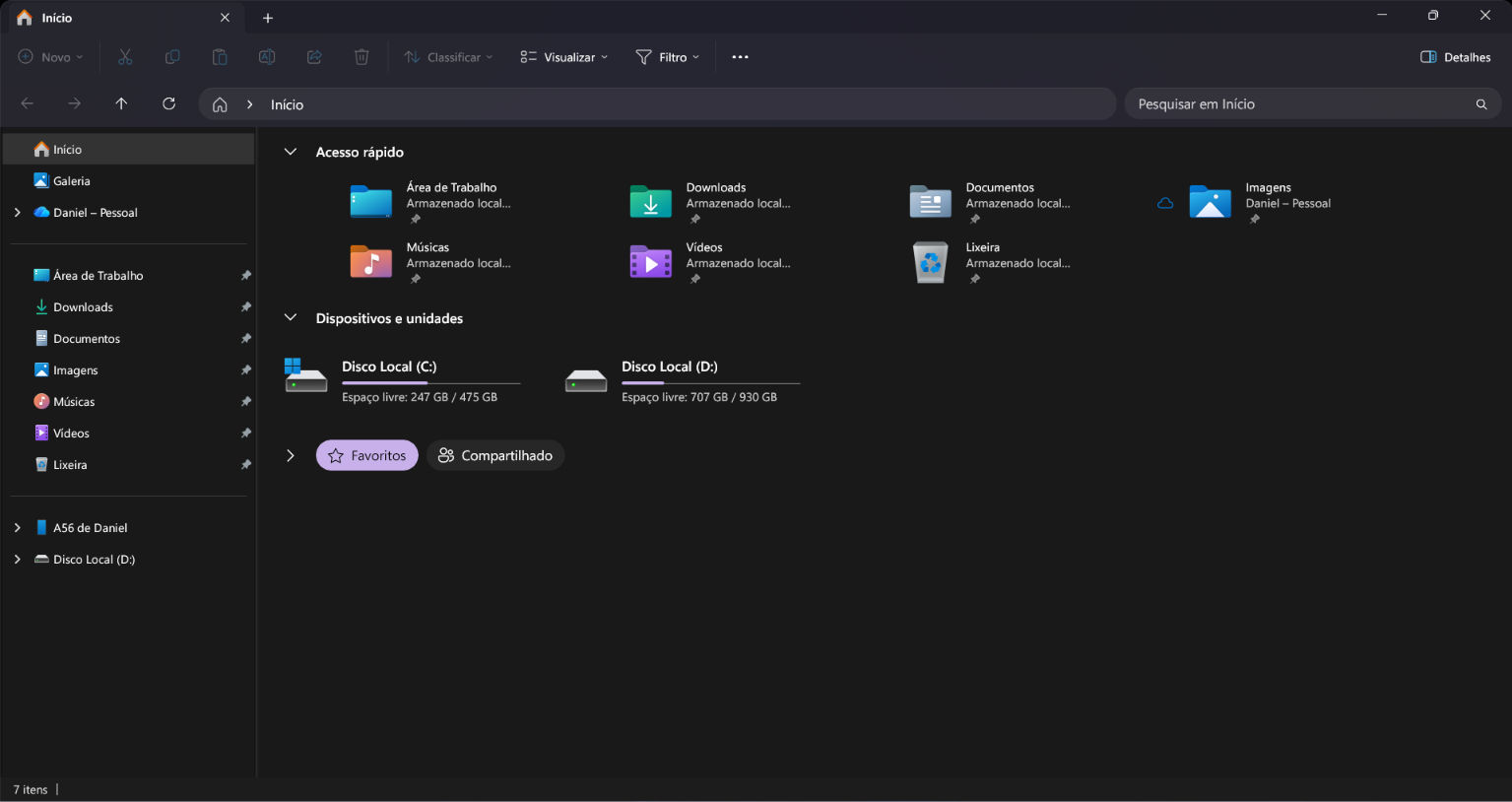
Devices and drives in Explorer Home 1.0.0
Devices and drives in Explorer Home
The This PC folder in Windows File Explorer shows your drives, this mod brings that to the Home folder. It adds a native Devices and drives section right after Quick access, built with the same WinUI the rest of the Home page already uses.
What you get:
A quick technical note: the mod reads Explorer's own WinUI page and inserts the section directly into it, without relying on XAML Diagnostics, so it plays nicely alongside other Explorer styling mods that need that facility for themselves. One consequence: a File Explorer window already sitting on Home when the mod is enabled may not pick up the section right away. Navigate away and back to Home (or open a new tab) to refresh it; windows opened after enabling the mod are unaffected. On some older Windows 11 builds, the section shows up at the bottom of Home instead of right after Quick access, and the native selection rectangle doesn't draw over it during a drag-select — everything else (drive cards, drag and drop, context menu, rename) works the same. The modern context menu is obtained and rendered through Explorer's own WinRT contracts, including its native commands, ordering and icons. If those contracts aren't available, or the selection can't be represented as one real file-system item, the mod falls back to the complete classic Shell menu.
A pasta Este Computador do Explorador de Arquivos do Windows mostra suas unidades, esse mod traz isso para a pasta Início. Ele adiciona uma seção nativa de Dispositivos e unidades logo depois do Acesso rápido, construída com o mesmo WinUI que o resto da Página Inicial já usa.
O que você ganha:
Um detalhe técnico rápido: o mod lê a própria página WinUI do Explorador e insere a seção diretamente nela, sem depender do XAML Diagnostics, então ele convive bem com outros mods de estilo do Explorador que precisam desse recurso pra si. Uma consequência disso: uma janela do Explorador de Arquivos que já esteja aberta na pasta Início quando o mod for ativado pode não mostrar a seção na hora. Saia da pasta Início e volte (ou abra uma nova aba) pra atualizar; janelas abertas depois de ativar o mod não têm esse problema. Em algumas builds mais antigas do Windows 11, a seção aparece no final da Página Inicial em vez de logo depois do Acesso rápido, e o retângulo de seleção nativo não é desenhado sobre ela durante uma seleção por arraste — o resto (cards de unidade, arrastar e soltar, menu de contexto, renomear) funciona igual. O menu moderno é obtido e renderizado pelos próprios contratos WinRT do Explorador, inclusive com comandos, ordem e ícones nativos. Se esses contratos não estiverem disponíveis, ou a seleção não puder ser representada como um único item real do sistema de arquivos, o mod volta automaticamente ao menu clássico completo do Shell.
La carpeta Este equipo del Explorador de archivos de Windows muestra tus unidades, este mod trae eso a la carpeta Inicio. Agrega una sección nativa de Dispositivos y unidades justo después de Acceso rápido, construida con el mismo WinUI que ya usa el resto de la página de Inicio.
Qué obtienes:
Un detalle técnico rápido: el mod lee la propia página WinUI del Explorador e inserta la sección directamente en ella, sin depender de XAML Diagnostics, así que convive bien con otros mods de estilo del Explorador que necesitan ese recurso para sí mismos. Una consecuencia de esto: una ventana del Explorador de archivos que ya esté abierta en la carpeta Inicio cuando se active el mod puede no mostrar la sección de inmediato. Sal de Inicio y vuelve a entrar (o abre una pestaña nueva) para actualizarla; las ventanas abiertas después de activar el mod no tienen este problema. En algunas builds más antiguas de Windows 11, la sección aparece al final de Inicio en lugar de justo después de Acceso rápido, y el rectángulo de selección nativo no se dibuja sobre ella durante una selección por arrastre — el resto (tarjetas de unidad, arrastrar y soltar, menú contextual, cambiar nombre) funciona igual. El menú moderno se obtiene y se renderiza mediante los propios contratos WinRT del Explorador, incluidos sus comandos, orden e iconos nativos. Si esos contratos no están disponibles, o la selección no se puede representar como un único elemento real del sistema de archivos, el mod vuelve automáticamente al menú clásico completo del Shell.
r/Windhawk • u/wh-updates • 1d ago
Taskbar Badge Control 1.0.0
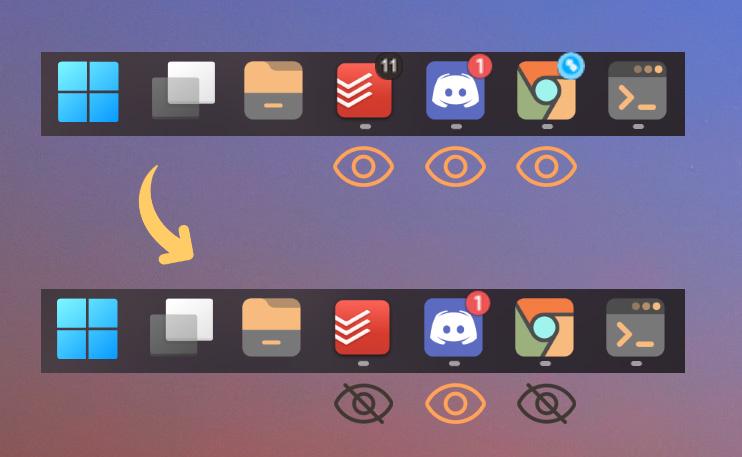
This mod lets you show or hide taskbar badges per application, instead of turning them all on or off through Windows. It's useful for apps that don't offer their own setting to disable taskbar badges.
Taskbar before and after selectively hiding application badges
Use the filtering mode to show badges by default or hide badges by default, then populate Applications with the apps that should behave differently.
Add process names (process.exe), full executable paths, or AppUserModelIDs under Applications. Entries are case-insensitive exact matches; wildcards are not supported.
Enable Show badges on taskbar apps under Settings → Personalization → Taskbar → Taskbar behaviors.
If this setting is disabled, Windows hides all taskbar badges regardless of the mod's rules. The mod cannot show badges for allowed applications while the global setting is off.
Windows taskbar settings with Show badges on taskbar apps enabled
r/Windhawk • u/wh-updates • 1d ago
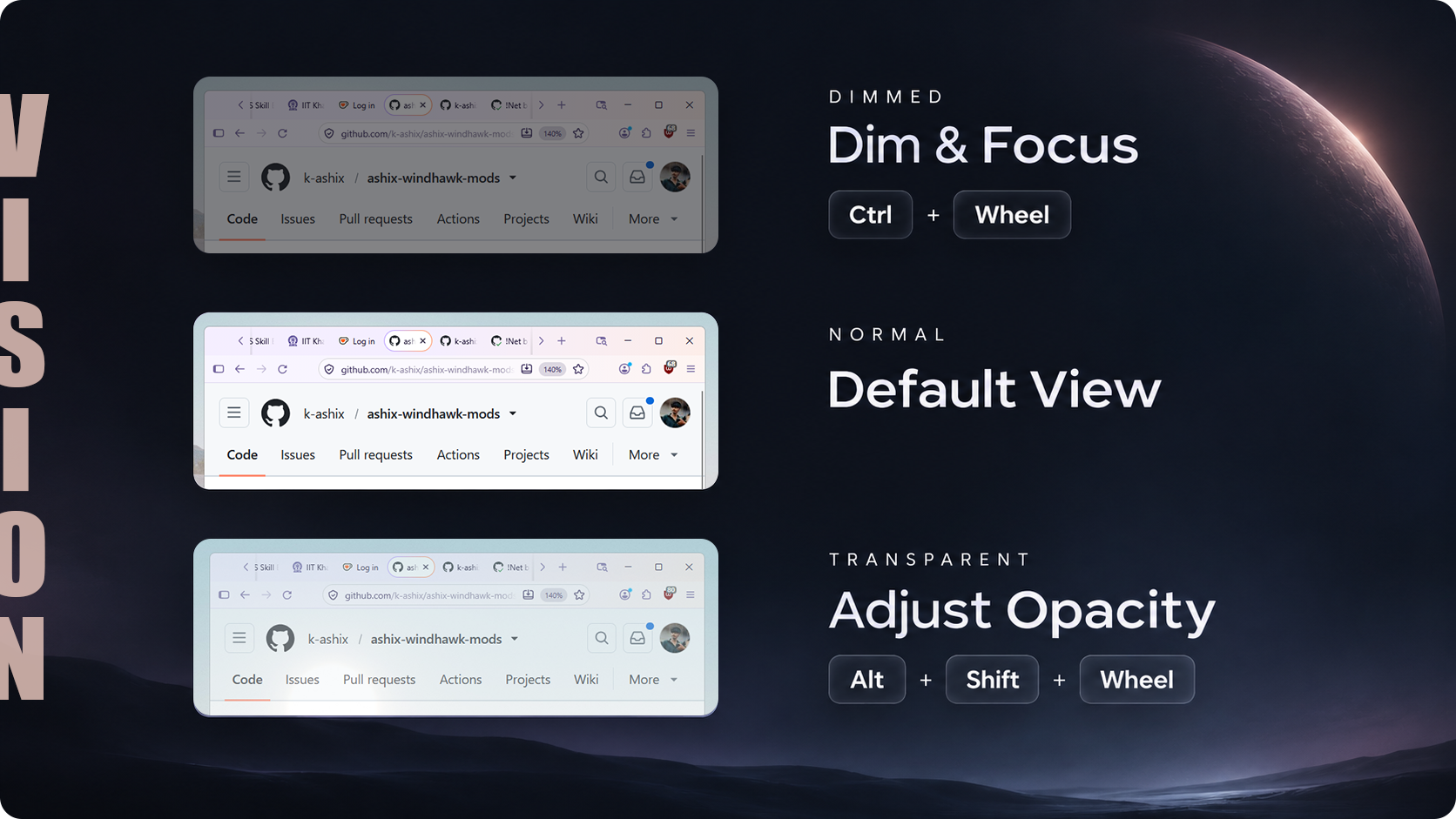
Vision 1.2026.2511
Control any window's opacity, always-on-top state, and per-window dimming overlay directly from its title bar.
| Action | Default Trigger | Notes |
|---|---|---|
| Adjust Opacity | Alt + Shift + Wheel over title bar | 25%–100%, 5% step |
| Toggle Saved App Opacity | Alt + Shift + Double-Click over title bar | Toggles ON/OFF without erasing saved app opacity |
| Toggle Pin (Always on Top) | Alt + Shift + Middle-Click over title bar | Pins or unpins the window |
| Adjust Dim | Ctrl + Wheel over title bar | Soft per-window overlay, never 100% pitch black |
| Toggle Saved App Dim | Ctrl + Double-Click over title bar | Toggles ON/OFF without erasing saved app dim |
Header % Button & Slider | Optional (disabled by default) | Minimal % indicator in the title bar; hover reveals a dim slider |
% Control: Enable a compact % badge in the active window's title bar that reveals a smooth slider on hover for one-handed dim adjustments.exclude_all, show_dim, show_controls, show_all).% slider.r/Windhawk • u/wh-updates • 1d ago
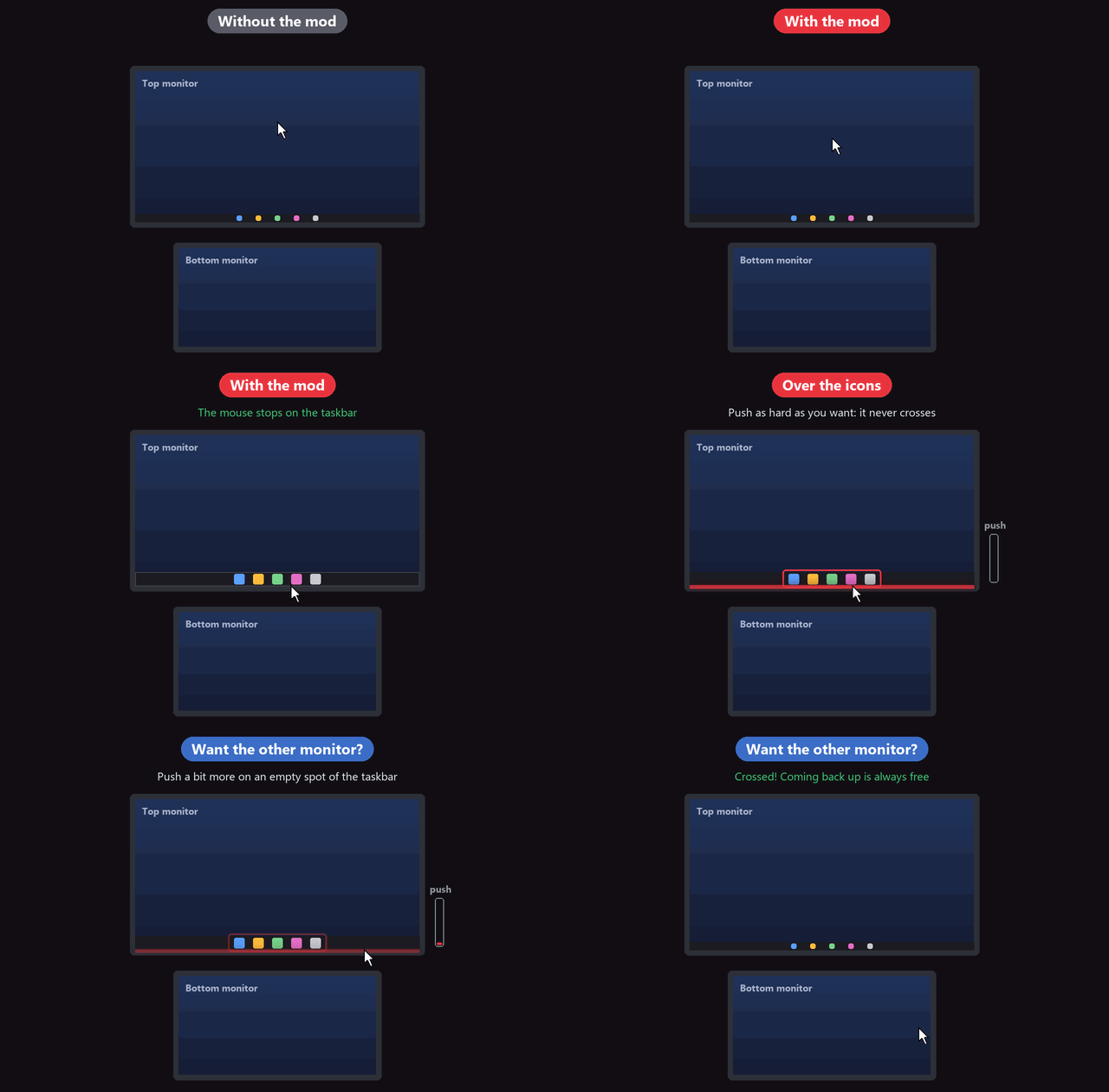
The problem: with two monitors, you move the mouse to the taskbar and it slips right past it onto the other monitor. With a small or auto-hidden taskbar this happens all the time.
The fix: the taskbar becomes a "stopper". The mouse stops on it, so you can click your icons without overshooting.
r/Windhawk • u/wh-updates • 2d ago
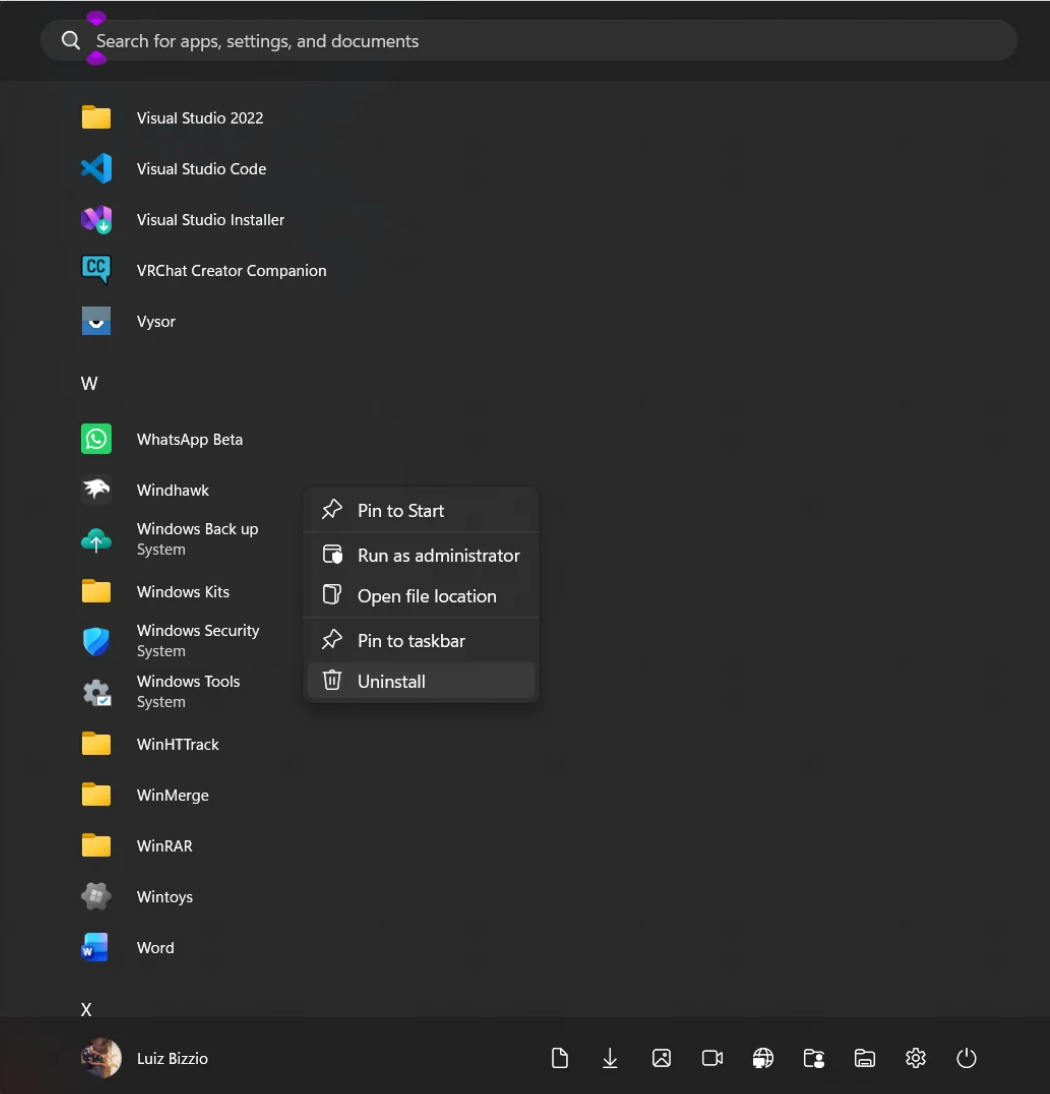
Uninstall Here 1.0.0
Open a desktop app's own uninstaller from the Windows 11 Start menu. Uninstall Here saves you a trip through Installed apps when it can identify the app's uninstaller.
Start → All apps → right-click the app → Uninstall
Confirm the product name before its uninstaller opens. MSI products open Windows Installer in uninstall mode. Follow any subsequent prompts from the uninstaller or Windows.
This mod targets 64-bit Windows 11. The All apps flow was tested on x64 build 26300.10075.
Windows handles packaged apps and desktop apps without one identifiable registered installation.
If you expected the app to work, enable logging for Uninstall Here in Windhawk and repeat the click. Include the app version, Windows build, and the mod's log entries in your report. Report an issue
The Uninstall command highlighted in the Windows 11 Start menu
r/Windhawk • u/wh-updates • 1d ago
Aleph - Infinite Window Canvas 1.8.0
Aleph presents eligible application windows on a navigable canvas. Live windows use DWM thumbnails; minimized and other-desktop windows use icon cards. Drag cards to arrange them without moving the real desktop windows.
[Aleph Canvas demo](https://imgur.com/a/qpERhgR)
Ctrl+Alt+Shift+F12: toggle the canvas. Leave the setting empty to disable the hotkey. If the hotkey does nothing, another program may already use it; pick a different combination.WM_CLOSE to the real window, so the application closes; the card leaves the canvas once the next scan reports the window gone.Card positions are saved in the Windhawk mod storage directory as layout-<user-SID>.json. Canvas coordinates use physical pixels relative to the virtual desktop origin. Card badges and the empty-canvas hint follow the interface language setting. Auto uses the system UI language and falls back to English when that language is not one of the thirteen supported ones. Icon cards ask the shell for the largest available icon (256 px when the jumbo image list exists) and fall back to smaller lists, then to the window icon. Arranging cards never moves real application windows. Activating an other-desktop card asks the documented IVirtualDesktopManager interface to move that window onto the desktop displaying the canvas. Windows can reject requests for windows owned by another process. A failed move is logged and the mod still attempts normal foreground activation, which can also fail.
r/Windhawk • u/wh-updates • 1d ago
Windows 7 User Account Page Restorer 1.0.0
This mod restores the User Accounts page of Control Panel as it was in Windows 7: the user tile with its glass frame, "Create a password for your account", "Change your picture", "Manage another account", "Create a new account", the guest account pages, and the classic task list on the left.
Windows 10 and 11 still have a User Accounts page, but it is a reduced one that sends most tasks to the Settings app. This mod puts the original Windows 7 page (NT 6.1) back in its place. The page is the real one, not a recreation: it is Microsoft's usercpl.dll 6.1.7600.16385 running on its own Windows 7 DirectUI engine.
No system file is replaced or modified, and nothing is written to the registry. Disable the mod and the Windows 10/11 page is back.
User Accounts page, account view
The mod contains no Microsoft binaries and never asks you for a file. The first time it runs it downloads four files, 2 MB in total, from Microsoft's public symbol server (https://msdl.microsoft.com/download/symbols/):
| File | Version | Used for |
|---|---|---|
usercpl.dll | 6.1.7600.16385 (Windows 7) | the page |
dui70.dll | 6.1.7601.23403 (Windows 7 SP1) | the DirectUI engine the page was built for |
shacct.dll | 10.0.10240.16384 (Windows 10 1507) | only the picture frame bitmap; never loaded as code |
duser.dll | 6.1.7600.16385 (Windows 7) | only the text of the "common" style sheet; never loaded as code |
The size and the SHA-256 of each file are checked against values pinned in the mod; a file that does not match is discarded. The originals are kept in the mod's storage folder (dl). From them the mod builds, in bin, a private copy of the page for the selected language (see How it works). Nothing is downloaded again while dl is present, so after the first run the mod works offline.
The download cannot be turned off, and the mod cannot work without it. With Keep downloaded files when the mod is disabled off, the files are deleted at every unload, so the download is repeated after every disable or update. The only thing sent is the HTTPS request for the four fixed URLs, with the user agent Microsoft-Symbol-Server/10.0.0.0.
Offline at first run: the Windows 10/11 page simply stays, and the reason is written to the mod's log. Connect to the internet and restart explorer.exe (or toggle the mod).
System32\usercpl.dll (one documented function, PSPropertyBag_ReadStr, answers differently for that one value). The private copy is Microsoft's file with no code byte changed; only its resources are extended: the strings (the symbol server has no .mui files, so the strings are embedded in the mod, in English, Italian, French, Spanish, Portuguese and German), the picture frame, and the page definition.The "modified page". The original Windows 7 layouts cannot load on Windows 10/11 as they are, for two reasons, and both are solved inside the private copy, with nothing in System32 involved:
shacct.dll, which no longer contains it since Windows 10 1607 (this is why the manual method needs a patched shacct.dll): the frame is put into the private copy and the layouts are pointed to it;DUser.dll; since Windows 8 that sheet is stored in a binary format the Windows 7 DirectUI cannot read: the Windows 7 text of the sheet is put into each layout.net.exe user "<name>" /add elevated, which can show a second UAC prompt. It creates an account without a password; the page then performs any further changes through its account object. If the command times out or the account cannot be read back, creation may already have succeeded: check the account list before retrying.explorer.exe. Until the page is opened for the first time it loads nothing.explorer.exe.ProgramData\Microsoft\User Account Pictures\Default Pictures, which Windows 10/11 do not ship; "Browse for more pictures..." works.explorer.exe until it restarts, but nothing in them points into the mod.shacct.dll.r/Windhawk • u/wh-updates • 1d ago
Win+Ctrl+Shift+T) to toggle the super-topmost state of the current foreground window.This mod absolutely requires the UIAccess privilege, so it may not work with a portable Windhawk installation running without admin.
ctfmon.exe. This mod won't work if ctfmon.exe is disabled by debloating tools. Also, the mod process will show up in Task Manager as second CTF Loader process.WS_EX_LAYERED).If this concerns you, either do not use this mod, or disable the lock screen entirely (use the NoLockScreen registry/GPO) and/or enable the mod's mitigation in the options page.
NoLockScreen still doesn't disable LockApp.exe in that case.Change the hotkey in the mod's settings. Write any modifiers and exactly one key, joined by +, for example Ctrl+Alt+M, Win+Shift+F9 or Pause.
Ctrl, Alt, Shift, Win.A-Z, 0-9, F1-F24, Space, Tab, Enter, Esc, Backspace, Insert, Delete, Home, End, PageUp, PageDown, Up, Down, Left, Right, Pause, ScrollLock, PrintScreen, Numpad0- Numpad9, VolumeMute, VolumeDown, VolumeUp, MediaPlayPause, MediaNext, MediaPrev, MediaStop.0x4D.Windows gives a hotkey to only one program at a time, and other apps stop receiving that key combination. If the hotkey does nothing, another program may already own it. Turn on logging in the mod's Advanced tab to see why.
r/Windhawk • u/wh-updates • 1d ago
Taskbar Recent Focus Highlight 0.12.3
r/Windhawk • u/wh-updates • 1d ago
Taskbar Live HUD 1.2.2
r/Windhawk • u/wh-updates • 1d ago
Environment Variable Spoofer 1.0
Makes selected processes see fake values for environment variables such as TEMP and TMP. The system and other processes are not affected.
By default, the mod only intercepts the Win32 APIs that read environment variables, and the real environment block of the process is left untouched.
The mod targets nothing by default, so it does nothing until you tell it which process to apply to. Open the mod in Windhawk, go to the Advanced tab, and put the executable name of your target in the Custom process inclusion list. The mod takes effect as soon as you save.
| Setting | Default | Description |
|---|---|---|
| Spoofed variables | TEMP=C:FakeTemp, TMP=C:FakeTemp | The environment variables to spoof, one NAME=VALUE entry per item. Names are case-insensitive. |
| Also write into the process environment block | off | Also write the values into the process environment block, so that CRT getenv, GetEnvironmentStrings and child processes see them too. The original values are restored when the mod is unloaded. |
GetEnvironmentVariableW/AExpandEnvironmentStringsW/A, i.e. the expansion of %TEMP% and similarGetTempPathW/A and GetTempPath2W/A, which look at TMP, TEMP and USERPROFILE in that orderGetTempPath keeps the lookup order of the system: if the process has a real TMP and only TEMP is spoofed, the real TMP still wins. Spoof both.
Changing the settings reloads the mod automatically.
With the environment block option turned off, programs that cache a copy of the environment at startup (CRT getenv / _wgetenv, Python os.environ) and child processes created by the target process still see the real values. Turn the option on to cover these cases.
With the option turned on, the mod must be injected before the target program caches its environment. A cache made earlier cannot be changed.
Programs that parse the environment block in the PEB directly, or call ntdll!RtlQueryEnvironmentVariable* themselves, are not affected by the API hooks. The environment block option covers them.
The mod hooks the exports in kernelbase.dll, falling back to kernel32.dll. GetTempPath2W/A do not exist on older systems and are skipped there.
ExpandEnvironmentStrings is only taken over when the source string contains at least one spoofed variable. Everything else goes to the original function, so without a spoofed variable in the string the behavior is unchanged.
The environment block option writes the values with SetEnvironmentVariableW before the hooks are installed, so the original values can be read back and restored when the mod is unloaded.