r/ZephyrusM16 • • May 12 '21

r/ZephyrusM16 Lounge

44 Upvotes

A place for members of r/ZephyrusM16 to chat with each other


r/ZephyrusM16 • • 2h ago

Zephyrus M16 (2021) Survival Guide: keyboard not working, top case replacement and no liquid metal under the cooler

7 Upvotes

2021 Zephyrus M16 (GU603HR, i9-11900H, RTX 3070), bought new in March 2024. I've replaced the top case twice myself because of the keyboard. During the first swap I found dried paste on the CPU instead of liquid metal, so I applied liquid metal myself. Then I replaced Armoury Crate with G-Helper, limited the CPU and overclocked the GPU. CPU temps went from 100°C to ~90°C, the microstutters are gone in every game, and STALKER 2 runs at 70–80 FPS at 1440p with frame gen. I also upgraded the RAM to 24 GB.

What was wrong

I bought the laptop new in March 2024. Over time I ran into three problems:

  • the CPU hit 100°C under load;
  • microstutters in The Finals and many other games (STALKER 2 at launch doesn't count, since it ran badly for everyone). Tweaking settings sometimes helped, but the stutters never fully went away;
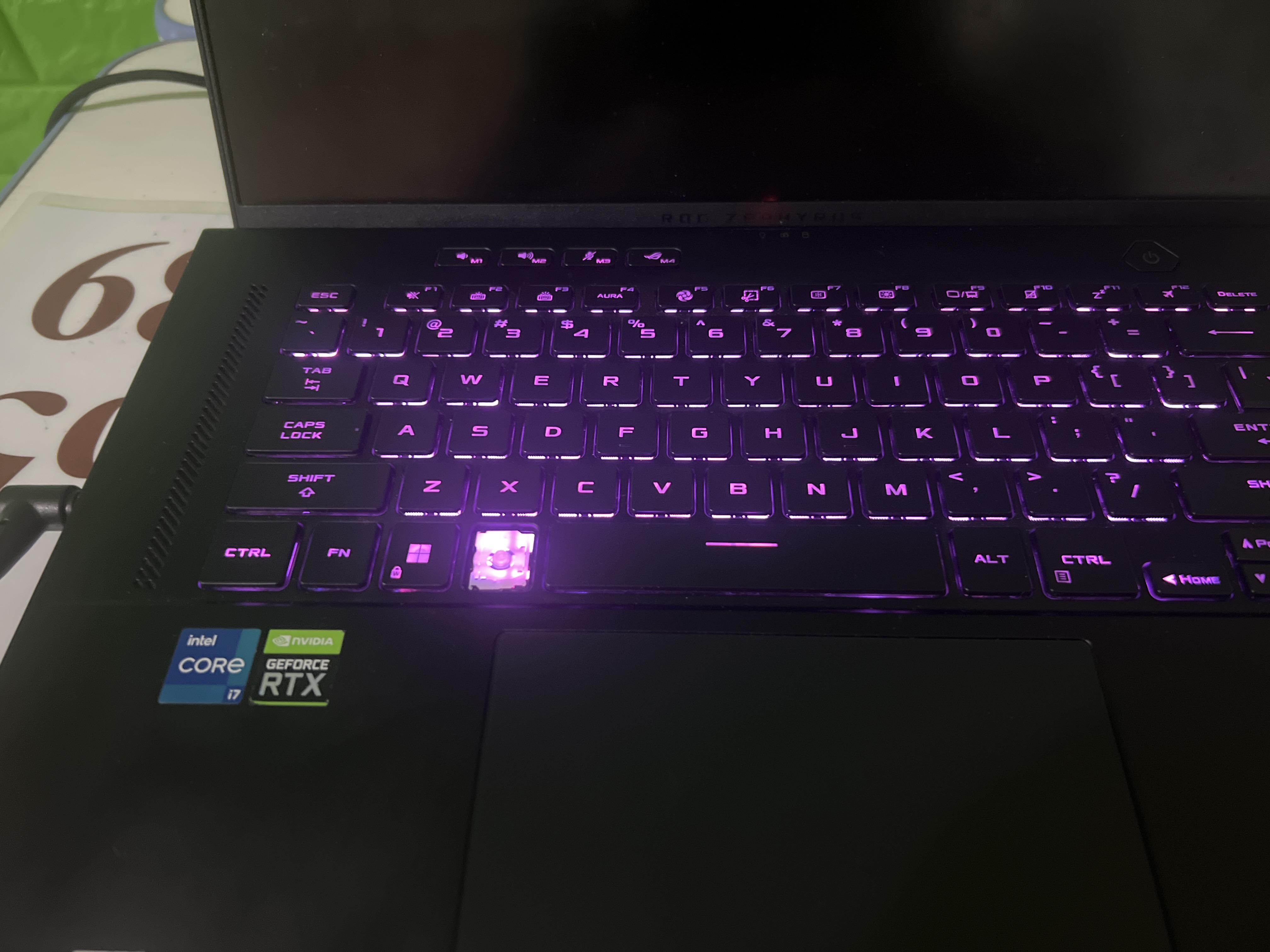
  • a few months in, the E key and one more started sticking. At first it was rare and went away by itself. I press hard when I game, and over time some keycaps cracked.

2024–2025: RAM

I added RAM myself. It's 24 GB now.

December 2025: first top case swap

On the M16 the keyboard is part of the top case, so you have to replace the whole thing. I ordered a top case from China (~$100) and some liquid metal. According to ASUS, the 2021 M16 has Thermal Grizzly liquid metal on the CPU, and I wanted to refresh it.

There was no liquid metal under the cooler. The foam barrier that holds liquid metal in place was there, so the laptop was clearly built for it. But the CPU had badly applied, dried-out paste on it. I bought the laptop new, and nobody had opened it before me. Unfortunately, I didn't take a photo of it.

I got a syringe at the pharmacy and some alcohol wipes, cleaned everything and applied liquid metal to the CPU. For the GPU I used ID-COOLING Frost X05 paste. Temps dropped noticeably.

October 2026: G-Helper instead of Armoury Crate

I uninstalled Armoury Crate and installed G-Helper. My current Turbo settings:

  • CPU limited to 60 W sustained and 60 W boost;
  • GPU overclocked: +100 MHz core, +200 MHz memory;
  • custom fan curves.

The CPU and GPU share heatpipes. With the CPU limited, the GPU has more cooling headroom.

Together with the liquid metal, this brought the CPU down to ~90°C from 100, and the microstutters are gone. The Finals runs on high settings with ultra textures and DLSS, capped at 70 FPS, with no drops.

October 2026: keyboard again

On the new top case, the 3, E and Space keys started sticking, and Caps Lock stopped working. They're on the same circuit. Temporary fix: I trimmed the end of the keyboard ribbon cable and reseated it, and removed the metal stabilizer bars from the spacebar. They flexed the case slightly, and apparently a damaged trace was losing contact. That worked for a while, but then the keys started failing again.

November 2026: second top case swap

Another top case from China (~$100). This time I wanted to keep the liquid metal: if you take the heatsink off, you have to reapply it. So I took the motherboard out together with the cooling, as one piece.

The hardest part was the speaker wire. It runs under a heatpipe and through a narrow gap between the fan and the board. To get it out, I unscrewed the fans and the board, lifted the whole block a little and tilted the fan slightly on its axis. That makes the gap a bit wider, and the wire goes through. Installing the board in the new top case works the same way.

A few more tips:

  • Besides the two screws marked with arrows, there's a third one holding the board: the standoff for the second SSD. It's easy to miss if you don't have a second SSD. If the board won't come out, check it.
  • The hinges have 4 holes each, but only 3 screws from the factory. Put them back the same way.
  • The bottom cover screws are different lengths, so keep them in order.

Everything worked on the first try.

Results

STALKER 2 on my TV at 1440p, DLSS + FSR 3 Frame Generation + NVIDIA Reflex, mostly High: 70–80 FPS, GPU 78–81°C, CPU 78–90°C. With Reflex on, I don't notice any input lag from frame gen. For this game I also used SCSKiller, a new free tool that pre-compiles DX12 shaders before you play. 20+ hours in, and I haven't had a single stutter or freeze. Since these changes I've played a lot of The Witcher 3 Remastered. All my games run on high at 1440p with DLSS, with no drops or freezes.

What helped

  • Keyboard: the only real fix was a new top case (~$100 from China). My first replacement lasted about 10 months before the keys started failing again. Temporary fix: trim the ribbon cable and remove the spacebar stabilizers.
  • Temps and microstutters: liquid metal instead of dried paste, plus G-Helper with a CPU limit and a GPU overclock. The top case swaps had nothing to do with it. If your 2021 M16 hits 100°C, start with G-Helper. It's free and you don't need to open anything. If that's not enough, check what's under your cooler.
  • Shader stutter in STALKER 2: SCSKiller, a free tool that pre-compiles shaders before you play.

The M16 hardware is good. The weak spots are the keyboard and the ASUS software, and from what I've heard, not just on this model. For a laptop in this price range, that's disappointing. But after these fixes it runs great: high settings at 1440p with DLSS, no drops, no freezes, sharp picture.

The only thing I can't play on it yet is GTA VI, since it's console-only. Once it's out on PC, I think it'll look sharper on this laptop than on console. DLSS and frame gen really work: with them, even a 2021 laptop runs new games well at 1440p.

Has anyone else had the keyboard fail or found paste instead of liquid metal under the cooler? What worked for you?

r/ZephyrusM16 • • 2d ago

CPU thermal spike when opening minecraft

2 Upvotes

I just bought a used m16 2023 and decided to use the "standard" setting in the armory crate
When i opened minecraft the cpu temp just rise like crazy and the screen just stop functioning after that. But after changing to the ultimate mode it works just fine....
Is it really not possible to play minecraft using the standard setting? Bcs one of the reason why i am buying the 2023 model is bcs there is the advance optimus.
Cpu: i9 - 13900H
Gpu: Rtx 4070


r/ZephyrusM16 • • 11d ago

Update on 2022 model not booting!

Post image
10 Upvotes

After doing some of the suggestions in the comment my zephyrus is showing different signs now.

The keyboard lit up

The first and second bar lighted up, light bulb faint white and battery orange

The display backlight is still not on

This is 1 min after doing all the suggestions

Am praying this thing is just stuck in memory training as google suggested.


r/ZephyrusM16 • • 11d ago

1 year and 7 months in, no new thermal paste or liquid metal, Seems good

Post image
12 Upvotes

Just waiting on rockstar now and hoping its not a year long wait........


r/ZephyrusM16 • • 11d ago

How to Resolve UCM-UCSI ACPI Device 43 Error After Updating Nvidia Drivers

1 Upvotes
  1. First, disconnect your laptop from its charger. 2. Access Device Manager by searching for it in the Task Bar. 3. Navigate to the USB Connector Managers, then expand the section to see UCM-UCSI ACPI Device. 4. Right-click on the UCM-UCSI ACPI Device and select Uninstall Device (if a prompt appears with a checkbox to delete it, just ignore that and don't check the box, we're only uninstalling it). Confirm the uninstallation when prompted. 5. Power down your laptop completely and then turn it back on, don't just restart because that won't fix the problem (and make sure your charger is still unplugged). 6. Once your laptop is back on, head back to Device Manager and check if the issue is cleared up. If it is, you can reconnect your charger.

Big thanks to u/RayzaEverton for the help!


r/ZephyrusM16 • • 12d ago

Help motherboard or battery problem

Thumbnail
gallery
12 Upvotes

Hello, I need help diagnosing my ASUS ROG Zephyrus M16 GU603ZM (2022).

The laptop was working perfectly before I opened it for fan cleaning.

During maintenance:

• I shut down the laptop.

• Disconnected the internal battery.

• Sparks occurred directly at the battery connector during disconnection and reconnection.

• I reconnected the left fan cable and display cables.

• Reassembled the laptop.

After reassembly, the laptop no longer boots.

Current symptoms:

• White third status indicator illuminates briefly.

• Caps Lock illuminates white for a few seconds.

• Both fans remain completely stationary.

• Keyboard backlight doesn’t turn on.

• Display remains completely black with no backlight.

• Charging indicator doesn’t illuminate.

The charger was not connected during maintenance.

I have photographs of the motherboard and battery connector available.


r/ZephyrusM16 • • 12d ago

Display

Post image
8 Upvotes

Is there any way to reduce this flickering until i get a replacement, i tried changing refresh rate to 60 and switch gpus none of it helped and now it getting worse.


r/ZephyrusM16 • • 12d ago

I want to buy a zephyrus m16 4090

1 Upvotes

If anyone wants to sell their m16 or trade with my legion pro 7i dm me. Canada only


r/ZephyrusM16 • • 13d ago

where can i sell this laptop?

2 Upvotes

My laptop doesn’t have any external issues with it, free of cracks, scratches. etc. But the internal sucks. today it’s not turning on at all, always overheating and restarting by itself, doesn’t hold charge… i’m tired.

Where can i sell for a decent amount? i’ve had this laptop since around 2023/2024


r/ZephyrusM16 • • 17d ago

ASUS ROG Zephyrus M16 (2022) GU603ZW – Multiple Issues Started Suddenly

7 Upvotes

I’m experiencing several issues with my ASUS ROG Zephyrus M16 (2022), GU603ZW. All these problems started today.
Issues:
Display issue: In Ultimate GPU mode, the internal screen goes black after the ROG logo during boot and again at the Windows lock screen. Switching to Standard GPU mode fixes the display issue.
Four dedicated ROG keyboard hotkeys have stopped working.
Touchpad is detected in Windows Device Manager and reports that it is working normally, but it doesn’t respond.
Keyboard backlight turns on during boot but switches off once Windows loads.
During Valorant, the laptop suddenly appeared to power off. I can get it running again by holding the power button for around 20 seconds and releasing it. All previously open apps are still running, suggesting it may actually be entering sleep or a similar power state rather than shutting down completely.
CPU and GPU temperatures were not particularly high when this happened.
Troubleshooting already done:
Updated BIOS and NVIDIA graphics drivers.
Reinstalled Armoury Crate.
Updated ASUS System Control Interface V3 to version 3.1.73.0.
Installed ASUS Armoury Crate Control Interface.
Reinstalled touchpad and Intel Serial IO drivers.
Reset BIOS settings to defaults.
Disabled Windows Fast Startup.
Tried Windows Clean Boot.
Performed a 40-second EC reset.
None of these resolved the issues.
Service history: The laptop was serviced approximately three weeks ago, and both the CPU and GPU fans were replaced. However, all the problems described above started only today.
Has anyone experienced similar issues with this model? What could be causing them, and what should I check next?

PS: in the device manager system it says no drivers are installed for asus v3 and aromary if that helps


r/ZephyrusM16 • • 18d ago

Need replacement keyboard source from China.

2 Upvotes

Has anybody ever order an authentic m16 2022 gu603hm keyboard from China? And if you did can please drop the link.


r/ZephyrusM16 • • 26d ago

Fixed: ASUS GU603ZV keyboard stuck in “ITE Upgrade Mode”

Thumbnail reddit.com
2 Upvotes

r/ZephyrusM16 • • Oct 26 '26

My laptop kinda died

6 Upvotes

So I was playing Roblox with the charger plugged in and while I was playing my laptop completely shut down, it didn’t have any light source and it wasn’t opening at all. I tried removing the charger, changing outlet but still nothing. 0 light indicator
Am I cooked? I’ll take it to a technician tomorrow but just wanna ask if others had a similar issue ☹️


r/ZephyrusM16 • • Oct 16 '26

Upgrading my ROG Zephyrus M16’s RAM

Thumbnail reddit.com
1 Upvotes

r/ZephyrusM16 • • Oct 14 '26

ROG Zephyrus M16 GU604VI: internal screen won't dim on Linux

Thumbnail reddit.com
1 Upvotes

r/ZephyrusM16 • • Oct 13 '26

Zephyrus M16 2022 battery replacement issue

Post image
11 Upvotes

Hi guys.

I'm currently using a 2022 Zephyrus M16. A year ago, I attempted to repaste my laptop so I disconnected the battery to repaste it. But when I try to reconnect the metal connector, I heard some buzzing sound under the motherboard (the battery cell also doing some popping sound too). The laptop is still turning on but no longer detect the battery.

A few months later, I brought it to a technician to fix it and recognized the battery but I think the BMS has been locked. So I ordered a new battery to fix it and this time I tried to remove the connector on the battery instead of the metal connector. When I try to reconnect the new battery, the issue happened again, and this time it also killed my RAM slot (the RAM itself still alive but the slot no longer recognized).

Should I bring it to fix again or just use as is rn? cuz this machine is my college gift and I kinda don't want to throw it away

Thanks for reading my post. Your advice will help me a lot!!!!


r/ZephyrusM16 • • Oct 12 '26

How much would you guys pay for this?

3 Upvotes

Hello all, so I have a GU604VI I bought in 2023 but I’m trying to sell it to swap for a g16 for better battery life(instead of 2 laptops). Its a ASUS ROG M16, RTX 4070 Laptop, 13900H, 32GB of ram(Upgraded from 16), 1TB SSD(with heatsink), and damages wise it has one dysfunctional usb port on the right, and a slight little broken chip on the bottom panel from user error when prying it open. However it has been serviced and replaced the default Liquid Metal with PTM7950, and other than those damages the laptop is in perfect condition.

I currently have it listed for 907$ but no one has bought it I have people trying to offer me 400$? But I know it’s worth more? Right? What do y’all think?

UPDATE: SOLD for 850.


r/ZephyrusM16 • • Oct 11 '26

Upgrading ram

5 Upvotes

Hello I am new to upgrading laptops and everything so bear with me. I have a rog zephyrus m16 2021 model and apparently I can upgrade the ram. What does upgrading ram do and what kind of ram do I buy. Is it easy to install as well? If you can also tell me any other details that’ll be great.


r/ZephyrusM16 • • Oct 10 '26

ASUS ROG Zephyrus G16 GU605CR

Post image
3 Upvotes

r/ZephyrusM16 • • Oct 08 '26

Mi portátil para juegos no enciende.

Thumbnail reddit.com
0 Upvotes

r/ZephyrusM16 • • Oct 08 '26

Asus Zephyrus M15 Display panel off, detects in software

Thumbnail reddit.com
1 Upvotes

r/ZephyrusM16 • • Oct 07 '26

thermal pad

2 Upvotes

Hi everyone, I want to apply a thermal pad to the SSD in my ROG Zephyrus M16 (GU603HE-KR040T) but I'm not sure about the right thickness. What thickness should I buy? Thanks.


r/ZephyrusM16 • • Oct 06 '26

Buying Zephyrus M16 GU603HM. HELLP PLEASE

Thumbnail
gallery
3 Upvotes

Hi everyone,
I’m considering buying a used ASUS ROG Zephyrus M16 GU603HM with an i7-11800H and RTX 3060.

The seller is asking around 64,000 ₽ (~$700). I was able to ask for some stress-test results before buying, and I’m a bit concerned about the temperatures.

The seller ran a CPU stress test for about 20 minutes. The:
“CPU Throttling (max: 27%) — Overheating Detected!” - AIDA

The GPU was also tested with FurMark for about 18 minutes.(min 46; max 60; avg 55):
Resolution - 2560 x 1570
GPU temperature - 86°C
GPU hotspot - 91°C
Core clock around 1100 MHz
Power - 95W - PPW:0.591