r/AMDHelp • • 5h ago

Help (Software) Recently switched from NVIDIA to a 9070XT, currently experiencing the "Driver timeout" issues with Adrenalin along with other problems. Whats the best way to fix this?

3 Upvotes

Here is what i've experienced so far (on windows 11).

  1. Game either stutters to a crawl or crashes, i get the generic "AMD detected a driver timeout" or something. All of my overclock settings are reset.
  2. Game stutters, but only Adrenalin crashes. Screen flashes to black, desktop background is black, but I can still play my game. Adrenalin crashes.
  3. Game crawls, no black screens but Adrenalin crashes. Don't receive the "AMD detected" message.

I have tried to leave settings on default for GPU overclock/undervolt. I have tried setting the MHZ offset to -100. I have tried just leaving Adrenalin closed. None of these have worked.

What is the surefire way to fix this? I have seen so many posts on this problem with the final answer being "switch back to nvidia". I can't do that so i really need to fix this. Does anyone know what the root cause is, and has one solution attained more success consistently than the others? Thank you

r/AMDHelp • • 15h ago

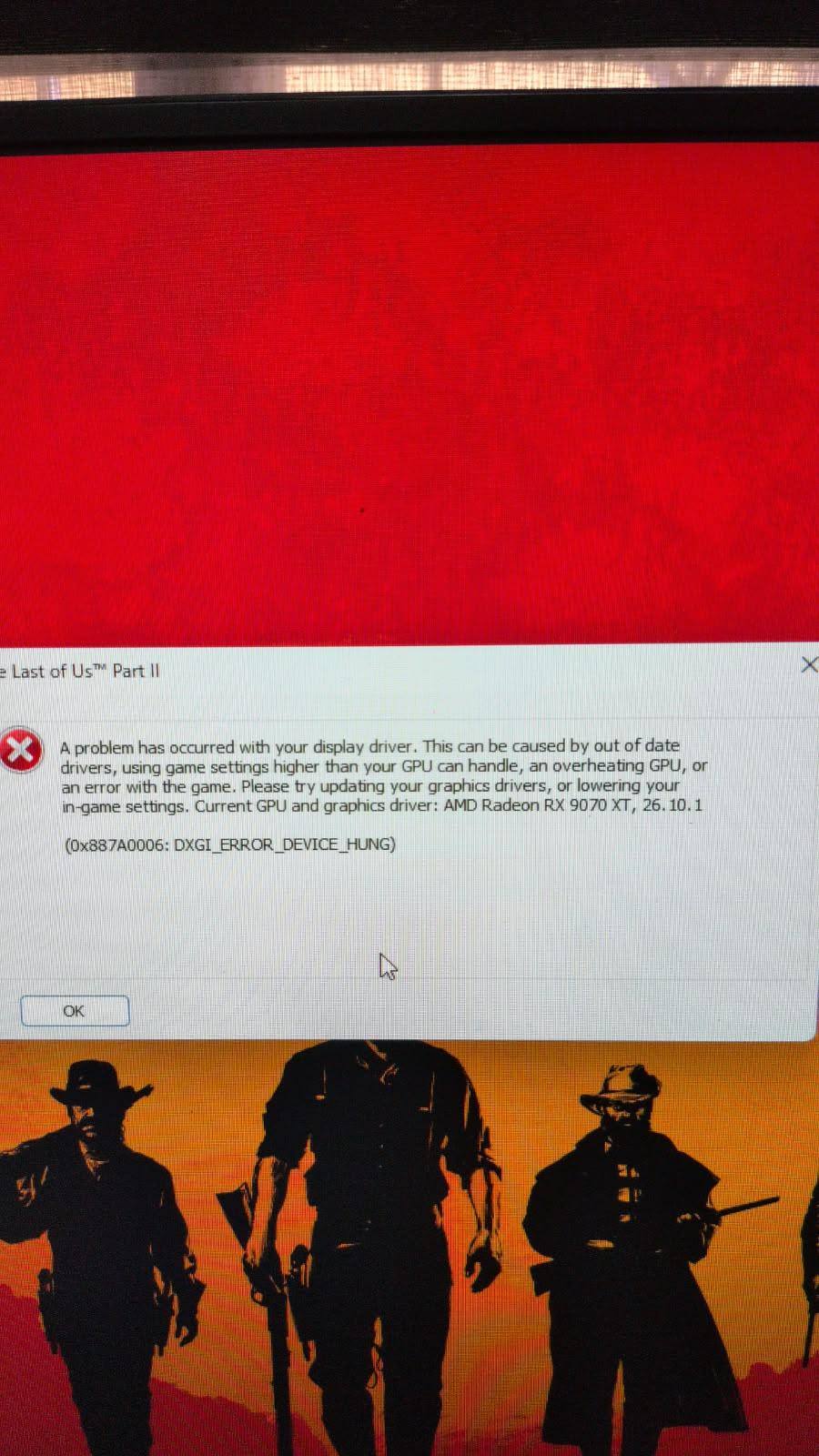
Help (GPU) Need help with my 9070 XT - Crashes

Post image
2 Upvotes

Sapphire Pulse 9070 XT

Gigabyte Force B850M

7500X3D

16 DDR5

1000W PSU

This seems to happen only when gaming. I'm guessing it could be the boost clocks. A simple tap on favour efficiency on Adrenaline helps but I'm not sure what's the root cause. Need your input guys.


r/AMDHelp • • 18h ago

Tips & Info I may have just made a $300 mistake… 💀 or did I?

8 Upvotes

After careful consideration and some helpful insights from some of you guys, I just bought the 5800X3D to upgrade from my 5600X.

The delivery is scheduled to arrive tomorrow, and I wanted to ask for some tips on what I should do before installing the new CPU and what to do after I install the CPU to get the best performance. I also possess a 3733 16gb kit which some people thought was a bad thing. I play games like ETS2, R6, Marvel Rivals, and AAA games.

My current setup:

9070 Asus Prime OC

5600x

16gb 3733MHz

1 TB SSD

XPG CORE REACTOR II VE 750W Plus Gold

B550M K WIFI6E mobo

Thermalright TR Phantom SPIRIT 120SE CPU cooler

1440p monitor


r/AMDHelp • • 4h ago

Help (Software) Is there any way to tell if DDU worked?

0 Upvotes

I tried following all instructions but one thing I could NOT do was install adrenalin without a network connection. However, before i did this i did set the group policy to ignore hardware drivers for windows updates.

How do I tell if DDU worked, and only the Adrenalin drivers are on my PC and not the windows ones??? Again, Adrenalin could not proceed with the installation without a network connection.


r/AMDHelp • • 19h ago

Help (GPU) Crashes in modern games in Fullscreen

0 Upvotes

Alex here.
[Edit: Windows Shutdown(not BSOD) gives code WHEA_internal_error 0x122 after new gpu]
I replaced my Radeon Vega 64 with a Radeon VII a few months ago and my modern games do not go past the start screen. Tried DDU to no avail, reinstalled Windows twice, before reinstalling, some older titles would work in borderless and then crashed fullscreen like the others, after two reinstalls of Windows(no Adrenalin settings or other customisations just new Windows with auto plus AMD drivers, no OCs), Skyrim crashed on the first fire up but now doesn't. Games like Forza Motorsport would work but now don't go past the start screens. On first reinstalling Windows, in Assetto Corsa Rally, I would go into settings then it crashed if I stayed configuring the graphics settings too often, played a full stage but game crashed again after going to graphics settings twice or trice then never worked again. *My Vega 64 LC which is older had no issues like these*
I used DXVK for some games at the beginning and that makes all games crash, no release of DXVK works on my Vega II.
Card is second hand but I stress tested it in Adrenalin and Kombustor and all seems well, replaced thermal interfaces as well. Changed the config file for Assetto Corsa Rally but also to no avail, Steam launch arguments in properties works neither, Assetto Corsa Competizione works okay. If you know the cliche fix then I'd be delighted to apply the fix.

P.S. No this isn't Me trolling when I know the problem, I first isolated my 92Hz refresh rate as the cause but this goes deeper, I won't apply my own fixes here sadly so it's kinda on you guys.
I'm on Vega because RDNA is an excuse for capitalism entirely, terrible quality, and am waiting on UDNA. Linux is on the table but I want to be on Windows. Cheers and bless

14700K
Gigabyte Z790 D DDR5
Samsung PM9A1 500GB
TeamGroup T-Create Expert


r/AMDHelp • • 14h ago

Help (Software) Is Windows 11 23h2 supported by AMD 9950x3D drivers ? AM5 B850 Chipset drivers ?

1 Upvotes

I have a bit of the following problem:

My existing Windows 11 installation is: Windows 11 23h2.

I am considering a board like: ASRock Steel Legend B850 and AMD 9950x3D processor.

However the AI is warning me for a couple of things:

  1. Newer chipset drivers for this chipset, might not support this older version of windows 11.
  2. Newer processor drivers same issue, might not work that well on older windows.
  3. Older windows out of support, security risks.
  4. However older windows a bit safer for read/write/trim risks of ssds.

One possibility is buying a third SSD, driving up repair costs, however re-installing windows 11 24/25/26h2 and trying to move over registry settings for applications is in a major pain in the ass.

Cloning is also problematic with 4K sectors and weird things going on with that.

Plus faster more optimized Windows 11 also risks damaging the KC 3000 kingston ssds...

Steel Legend B650E not sure sale anymore, as well as 7950x3D.

So repairing my computer endangers my Software installation which I spent 3 years building...

I could virtualize it, it's already virtualized, but that is from two years ago.

So my question is basically, will these drivers for B850 and AMD 9950x3D still work on Windows 11 23H2 ???

AI says, maybe somewhat, but might not be optimal ?


r/AMDHelp • • 12h ago

Ram causing Stutter issue 7800x3d

1 Upvotes

I have 7800x3d
B650 aorus elite v1.2
Ram:xpg 2x16 5600 with expo on

Is my ram causting the stutter and input lag i feel in games ?

My friend has the same build but with 6000hz ram and its super smooth

Help plz

I tried new win - bios optimizations
Im going crazy


r/AMDHelp • • 10h ago

Help (Software) Windows keeps overwriting my gpu driver

8 Upvotes

im about to crash out.

i got a new pc with a 9070 xt and i got nothing but problems.

windows keeps overwriting my gpu driver.

as soon as I unistalled it with ddu in safe mode while the option "prevent windows from downloading drivers" then reinstalled it after 10 minutes the screen goes black because windows doenloaded a different driver.

i already set group policies yet windows ignores them

EDIT: i mightve fixed the issue. i deactivated my igpu in bios


r/AMDHelp • • 21h ago

Help (Software) OC’d my ram through AMD software, computer won’t start

4 Upvotes

I was reinstalling my AMD chipset drivers and I saw the new panel for their software as I haven’t been inside their software in a while, was playing around and with it and saw an advanced option and OC’d my RAM to 3600mhz as it was at 3200 through their software, restarted my PC, and now the lights and fans come on but screen and keyboard are unresponsive with nothing turning on.

How can I just reset my computer to factory settings or at least the RAM?


r/AMDHelp • • 15h ago

Help (Software) NBA2K27 texture bug

Post image
5 Upvotes

ever since the 26.10 and 26.11 patches ive been getting these weird textures in NBA2k27. I have tried everything. I have tried shaders, all different kind of settings. Everything is off in adrenalin. I only have Anti-lag on. No FSR.. Anyone know what might be causing this? Its on particular areas of the city lobby and on the court in different spots.

Im also experiencing a drop from 70% shooting to 20% shooting. Which is timing based.

Im playing on a 9070XT. When i downgrade drivers to 25.x, its all normal.

Computer Type: Desktop

GPU: 9070XT Hellhound

CPU: 57003XD

Motherboard: ASUS TUF x570 wifi plus

BIOS Version: latest

RAM: 32GB CORSAIR 3200MHZ CL16

PSU: 900W

Case: Bequiet pure base

Operating System & Version: WINDOWS 11 PRO

GPU Drivers: 26.x

Chipset Drivers: Latest


r/AMDHelp • • 8h ago

Resolved 9060xt 0rpm fan mode works kinda weird

8 Upvotes

Is this normal for 0rpm mode?

Kinda doesn't look very well optimized.

Gpu is sitting at stable 60c and this is how its working.

It should be like when it gets 60c and higher fans kick in and when it gets under 50c then they stop. Could this repeated twitching and power on cycles damage the fans? The rpm meter on overlay jumps to like 24000rpm when they twitch and start spining...

EDIT: resolved. I reinstalled my drivers because my tuning page was blank. I turned off 0rpm mode and now its idling at 28c and there is no random fan "kicks"


r/AMDHelp • • 16h ago

Help (GPU) Graka defekt???

Post image
9 Upvotes

Seit ein paar Tagen ist das so. Hat jemand eine Idee?
Ich habe eine 9070xt und hab auch schon via DDU die Treiber deinstalliert.


r/AMDHelp • • 14h ago

Help (General) AMD tuning help

2 Upvotes

Hello! I’m sure there may be guides already in this subreddit regarding this but all the information sometimes gets me overwhelmed.. but I’m looking to undervolt and tune my 7600X and RX 9070 XT and need help.

Goal: Maintain equal or better performance while reducing power draw and temps as much as possible.

Hardware:
• CPU: Ryzen 5 7600X
• GPU: Asus Prime RX 9070 XT 16GB
• Motherboard: Gigabyte B650I Aorus Ultra
• RAM: 32GB 6000 CL30
• PSU: SilverStone Extreme 850R Platinum

Questions:

  1. Which should I tune first, CPU or GPU?
  2. What stress tests or games should I run to verify stability?
  3. Should I just do a general all-core CO, PBO, etc tune, or can someone help me with per-core tuning?
  4. Should I use Ryzen Master to find stable values first and then apply them in my BIOS, or just tune directly in the BIOS?

r/AMDHelp • • 14h ago

Help (CPU) Is this likely to get rejected in warranty claim?

Post image
7 Upvotes

Pc randomly didnt start one day so diagnosed it down to the cpu, seems like 1 pad is burnt/ shot.

Is this likely to get rejected in warranty claim checks?


r/AMDHelp • • 14h ago

rx 7900 gre need help with thermal pads which size since the old one are dryed up and tmeps go over 110

Post image
1 Upvotes

 Hello i have a rx 7900gre gigabyte oc and couldnt find any thermal pad sizes i need help with this i m so tired i had 110 temperatures before thats why i ask i had also crashes because the temperature rised too fast i need someone 

who could tell me which size the termal pads on the vrm and mosfet and on the vram are im quite disapointed that gigabyte doesnt reply back to my question about the thermal pad size

many thx


r/AMDHelp • • 14h ago

Help (General) Stuttering

Post image
2 Upvotes

When playing games like Frostpunk, Hogwarts Legacy, Spider-man Remastered, etc I get consistent stuttering... I think my PC should be able to play them correctly.

GIGABYTE RX 9070 XT, R7 9700X 8-Core, 32 GB DDR5 6000MT/s CL48, 750W PSU.


r/AMDHelp • • 14h ago

Help (General) Monitor going No signal after playing games for sometime

2 Upvotes

Hello everyone,

I've a Sapphire Pulse 9070 XT 16 GB. From a few months I'm facing an issue where the monitor is going No Signal, but I can still hear audio from applications. It's happening with games or even just while vcing in discord. I have to reseat the graphics card for it to work for a while and then it's going No Signal after like 30 minutes again.

Sometimes, even when I boot up my PC, it gives me No Signal till I reseat the graphics card in the PCIE slot. It is clipped tightly and my case is horizontal.

I got this GPU in July 2025, but this issue started August this year. It was pretty smooth for the past year.

I changed my graphics card to my RTX 3060 ti and I'm not getting this issue with that card.

Anyone know any solutions to this ? I've tried reinstalling the drivers in Safe Mode but no luck with that too.

Any help would be greatly appreciated. The only other option I have is to claim warranty on this.

Specs :-

CPU - AMD Ryzen 7 5800x3d

Graphics Card - 9070 XT 16 GB

RAM Corsair DDR4 32 GB 2133 MhZ

PSU - Gigabyte 750W

Motherboard - AORUS Elite x570


r/AMDHelp • • 15h ago

XFX RX 9070XT 16 GB SWIFT

Thumbnail reddit.com
2 Upvotes

r/AMDHelp • • 17h ago

Help (Software) Chipset Drivers

4 Upvotes

Just built a pc and got recommended a video of AMD Chipset driver 8.09 being bad compared to 8.08? Should I just install 8.08 and call it a day or get the latest update?


r/AMDHelp • • 17h ago

Help (GPU) AMD Radeon GPU reporting 0C

Thumbnail reddit.com
2 Upvotes

r/AMDHelp • • 18h ago

Help (CPU) Can you recommend me the best motherboard that is below 500 euros, for the 9950x3d? I'm planning an upgrade?

3 Upvotes

I saw this one randomly: GIGABYTE B850M AORUS ELITE WIFI6E ICE, liked the design of it

What I'd want from it, to basically be enough to power the 9950x3d and use it solely for gaming. Right now I have B550M DS3H and a 5700X3D


r/AMDHelp • • 19h ago

Help (Software) EXPO 1 Causing Error Screens and reboots. Troubleshooted it, but can I turn it back on?

2 Upvotes

I managed to fix my random bluescreens by turning off EXPO 1, im guessing it was was the problem, couldve been graphics drivers too ig, which I deleted with ddu then reinstalled.

Does this mean I can never turn on EXPO again?


r/AMDHelp • • 20h ago

Help (Software) Lackluster performance in gaming specifically.

Thumbnail reddit.com
2 Upvotes

I Post this here as I expect this has to do with my CPU.


r/AMDHelp • • 22h ago

Help (GPU) 9070 XT prebuilt keeps restarting when gaming or watching 4K video, no BSOD

3 Upvotes

Computer Type: Desktop (prebuilt)

GPU: ASRock Radeon RX 9070 XT Challenger 16GB

CPU: AMD Ryzen 7 7800X3D

Motherboard: Gigabyte B650 Eagle AX

RAM: 32GB Corsair Vengeance DDR5 6000MHz CL38 (2x16GB)

PSU: Gigabyte UD850GM PG5 V2 850W 80+ Gold, fully modular

Case: Nox Hummer Element

Operating System & Version: Windows 11

Description of Original Problem: PC restarts on its own, no bluescreen, it just cuts off and reboots like someone pulled the plug. Only happens when the GPU is working: gaming (Deadlock, WoW) and also watching 4K videos. Never happens when just browsing. In Event Viewer there's a WUDFRd error right before the restart, then Kernel-Power 41 after it reboots.

Troubleshooting: Not much yet, the PC has been at the shop under warranty for 3 weeks and they haven't told me anything. I read that the 9070 XT can do this when it's powered by one PCIe cable using both connectors instead of two separate cables from the PSU, but I don't know how mine is connected since I don't have it here. Is that likely the cause, or does it sound more like a bad PSU or GPU? Just want to know what to push the shop on.