Is there a way to edit and/or delete reading history, I have 2 issues, first is I re-migrated from audiobookshelf trying to fix something and in doing so it's doubled up my reading history with the now deleted migrated library showing all the books as removed from library.
Second issue is accidentally having a book mark as finished, like listening while going to sleep means you need to start a re-read to finish the book and in doing so it messes up the start and finish date.
I started using book orbit and have got things running well. I love it, I love the flexibility and that it's all on my own servers... I have a suggestion.
I have Dyslexia, and the Open Dyslexic font really helps me. Is it possible (since it's an open font) to add this as an option in the font section? I didn't know who to send the message to, so I'm posting it here in the hopes that someone who can help might see it.
When i edit audiobook metadata i sometimes get this message when trying to save it. is there any way of me increasing the acceptable maximum file size in the ui settings or compose yaml? I had a look in the docs but didn't spot anything.
I saw in a GitHub issue about a feature showing possible gaps in book series. I can't see this in my app, what am I doing wrong, or where do I see this? Second screenshot is the supposed feature...
What it is: CrossInk 2.0 with BookOrbit integration for the EEGO A4 / A4 Lite. If you self-host BookOrbit, your progress, highlights, bookmarks and reading stats sync both ways. You can browse and download books from your library right on the reader, and the Home screen shows your current book, streak, weekly reading and yearly goal.
What I added on top:
Sync on Wake: syncs your book when you wake the reader (every time, or only if it's been 15 min / 1 hour)
Sync banner: syncs show a small banner over your page instead of switching screens, then drop you back into your book
Apply to All Books: change the font once and every book uses it
BookOrbit boot logo ("Powered by CrossInk"), which you can switch off
Faster loading for fonts on the SD card
Updates come from my repo, so Check for Updates won't swap in a version without these features
How to install: flashing takes about a minute over USB-C with esptool. The guide walks through backing up your stock firmware first, flashing, and going back to stock if you want to.
⚠️ Heads up: this is unofficial, community-built firmware, tested on very few devices. It's not endorsed by EEGO or any of the projects it's built on. Flashing replaces the stock firmware and may void your warranty. Back up your stock firmware first (step 2 in the guide) and flash at your own risk.
Credits: built on CrossPoint → CrossInk → CrossInk-Bookorbit, on the FreeInk SDK. All the A4 hardware support comes from those projects, so huge thanks to their authors. Built with Claude Code.
Hi all - loving book orbit. Truly is phenomenal, and this is coming from a reformed nay-sayer.
Just a quick question, is there a notification feature for when someone makes a book request in the iOS app? Just asking in case I’ve missed something, or if this is a planned feature at all? TIA
In Read Along, I'm using Barrett – Orbit Voices. When I select 4x speed, the app displays 4x and updates the estimated remaining time in the chapter running at 4x speed however, the actual narration and text highlighting continue at 1x speed and remaining time displayed in the bottom right corner next to the percentage complete never adjusts to the newer speed.
The problem happens immediately, not after playback has been running for a while. It also does not apply to the speed of the text highlighting.
I’ve tried setting the speed, exiting the book and reopening it as well as closing out of the app completely and reopening.
Does anyone have any suggestions for the read along feature to truly operate at 4x speed?
While setting up my BookOrbit, I found that usually it couldn't find and assign decent profile pictures for the Authors. So I started populating the list with images I found online. However, soon I started disliking the non-uniformity of the looks. Some guy was leaning against a wall, another was low resolution, another was taken in a crowd, etc.
So, I started looking for, cropping, and applying a sepia tone to images I thought looked better. Now my Library looks elegant (imho, at least).
So, I present you with a shared Google Drive folder with the 300 author profile pictures I have this far edited. They are 600x800 jpgs, each file named after the author. Small sample in the carousel of this post.
Need some advice/help started reading a book yesterday and the chapters were broken, anyway carried on for 2 hours and today now that I'm back at a computer I've fixed the epub. But how do I go about replacing/swapping out the new version for the old version without losing history and data?
Anyone know if I buy the Family Plan for the iOS app if the license can be shared with an Android user? I’m on one platform and my partner is on another so I’m looking to figure out which one works better.
Station Log is a new video series for this community: one episode per feature, shown working on a real library. Episode 001 covers story guides and Constellations.
The problem: a long novel gets put down for a week, a half-remembered character walks back in, and searching back through the chapters risks hitting a spoiler.
A story guide is a who's who for one book. The server's AI reads the book once, finds every person, place and term, works out who is tied to whom, and writes what each one is like at every chapter.
The guide is stored on the server and shared. Reading with it costs nothing, and one build serves everyone who can read that book.
Constellations, in the iPhone app, shows the guide up to the page that has been reached and nothing beyond it. The same character reads differently at chapter 4 and chapter 20. A map called the Sky shows who is tied to whom, and a scrubber walks back through the chapters.
Select a name on the page for a hint, open the Recap after a break, or type a question about the story so far. Answers come from the pages already read.
Bring your own AI:
BookOrbit has no AI of its own. Nothing is sent anywhere until an admin connects a provider (Anthropic, OpenAI, Gemini, OpenRouter, Ollama, LM Studio or any compatible server), picks the models and switches a feature on.
The admin sets a monthly spending limit, and every build shows an estimate first. In the demo, a full-length novel was estimated at about 13 minutes and $0.20 on a small model.
Only book text goes to the provider. Reader accounts and notes do not.
Answers can be written on the phone or by the server's AI.
The video (6 minutes, captions only, no audio) covers the server-side AI setup, building and managing guides, and the iPhone side: Constellations, entry pages, fixes, the Recap, Reading Help settings and the Sky.
Is there a way to utilize the peek feature and also view the community ratings from the metadata providers on iOS? It’s available on the web but I don’t see it on mobile.
BookOrbit 3.10.0 and iOS 1.12.0 are out. The big change is that the ebook, audiobook and translated editions of a title can finally sit together. On iPhone, the next audiobook can start on its own, and the sleep timer can stop exactly where you want it to.
One book on the shelf, every edition inside
Group the ebook, the audiobook, a translation or another printing as editions of the same book. Library lists, series and author pages show the title once and open the edition you last read. Each edition keeps its own files and progress, so listening ahead in the audiobook leaves your ebook bookmark where it was. Open a book and use Add edition to see likely matches. Editions are also available in iOS 1.12.0 when connected to a 3.10.0 server.
Keep the audiobooks coming on iPhone
Add a book to Up Next from its page or the library menu, then drag the queue into whatever order you want. When the current book ends, a short countdown shows what’s about to play. An empty queue can carry on to the next audiobook in the series, and that setting can be turned off.
The player now shows how much listening time is left at your actual speed. An hour of audio takes 40 minutes at 1.5×, and the player shows 40 minutes. Playback goes up to 4×, and you can switch the progress bar to show the whole book with chapter markers. Skip buttons can be set anywhere from 5 to 90 seconds using the available presets.
A sleep timer for “one more chapter”
Set a custom duration or pick the chapter where playback should stop. Each chapter option shows when the timer would pause at your current speed. Shake the phone to add 15 minutes or one more chapter, and set a short rewind when the timer stops so it’s easier to find your place the next day.
Also in this release
Browse genres and tags on iPhone and iPad, pick the colour and strength of the spoken-line highlight in Text to Speech and Read Along, build story guides for Spanish books, and sync audiobook progress to StoryGraph. The server also fixes Kobo sync for fixed-layout comics and restores KOReader’s “not on device” filter.
Which books would you group first: ebook and audiobook pairs, translations, or different printings? Feedback on how well Add edition finds matches is especially welcome.
Basically as the title says. Any chance that book request will end up with a fork of Shelfmark or maybe a full blown Shelfmark Plugin integrated into it? It seems like the potential is definitely there and would make the whole book request process work with IRC sources easily.
BookOrbit 3.9.0 is out, and the theme is control: where books end up, which AI does what, and what the server is busy with.
Every library gets its own dock
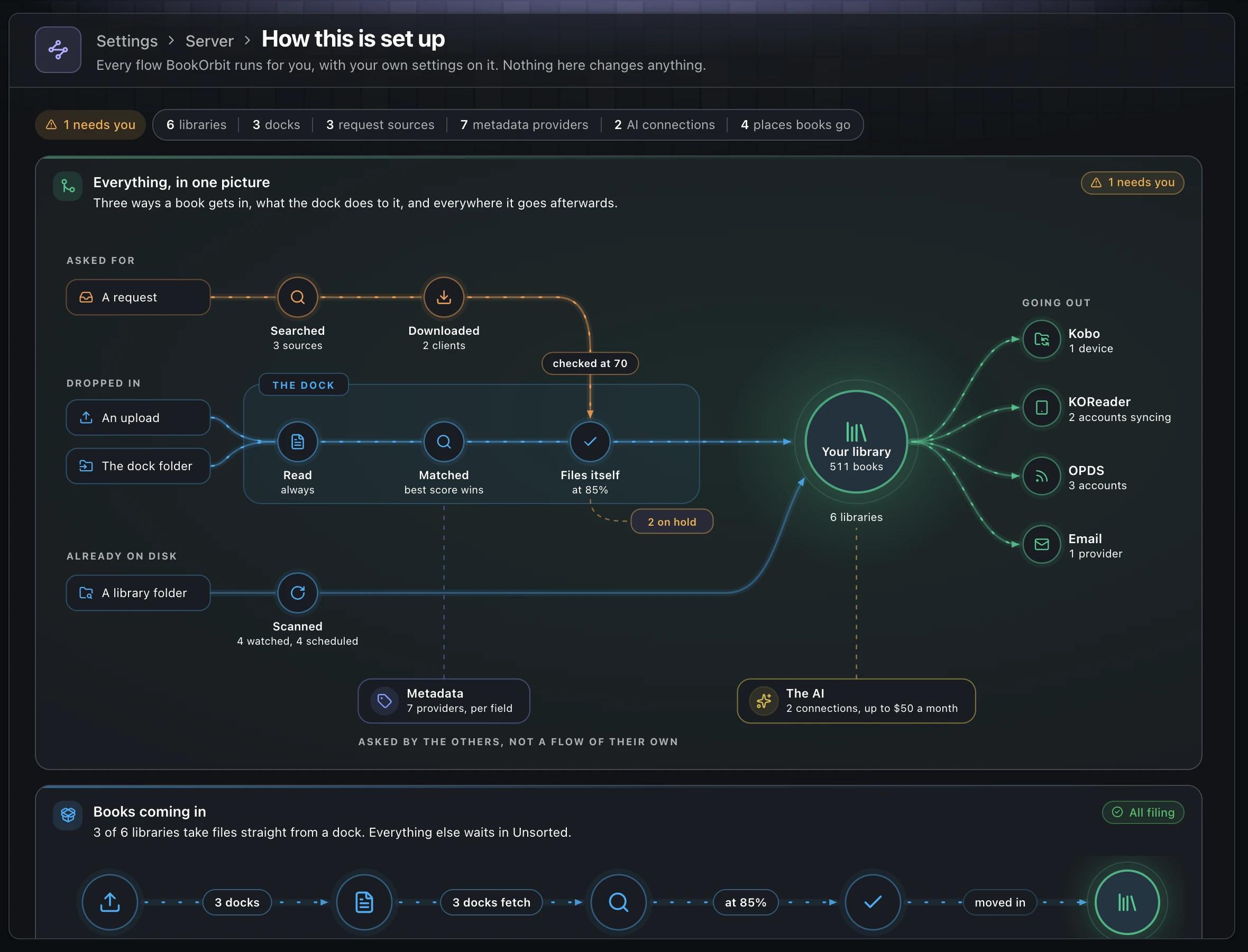
Drop a file into a library's dock and it is fetched, named and filed by that library's own rules. One library can use a strict match threshold, another can keep originals for seeding, and each files into its own folder. Every file that is waiting says why it is waiting, so nothing sits in a folder unexplained.
Bring your own AI
Plug in OpenAI, Anthropic, Gemini, OpenRouter, or a local Ollama, LM Studio or vLLM server. Story guides, photo scans and reading help each get their own switch, and a monthly spending cap plus a usage report by feature and model keeps the bill visible. A local model means no per-token bill at all.
What that unlocks on iPhone
When the phone cannot read a decorative cover or a crowded shelf photo, the server's AI can. Each character's story so far shows up with their family and ties, revealed only as far as the book has been read, and reopening a book after a few days brings a recap of where the story stands. No photo leaves the phone until it is allowed to. There is also a new starry "Orbit" Home style, and narration can follow along with four highlight styles.
See what the server is doing
The new Jobs page puts story guides, read-alouds, merges, downloads and bulk actions in one list. Jobs can be paused, moved up or cancelled, and bulk actions keep going after the tab is closed. A Setup overview under Settings > Server draws how everything is wired (how books arrive, where requests go, which provider answers each metadata field) and points at anything that needs attention.
Also in this release: sort by any field with a second level, filters that save as Smart Scopes, genre and tag pages, an icon-row sidebar, ISBNs found on the copyright page, nameable KOReader devices, and a pile of Kobo, torrent and stats fixes.
Which local models work best for story guides and recaps? Reports from real setups are very welcome here or on GitHub Issues, along with bug reports and ideas.
Hi, since now I have my book orbit docker only on my LAN and my devices (kindle with koreader and Xteink X3) can’t access outside (only Tailscale on my mobile / laptop).
Now I configured a cloudflare tunel to it, so I can access on mobility to book orbit now.
The question:
- What I have to configure to generate again the koreader plugin?
I want to have access to BookOrbit with my kindle outside my home network (I’m on holidays) and I want to give access to my sisters and my mom kindle to.
I have a book that is managing to "break sync" and I can't figure out why.
Setup:
BookOrbit (latest) running in Docker on Unraid
KOReader (latest) running the 1.4 plugin on a Boox Go 7 BW
Kobo Clara BW running native interface but pointed at BookOrbit via the store API url
I am at a specific point in the book on the Boox device, Chapter 3, which is 12% of the book. I push my reading location.
I go to my Clara BW, tell it to sync before opening the book, and I can see that the book now says it's at 12%, matching the Boox. I open it. It opens right where it was before hand, does not advance to chapter 3, and when I close the book, it now says it's at 9%.
I go back to the Boox and push my location again, and this time go to the web reader in BookOrbit. It also reports 12%, but when I open the book in BookOrbit, it's a few pages into chapter 3, not at the start like the Boox.
So, essentially, this book in particular is all over the map with location between all the things. I haven't seen this with another book. So what do I look for here? I am not sure if this is a bug with BookOrbit or something weird with this epub.
If one of the devs is on here, please ping me and I can share a copy of the book so you can try it yourself.
Hi I use Calibre to edit epubs and tweak metadata. I was wondering it would be possible to then share the finalised EPUBs to a folder which can be scanned and imported to Bookorbit which is hosted on Corehost. Hope this makes sense. Would appreciate any advice. Thank you