r/DigitalPlanner • u/storyplan • 19h ago
Story Plan – A life planner connecting goals, daily plans, habits and reflection | 50% off Pro + 10 Lifetime Pro giveaways
gallery
1
Upvotes
r/DigitalPlanner • u/plannerpick • 1d ago
I've always liked physical planners, but finding one that has exactly the layouts and sections I need can be difficult.
So I started building my own tool where you can customize a printable planner, choose its design, personalize the cover, preview the pages, and download the PDF.
I'm still improving it, and I'd genuinely appreciate feedback from people who actually use paper planners.
I'm the developer behind PlannerPick, so I'm happy to answer questions and take suggestions.
You can check it out here: PlannerPick
r/DigitalPlanner • u/MarcN-Apps • 1d ago
Hi everyone, my lovely Habit OS Routine Tracker app now includes some planning and task features. It’s currently with the ASC for approval of this new version. If you’d like to give the current version a go, I’d be delighted.
r/DigitalPlanner • u/Negative-Procedure23 • 1d ago
r/DigitalPlanner • u/striker666dk • 1d ago
What it is: an Android planner that gives you one calm overview of your tasks, routines, calendar events and notes, and doesn't punish you for bad days.
Highlights
Privacy: fully offline. No account, no ads, no tracking.
What I need: testers who use it for 14 days (Google Play's closed-testing requirement). Every tester gets a free code that unlocks the full app for good.
How to join (2 minutes):
Languages: English, Danish, German, Spanish, French, Italian, Norwegian, Portuguese, Swedish. Feedback of any kind is welcome.
r/DigitalPlanner • u/Wonderful_Hotel_1304 • 1d ago
519 pages
- Calendrier
- Emploi du temps
- Planning de l'année
- Trimestre (4 pages)
- Semestre (2 pages)
- Budget annuel, mensuel (13 pages)
- Maison (12 pages)
- Mois
- Semaine
- Jour
Agenda 2027
https://xixshop.etsy.com/fr/listing/4520238856
--------> Vous pouvez tester la version 2026 avec ce lien :
https://we.tl/t-zeAtBxMsUoGJGUUd
(Pour l’agenda 2027 :
Quelques changements : redesign des pages "mois", pour les pages "jour" la barre navigation a été enlevé pour plus d'espace.)
r/DigitalPlanner • u/Chrisdin_creates • 1d ago

r/DigitalPlanner • u/StudioMason27 • 1d ago


Every January I buy a 200-page digital planner, use about eleven pages, and keep the other 189 around as a reminder that I'm behind. This year I tried the opposite: one small hyperlinked file, 19 pages, built for GoodNotes first and printing second.
What's in it: a goals and index page, the year at a glance, twelve dated months with real 2027 weekdays, one weekly page, one daily timeblock page, a habit tracker, and a dot grid.
What I cut:
What I'm still unsure about:
If you plan on a tablet all year, what would be missing from a 19-page file that would send you back to a 200-page one? That's the thing I want to know before I stop editing.
Happy to screenshot any page if it helps.
r/DigitalPlanner • u/Wonderful_Hotel_1304 • 1d ago

Choice of three notebooks :
- DIARY / lined paper - SKETCHBOOK / blank paper - NOTEBOOK / grid paper
3 pages per day (1168 pages)
Color or black and white screen
PDF with hyperlinks
For reMarakble 2, paper pro, Pure,
https://xixshop.etsy.com/listing/4365838381/
For reMarakble Paper Pro Move
https://xixshop.etsy.com/listing/4388035783/
For Boox, Supernote, e-ink tablet
r/DigitalPlanner • u/RobertN100 • 1d ago
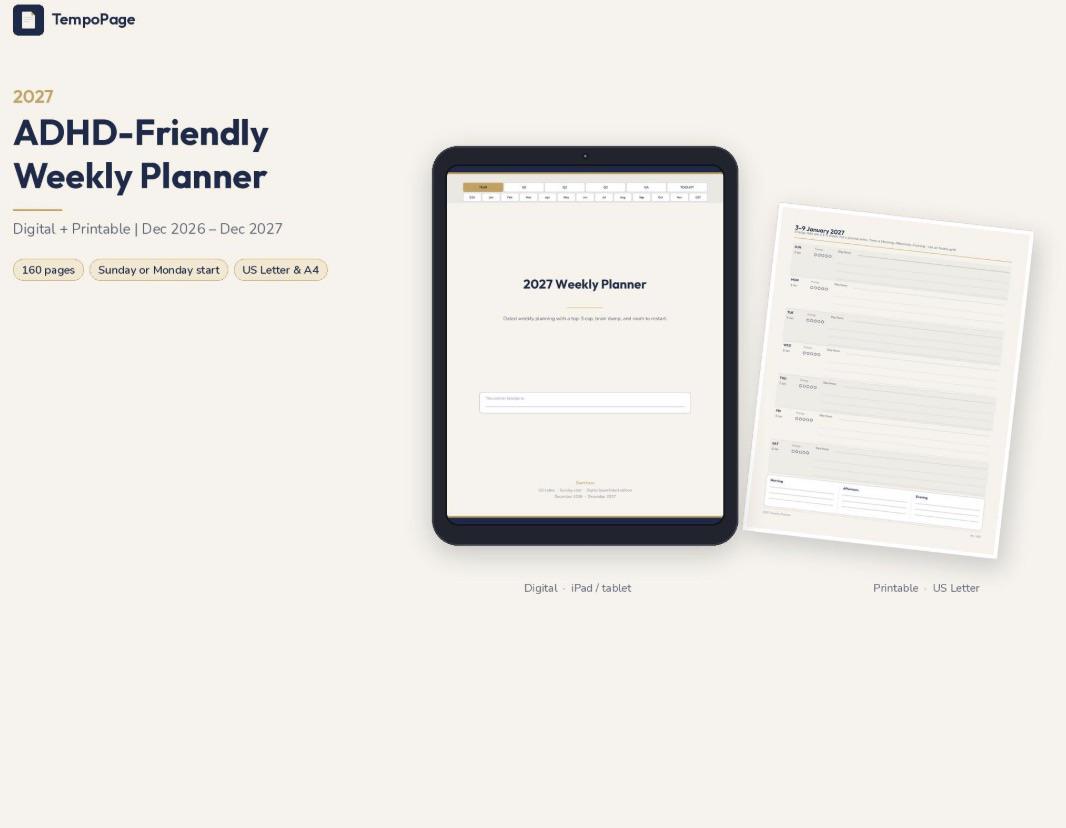
As a college student with many varying responsibilities, I decided to make a planner I could actually stick to. I created a 2027 weekly planner with one simple spread per week, a short "top 3" focus box, and a lot of white space. It's hyperlinked for GoodNotes and other PDF apps, comes in Letter and A4 print-formats, and includes both a Sunday and Monday-start version so you have maximum flexibility.
This planner allows you to prioritize what's important and makes it easy to get back on track if you fall behind. While it is an ADHD-friendly planner it is also a great planner for anyone juggling many priorities yet looking for simplicity. It also gives you the option to start early with a December 2026 page. I encourage you to check it out if you're interested!
It comes in a few designs (Classic, Floral, Boho, Olive). It's 40% off on Etsy through Dec 6 while I'm just starting out, if anyone wants to try it, the link to the classic design is below but you can click on my shop to see the rest:
https://tempopage.etsy.com/listing/4623596867
I'd love any feedback you guys have as well. Please let me know what you think!
r/DigitalPlanner • u/PunguinFocus • 1d ago
Half my wasted time used to happen before I even started working, just jumping between a timer, a calendar, a to-do list, and random notes to figure out what I needed to do next.
So I started building PenguinFocus to keep everything in one place. It has a 24-hour Day Map Planner with templates, undo/redo, image or PDF export, and schedule sharing, plus a Pomodoro timer, a calendar, and goal tracking. It also works in both English and Arabic (with full RTL support).
It's still pre-launch, and joining the waitlist puts you in the draw for a closed beta invite. Curious how your setup looks right now, do you keep everything in one app or use separate tools for each part ? ❄️🤍
r/DigitalPlanner • u/No-Tower7665 • 1d ago
r/DigitalPlanner • u/klawUK • 1d ago
r/DigitalPlanner • u/uhhidontknow07 • 1d ago
So, I made an ADHD planner, and honestly, I think it's pretty good. 😭
I designed it, made a whole Pinterest post about it, uploaded it to Gumroad, and it's actually getting impressions! Which is great, except nobody is buying it. LMAOOO.
So I'm putting it out here too. If you've been looking for an ADHD-friendly planner, maybe give mine a chance? Even a few purchases would mean a lot.
I'm just a girl trying to save up for a solo trip, and apparently my travel fund isn't going to fill itself. 😭✋
Please help a girl get out of her financial delusions and onto a train. LOL.
Also, it costs just a dollar. 👉👈
r/DigitalPlanner • u/OkReindeer1419 • 1d ago
Schaut euch mal diese tolle App an, ist sehr günstig. Einmal Preis ohne teures Abomodell. Der Entwickler hilft sehr schnell. Setzt schnell Verbesserungen um. Hat verschiedene Ansichten Monat Woche eine Notizfunktion. Einfach funktional. Schaut sie euch mal an im App Store. Für mein iPad mini 8 gut geeignet.
r/DigitalPlanner • u/itzyaboied • 2d ago

r/DigitalPlanner • u/Mother_Warthog_2410 • 2d ago

Hi all! I'm the one who makes the Sunny Planner app. I put together a few December Planners and they're free, so figured some of you might like them.
There's 4 covers (woodland, winter blue, berry and blush). each one has a month page, a horizontal week and a day page. works on iPad landscape or portrait, iPhone and Android too.
My favourite bit is they sync with your calendar, and that's free as well. Apple, Google or Outlook, work and personal ones together, and your stuff just shows up on the right day and time (2nd pic). only thing is if you import a planner from somewhere else it can't sync, but there's heaps of planners in the app that do
They're in the Marketplace in the app under "Free for December". Thank you
App Store: https://apps.apple.com/app/id6831065861
Google Play: https://play.google.com/store/apps/details?id=app.sunnyplanner
Happy planning!
r/DigitalPlanner • u/Competitive-Bet1084 • 3d ago
Hi all,
I have an offline digital productivity planner listed on Etsy. Please check it out here:
There’s also a live demo here: https://productivity-two-lake.vercel.app/
I’d really appreciate it if you could try it out and share your feedback. I’m currently looking to get users. I am also open to making customisations based on your needs.
Thank you!
r/DigitalPlanner • u/Cloverologie • 3d ago

Made this n wanted to share, gonna give it away to whoever wants it when I’m done with it
r/DigitalPlanner • u/geezthatseasy • 3d ago
Hi everyone, I'm Gene, the founder of Geez, a Super App for iPhone and Android that handles group plans without the group chat, while keeping the rest of life organized.
You start the plan, everyone gets their own invite, and you can see who's in and who's still deciding. No thread to scroll.

New this week:
It's free for everyone through Jan 1, and guests are always free. They don't need the app to answer.
If you have ideas, have problems or find a bug! Tell me below, with your phone and what you were trying to do. Your feedback shapes what we build next. Thank you!
- Gene
r/DigitalPlanner • u/efflorezen • 3d ago

I wanted a single space I could turn to for different kinds of resets that help me in everyday life, so I ended up building this Notion template.
It’s called the Reset Routine Template, and the idea behind it is to make it easier to pause, review and reflect, organise or get back on track whenever needed.
Here’s a peak into what’s included:
It’s built around 12 core reset themes across 4 broad categories covering different areas of everyday life along with customisable sections and a main dashboard with integrated reflections.
Why I find have something like this useful:
I often find that planning alone isn’t enough. I need to periodically review where I am at, figure out what needs my attention and be clear on how I want to move ahead. That’s where I rely on taking some time out for weekly resets and then an end-of-month reflection.
And when I want to tackle occasional seasonal tasks like decluttering or life admin tasks, I’d rather have a checklist ready to refer to than spend time figuring out what needs doing each time.
The idea is to have all these different things in one place, without having to maintain a rigid routine or use everything all the time. You can pick what you need and return whenever you need another reset.
I’ve included the link to this product and also some screenshots so you can look how it’s structured. Sharing it here in case it’s useful to anyone else.
And I’ve also got a seasonal Black Friday sale running till Nov 30, get it for $20.25 only, for anyone interested.
r/DigitalPlanner • u/armoon1 • 3d ago

Bloom just got an update: Dark Mode, Calendar Sync and Clearer Budget Tracking (more coming in version 2.2 soon)
Hi everyone, I’m the developer of Bloom, a free planner for iPhone and iPad. Your feedback has helped shape a cleaner planning experience, with dark mode, Apple Calendar sync, refreshed Today/Habits/Focus screens, and weekly, monthly and yearly budget insights.
Keep your plans, notes, goals, workouts and spending together. Choose the tabs you need and make it yours—no account, ads or subscription required.
Download Bloom free on the App Store
https://apps.apple.com/us/app/bloom-daily-life-planner/id6829106550
Found a bug or have a suggestion? Please share it below, including your device and app version if something isn’t working. Your feedback helps me improve Bloom. Thank you!
r/DigitalPlanner • u/ThatIOWGuy • 3d ago

Hi everyone 👋
I've just released Sencillo Daily Planner, a native Mac app that puts your Apple Calendar events, Apple Reminders tasks and your notes in one place, so you can plan your day without jumping between three apps.
It uses your existing calendars and reminders (iCloud, Google, Exchange — anything you've added to your Mac), so everything you change in Sencillo syncs to your iPhone, iPad and Apple Watch through Apple's own apps.
What it does
Privacy
No accounts, no analytics, no tracking and no servers of mine. Events and tasks stay in Apple Calendar and Reminders, and Sencillo's own notes, tags and habit streaks sync through your private iCloud. I can't see any of it. The website doesn't use cookies either.
Problem
Planning a day on a Mac means switching between Calendar for events, Reminders for tasks and Notes for everything else. None of them shows the whole day in one place. Adding things is slow, with a form and pickers for every date, and most planner apps that fix this want a subscription, an account, and your data on their servers. Sencillo puts Apple Calendar, Apple Reminders and your notes into one calm daily view. You add things by typing naturally ("Lunch with Pete fri 12:30 for 1h #work"), and everything stays in Apple's apps and your own iCloud.
Comparison
Pricing
It's a one-off purchase, no subscription. For Black Friday it's $4.99 (normally $9.99) until 6 December.
iPhone and iPad apps are coming soon, and they're included in the price. If you buy the Mac app now, you won't pay again when they launch.
Requirements: macOS 26 Tahoe or later on Apple silicon (M1 or later). Apple Intelligence is optional.
Site, screenshots and download: https://sencillo.lowworks.co.uk
This is version 1.0, so I'd really love feedback — what's missing, what's annoying, what you'd want in the iPhone app. Bug reports are welcome here or at hello@lowworks.co.uk. Happy to answer any questions!
