r/Fallout4Mods • • 8h ago

Question! PC Is it worth updating Fallout 4?

Post image
31 Upvotes

So I never updated base Fallout 4 lol. I love my load order, everything runs relatively smoothly with like a single crash every so often. Also love the mods I currently have.

I’d really like to update the base game and play the creation club prequel but I have an irrational fear of losing my current load order. Is it worth it?

Pic for attention.

r/Fallout4Mods • • 17h ago

PC DIY TUTORIAL [FO4] Creating a Fallout4Custom.ini for Modded and Unmodded Games

0 Upvotes

This is just the fastest way I have found to make a Custom.ini. This comes with a few Steps that should help.

  • Bethini Pie (Performance INI Editor): Mod and Video Card setup (Community Recommended). Has a lot more then just the .ini going on and can do it on its own. So this guide below wont be needed if you use this Mod.
  • Mo2 Users has its own Fallout4Custom.ini spot by clicking the Red Puzzle Pieces Icon (the info I found)
  • Vortex Users can use this.

~Modding~

Stick [Archive] section on top of any Fallout4Custom.ini or Alone In The Custom.ini to Start Modding your game.

~Copy Below Only~

[Archive]

bInvalidateOlderFiles=1

sResourceDataDirsFinal=

~Copy Above Only~

~Making the Fallout4Custom.ini~

  1. Open the Search bar at the bottom, type Notepad.
  2. Now Copy Paste the below [Controls] (These [Setting] are here to help you out) or above [Archive].
  3. Go to File > Save As.
  4. Find desktop on the left click this.
  5. Then make the File Name > Fallout4Custom.ini
  6. Crucial Step: In the "Save as type" dropdown, select All Files (.).
  7. Save.
  8. A new Document should be on your Desktop Name Fallout4Custom.ini should have a little paper with a gear in front of it.

~Copy Below Only~

[Display]

[Controls]

[Combat]

[General]

[Interface]

[Workshop]

~Copy Above Only~

Now you will pull this new Document from your Desktop into this file path.

  • C:Drive C:/user/Your Name/Documents/My Game/Fallout4
  • The Fallout4.ini and Fallout4Prefes.ini should be here.
  • this is just the start as there are many more [Headers] and codes to add this is just the steps to make one.

~Tips~

  • [Papyrus] Do not use.
  • bUseCombinedObjects is best left out.
  • uGridsToLoad youll need to know what your doing.
  • Warning: Do not set your Fallout4.ini, Fallout4Prefs.ini and Fallout4Custom.ini to "Read-Only," it locks you out of making in game changes. Unless It keeps resetting your .ini changes on starting the game.
  • The .ini are all about the [Headers] and what's under them.When you copy this over it will have a lot of blank spaces you will need to delete all Blank Spaces to bring the Code under the [Headers] (all Codes and [Headers] Needs its own line like a check list) but don't delete any anything unless you know you dont want it (Just the blank spaces only), and tinker till you like it.
  • A easy fix if anything goes wrong with your .ini work just delete the Fallout4.ini and Fallout4Prefs.ini and start the game up and set up your graphic should give you fresh .ini (this is faster than verifying the game in Steam).
  • If its a code in the Fallout4Prefes.ini change it there then check the Fallout4.ini. Only if its not there add it to you're Custom.ini and if it doesn't work it may not do anything at all
  • If Fallout 4 updates this will affect both Fallout4.ini and Prefes.ini and all changes must be redone.

~Other settings~

  • This is Optional but you may need this.
  • Graphic Settings, Video Card Setup and HighFPSPhysicsFix.ini Would You Like To Know More? More.
  • The above guide should be done first as updating your in game Grapics will reset the Fallout4Prefs.ini.

~iPresentInterval=~

Looking where to go .

  1. Go to> This PC > C: Drive /user/Your Name/Documents/My Game/Fallout4 and your there. The Fallout4.ini and Fallout4Prefs.ini and the soon to be Fallout4Custom.ini will be here, In your Fallout4.ini and Fallout4Prefs.ini Document you should change iPresentInterval to 0 to unlock the games framerate.
  2. Fallout4.ini and Fallout4Prefs.ini
  3. Open one of the above .ini in your notepad. Both must be done.
  4. Hold Ctrl + F should bring up the find box under Edit button. Copy and paste iPresentInterval into the find box Change iPresentInterval=1 to 0
  5. Save the changes.
  • If steam updates: You will need to go back to redo Both .ini settings as Steam reverted these .ini, your Custom.ini is fine.
  • Changing your Graphic setting will reset both .ini.
  • Warning: change the iPresentInterval=0 your turning in game frames rate off to correctly set the games FPS use your Video Card setting OR the High FPS Physics Fix mod if you want over 60 fps.
  • Warning: Do not set your Fallout4.ini, Fallout4Prefs.ini and Fallout4Custom.ini to "Read-Only," it locks you out of making in game changes.

~Fallout4Prefs.ini~

  • The below Guide is my Custom.ini. it is basic (setup is the same).

This list below is setting that i think will help out gameplay and this goes over it well Fallout4Prefs.ini Light Guide by DoubleYou or Deep Dive into Fallou4Prefs.ini by Kesta. (The Prefs.ini has the Power here. Its settings take priority over the Custom.ini) this is only needed if your having FPS problems or want to tone down something and the normal Grapics settings isnt cutting it below is my cheat sheets.

  • [Display]
  • bSAOEnable=
  • bVolumetricLightingEnable=
  • fDirShadowDistance=( fShadowDistance needs to match if you change it)
  • fBlendSplitDirShadow=
  • iVolumetricLightingQuality=
  • fMeshLODLevel1FadeDist=
  • fMeshLODLevel2FadeDist=
  • [TerrainManager]
  • [Main]
  • [LightingShader]
  • [Decals]

~Nvidia~

To get Nvidia working theses settings must be changed in Fallout4Prefes.ini (The Custom.ini has no Power here).

  • bSAOEnable=1 (in [Display] Needs to be turned on)
  • bEnable=1 (in [NVHBAO] tuns on Nvidia)
  • Once done you can start the game to get the full [NVHBAO] Section in the Prefes.ini.
  • bBlurEnable=0 (can then be turned off Based off guide below)
  • Nvidia Grapics Info (should be used when changing [NVHBAO] settings.)
  • Weapon Debris Crash Fix - Needed for Nvidia cards.
  • Version 1.6: Disables Debris. Will be better for lower end computers.
  • Version 2.0.5+: Enables Debris (doing so may affect FPS Grapics best set Debris to Med in Grapics and if its still not working make bNVFlexEnable=0 to =1 in [NVFlex] section).

~Custom.ini ~

The Custom.ini Deep Dive guides below has a List of variables that will not be overwritten by Fallout4Custom.ini (Credits go to DoubleYou)

Thank you for reading.


r/Fallout4Mods • • 13h ago

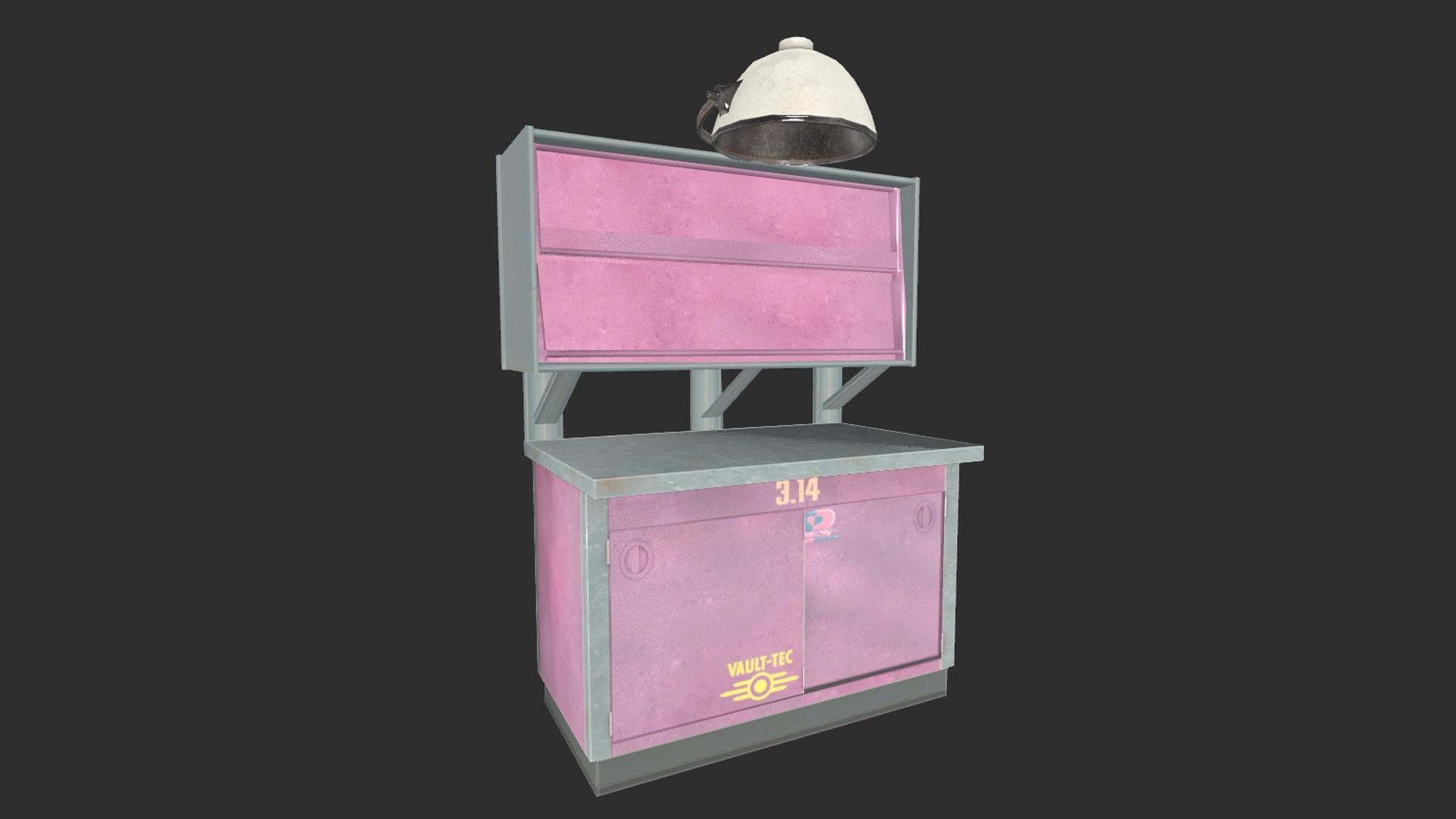
MOD DISCUSSION! PC [fo4] 3.14 v2

Post image
4 Upvotes

Work on v2.0 had begun. This newer version will have a cupboard cabinet (-- see image --) linked to the cooker, that will allow the depositing and display of the pans and magazines+recipes. Technical detail: they will also be deposited in a global container, so if you will have other cooker-cupboard combo, they will be recognised as owned and displayed there as well. When cooking, the existence will be checked against inventory AND the global container. - except the pans - for those you will have to have a set in each location. As usual, the cabinet will come with sliding doors and a working light.


r/Fallout4Mods • • 16h ago

MOD DISCUSSION! PC A better world updates?

Post image
10 Upvotes

I havent played for a few years, want to do a modded replay, and i remembered this mod and i see that its been like 4 years and it still isnt out. Are there any updates on it?


r/Fallout4Mods • • 18h ago

Question! PC Looking for Claire's Noir outfit from the RE2 remake. Any mod recommendations?

Thumbnail
gallery
11 Upvotes

I know there's a similar outfit in game already, but it's not quite the same


r/Fallout4Mods • • 3h ago

HELP! PC Anybody knows this ghoul replacer mod?

Post image
2 Upvotes

r/Fallout4Mods • • 22h ago

MOD DISCUSSION! PC Mod recommendations

3 Upvotes

Heyo! It's been some years since I last played Fallout 4 (maybe 2022?) and I was starting a new mod list in MO2. Many of the mods I used seem to have either become outdated for NG or become outdated due newer and better mods replacing them. Since I completely lost what mods I used to play with, I'm open to have a fresh list.

That being said, what mods have you been using these years that you would recommend? Like, they can be anything really.

I like playing with survival mode. Unlike what some people complain from GTA VI, I do like realism, so things like needing cleaning/bathing and similar stuff I like too.

I also like building settlements, not sure if SimSettlement 2 is still going strong?

And what about lighting or ENBs? What are the ones you find better looking?

On my specifics: I play on PC, preferably mods should be from Nexus (I don't want to use Creations). Not sure what more specifics should I add xD


r/Fallout4Mods • • 10h ago

MOD DISCUSSION! PC String 'Em Up - Custom String Lights mod!

Thumbnail
nexusmods.com
2 Upvotes

Hello all! I wanted to share a new mod I've just posted for Fallout 4 on PC. This mod allows you to create static string lights of customizable length, with all sorts of colours. I'd love feedback, so if you give it a shot, please let me know what you think!