Welcome to the official Higgsfield community. Share what you make, exchange workflows, and talk about the product - including what is not working for you.
Show your work: choose Showcase. Finished work and work in progress are welcome. A full tutorial is optional.
Share a process or test: choose Tips / Tutorials / Workflows. Explain what you tried and include useful settings or references when you can.
For workflow or interface questions, choose Workflow Help · Open. Tell us your goal, what you tried if anything, and what happened. Add the tool or model and an example when useful. Beginners and short, clear questions are welcome. Members help each other; team replies are not guaranteed.
When a concrete answer is offered, change the flair to Workflow Help · Answered.
For billing, refunds, login, or account changes, email support@higgsfield.ai or join our Discord. Official contact page: https://higgsfield.ai/contact Keep private details out of posts and comments. Reddit posts and DMs do not create support tickets or give priority.
Product experiences, bug discussions, and suggestions belong under Product Feedback. Other relevant conversations can use Discussion. For a moderation question or appeal, use Message the mods and include the post link.
In October Draft Mode wasn't available in the US, so I tested ways to get the same loop with other tools: decide on a cheap 480p take, then finish only the one I approved. Draft Mode is back in the US now, so use it if you have it. This is still useful if your draft is past the 7 day upgrade window, or you just have a 480p take you like and want it sharper.
Six test clips, from a quiet workshop scene to a sword fight and a mass battle.
**The idea:** a depth map of your draft carries the motion (camera, framing, cuts, poses). Your reference images carry the looks (faces, outfits, the set, the light). The finish puts them back together at high resolution.
**Steps**
Build references first: a straight-on face on a flat mid-grey backdrop, a full-body outfit generated from that face, and one empty location plate for every direction the camera looks.
Draft at 480p on Seedance 2.5, References tab, with every reference attached, at your final length and ratio. Reroll until the motion is right. Write down where the cuts really land, the draft rarely cuts where the prompt asked.
For B and C below, make a depth map of the approved draft: Video > Edit Video > Depth Map, Grayscale, side by side off.
Finish one of three ways.
**A. Upscale** (Edit Video > Upscale, ByteDance Upscale, 1080p, AIGC preset). About 2 credits for 10 seconds. Keeps your exact take, cuts and audio, 98% identical to the draft on all six clips. Adds no new detail, it only sharpens what's there.
**B. Seedance 2.5 at 1080p**, References tab, depth map attached first, then the references in the same order as the draft. 160 credits for 10 seconds. Draws real new detail from your references. Works up to 30 seconds. 65 to 73% close to the draft.
**C. Seedance 2.0 at 4K** (the full model, Fast and Mini stop at 720p), same attachments. 220 credits for 10 seconds. The closest rebuild, 71 to 74%, best on faces, hands and anything near the camera. Up to 15 seconds, and cuts can land up to 4 frames early.
B and C are new generations locked to your draft's motion. Same shot, not the same pixels. Only A keeps your frames.
**The prompt for B and C**, one paragraph: describe each shot as it actually plays in the draft with the real cut times, then add this so the result doesn't come back grey: "Video 1 is a grayscale depth map that supplies only the motion, the framing and the timing and none of the look; the picture is in full natural colour with no grey or depth-shaded areas." Then point at the images (face follows Image 1, outfit Image 2, location Image 3) instead of describing them again, and list every sound you want, ending with "nothing else is heard".
**What didn't work**
- Using the raw draft instead of the depth map. The finish copies the draft's softness too. The upscale does that job better for 2 credits.
- Anything thin or small isn't in the depth map. My battle draft had about 250 arrows, the depth map had an empty sky, so the finish redrew them from the prompt on its own timing. If it has to stay exactly as drafted, use A.
- A location plate with soft vignette corners. Seedance 2.0 turned the corner into a black band. Plates need to go edge to edge.
- "No music" on its own still got me a score. Listing every allowed sound fixed it.
- Finishing a finish. Always go back to the approved draft, every extra generation drifts further.
- The grey reference backdrop leaks into the shot unless the prompt says it's the reference sheet and not part of the scene.
**Cost for a 10 second clip**, three 480p drafts included: about 102 credits with A, 275 with B, 335 with C. Three rolls straight at 1080p cost me 480. These are from my October tests, so check the Generate button.
Caveats: each finish was rolled once per scene. And Seedance 2.5 got 4K after I ran this, I haven't tried it as the finish yet.
El resultado me gustó algo muy sencillo y rapido para mostrar algo sencillo. Antes puse una persona pero por aluna razón agregarle personas hace sentir el video sintetico tambien la idea es que la pizza sea 100% protagonista. El unico problema fue las líneas que dividen las rodajas de pizza que se arreglan incluso sin usar higgsfield.
I recently made a sci-fi short film called GENESIS, and we'd love to get some honest feedback from the community:
I'm particularly interested in what you think of the plot and screenplay. Does the story come across clearly? Are there any scenes that feel confusing, rushed, or could have been executed better?
I'd genuinely love to hear your thoughts, both positive and negative, as we're always looking to improve our filmmaking and storytelling skills. :)
And if you enjoyed the film, we'd really appreciate a like on the competition page. Your support would mean a lot to us!
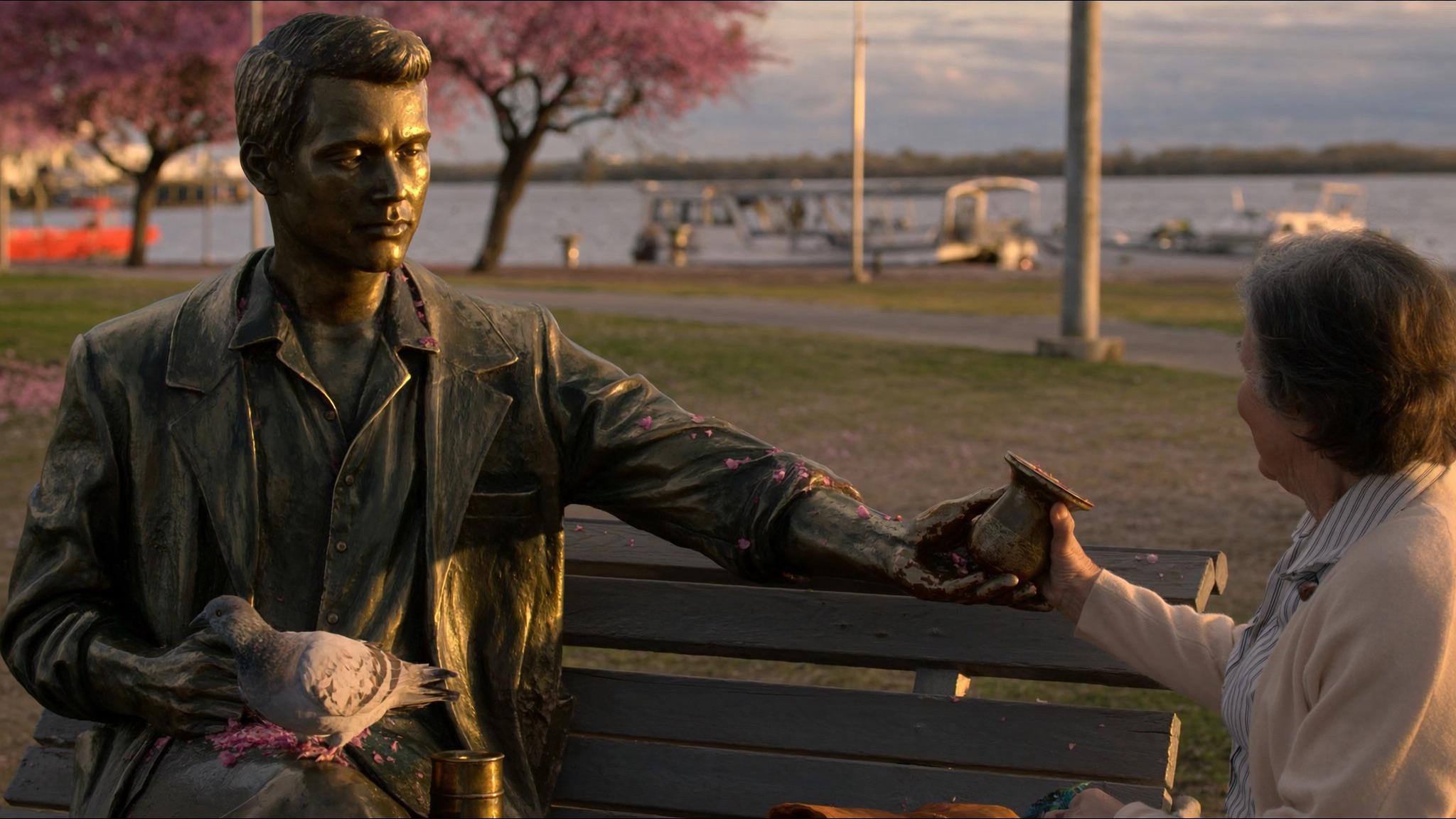
https://higgsfield.ai/s/-DGX4hw69mo Monument to the one who serves the mate. In Argentina, mate is shared in a circle, and there's always one person who prepares it, serves everyone, and drinks last. Nobody thanks them, but the ronda doesn't exist without them. So here he is in bronze, still offering the mate. And people still sit down to share it with him.
Honoring every parent who stayed awake beside the crib long after midnight, quietly watching over a sleeping baby until exhaustion finally caught up. A bronze monument set inside a real, brightly lit nursery to celebrate an everyday act of devotion.
Why I chose this idea: after every festival, parade or big night out, someone gets up before sunrise so the city can wake up like nothing happened. We almost never see them. Monuments usually go to generals and kings, so I gave the street cleaners one, standing in the square where they work.
And the only one there to see it at dawn is a real street cleaner. Before he sweeps up the confetti and the popped balloons, he gently brushes the confetti off his bronze colleague's shoulders first. One cleaner looking after another.
The city sleeps in. He's the reason it wakes up clean.
https://higgsfield.ai/s/8_hMzO0OshM In so many Indian homes, Mother serves everyone hot rotis and eats last, alone, from whatever's left. Nobody notices this tiny daily sacrifice, so I gave her the statue generals usually get. The marigold garland is the city finally saying thank you.
Hey guys, so Higgsfield is running a sale, in which it dropped its price for Ultra plan 9k credits each month for $99, if you buy annually.
Higgsfield ran a similar offer last year.
I want to know, should I go for, I know its worth the price but want to know from people who bought yearly plan sale last year. Did it go well for you? Is there anything I should be aware of?
I’m exploring the idea of creating 40-minute AI-generated dramas, potentially structured into multiple short episodes. My current setup/plan:
Platform: Higgsfield Ultra Plans ( 3 )
Video generation: Magi 2.
Pre-production: Using Higgsfield’s Short Drama feature to plan scenes and structure the story.
Additional tool: Blender for scene blocking, camera angles, character positioning and movement.
However, I’m still facing inconsistencies between generated scenes. Some shots look good individually, but maintaining continuity across multiple shots is proving difficult. Before investing heavily in this workflow, I’d like to understand a few things from people who have actually experimented with long-form AI filmmaking.
Is creating a 40-minute drama realistically possible right now? Has anyone successfully produced something of this length using Higgsfield and Magi 2?
Scene consistency: How are you maintaining character appearance, clothing, locations, lighting and continuity between consecutive shots? Are these problems still unavoidable?
Short Drama feature: Does Higgsfield’s Short Drama feature genuinely help with scene planning and continuity, or is it primarily useful for structuring scripts and prompts?
Blender workflow: Would it be better to prototype every scene in Blender, establishing camera angles, character positions and movements before generating videos? Or is that overkill? Would using Blender only for complicated scenes be a better approach?
Production workflow: What does a reliable end-to-end workflow look like for producing a 40-minute AI drama? How much manual intervention is still required?
Credit economics: Is the Ultra Plan sufficient for this kind of production, considering the number of generations and retries needed to get consistent results?
I’m particularly interested in hearing from people who have attempted multi-scene short films or episodic dramas rather than just standalone 5–10-second AI clips. I understand that individual AI shots can look impressive. My concern is whether we can actually connect hundreds of shots into a coherent story without continuity breaking every few scenes.
Before committing significant money and time, I’d like to know whether this is currently a viable production pipeline or whether there are important pieces I’m missing.
Any practical workflows, experiences, tips or lessons learned would be appreciated. P.S. I used ChatGPT to help write and structure this post.
Here's a short cartoon I made using the new MAGI-2 model on Higgsfield. My prompts and workflow are fully open to explore on Higgsfield! Hope you enjoy 💚
I have done this methodology: • Generate the script • Turn the script into a 3D scene in blender with characters, animations, etc. • Pose camera • Render Key Moments • Turn Key Moments using ChatGPT into Movie Grade 3D Renders • generate eleven labs voices (to ensure proper speech). • use google gemini omni 1.2 to generate scenes
Still things pop out and inti existence and backgrounds blend
Aajkal AI video generation tools kaafi popular ho rahe hain, especially Higgsfield, Google Veo (Flow), Gemini aur kuch other platforms. Main bhi AI video creation explore kar raha hoon, but honestly, samajh nahi aa raha ki kis tool mein invest karna worth it hoga. Aap logon ka kya experience raha hai? Higgsfield kaisa perform kar raha hai? Google Flow / Veo better results deta hai? Gemini video generation ke liye kaisa hai? Koi aur AI tool jo in sabse better results de raha ho? Main mainly cinematic videos, realistic visuals, storytelling aur YouTube/Instagram content creation ke liye tool explore kar raha hoon. Paid plans bhi consider kar sakta hoon, bas output quality aur pricing dono worth it hone chahiye. Aapke according kaunsa tool best hai aur kyun? Agar aapne multiple tools use kiye hain toh apna honest comparison zaroor share karein.
A monument to the immigrant, the everyday hero nobody builds statues for. 🌍
He is made of glass so you can see him clearly: no armor, no pedestal speech. One arm raised, holding up the whole world, while his wife and daughter stand at his feet, safe and holding hands. 🤍
Around him, the small things he left behind: an empty chair, a small plane, a photo of the people who stayed. Every day he lifts the world so they never have to carry it. 🥹
How I made it: Stylized 3D animated short. All video generated with MAGI-2 on Higgsfield (References mode, timed cuts, extended clips); images, voices and music generated on Higgsfield. Edited externally only to assemble, colour grade, mix sound and add titles.
I've been experimenting with nostalgic and dreamcore aesthetics. I generated the reference images using ChatGPT 6 Astra and animated them using Higgsfield (seedance 2.5). My goal was to make a familiar city feel strangely unfamiliar. Would love to hear your thoughts!
Okay, this one was HARD 😭 I actually thought about splitting the credits between everyone at one point. You brought idioms I’d never heard before, personal stories, and images I kept coming back to.
But we have our five. Here they are 💚
🥇 1st: u/tobiager | Rowing Through Dulce de Leche 47/50 · 1,200 credits
Some days, even moving forward feels like rowing through caramel. Apparently, Argentina has a phrase for that. An exhausted office worker, a sea of dulce de leche, and a little mate for moral support. The golden light and caramel stretching from the oars are gorgeous, but learning that this is how the author feels about their final year of studying makes it personal. He’s exhausted, but he keeps rowing. “And that’s the most Argentine part.” What a line.
Well, there goes the way back. A burning bridge over a foggy gorge, a torch still in hand, and someone who’s clearly made their decision. The blue twilight against those flames looks straight out of a film. It’s a familiar idiom, and I would’ve loved a little more about why you chose it, but that feeling of finality comes through immediately. Also, this is going on my laptop wallpaper. Had to say it.
Dinner? Never heard of it. Dignity? Still here. The author introduces a Japanese saying about a samurai using a toothpick even when he hasn’t eaten, keeping up appearances through hardship. The empty dishes, visible ribs, and hungry cat tell one story; that raised chin tells another. Hard sunlight and deep shadows make it feel like an old samurai film. A little funny until you think about it, then mostly heartbreaking.
That rat is absolutely wearing a wire. A detective takes “smell a rat” literally, while the suspect has a microphone hidden under a plaster. Two meanings, one very suspicious rodent. The noir lighting sets the scene, and making the plaster the only coloured detail is a clever touch. Your eye goes right to the evidence.
🏅 5th: u/ParallaxView12 | A Lot on Her Plate Tonight 43/50 · 1,000 credits
Dinner tonight: bills, laundry, a laptop, and everyone else’s schedule. The literal joke is clear, but the small moment with her child makes this one stick. She’s exhausted, fork in hand, and still turns gently towards the little person pulling at her sleeve. The author’s explanation draws attention to exactly that. A familiar expression made quietly personal. Someone get this mum an actual dinner.
📩 Winners, let’s get you those credits!
Send your challenge day, placement, and winning generation link through modmail.
Add a subject, such as “Day 14 prize claim”, paste your details into the message, and hit Send. This goes directly to our moderation inbox. Please use this link rather than a private chat with an individual moderator so we can keep prize claims together.
Thanks for making choosing five such a struggle 💚 Now I’m off to change my wallpaper.
I'm starting to feel a bit conned by Higgsfield. You put very clear instructions in a prompt and the AI just ignores them and generates something unusable. It feels like this is starting to happen more and more.
Obviously it's in Higgsfield's interest to not give us exactly what we need because then we'll spend more money/credits trying to get it to work.
And it can't be that I'm prompting it wrong or choosing the wrong models etc, because I've seen things work one time and then I do basically the same thing another time and it generates something randomly wrong.