r/MicrosoftEdge • u/AnonVibeCoder • 14h ago
MS Edge Auto-Refresh Extension
1
Upvotes
I noticed at work there wasn't an open source tool, so I vibe coded this one; please try it:
r/MicrosoftEdge • u/Just_Rush5409 • 14h ago

Hi all! I shared WLX here a couple of weeks ago (an Edge extension that exports your YouTube Watch Later to a spreadsheet). I'm the developer, so this is my own project. Version 1.1 just went live on Edge Add-ons.
YouTube's own "Remove watched videos" is all or nothing, and once they're gone you can't see what you removed. The new cleanup in WLX works differently:
Also new: export your subscriptions, total video time after each export, and extra columns like % watched.
Everything runs in the browser, with no account and no server, and it never downloads videos. Exports are free up to 50 videos per playlist; the cleanup is in the one-time Pro ($10).
https://microsoftedge.microsoft.com/addons/detail/cejnaobnjbnkbiihgnaepegdfenlhhhp
Questions and feedback welcome!
r/MicrosoftEdge • u/bumpyy134 • 1d ago
Hi everyone,
I'm using an old 2011 Intel iMac running macOS High Sierra (10.13.6), with Microsoft Edge version 116.0.1938.81.
I'm trying to sign into my Edge profile to sync my passwords and favorites, but the sign-in window is completely blank. It just stays white and never loads.
Here's what I've tried so far:
--disable-gpu.edge://signin-internals (TokenService shows success, but the status remains "Not Signed In").edge://policy (no policies are defined).None of these fixed the blank sign-in window.
Since Edge 116 is the last version I can use on this macOS version, I can't simply update it.
Does anyone know how I could fix the blank Edge profile sign-in window on macOS High Sierra, or another way to import passwords into Edge without signing in?
Thanks in advance!
r/MicrosoftEdge • u/kittiza_ • 1d ago
r/MicrosoftEdge • u/Shadow_118 • 1d ago

I don't know is the solution is obvious or not, but:
At some point this Emoji extension got disabled that i added at some point
I keep removing it from my Installed extensions but somehow it just keeps popping back up in the Installed extensions... it's more of a mild annoyance at this point than anything at this point, tbh
Is there any easy way i can permanently remove and have it stop popping up again constantly, or is this something i'd need to completely refresh/restart Microsoft Edge?
Just thought i'd inquire on options before resorting to that last option....
r/MicrosoftEdge • u/Ok-Finger-1176 • 1d ago
just got my first extension approved on microsoft edge addons today so figured i'd share it here.
if you use any ai coding agent (claude code, cursor, antigravity, codex, etc.) while following youtube tutorials or reels, i built this to turn the video straight into a structured SKILL.md guide with exact timestamps and commands instead of pasting a messy raw transcript.
runs 100% locally inside edge — no accounts, no tracking, no backend server, and works without an api key (though you can hook up ollama or your own key optionally).
link if anyone wants to check it out: https://microsoftedge.microsoft.com/addons/detail/skillloom-%E2%80%94-free-localfi/hgonifdpcgeeoenaffajegmlceinnihn
source is on github too: https://github.com/gg1i/skillloom
let me know if you run into any bugs on edge!
r/MicrosoftEdge • u/External-Drive6208 • 1d ago

LinkUnzip is on Edge Add-ons now. I'm the dev, it's free and open source.
You paste a zip link, or use the one on the page you're on, and it shows what's inside: folders, files and sizes. You tick the files you want and it downloads only those, straight into a folder. So if you need a few folders out of a 40 GB zip, you download roughly what those folders weigh, and you don't need free space for the zip on top of the files.
You can also open a picture, video, pdf or text file from the zip without saving it. Password zips work if you know the password.
In Edge it says Edge, and its buttons open Edge's own downloads and settings pages.
It only handles .zip, not rar or 7z. The site also has to allow partial downloads (range requests). Most file hosts and dataset sites do, and when one doesn't it tells you. The files come straight from the site to your PC and nothing goes through my server.
If anything in it still says Chrome or acts oddly in Edge, I'd like to hear about it.
r/MicrosoftEdge • u/ItsMeRPeter • 2d ago
r/MicrosoftEdge • u/agavrysh • 2d ago

I'm the developer; it went live on Edge Add-ons on 18 November.
Why: Outlook on the web has no PDF export. Its Download menu offers only EML and MSG, so the usual way out is to print and pick Save as PDF.
What it does. It adds a button to the reading pane: one click saves the open conversation as a PDF to Downloads, and the arrow next to it picks a single message instead. Each message gets a header block with From, To, Cc and date, attachment names are listed under it, messages run oldest first, and repeated quotes are left out. You can also tick up to 50 conversations in the list and get them in one PDF with a contents page (it opens them one by one, so each may lose its unread mark). Pictures from other websites are your choice: "Save with images" goes through the browser's own Save as PDF window, or you leave them out. In compose there's a Templates button for saved replies with fields such as the recipient's first name, the date or the subject.
What it doesn't do. It doesn't work in the desktop Outlook apps, only in a browser tab (work, school and personal accounts; not government clouds or self-hosted servers). There is no ZIP of separate files. Attachments are listed by name, not embedded. The interface is English only, and in a non-English Outlook interface it doesn't expand the hidden message history, it flags it in the PDF instead. Edge only for now.
Permissions are storage, scripting and downloads, with host access only to the Outlook web domains. No server, no account, no analytics; templates stay in this browser profile. Free.
Details and screenshots: https://gavrysh.dev/outlook-tools/?utm_source=reddit&utm_medium=social&utm_campaign=r-0058
If a PDF comes out wrong for your mailbox, tell me what was off and I'll look at it.
r/MicrosoftEdge • u/Ab_dev1 • 2d ago
I wanted something more useful than just a few shortcuts and a wallpaper every time I opened a new tab, so I built MemoTab.
You can use it to:
I'm sharing it here because I think it could be useful for people who take notes frequently throughout the day.
I'd really appreciate it if you gave it a try and shared your feedback or recommendations. I'm actively working on improving it, and hearing how other people organize their notes would be incredibly helpful.
Try it here: MemoTab
r/MicrosoftEdge • u/Fancy_Meeting8720 • 2d ago

Hi! So, I've set my browser language to my second language because I'm comfortable using it. However, there are still some words I don't know.
I used to keep Google Translate open in another tab, but it was taking too much time and also breaking my focus. Looking up a word should take at most half a second, and it should be private.
Recently, I've been using the built-in translation tools in browsers. However, selecting the text, clicking the translate button, and waiting for the result was still too slow. Also, there were no language options (you could only translate into your browser's languages), and privacy was another issue.
So, I decided to build my own browser extension.
Now, I can translate text just by selecting it. The results pop up within 0.1 to 0.3 seconds. Everything happens locally (no servers), so it's completely private. There's also an option for online translation using the Google API.
Over time, I've added some more features, such as favorite words, history, and so on. Right now, I'm working on document reading. It already works fine with PDFs, and things are going well. I think it'll be published in about two days.
The extension is lightweight and 100% free. No accounts, no in-app purchases, privacy, just vibes.I'd be happy if people could benefit from it. <3
Technologies used: Bergamot Engine, Chrome's built-in translation (offline only chrome), and Google API for online translation. Models are hosted on Hugging Face and GitHub Pages.
Chrome & other Chromium browsers (<link>) · Edge (<link>) · Firefox (<link>)
r/MicrosoftEdge • u/PeaceToGaming • 2d ago
I had a list of sites of which I wanted to keep the unclosed tabs active. It's been working perfectly on my computer for years.
Now all of a sudden, every time I close my main Edge browser window, then I re-open the window and check the "System & Performance" section of my Settings, it's automatically erased the list of sites I want to keep active.
The last change I remember making to my Settings, was a few days ago, when I decided I wanted to delete all of the cookies I had saved over the years.
I can't remember exactly what I did, but I think I changed the Settings so that Edge would automatically delete all of the cookies whenever I closed all the Edge windows that I had open at the time.
I tried changing the Settings again just now to undo that first change I made, so that I would NOT automatically delete any more cookies whenever I close the main browser, but it still keeps erasing the list of sites from the "System and Performance" section.
Why is this happening?
r/MicrosoftEdge • u/MouseReasonable6395 • 2d ago
Hi! I use Edge because of the workspaces function, but the last few days I've been having an issue and I can't troubleshoot past it. Before, when I opened a workspace, it would open in a new window. Now it just completely overrides whichever window I'm opening it from, even if that's without a workspace (so tabs are unorganized and get lost if I don't notice right away). Any idea if that's a new update and/or something I can fix/turn off? I can't find a setting for it, but it's very annoying. I keep losing my work or having to open more windows just to get to my workspaces and switch between them for tasks that require multiple workspaces.
r/MicrosoftEdge • u/AUsernameWithoutUse • 2d ago
Lately, the Guest Tab has been a recurring distraction while I'm working. I tried to find ways to block it, but I can't find any website or video that explains how. Is it impossible, or is there a way to block it off entirely?
r/MicrosoftEdge • u/Goofology • 2d ago

r/MicrosoftEdge • u/benstone326 • 2d ago
Konode syncs bookmarks, history, open tabs and your extension list between browsers, through storage you already own: Google Drive, GitHub or a WebDAV server. No account and no server of mine in between, and end-to-end encryption if you want it. A lot of you found it here first, so the new version goes here first too.
What's new in 1.6.0:
Edge Add-ons: https://microsoftedge.microsoft.com/addons/detail/acmngpjfommajbkfbfmdfemlheiamfoe
What each feature is for, with screenshots: https://konode.org/features.html
Source and issues: https://github.com/konabe-studio/konode
Feedback welcome, here or on GitHub.
r/MicrosoftEdge • u/ShadowGuyinRealLife • 2d ago
The "Close other tabs" is too close to "mute tab" "close tab" and "reopen tab." I use the last 3 a lot, but not "close other tabs." At one point I considered switching to Chrome when they ditched the "close other tabs" but alas they got it back. Is there any way I can disable this option? I don't have the admin account so I don't think I can install plugins to change the UI.
r/MicrosoftEdge • u/Ember_the_F0x • 2d ago
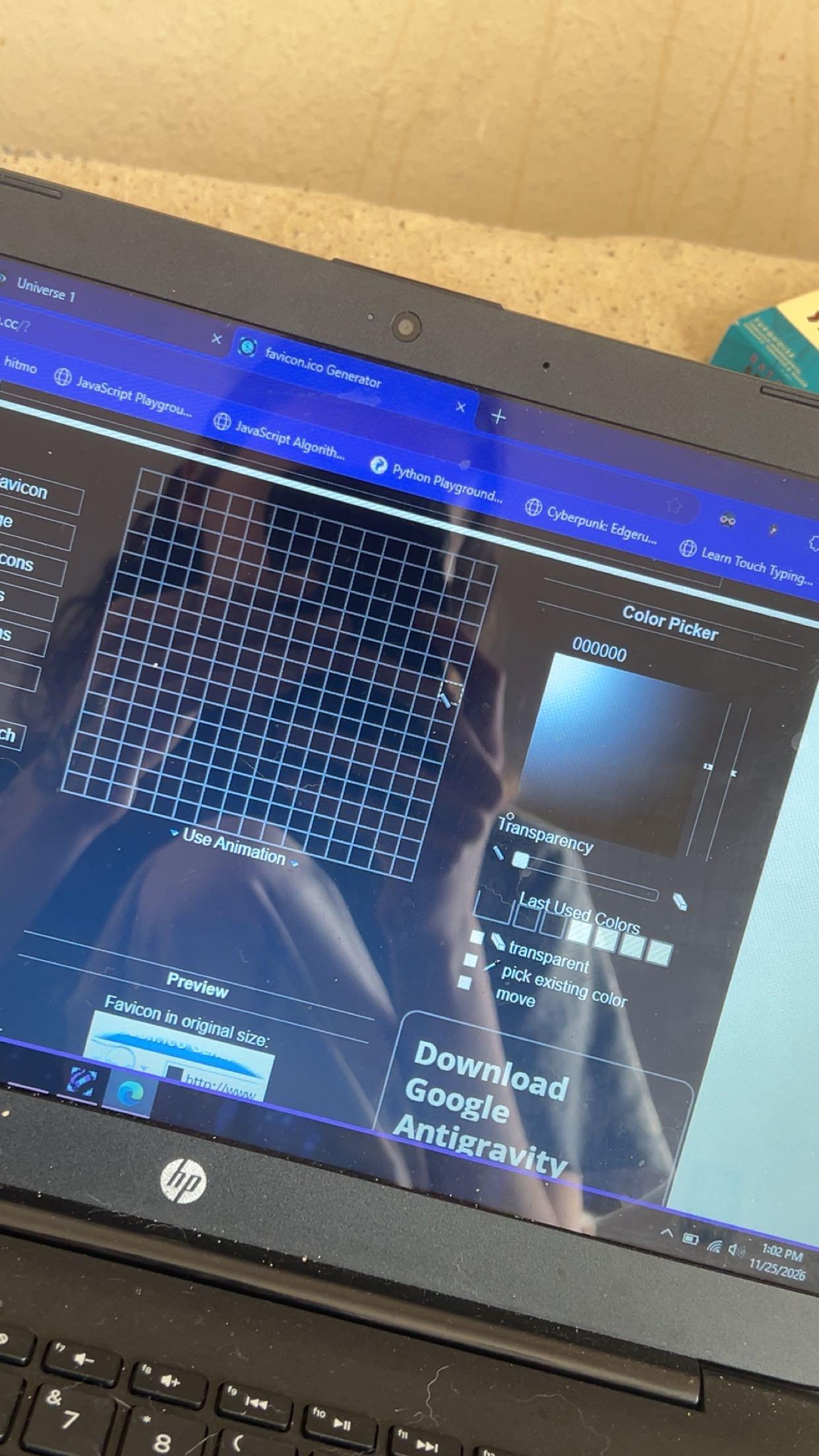
I just kinda opened it up, and tried to import one so I could have the same colors but apparently I’ve lost color privileges. I’ve tried restarting, closing the tab and going back to the website, and idk how to do more than that. Anything else I could try?
r/MicrosoftEdge • u/aBsyNte-zErO • 3d ago

build 158.0.4370.33
The settings for managing PWA (Progressive Web App) applications and Reader Mode are inaccessible.
This is occurring on both of my PCs: a laptop running Windows 11 Home and a desktop running Windows 11 Pro.
The laptop has just been reinstalled, and everything is up to date.
Synchronization is enabled, with all options turned on. The desired applications appear on one of the PCs but not on the second one.
Disabling and re-enabling app synchronization caused the applications to immediately disappear from the desktop.
r/MicrosoftEdge • u/MaleficentWolf802 • 3d ago

tbh my brain just completely filtered out this button on the top right whenever I had a video playing. Finally clicked it today when I had like 30 tabs open and couldn't find which one was making noise. Being able to pause or jump straight to the tab is actually super handy.
Anyone else completely miss this or am I just slow? lol
r/MicrosoftEdge • u/novirite • 3d ago
Glintcast adds a small glint button to Twitch's top bar. From there you can switch between Default, Video, and Chat layouts, change themes (Twitch, a darker Glint theme, or a light Paper theme), and tune the player: volume memory, an audio compressor for loud streams, and optional local upscaling.
It runs only on twitch.tv, and settings stay in your browser. It works alongside 7TV, FFZ, and BTTV.
Install and docs: glintcast.mintlify.app
It's early (v0.3.0), so I'd love to hear what feels off or what you'd want next.
r/MicrosoftEdge • u/8mis • 3d ago
I’m having an issue when watching videos: if I leave a video playing and switch to another tab, the audio often freezes and then resumes. Do you know what might be causing this? I can’t stand it anymore.

