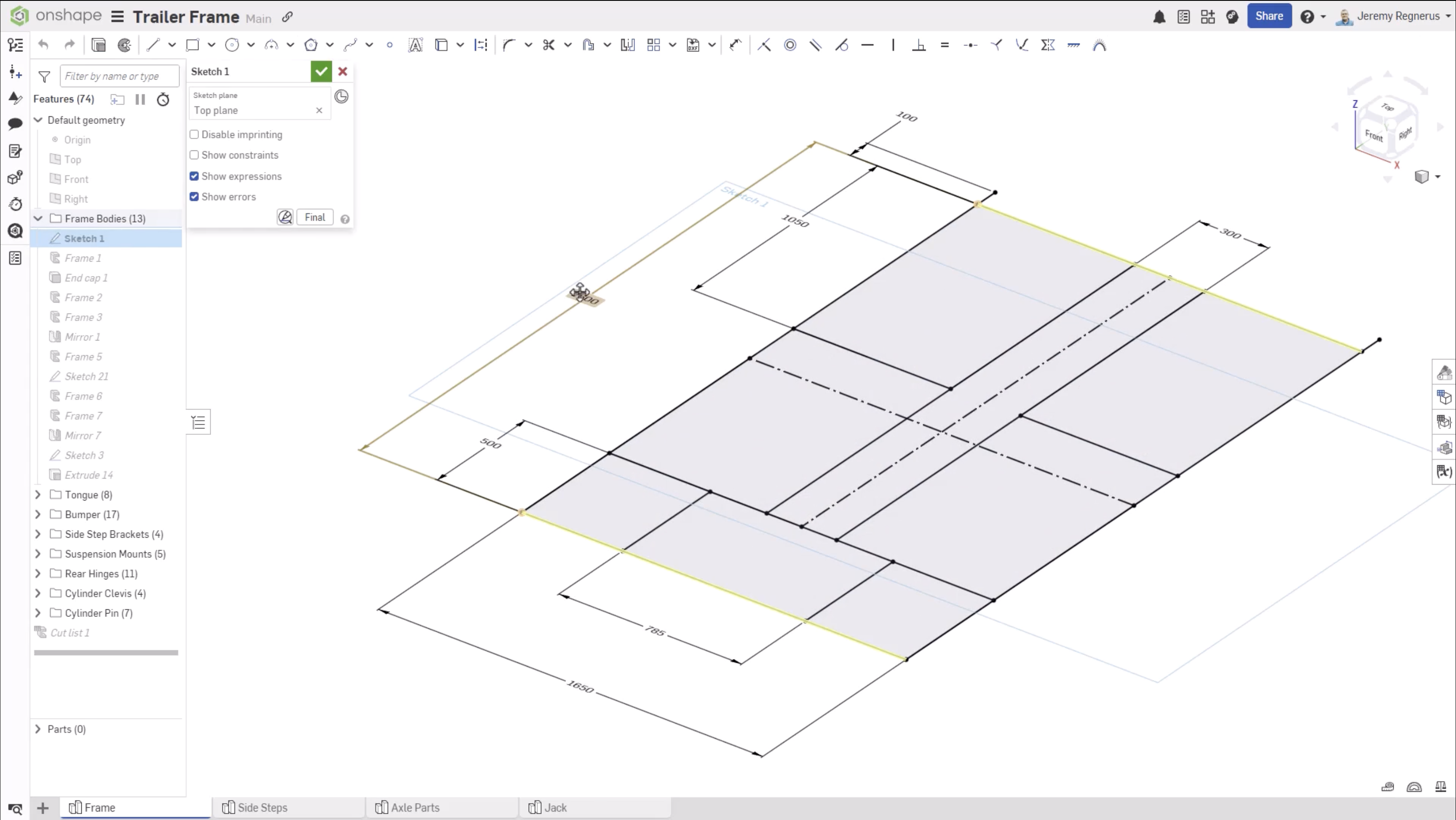
I’m looking at taking on a contract to provide CAD support to another company on the side. In my day job we use Creo, and when using standard CAD software deliverables would include source design files with a model tree.
For this though it’s in Onshape. The client doesn’t have a license, they are not CAD people and are paying us to essentially design assemblies, make drawings etc. There isn’t a way to provide “native files” they can store locally without having a license and I don’t want to require them to get a license to accept the contract.
These are mostly assemblies and fabrication drawings. I don’t think the client will actually care about having access to the model tree, but I’d like to know how to handle it if they do.
Yesterday I posted a Chrome extension I vibe-coded that sends Onshape parts straight to Bambu Studio, OrcaSlicer, PrusaSlicer or Cura, like Fusion's "Send to 3D print". Thanks for the feedback! Here's what's new:
New:
Firefox support. It's signed by Mozilla, so you can install it with one click from the GitHub release, and it updates itself.
Exports what you selected. Click a part (or any face of it) in Onshape and it's already ticked when you open the extension.
Keyboard shortcut (Alt+Shift+E). Select a part and press it. It exports straight away with the format, slicer and action you used last, without opening the popup.
Settings page:
choose your own export folder
choose which slicers to show
date in folder names on/off
archive old files or overwrite them
STL/3MF mesh quality (fine/medium/coarse)
Still the same:
Each part becomes its own file: 3MF, STEP or STL (plus IGES/Parasolid).
Open in your slicer, save, or both. Saved files are sorted into <document>/<part studio>/<date>_<version>/, and older exports are moved to an archive instead of overwritten.
Uses your normal Onshape login, no API keys.
Install:
Firefox: download the .xpi from the release page and drag it into Firefox.
Chrome/Edge/Brave: load it unpacked (steps in the README).
Either way, run the small installer once (install.bat on Windows, ./install.sh on Mac/Linux). It lets the extension save files and open your slicer.
Testing status: Linux + Bambu Studio is what I use daily. Firefox, Windows, macOS, Orca, Prusa and Cura are new or lightly tested, so reports like "works on Windows + Prusa" or "broke on Mac" really help.
It's vibe-coded (built with Claude), so feel free to read the code first. It's small and open source.
I'd like to make a video this way- supress everything, unsupress first feature on the tree, make screenshot, unsupress second feature, make screenshot, unsupress third feature... and so on. On the end make a video of these screenshots. Manually this is a lot of work so I am looking for some tool making this or similiar thing. Have you ever seen something like that?
Can anyone pleas help. I am modelling a bent steel lamp with the sheet metal tool. I’ve applied some holes on the bent corner but can’t get them to do a circular pattern - I am stuck as to why… any ideas appreciated!
One thing I missed coming from Fusion was the one-click "send to slicer" button. With Onshape I kept doing export then I would find the file in Downloads and finally drag it into the slicer, over and over. On top of that, a friend and I kept running into exports that just failed or hung. So I vibe-coded a small extension for it (built with Claude).
What it does:
Click the icon on any Part Studio, tick the parts you want, hit Export
Each part becomes its own file, in 3MF, STEP or STL (IGES and Parasolid too, for other CAD tools)
Opens them straight in Bambu Studio, OrcaSlicer, PrusaSlicer or UltiMaker Cura, saves them, or both. There's also "Save as…" to pick any folder
Saved files are sorted automatically: onshape-export/<document>/<part studio>/<date>_<version>/. Re-exporting the same version moves the old files into an archive/ folder instead of overwriting them
Keeps running if you click back into Onshape
Uses your normal Onshape login, so no API keys
Works in Chrome, Edge, Brave and Chromium
Platforms:
Linux + Bambu Studio: tested daily (Ubuntu, Chrome, Flatpak)
Windows, macOS, OrcaSlicer, PrusaSlicer and Cura: support is brand new and not tested on real setups yet. If you try it, please tell me whether it worked, even just "it worked on Windows + Prusa"
Setup takes a couple of minutes: install Python, run the install script (install.bat on Windows, ./install.sh on Mac/Linux), then load the extension unpacked. A browser can't start programs on its own, so a tiny Python helper handles opening the slicer and saving files
Since it's vibe-coded, feel free to read the code before installing. It's small, and the README explains what the helper is allowed to do.
Unofficial, not affiliated with Onshape/PTC, Bambu Lab, OrcaSlicer, Prusa Research or UltiMaker.
Feedback, bug reports and feature ideas welcome! If the normal Onshape export fails for you on a part, I'd love to know whether the extension manages it. I haven't been able to test that properly yet.
Does anyone else get bothered with how Onshape sorts numbers in the file manager? I'm sorting my name and the numbers do not sort consecutively. I've reached out to support years ago and mentioned again today and it's a low priority...seems like a big oversight to me
I've been noticing (when opening step files in orca slicer) that some (somewhat complex) models are non manifold. I thought that it was orca at first, but I have tried converting the step file to stl in a few different apps and they all produce non manifold geometry (freecad, convert3d, meshy, meshinspector). If I export from onshape in stl it is fine. The example in the image is a smaller model (it's multiboard actually) that shows the issue, but I am getting it in a few models that have any kind of fine detail. (https://cad.onshape.com/documents/a05ee7a03c5d25f5e9569600/w/9891a7dabf8ef662503354b4/e/9070839631a7570f58abf05b)
Say a stop slides in a slot and clears the bracket at both ends, but a screw head sticks into the path halfway along. How would you check the travel in the assembly without dragging the stop through it by eye?
Glad I’m giving myself the time necessary to really design this CNC out. I’m getting interference between the ball screw and glass scales on the gantry, and that’s without the Z plate and the ball nut being involved as well. Initial suggestion is to raise the mounts for the linear rails. It’s an absolute glass scale so it’s rated for harsh environments but also makes it thicker than the slim design.
Still extremely new to this program but making progress daily. Enjoying the journey.
A while ago (2022) I spent a bunch of hours laboriously constructing a violin model in Onshape. It was very accurate (and fun to do by hand) but fast-forward to 2026, of course getting LLM + FeatureScript MCP to dig into the same research papers I used would be much more efficient!
Here is part 1 of this more recent journey.
In this initial video I show the first couple of features created: the driving sketches and the belly/back plate surfacer. (there will be a follow up coming with the next batch of features (mould, ribs, purfling bridge, and scroll...) Of course it is fully parameterized - I can switch between famous instruments (multiple different Stradivarius, Guarneri, Amati from their best eras) along with generalized models (e.g. Kelly, Eshka) which means incredible configurability.
Sometimes I have a bunch of things to layout, such as hole locations to drill. The more items there are on one sheet, the more cluttered it gets with ordinal dimensions in a drawing. For example the drawing below is a backplate for an electrical enclosure and the holes are where various components need to mount, and I don't have CNC equipment to do this automatically so I create a drawing to follow when drilling by hand:
What I'd really like to see is a feature that lets you define a datum for the view and then place (X, Y) coordinate annotations, for example this is just done with a note and hand-typed but hopefully gets the idea across. Either with, or without the hole size.
Making progress with my CNC design. I have some mounting brackets for my ball screws but when trying to insert the ballscrew bracket assembly into my gantry beam assembly, the old version that doesn’t exist is all that’s available. I’m not sure why the document isn’t updating. I even went so far as to change the name to make sure there wasn’t something hidden, but sure enough, new name and old components.
Customer is asking for this roundel design for a military heritage piece. I cannot get the background to extrude for some reason. I have tried as new, add, etc. and extruding it as first order of operation. I have also tried extruding down then remove-extrude the design. I am fairly novice at onshape so please excuse my ignorance. (Note: The 100mm is just to show you what I'm attempting to extruded, the actual is 1.5mm.)
"Extrude 10 did not generate properly: Failed to extrude selections, check input."
I have already sketched this half moon piece of sheet metal as a normal solid. Might be a silly question, but how on earth to do convert it to sheet metal without redrawing it in the sheet metal tool? I’m new to onshape (normally use inventor) and in inventor you can just draw a solid convert to sheet metal quickly. Ive draw a few other parts of my design like this so if this works i can apply it to the other pieces of my design.
I cant work out what faces or edges to select for this scenario so it will simply flatten out so i can get a DXF for laser cutting.
We just started testing Onshape for our company when I noticed that the API is limited to a few thousand calls per year. In our sales and onboarding calls we did not really get an explanation other than we could buy additional 60k calls for roughly 1.5k$.
Given that a professional user in the browser probably uses more than 5Mio REST calls from the frontend, the annual limit seems very strange. Does anybody know why this limit exists?
EDIT: Thank you all for the feedback! Just to put this into the right context: We were planning to use the API for regular metadata and property sync between ERP and shopfloor systems (both cloud-based), not primarily for MCP/AI!
I am working off of an old CAD model for a Formula SAE team. I am trying to design some panels that would closely follow the metal members. I not sure what would be the easiest way to go about and hoping y'all may have some recommendations on how to go about it. Any help is appreciated. Thank y'all.
Hi All - name of the product isn't included because I'm trying to avoid self promotion, please do not ask. We're simply looking to gauge if there's interest in a product like this for the end-user community. We absolutely support Onshape, and are a verified first-party partner.
We built a real competitor to the Spacemouse, with the goal of fixing it's shortcomings and transforming it from a single use tool into a platform anyone can use to increase productivity in CAD. It features:
- Decoupled 6DoF motion (translation via touchscreen so users don't have to manage 6DoF simultaneously)
- Customizable haptic feedback (the entire tilt assembly sits on a haptic motor - it can provide twist resistance, vibration, detents, or anything in between)
- Touchscreen (on the top, its a round touchscreen that can be configured for shortcuts or mode switching)
- Accompanying software (offers full bindability over literally every function as well as a node-based builder tool to automate your workflows with ease; it has full API access and can be used to complete design reviews, compliance checks, or just automate those stupid deep menus)
- Expandable application library and developer access (we publish our motion SDK so developers can build their own plugins for applications we don't support in our ever-growing catalog)
We have some interest from enterprise firms, but we're curious if something like this might land well with consumers as well. Let me know your thoughts below, positive or negative! All feedback is welcome.
This release is about building smarter designs with less manual effort. Configure folder suppression lets you control a whole group of features with a single configuration input. The new Context Manager tab puts every in-context reference for a Part Studio in one place. You'll also find faster drawing cleanup, consistent file naming for batch exports, thread milling in CAM Studio, and more on Android and iOS.
PART STUDIOS
CONTEXT MANAGER TAB
Part Studios get a new Context manager tab in the right side panel that lists every context for the Part Studio in one place. See each context's assembly, named position, and affected parts at a glance. You can click on the reference assembly to switch to it, or right click on it to change the configuration or show and hide context instances. Out-of-date contexts are flagged so you know when to update, which is facilitated by an Update all out of context references button.
CONFIGURE FOLDER SUPPRESSION
Feature list folders can now be configured and suppressed as a unit. Configure suppression on a folder and it shows up as a single column in the configuration table, instead of one column per feature inside it. Suppressing a folder suppresses the folder itself rather than each child feature, so configured Part Studios with optional groups of features are much easier to build and maintain.
HIGHLIGHT SKETCH ENTITIES ASSOCIATED WITH DIMENSION
When you hover over a sketch dimension, the entities it's attached to now highlight. This makes it easier to see and understand the design intent behind each dimension.
ASSEMBLIES
HIGHLIGHT PARTS MISSING MASS FOR ASSEMBLY CENTER OF MASS
When you turn on center of mass in an assembly and one or more parts are missing mass properties, Onshape now selects those parts in the Instance list. Instead of a generic error, you can see exactly which parts need a material or mass override.
SORT BOM BY MATERIAL OR APPEARANCE
The Bill of Materials can now be sorted by Material or Appearance. Group parts that share a material for purchasing and cut planning, or that share a finish for painting and coating, right from the BOM.
DRAWINGS
MOVE MULTIPLE DIMENSIONS AND ANNOTATIONS TOGETHER
You can now move multiple dimensions and annotations at the same time in Drawings. Window select or multi-select the annotations you want, including weld symbols and callouts, then drag one of the selected dimensions to move them all together. This makes it much faster to clean up a crowded view or make room for other annotations.
IMPORT / EXPORT
EXPORT RULES FOR PART STUDIO BATCH EXPORT
Export Rules are now applied when you batch export parts from a Part Studio as individual files. Each part in the .zip is named using your company's export rules, so files come out consistently named with part numbers, revisions, or other properties, with no manual renaming.
RENDER STUDIO
IMPROVED SELECTION HIGHLIGHTING FOR TEXTURES AND APPEARANCES
In Render Studio, selected faces and parts now switch from a solid fill highlight to an outline while the Appearance property panel or the Projector dialog is open. You can see exactly how a texture or appearance looks on the selected faces as you adjust it, without deselecting to check and reselecting to keep editing.
CAM STUDIO
THREAD MILLING
CAM Studio now includes thread milling. Cut internal or external threads by circular interpolation using a single-point or full-length thread mill. You'll find it under Holes > Thread milling, with options for pitch, direction, passes, and lead-in and lead-out.
ROLLBACK BAR
CAM Studio now has a rollback bar in the job list, just like the feature list in Part Studios. Roll back to any point in a job to insert new toolpaths exactly where they belong in the machining sequence, instead of always adding them at the end.
A post-processor for ProtoTRAK SMX controls, initially with the TRAK TMC5 ProtoTRAK-GCD machine.
A new generic Mitsubishi post-processor targeting the Mitsubishi M850 control, delivered as a 3-axis machine initially.
MOBILE
iOS: REDESIGNED NUMPAD
The numpad used when editing sketch dimensions on iOS has been redesigned to match current Onshape UI standards. It keeps the custom options you rely on, like tolerances and driving or driven dimensions, in a cleaner layout that's consistent with the rest of the app.
iOS: ATTACH COMMENTS TO SKETCH DIMENSIONS
On iOS, you can now attach comments directly to sketch dimensions, just as you can on the web. Flag a critical dimension or explain why it's set the way it is, and your team sees the comment tied to that exact dimension.
ANDROID: PARTS LIST PROPERTIES, DRAWING COMMENT TAGS, INFO AND SHARE
Onshape for Android picks up three updates that bring it closer to the web. The Part Studio parts list can now show part number, revision, and state when Display parts list properties is turned on in your account preferences. Comments tagged to drawing views and annotations on the web now display as tagged on Android. Info and Share have also moved out of the right side panel, to the top right on tablets and to the bottom bar on phones.
LEARNING CENTER
NEW ARTICLES
We’ve published several new Learning Center articles. They cover data management, release workflows, and building better assemblies:
Please take a moment to try out these new features and improvements, and leave your comments below. For a detailed list of all the changes in this update, please see the changelog.
Remember: The updates listed here are now live for all users when creating new documents. Over the next few days, these features will also be available in documents created before this update. Mobile improvements roll out in the days after the release and are updated via the Apple App Store or Google Play Store.
I teach a high school level CAD/CAM course. I started out with Solidworks and Mastercam, and happily used them both until the software requirements outpaced what the school computer lab hardware could handle. Then we made the switch to Onshape and Kiri:Moto which worked okay - Onshape was great, Kiri:Moto was getting the job done.
We (province-wide school board) have now purchased an Onshape Education Enterprise licence and are just (I mean, literally today) starting to use CAM Studio. The learning curve is steep, but we’re figuring it out, except the lack of tabs!
Standard CNC practice for all schools that take part has been to install a “sacrificial bed” of plywood to the table (kids cannot be trusted to use the clamps properly so we just oversize the project wood, screw it to the plywood, and use tabs to secure the project piece) and we’ve been at it so long that most machines are long since missing their clamp hardware.
So what do we do now? Anyone else use tabs and have developed a workaround for this?
For reference, my CNC is a Techno LC series 3204, while other schools have Larkens. All routers are at least 15 years old and there is no budget to replace at the moment (in case that was your suggestion).