r/PhotoshopRequest • • 1d ago

Mod Announcement Welcome to r/PhotoshopRequest: Rules & Bot Guide

18 Upvotes

If you are new here (or just need a refresher), this post covers how the subreddit works, what the rules actually mean in practice, and how our automated bot (psr-bot) handles posts, commands, and safety checks. For full details, always refer to the Rules Wiki, the Status System Guide, and Request Types.

For Requesters: Posting & Using the Bot

Account Requirements & Posting Limits

  • Minimum account requirements (Rule 1): Your Reddit account must be at least 10 days old, have positive comment karma (above 0), and have at least 30 combined karma to post. Removed posts are not automatically approved once you hit those numbers, so you will need to repost later.
  • One active post at a time: You cannot submit a new request while you already have an Ongoing, Abandoned, or Unpaid post on your account. Any additional posts will be automatically removed until your previous one is resolved.

Free vs. Paid Requests

  • Pick either the Free or Paid flair when posting (posts must be a request or a thank-you post).
  • Paid requests: Only full Wizards (🪄) can participate, and every submission must carry a clear, full-image watermark. You only pay for the edit(s) you actually want to use (via whatever tip link the editor provides, such as PayPal, Ko-fi, Buy Me a Coffee, or Venmo), and you do not have to pay everyone who submits. Once paid, the editor sends the unwatermarked version. If an editor goes quiet after you pay, give them at least 12 hours of inactivity before worrying; this is a global community and people need to sleep sometimes.
  • Free requests: Open to all eligible editors. Watermarks are not required, and if an editor includes one on a Free post, they must remove it for free if you ask.
  • Switching Free and Paid: If you change an Ongoing post from Free to Paid, the bot automatically hides submissions from editors who aren't eligible for Paid requests. If you switch it back to Free, those comments are restored automatically.

Public, Private, and Sample Photo Requests

  • Public requests: Attach your image(s) or link directly in your post. The bot automatically pulls direct full-resolution source links and pixel dimensions into the pinned comment so editors work from the highest quality file available.
  • Private requests (text-only): If you don't want to share your photo publicly, make a text-only post (no images or links attached) describing what you need in detail and ask interested editors to reply publicly. Vet the editors who comment by checking their history, then DM whoever you want to work with.
  • Sample photo requests: If you attach one sample photo and plan to send the rest privately, the post is treated as Public. Editors must post watermarked edits of that sample publicly in the comments first; from there, pick an editor, DM them for the remaining photos, and reply !solved to their public comment.

Contest Mode & "Missing" Comments

  • Contest Mode: New posts start in Contest Mode for the first 3 hours, which randomizes comment order so every editor gets a fair look. It turns off automatically after 3 hours, or immediately once you update your post's status.
  • Comment count mismatch: If your post shows more comments than you can actually see, those extra comments came from accounts that didn't meet subreddit requirements and were automatically removed. Reddit still counts removed comments in the total.

Updating Your Post Status (Bot Commands) Post flair updates automatically via bot commands rather than manually. Commands only work as comments on your post, never in modmail.

  • !solved: Reply directly to the winning editor's public comment with !solved (or tag them with !solved u/username if they have a valid public submission on the thread). You can credit multiple editors by replying !solved to each winning comment or tagging them together once you are done taking submissions. You need to wait about 5 minutes after posting before !solved will go through.
  • !unsolved: Leave a top-level comment saying !unsolved if you didn't get what you needed or want to close the post without crediting anyone. Once updated, you are free to delete the post and try again.

The 72-Hour Deadline & Deleting Posts

  • 72-hour review window: Every Ongoing post has a 72-hour deadline (shown in the pinned status comment with a local-time link). If your post has submissions, the bot sends modmail reminders at 12 hours and 2 hours before the deadline.
  • Abandonment: If the deadline expires while your post has submissions and no status update, it is automatically marked Abandoned. Your post stays visible, but its status locks and you are restricted from posting again until you message the moderators. If no submissions were received in time, it automatically becomes Unsolved with no penalty.
  • Do NOT delete an Ongoing post before updating its status: Deleting an Ongoing post that has submissions triggers an Abandoned penalty and restricts future posting. Repeatedly abandoning posts will result in permanently losing posting privileges.
  • 5-minute grace period: If you upload the wrong photo or make a mistake right after posting, deleting within the first 5 minutes triggers no penalty.
  • When it is safe to delete: Check the pinned status comment. Once your post is marked Solved or Unsolved, you can safely delete it. Keep in mind that removing comments on our end does not erase images from editors' profiles, so if you want edits taken down completely, you will need to ask each editor directly.

Security & Anti-Scam Rules

  • Ignore all unsolicited DMs (Rule 7): Editors are strictly banned from messaging requesters privately first. Anyone who DMs or chats you out of nowhere about a live post is almost certainly a banned scammer who cannot comment publicly. Do not pay them.
  • Beware of copycat subreddits: Always verify you are interacting inside r/PhotoshopRequest. Do not engage if someone redirects you to another subreddit, as copycat subs scrape requests to bypass our safety and payment protections. If someone reposts your photo elsewhere, file a copyright violation report at [http://reddit.com/report](http://reddit.com/report).
  • Non-payment on Paid requests: If you mark a Paid request !solved and fail to pay the credited editor, they can comment !unpaid to log a report. This blocks you from posting again, notifies you via modmail, and triggers an automatic ban after 24 hours if unresolved. Once you pay and the editor replies !paid, the bot clears the report and lifts the ban automatically.

For Editors: Eligibility, Standards & Strikes

Eligibility & Ranks (Rule 8)

  • Account age: Your Reddit account (not your personal age, and yes that actually needs to be clarified) must be at least 6 months (180 days) old to submit edits on either Free or Paid requests.
  • Participation: Top-level comments on request posts are restricted to the OP and flaired editors. Read the full rules wiki carefully before submitting your first edit.
  • Paid access: New editors and Apprentices (magic baguette 🥖) can only work on Free requests until they reach full Wizard status (magic wand 🪄). We do not disclose the specific metrics or thresholds used, though it typically takes several weeks of consistent participation on Free requests, and your flair updates automatically once you qualify.
  • Flair sync: If your flair ever gets out of sync or accidentally reset, it fixes itself automatically the next time you comment.

Submission Formatting & Quality Rules

  • Watermarks (Rule 5): Clear, full-image, non-croppable watermarks are required on all Paid requests. They are optional on Free requests, but must be removed for free if used.
  • No edit theft (Rule 6): Never steal another editor's work or remove their watermark. This will get you banned immediately.
  • One thread per post (Rule 9): Keep all of your submissions, revisions, and multi-photo edits for a request inside a single comment thread (reply to your own original comment for additional versions). Duplicate top-level submission comments are automatically removed. No placeholder comments, maximum 2 edits per file, concise text, and clean single-word tip jar links.
  • Keep winning edits up (Rule 9): Do not delete or wipe out a winning submission while the OP's post is still live.
  • Resolution & AI quality (Rule 10): Always match the source file's exact pixel dimensions (use the i.redd.it links in the pinned comment) without needless upscaling or downscaling, unless the OP specifically asked for resizing or cropping. Raw or unblended AI output is prohibited; generated areas must match the original photo's grain, lighting, and resolution with no blurry patches or altered faces. We do not pre-screen edits in modmail. Full details are in the AI Policy Update.
  • Reporting non-payment: If you are credited on a Paid request and haven't been paid in a reasonable time, comment !unpaid on the post. If the OP pays you afterward, reply !paid to clear the report and lift their restrictions.

The 3-Strike System & Probation Violations of community standards (Rules 3, 5, 9, and 10, including low-res edits, bad or unblended AI, missing watermarks, or formatting violations) are tracked on a 3-strike system:

  • Strike 1: Official warning via modmail.
  • Strike 2: Probation, which restricts you from Paid requests. Probation is activity-based on Free requests rather than time-based (we do not disclose exact quotas), and it lifts automatically once completed.
  • Strike 3: Permanent ban.
  • Strike decay: Strikes step down automatically by one for every 90 days of clean participation (no notification is sent). If you are placed on probation at Strike 2, your 90-day step-down timer from Strike 2 to Strike 1 begins once probation is lifted.

Core Subreddit Rules (Applies to Everyone)

  • Rule 2 (Be nice & no AI witch hunts): Stay polite. No slurs, harassment, or shaming tip jars and watermarks. We police final image quality, not which tools an editor uses; harassing or trolling editors over AI results in a ban.
  • Rule 3 (No fraud): No fraud of any kind: no editing official or unofficial documents, receipts, tickets, medical records, IDs, or excuse photos, no faking or hiding property damage or completed tasks, and no removing third-party watermarks.
  • Rule 4 (No NSFW): No explicit nudity, fake nudes, or removing clothing. Sensitive medical or memorial images require both NSFW and Spoiler tags.
  • Rule 7 (No unsolicited DMs): Editors must never DM a requester first concerning live posts (permanent ban without warning).

r/PhotoshopRequest • • Jul 19 '26

Mod Announcement Reminder for the editors: If there are areas of the image that do not need to be altered to complete the request, they must not be.

39 Upvotes

r/PhotoshopRequest • • 10h ago

Paid 💰 Photoshop Anthony Mackie’s face onto this seal’s face and add the text at the bottom, Son.

Thumbnail
gallery
53 Upvotes

r/PhotoshopRequest • • 12h ago

Paid 💰 Can someone make a collage of my pets so I can put it on a displate?

Thumbnail
gallery
58 Upvotes

I'll give 50 to whoever makes it, I would but I am untalented and I want it to actually look good, it's been a tough year. The collage doesn't need all of the photos provided, just to give a range of pics of the pets for you to work with


r/PhotoshopRequest • • 7h ago

Solved ✅ Remove the bald man in blue and his puppy

Thumbnail
gallery
14 Upvotes

He sucks. This is one of the only photos we have of my partners whole family together. We realized on Thanksgiving that we still had this photo printed and I told his grandparents I could get it taken care of 🤣

They would love the photo where the kid is actually looking at the camera, so I’m posting both for reference.

Thanks in advance everyone!!!


r/PhotoshopRequest • • 2h ago

Free Can someone please remove the guys in the background and clean up around my other shoulder?

Post image
6 Upvotes

I used the clean up feature on Apple on the other people in the background but it won’t work on these last two, it also kind of distorted around my other shoulder if that can be cleaned up too 🙏🏼


r/PhotoshopRequest • • 7h ago

Free Can anyone clear this up or add color. My dad as a young man was only 4’11” and a police dispatcher. When he was 21 shot up to 6’1. People never believe him but this photo is proof. His height kept him from being sent to Vietnam and now I’m here so it’s a cool story.

Post image
11 Upvotes

r/PhotoshopRequest • • 14h ago

Solved ✅ Make us both love the pic

Thumbnail
gallery
31 Upvotes

Hi! Can someone please replace my gf with the drink from the 2nd photo into the first photo so we BOTH like it 😂 will tip $5!


r/PhotoshopRequest • • 2h ago

Paid 💰 Need family photo edited to be higher resolution

Post image
3 Upvotes

Hello,

I’m looking for someone to edit this family photo and make it higher resolution/sharper, as well as removing the glare. It’s a special family photo and we want to get a print made at one of our local stores. The only issue is that it’s low quality/low resolution, so transforming it into a larger size would be a little tricky.

Any help is appreciated, please feel free to post examples.


r/PhotoshopRequest • • 5h ago

Solved ✅ Wedding Photos!

Post image
5 Upvotes

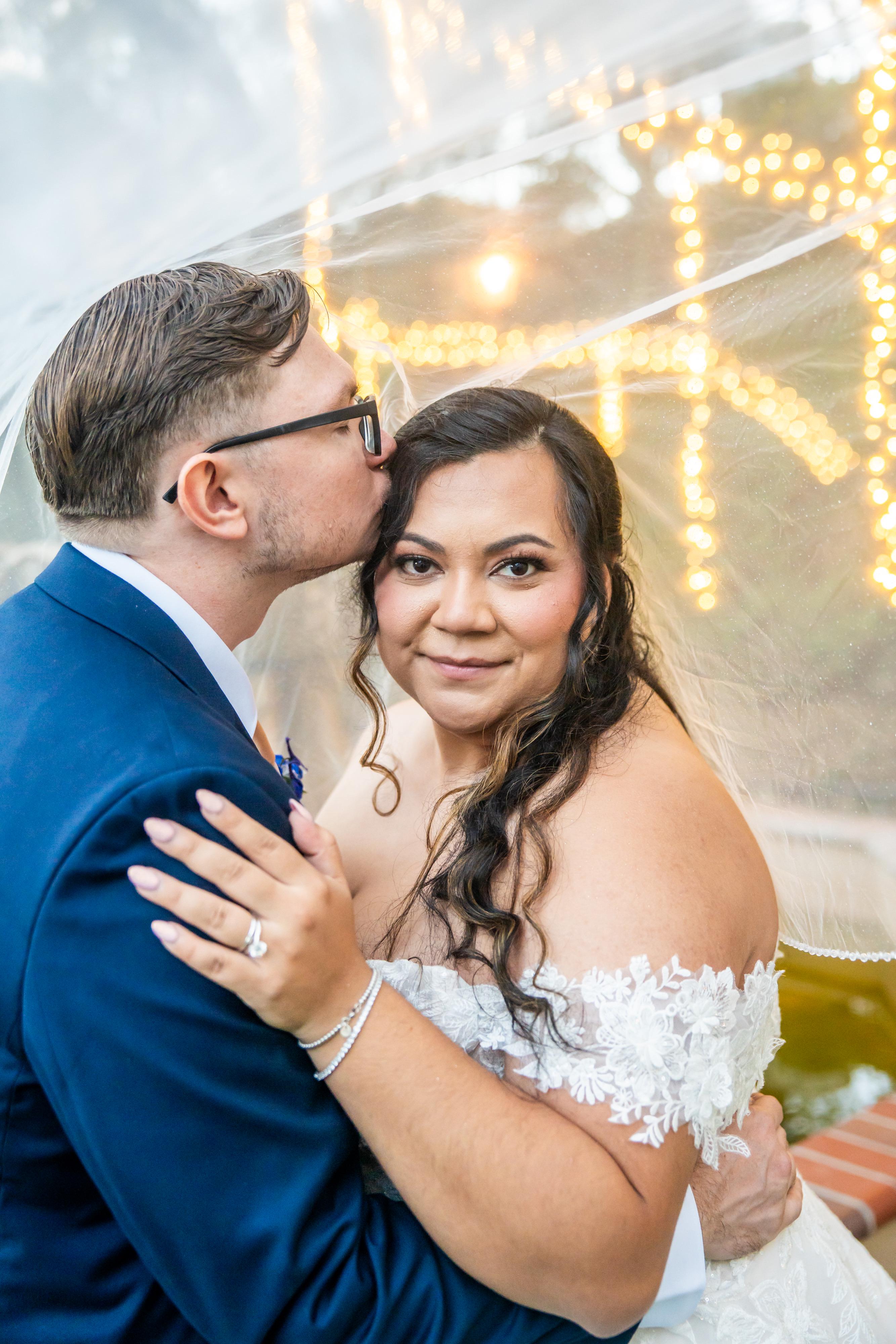
Hi all! I’m hoping to get some wedding photos done. Not the whole gallery, just particular ones I can send! I’m a big girl and I don’t want to lose my identity in cropping out my curves, but I’d like some bulges smoothed out and my makeup retouched! Nothing too crazy! It’ll be around 20-25 pictures, with possibility of more with amazing work :) here’s one sample so we can see if we’re a match in working together! Paid job and open to negotiating :)


r/PhotoshopRequest • • 11h ago

Paid 💰 combining dog and child in the same picture in front of the tree

Thumbnail
gallery
14 Upvotes

want to combine both the children and the dog in front of the tree. can be on any picture of the tree, provided another picture of the tree by itself if that is helpful too.


r/PhotoshopRequest • • 4h ago

Solved ✅ I need tights added to girl and bows that match her dress added as well.

Post image
3 Upvotes

Don’t change faces.


r/PhotoshopRequest • • 5h ago

Solved ✅ Can someone please combine my sons face in the first photo and my face in the second photo into one photo, and also please help me to look less wrinkled? Thanks.

Thumbnail
gallery
4 Upvotes

r/PhotoshopRequest • • 6h ago

Solved ✅ Can someone make my cat look like the pathetic cat meme?

Post image
4 Upvotes

r/PhotoshopRequest • • 9h ago

Solved ✅ Can you remove my SIL’s ex-husband from family photo?

Post image
7 Upvotes

Hi yall! My sister in law got divorced a few weeks after me and my husbands wedding. Can you remove the man on the left?

Extra bonus points for centering us and removing the person in the doorway 🤞

Thank you!!! My in-laws will be thrilled to be able to put this picture up without the reminder 😬

Full res link: here


r/PhotoshopRequest • • 3h ago

Solved ✅ Would someone be willing to help me with two photos? Please remove the lady on the right in black for one of the photos and can you make the background not be so overexposed?

Thumbnail
gallery
2 Upvotes

Will tip decent. Really appreciate any help for my friend.


r/PhotoshopRequest • • 5h ago

Solved ✅ Can someone make my head level with my husbands and also make my face look smoother as in less wrinkled (again)? Thanks so much!

Thumbnail
gallery
3 Upvotes

r/PhotoshopRequest • • 10h ago

Free Need help clearing up a picture

Thumbnail
gallery
7 Upvotes

Hi All,

Is anyone able to make the first photo where my son is a puppy clearer? Not sure what the exact term is for it. I just want to be able to make out that it’s him as a puppy, something I never got to see. The second photo is him as a grown boy. I’m sorry I can’t tip but can pay in a big thank you/gratitude. {that’s a collar around his neck in the first pic}


r/PhotoshopRequest • • 8h ago

Solved ✅ 1860's photo of my Brother's House $20 Tip

Post image
5 Upvotes

My brother owns a lock keeper's house on an old canal in NY near New Paltz (now a river/creek - the locks have been removed for like 100 years). This is a photo he took with his phone of a photo from ~1860. $20 to restore/enhance for a holiday present for my brother - he is moving to Florida as a retiree and I want to give him an improved photo as a present. I can pay via Venmo or Zelle Thanks!


r/PhotoshopRequest • • 4h ago

Paid 💰 Please unblur

Post image
2 Upvotes

$5 - Please unblur this image 🙂


r/PhotoshopRequest • • 4h ago

Free Can someone make this photo look more professional for a wedding invite?

Post image
2 Upvotes

Feel free to use your own creativity… you can keep the background outside if you want or make it our wedding theme of navy blue sage green rustic vibe? I just want it to look more professional. Thank you!


r/PhotoshopRequest • • 1d ago

Solved ✅ First Thanksgiving with baby girl

Post image
352 Upvotes

Can someone smooth out my chest! The angle wasn’t flattering at all and this is our first Thanksgiving with our daughter!


r/PhotoshopRequest • • 42m ago

Free Can y’all photoshop my dog to wear a Jedi costume and look one with the force ?

Post image
1 Upvotes

Hey y’all can y’all make my dog one with the force ?


r/PhotoshopRequest • • 53m ago

Paid 💰 Need something added into a image of me

1 Upvotes

I have a picture of me that I want to edit in an ornament. Nothing too tough I don’t think. (Too shy to post my selfie here)
Budget $5-10 depending on quality