r/raspberry_pi • • 5d ago

2026 Nov 23 Stickied -FAQ- & -HELPDESK- thread - Boot problems? Power supply problems? Display problems? Networking problems? Need ideas? Get help with these and other questions!

4 Upvotes

Welcome to the r/raspberry_pi Helpdesk and Frequently Asked Questions!

Link to last week's thread

Having a hard time searching for answers to your Raspberry Pi questions? Let the r/raspberry_pi community members search for answers for you!† Looking for help getting started with a project? Have a question that you need answered? Was it not answered last week? Did not get a satisfying answer? A question that you've only done basic research for? Maybe something you think everyone but you knows? Ask your question in the comments on this page, operators are standing by!

This helpdesk and idea thread is here so that the front page won't be filled with these same questions day in and day out:

  1. Q: What's a Raspberry Pi? What can I do with it? How powerful is it?
    A: Check out this great overview
  2. Q: Does anyone have any ideas for what I can do with my Pi?
    A: Sure, look right here!‡

  3. Q: My Pi is behaving strangely/crashing/freezing, giving low voltage warnings, ethernet/wifi stops working, USB devices don't behave correctly, what do I do?
    A: 99.999% of the time it's either a bad SD card or power problems. Use a USB power meter or measure the 5V on the GPIO pins with a multimeter while the Pi is busy (such as playing h265/x265 video) and/or get a new SD card 1 2 3. If the voltage is less than 5V your power supply and/or cabling is not adequate. When your Pi is doing lots of work it will draw more power, test with the stress and stressberry packages. Higher wattage power supplies achieve their rating by increasing voltage, but the Raspberry Pi operates strictly at 5V. Even if your power supply claims to provide sufficient amperage, it may be mislabeled or the cable you're using to connect the power supply to the Pi may have too much resistance. Phone chargers, designed primarily for charging batteries, may not maintain a constant wattage and their voltage may fluctuate, which can affect the Pi’s stability. You can use a USB load tester to test your power supply and cable. Some power supplies require negotiation to provide more than 500mA, which the Pi does not do. If you're plugging in USB devices try using a powered USB hub with its own power supply and plug your devices into the hub and plug the hub into the Pi.
  4. Q: I'm trying to setup a Pi Zero 2W and it is extremely slow and/or keeps crashing, is there a fix?
    A: Either you need to increase the swap size or check question #3 above.
  5. Q: Where can I buy a Raspberry Pi at a fair price? And which one should I get if I’m new? Should I get an x86 PC instead of a Pi?
    A: Check stock and pricing at https://rpilocator.com/ — it tracks official resellers so you don’t overpay.
    Every time the x86 PC vs. Pi question comes up the answer is always if you have to ask, get a PC. If you're sure want a Raspberry Pi but not sure which model:

    • If you don’t know, get a Pi 5.
    • If you can’t afford it, get a Pi 4.
    • If you need tiny, get a Zero 2W.
    • If you need lowest power, get the original Zero.
    • For RAM, always get the most you can afford; you can’t upgrade it later.
      That’s it. No secret chart, no hidden wisdom. Bigger number = more performance, higher cost, higher power draw. Also please see the Annual What to Buy Megathread
  6. Q: I just did a fresh install with the latest Raspberry Pi OS and I keep getting errors when trying to ssh in, what could be wrong?
    A: There are only 4 things that could be the problem:

    1. The ssh daemon isn't running
    2. You're trying to ssh to the wrong host
    3. You're specifying the wrong username
    4. You're typing in the wrong password
  7. Q: I'm trying to install packages with pip but I keep getting error: externally-managed-environment
    A: This is not a problem unique to the Raspberry Pi. The best practice is to use a Python venv, however if you're sure you know what you're doing there are two alternatives documented in this stack overflow answer:

    • --break-system-packages
    • sudo rm a specific file as detailed in the stack overflow answer
  8. Q: The only way to troubleshoot my problem is using a multimeter but I don't have one. What can I do?
    A: Get a basic multimeter, they are not expensive.
  9. Q: My Pi won't boot, how do I fix it?
    A: Step by step guide for boot problems
  10. Q: I want to watch Netflix/Hulu/Amazon/Vudu/Disney+ on a Pi but the tutorial I followed didn't work, does someone have a working tutorial?
    A: Use a Fire Stick/AppleTV/Roku. Pi tutorials used tricks that no longer work or are fake click bait.
  11. Q: What model of Raspberry Pi do I need so I can watch YouTube in a browser?
    A: No model of Raspberry Pi is capable of watching YouTube smoothly through a web browser, you need to use VLC.
  12. Q: I want to know how to do a thing, not have a blog/tutorial/video/teacher/book explain how to do a thing. Can someone explain to me how to do that thing?
    A: Uh... What?
  13. Q: Is it possible to use a single Raspberry Pi to do multiple things? Can a Raspberry Pi run Pi-hole and something else at the same time?
    A: YES. Pi-hole uses almost no resources. You can run Pi-hole at the same time on a Pi running Minecraft which is one of the biggest resource hogs. The Pi is capable of multitasking and can run more than one program and service at the same time. (Also known as "workload consolidation" by Intel people.) You're not going to damage your Pi by running too many things at once, so try running all your programs before worrying about needing more processing power or multiple Pis.
  14. Q: Why is transferring things to or from disks/SSDs/LAN/internet so slow?
    A: If you have a Pi 4 or 5 with SSD, please check this post on the Pi forums. Otherwise it's a networking problem and/or disk & filesystem problem, please go to r/HomeNetworking or r/LinuxQuestions.
  15. Q: The red and green LEDs are solid/off/blinking or the screen is just black or blank or saying no signal, what do I do?
    A: Start here
  16. Q: I'm trying to run x86 software on my Raspberry Pi but it doesn't work, how do I fix it?
    A: Get an x86 computer. A Raspberry Pi is ARM based, not x86.
  17. Q: How can I run a script at boot/cron or why isn't the script I'm trying to run at boot/cron working?
    A: You must correctly set the PATH and other environment variables directly in your script. Neither the boot system or cron sets up the environment. Making changes to environment variables in files in /etc will not help.
  18. Q: Can I use this screen that came from ____ ?
    A: No
  19. Q: If my Raspberry Pi is headless and I can’t figure out what’s wrong, do I need to plug in a monitor and keyboard?
    A: If you cannot diagnose the problem remotely, you must connect a monitor and keyboard. That is the only way to see boot output and local error messages, and without that information the problem cannot be diagnosed.
  20. Q: My Pi seems to be causing interference preventing the WiFi/Bluetooth from working
    A. Using USB 3 cables that are not properly shielded can cause interference and the Pi 4 can also cause interference when HDMI is used at high resolutions.
  21. Q: I'm trying to use the built-in composite video output that is available on the Pi 2/3/4 headphone jack, do I need a special cable?
    A. Make sure your cable is wired correctly and you are using the correct RCA plug. Composite video cables for mp3 players will not work, the common ground goes to the wrong pin. Camcorder cables will often work, but red and yellow will be swapped on the Raspberry Pi.
  22. Q: I'm running my Pi with no monitor connected, how can I use VNC?
    A: First, do you really need a remote GUI? Try using ssh instead. If you're sure you want to access the GUI remotely then ssh in, type vncserver -depth 24 -geometry 1920x1080 and see what port it prints such as :1, :2, etc. Now connect your client to that.
  23. Q: I want to do something that already has lots of tutorials. Do I need a Raspberry-Pi-specific guide?
    A: Usually no.

    • Raspberry Pi (Linux computer): Use any standard Linux tutorial. A Raspberry Pi runs a normal Linux OS, not a special cut-down version. See Question #1.
    • Raspberry Pi Pico (microcontroller): Use Arduino tutorials. The Pico works with the Arduino IDE and can be used the same way as other Arduino-class boards.
  24. Q: Which Operating System (OS) should I install?
    A: If you aren’t sure, install Raspberry Pi OS. It’s the officially supported OS, it has the best documentation, the widest community support, and it’s what most guides and troubleshooting help assume you’re using.
  25. Q: How can I power my Raspberry Pi from a battery?
    A: All Raspberry Pi models run at 5 V. To choose a battery, first add up the maximum current of your Pi plus everything you attach to it (USB devices, screens, HATs, etc.). Then multiply that current by the number of hours you want it to run to get the required battery capacity in mAh. If you can’t find listed current values, use a USB power meter to measure the actual draw over 12–48 hours. Every battery question comes down to this simple math: the model, brand, or special setup doesn’t change the calculation.

Before posting your question think about if it's really about the Raspberry Pi or not. If you were using a Raspberry Pi to display recipes, do you really think r/raspberry_pi is the place to ask for cooking help? There may be better places to ask your question, such as:

Asking in a forum more specific to your question will likely get better answers!

Wondering which flair to use on your post? See the Flair Guide


† See the /r/raspberry_pi rules. While /r/raspberry_pi should not be considered your personal search engine, some exceptions will be made in this help thread.
‡ If the link doesn't work it's because you're using a broken buggy mobile client. Please contact the developer of your mobile client and let them know they should fix their bug. In the meantime use a web browser in desktop mode instead.


r/raspberry_pi • • Dec 01 '25

Community Annual December Pi Purchase Megathread: What Will Make the Perfect Gift for My Dad/Nephew/Granddaughter (Because I Don’t Know Nuffin ’Bout These Electronic Gadget Things)

9 Upvotes

Welcome to the Annual December Pi Purchase Megathread!

It’s that time of year when we get a flood of “Which Raspberry Pi kit/accessory/model should I buy?” posts. There’s no universal perfect kit or accessory, and these questions always get the same vague answers.

Before posting:

  • If you already know what you want to build, pick a project or tutorial — it will list the exact parts needed.
  • If you still want a kit, choose one that includes those parts.
  • If you want to know what a Raspberry Pi is, what it can do, or need project ideas, read the r/raspberry_pi FAQ.

To keep the forum sane:

  • All “what do I buy?” questions belong here.
  • Focus on what you want to do with the Pi or what projects you plan to try — not just “which kit is best.”
  • This thread can help with:

    • How to evaluate kits for your project
    • Features/components required for a particular setup
    • Tips, lessons learned, and project ideas

Which model of Pi should you get and where from?

Check stock and pricing at https://rpilocator.com/ — it tracks official resellers so you don’t overpay.

Which Pi to buy:

  • If you don’t know, get a Pi 5.
  • If you can’t afford it, get a Pi 4.
  • If you need tiny, get a Zero 2W.
  • If you need lowest power, get the original Zero.
  • For RAM, always get the most you can afford; you can’t upgrade it later.

That’s it. No secret chart, no hidden wisdom. Bigger number = more performance, higher cost, higher power draw.

Should you get an x86 PC instead of a Raspberry Pi? Every time the x86 PC vs. Pi question comes up the answer is always if you have to ask, get a PC.

Do not post “what should I buy?” anywhere else — it will be redirected here.

Think of this as a holiday sandbox for Pi gift chaos. Share your questions, experiences, and guidance without cluttering the rest of the community.


† If any links don't work it's because you're using a broken reddit client. Please contact the developer of your reddit client. You can find the FAQ/Helpdesk at the top of r/raspberry_pi: Desktop view / Phone view


r/raspberry_pi • • 5h ago

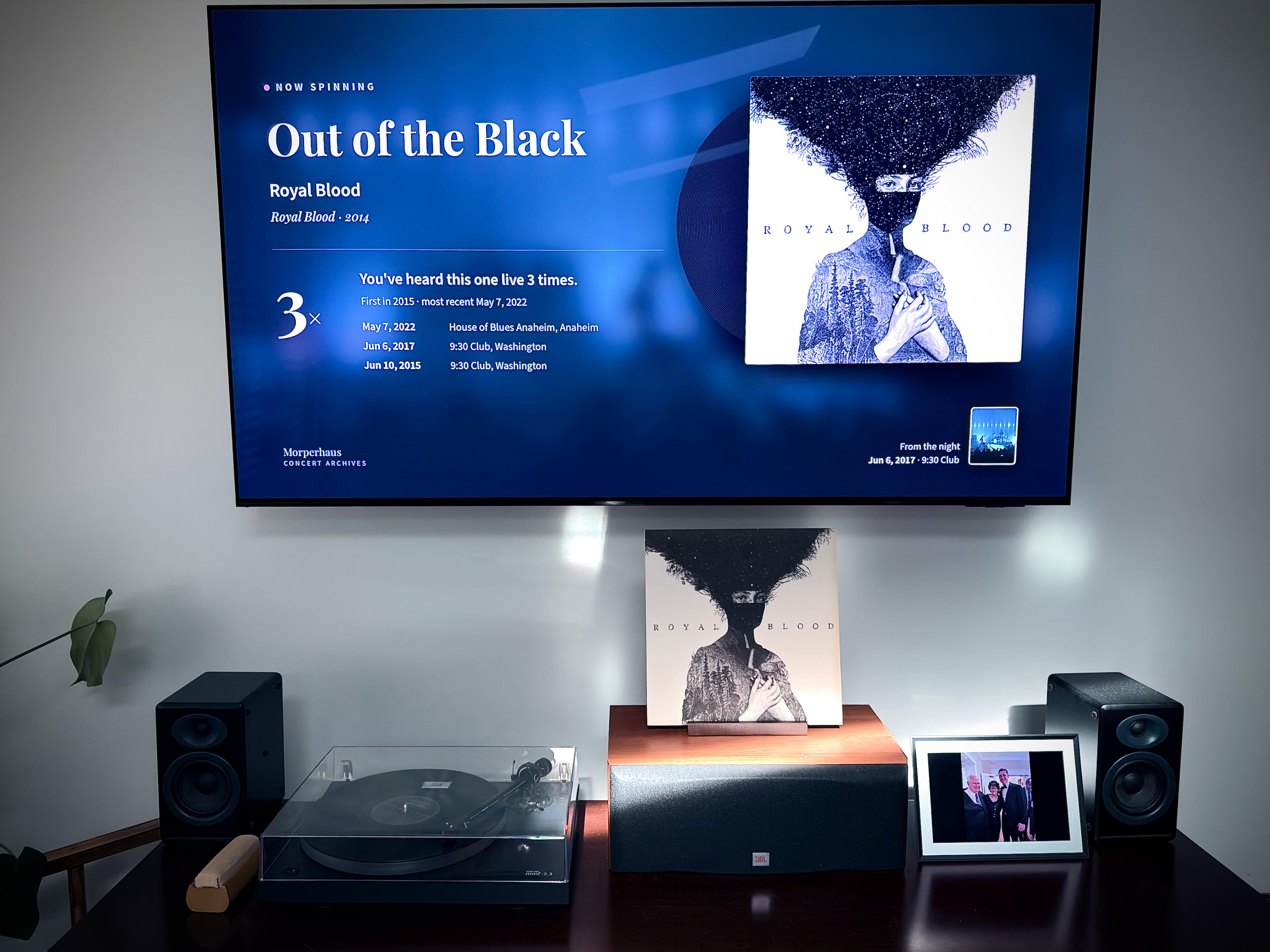
Show-and-Tell My Raspberry Pi listens to my turntable and puts the nights I saw the song live on the TV
Post image
34 Upvotes

My wife and I have kept a spreadsheet of every show we've seen since 1984, 186 of them. I wanted the record player to know about it.
Now, when I drop the needle, a Raspberry Pi listens to the turntable, fingerprints the song, and about 20 seconds later the TV shows the track, the album, and every night I heard it live, with photos from those shows. "Out of the Black" by Royal Blood: 3 times. If I've never seen it live, it says so: "Not in the archive. Yet." Nothing is recorded or kept; the screen lets go when the record stops.
I wrote up how it works, with diagrams you can play, for anyone curious about the plumbing (Pi, Shazam fingerprint, Cloudflare Worker, tvOS app):
https://concerts.morperhaus.org/how-it-works/now-spinning
Happy to answer questions.

r/raspberry_pi • • 6h ago

Show-and-Tell 3D Printed RC Car with Pico2W and a USB camera

Thumbnail
gallery
20 Upvotes

Looks pretty cool, simple RC car controlled via wifi over a web page.

It streams video back to the phone that's controlling it.

Fun parts are the pcb and the USB camera attached to a Pico streaming video.

I can share the 3d printed part STLs and source code if anyone wants to build the same


r/raspberry_pi • • 19h ago

Show-and-Tell Draw a maze, take a photo, and play it with tilt on Raspberry Pi-based device Cardputer Zero

77 Upvotes

Just a little something I prompted AI to code.


r/raspberry_pi • • 1h ago

Troubleshooting Rpi4 subsonic install

1 Upvotes

I’ve wasted much of the day trying to get the Subsonic app to run on my raspberry pi4. I had it running on the Libre Renegade board so I wanted to run everything on the rpi4. I have java8 installed. When I go to localhost I get page error 503. I don’t understand why this has to be so complicated and confusing compared to a windows or Mac install. Is there a better and easier program out there besides subsonic ?


r/raspberry_pi • • 1h ago

Project Advice Current NetPi alternative

1 Upvotes

Very long time ago it was project named NetPi as network analysed based on Pi. It was project dedidacted to get basic information about network and testing it. Are you now Pi based project which I can get basic network information like IP, VLAN, gateway, speed, switch port etc.? I want build something for school because some part of our network is mess, wrong connected cables on switch and I would like clean this. It is for replace commercial dedidacted devides and for make network project for fun to learn more about networking (based strictly on RJ-45 connection with WLAN as second).

So before reinventing the wheel I would know that is something similar to my need actual exists? I can move around with laptop, but for connecting next RJ45 classrom by classroom I prefer something more portable.


r/raspberry_pi • • 1d ago

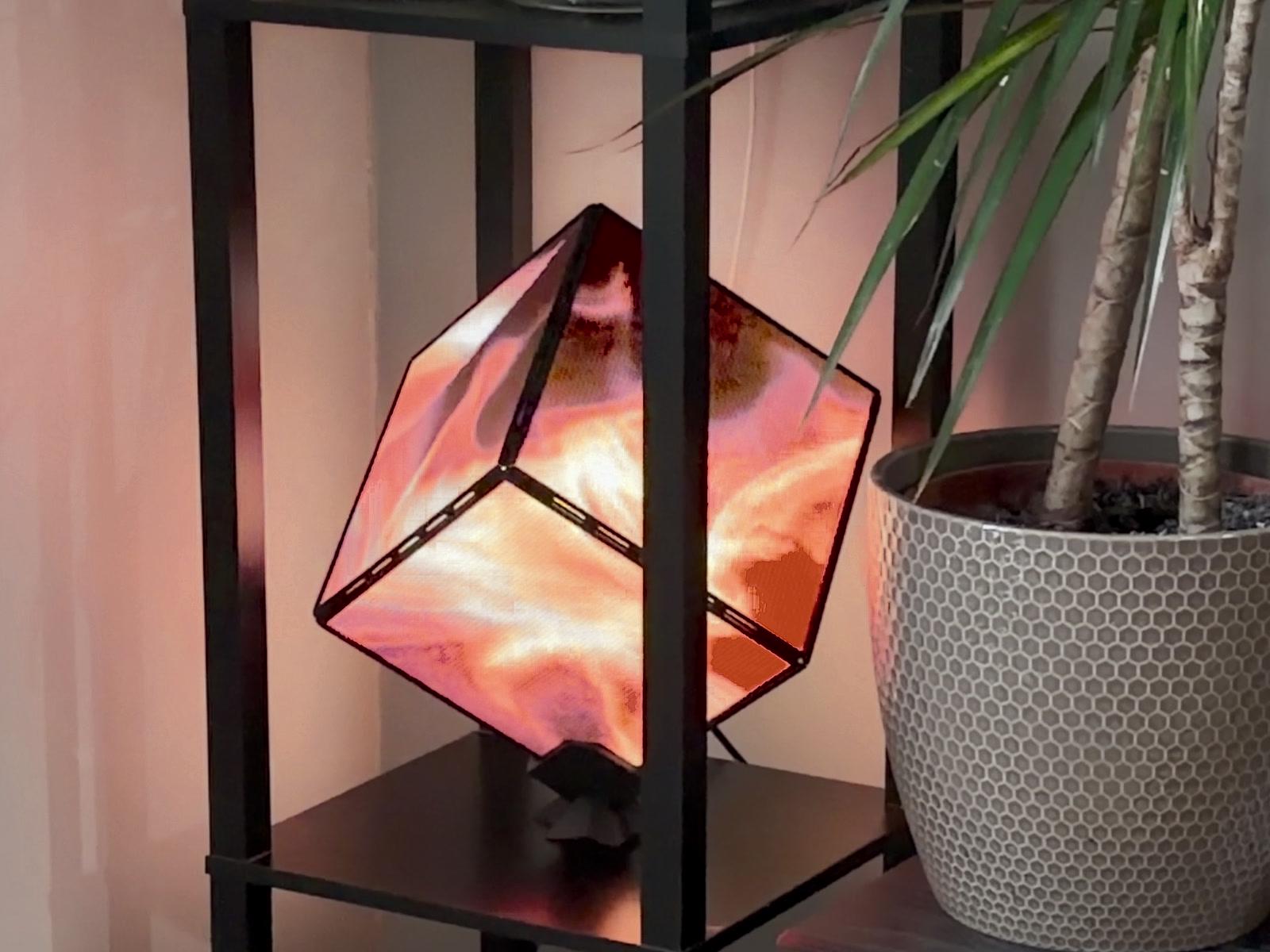
Show-and-Tell Six 64×64 HUB75 PWM panels and a CM4 on a custom carrier: my audio-reactive LED matrix cube (24,576 LEDs)

16 Upvotes

Hackaday wrote this up last week (A Big Ol' LED Matrix Cube), so here's the build for this sub. The full log with photos is on Hackaday.io.

It's six 64x64 HUB75 panels folded around a 3D-printed internal frame, driven by a Raspberry Pi CM4 on a carrier board I designed.

What took the longest:

  • Power: six panels at full white pull tens of amps at 5 V. A power board steps the battery up to 5 V, and I spent a lot of time with a scope on the rails chasing sag.
  • Mapping: one Pi drives all six faces as two chains of three, so getting animations to wrap cleanly across every edge and corner meant working out each panel's orientation.
  • Diffusers: cell-cast acrylic over each face turns the LED grid into a smooth image, for about 15% of the light.
  • Audio: mic FFT frequency bands drive the visuals in real time.
  • Software: 200+ visualisers, games that wrap around the corners, and a small HTTP API to script it.

Happy to answer anything about the panels, power or the mapping maths.


r/raspberry_pi • • 1d ago

Show-and-Tell Pi Pico powered gaming handheld for ants

Thumbnail
gallery
140 Upvotes

I have some plans to make a retro-go esp32 device sometime soon, but in my searching I found Arduboy and figured I could build my own with stuff I already had. Most every game came from Lorandil. Seriously huge shout out to their work.

All parts from my extras bin:
- qt py rp2040
- .96” OLED Screen
- 5 way navigation stick
- 2x buttons
- 1/3 of a piece of perfboard
- hot glue

Performance is great, but it needs a battery to make it useable. Going to see if I can dig a couple hundred mah battery out of something around the house soon.


r/raspberry_pi • • 1d ago

Troubleshooting What happened to plasma-bigscreen in Raspbian?

9 Upvotes

I'm currently trying to temporarily utilize my pi 5 as a media center for my TV, but despite it being in the package archive, and multiple people claiming to have installed it, the apt on my system can't locate it. It can find other plasma-related packages, but specifically not the plasma-bigscreen. What gives?


r/raspberry_pi • • 1d ago

Show-and-Tell Pi Zero 2 W that keeps watch and throws parties

Thumbnail
gallery
65 Upvotes

This is my party bouncer. Pi Zero 2 W with a Waveshare 2.23" OLED that keeps an eye on the house with USB cameras and doubles as a music visualizer and if there’s no music, it will just display the time, weather, etc. I have a second pi with a RetroFlag GPi Case 2 acting as the speakers. The beats stream over UDP to other Pi’s and the OLED shows them live. I also have ESP32s with LED strips that pick up the same beats and light up the room.

It’s running Pietato on a basic Raspberry Pi OS Lite install. When you have more than one Pi running it, they can start a band or a party and every Pi plays music and the LEDs follow along.

https://github.com/frogCaller/pietato

Parts used:

  • Raspberry Pi Zero 2 W
  • Waveshare 2.23" OLED screen
  • Waveshare USB hub
  • USB cameras
  • USB / Bluetooth game controller, or use the web UI

r/raspberry_pi • • 1d ago

Show-and-Tell Automatic HTTPS for local services running on a Raspberry Pi

Post image
10 Upvotes

My friend has been working on Local HTTPS, a project I originally created to manage HTTPS certificates for the services running on my Raspberry Pi.

The idea is to automate the whole process without needing a public domain or reverse proxy.

Features:

  • Automatic certificate generation and renewal.
  • Automatic HTTPS configuration for Pi-hole and Technitium DNS.
  • Support for local IP addresses, custom domains and Tailscale hostnames.
  • PEM and PFX certificates for other services like Grafana and Nginx.
  • Automatic management of certificate permissions.
  • Installation with a single command.

You only need to trust the local Root CA on your devices once.

It officially supports Raspberry Pi OS, Debian, Ubuntu and Armbian.

The project is completely free and open source under MPL-2.0.

GitHub: https://github.com/luizbizzio/local-https


r/raspberry_pi • • 1d ago

Troubleshooting Pi5 NVMe SSD boot failing

Post image
0 Upvotes

[solved!!!!!]

Hello, a short disclaimer: I am a beginner all things Pi5.

After succesfully running the Pi5 os on SD, I installed a NVMe hat and want to boot it from SSD.

The SSD I had laying around: KLEVV C715 256GB M.2 SSD

I used the SD copier function, rebooted the Pi5, i see the os startup on the monitor but then it gets stuck (see attached image). I tried disabling the power limitations but that did not work.

Maybe the SSD simply isn't compatible? I'm ok ordering a new SSD, but it would be shame if there was a simple fix for the problem I just dont have the knowledge of.


r/raspberry_pi • • 2d ago

Show-and-Tell BreadPilot v0.4.0-beta Release. 22 new parts to test on a real Pico.

Thumbnail
youtu.be
6 Upvotes

Hi everyone,

I shared BreadPilot here two weeks ago. Since then I've added 22 new components, but I couldn't test them all on real hardware. The engine follows the real datasheets and safety rules, but I want to be sure they actually work.

If you have any of the new parts in your drawer (MPU-6050, DHT22, soil moisture, sound sensor, OLED and more), I'd really appreciate your help. Each part has a ready-made test project in the app. Just build it, flash it to your Pico, and tell me if it worked. After you build, the app opens a filled-in GitHub issue for you.

It's open source, so any feedback or contribution is welcome.

Thanks !!

Github Link : https://github.com/Prestical/BreadPilot/releases


r/raspberry_pi • • 3d ago

Show-and-Tell Introducing E64 (Enhanced 64) – An Enhanced Bare-Metal Commodore 64 Emulator for the Raspberry Pi 3B+

Post image
47 Upvotes

I'd like to introduce a project I've been working on called E64 (Enhanced 64).

E64 is an enhanced bare-metal Commodore 64 emulation platform for the Raspberry Pi 3B+, originally derived from BMC64 5.2.6 and built upon VICE and Circle.

My goal was to retain the traditional Commodore 64 experience while expanding its capabilities through modern networking, hardware connectivity, and system management.

What does E64 offer?

  • Bare-metal operation without an underlying Linux operating system.
  • Integrated web-based management dashboard.
  • Ethernet and Wi-Fi networking.
  • Physical USB FTDI RS-232 serial adapter support.
  • Automatic USB serial adapter detection.
  • Serial communication at 300, 1200, 2400, and 9600 baud using UP9600 support where applicable.
  • Independent virtual RS-232 modem.
  • Enhanced configuration management.
  • Integrated web-based file manager.
  • Automatic GPIO-controlled cooling fan.
  • Publicly available source code and build documentation.

One of my primary interests was bringing practical serial communication and networking capabilities to the emulated Commodore 64 environment while maintaining the classic computing experience.

E64 V1 is now publicly available

I've released the firmware, source code, screenshots, and documentation for the retro-computing community to explore.

E64 V1 represents the completion of my original development effort. I'm making the project available to anyone interested in experimenting with it, improving it, or continuing its development independently.

Project links

GitHub repository:
https://github.com/E64-Project/E64

Firmware downloads:
https://github.com/E64-Project/E64/releases

Official Reddit community:
https://www.reddit.com/r/E64Project/

I'd also like to acknowledge the developers behind BMC64, VICE, and Circle. Their work provided the foundation that made E64 possible.

I hope E64 will be of interest to fellow Commodore enthusiasts, retro-computing hobbyists, electronics enthusiasts, and developers.

Keeping the Commodore 64 experience alive.


r/raspberry_pi • • 3d ago

Show-and-Tell I made a family calendar dashboard for the Pi Zero 2 W: Cozi, weather, and your photos and videos behind it (free, open source)

8 Upvotes

I wanted a screen at home that shows our Cozi calendar and the weather, running on a Pi Zero 2 W. So I made PiDash, an SD card image you flash and set up by editing one text file on your PC.

What it does:

- 7 days side by side with each day's weather, plus week, month, agenda and weather pages

- Works with the Cozi calendar link, and with Google, Outlook and iCloud iCal links

- Looks for calendar changes every 2 minutes

- Photo and video slideshow behind everything: just copy files into a folder on the card

- 5 layouts, 4 themes, rotation, night dimming, and touch, keyboard or button control

- Made for 512 MB of memory, with a watchdog that restarts the screen if it freezes

Honest status: this is a test release. The calendar, weather and layouts run on my Pi Zero 2 W. Videos and the splash screen are new and have only been tested on a PC so far. Photos and videos share about 420 MB, because Windows can only write to the small boot partition.

I designed it and tested it on my Pi; Warning To fix performance issues "mine you a Senior high school student" I used AI tool (Claude Code). It's MIT licensed.

Code, screenshots and the image: https://github.com/Hottuck71/PiDash

I'd love feedback, especially from anyone who can try it on their own Zero 2 W.


r/raspberry_pi • • 4d ago

Show-and-Tell Raspberry Pi Controlled Telescope for Capturing Photos of Aircraft

255 Upvotes

My post in r/aviation got mostly comments about aircraft looking like they are crashing. This effect is from the direction the plane was flying and the angle between the telescope and the plane. The images are mirrored though by the refractor’s diagonal.

I am using a Raspberry Pi 4 to control the telescope. The aircraft telemetry comes from an RTL-SDR Blog v4 running dump1090 to capture ADS-B packets. Aircraft that are on a track to cross through the portion of the sky visible through the window the telescope is pointed out are identified automatically. The scope then moves to a position to intercept the aircraft. Tracking is used to keep the plane in the frame for longer, but my mount can’t track at the speed the aircraft is moving. The frames in the video are cropped to keep the plane in the center for as long as possible. The camera takes 22 fps bursts through the pass.

It’s pretty fun to just let run during the day and see what aircraft I capture. Then at night I can just switch over to astronomy.


r/raspberry_pi • • 4d ago

Show-and-Tell Turned a $30 Bluetooth pixel clock into a smart weather clock with my Pi

Post image
118 Upvotes

A few months ago I ordered this $30 pixel clock on Amazon: https://www.amazon.com/dp/B0GY3BX9QC

It has a 32x16 LED matrix and is advertised as programmable but the customization is limited to a list of presets in the companion mobile app. And it loses time whenever there is a power outage, requiring me to manually connect over Bluetooth in the app to re-sync the time.

Since I didn't love any of the presets, I gave the app APK to Claude and asked it to reverse engineer the Bluetooth communication. It successfully did so and now I can fully manage the clock without the app, including updating the display, adjusting LED brightness, and syncing the time.

The code for controlling the clock and instructions to use it are on GitHub: https://gist.github.com/t1m0thyj/4445e29c1520ac2764489865ae40da86

Now I have the following automations powered by the iledclock.py driver script on my Pi 3:

  • Background image is refreshed every 30 min to show weather info (current temperature and 2-frame animation of conditions), which is retrieved with the free OpenMeteo API.
  • Brightness is adjusted to match ambient brightness in the room, using gpiozero.LightSensor to read data from an LDR (Light-Dependent Resistor).
  • Time is synced when the clock controller script starts (whenever the Pi reboots after a power outage), and every 24 hours to prevent clock drift.

I've not shared the code for these automations yet, as they are heavily customized for my setup (e.g., the LDR readings are shared by another Python script over a socket). But I'll share relevant snippets if anyone is interested.


r/raspberry_pi • • 5d ago

Show-and-Tell May I present: my self-driving Raspberry Pi RC car for newspapers

13 Upvotes

Built a Raspberry Pi 5 RC car that drives itself with a small neural network, trained with imitation learning and DAgger. In the video it drives a track layout it never saw in training: 2 minutes without a takeover.

Setup

  • Keyestudio 4WD chassis, Raspberry Pi 5, one Pi camera, PlayStation controller
  • MobileNetV3-Small (~1M params) gets the last 3 frames + a route command (left/right/forward) and outputs steering and throttle at 20 Hz
  • Runs fully on the Pi's CPU with ONNX Runtime, ~9 ms per frame

Training I first trained it on my own driving, then improved it with DAgger: the car drives while I hold the controller, and moving the stick takes over instantly. Each takeover, plus the frames just before it when the model was already drifting, becomes training data for the next round.

Next: steering as bins on the car, and predicting action chunks instead of one step ahead. What else would you try?

Code + write-up: https://github.com/YvesMG1/keyecar-pi
Full 2-min run: https://www.youtube.com/watch?v=Jv9juVpWOz4


r/raspberry_pi • • 6d ago

Show-and-Tell A Beautiful Weather Dashboard for E-Paper Displays

Thumbnail
gallery
404 Upvotes

Repository: https://github.com/mt-empty/pi-inky-weather-epd
Blog post about how it all came to be: https://matada.org/posts/weather-edp-dashboard/

Hardware used:

  • Raspberry Pi zero
  • Inky impression 7.3in E-Paper display
  • 3D printed case for pi zero (optional)

Features:

  • Highly customizable UI

    • Light and dark themes
  • Multi-lingual, 15+ languages
  • Auto update

The binary generates a PNG image, so you can take the image and draw it on any hardware.


r/raspberry_pi • • 6d ago

Show-and-Tell Homemade mp3/spotify/cd/phono player

Thumbnail
gallery
23 Upvotes

Well, I’m actually working on an MP3 player/project, usable by my stepmom. Spotify, qobuz, phono, cd…. will try to open source the code, final goal is to have a bootable image that runs the project, fastboot enabled and more. Ui is made with lvgl, c++ for the backend. If you’re interested in testing, shout out.


r/raspberry_pi • • 6d ago

Show-and-Tell Raspberry Pi thermal camera with rich visualization

Thumbnail
gallery
23 Upvotes

Weekend project: thermal camera using a Raspberry Pi Zero 2W and a MLX90640 Thermal Camera Breakout.

It's basically a simple Flask server streaming the temperature frames (32x24) to a web UI, and the proper visualization is done in the browser. Automatic temperature range, predefined set of palettes, snapshot capture.

Very convenient to see cold air leaks!

Available on GitHub: https://github.com/bezineb5/temperature-camera - mostly done with AI.


r/raspberry_pi • • 7d ago

Show-and-Tell Berryaudio DAC + ADC + Display Hat

Thumbnail
gallery
169 Upvotes

Hi everyone,

A year ago I started working on building my open source project https://github.com/berry-audio/berryaudio/. However I wanted a single, portable solution for my whole music collection, Spotify Connect, AirPlay, internet radio and an FM tuner. I also wanted to fine-tune the sound and use it as a USB sound card for a phone or laptop. After a year of weekends and late nights, I finally have a working module

The hardware: two HATs

  1. DAC + ADC + power supply board. BerryAudio can run on this without a display.
  2. Optional display and controller HAT that sits on top. You can navigate and change the volume right from the device. It also works as a standalone MP3 player, with 4 visualizers to choose from, including VU bar and spectrum analyser.

Hardware specs

  • PCM5122 DAC, up to 384 kHz sampling
  • PCM1861 ADC upto 192khz Input sampling
  • Si4703 FM tuner
  • SSD1306 OLED display
  • 5-way joystick and rotary encoder

What you can do with it

  • Use it as a USB-C sound card with a phone or desktop (needs a little soldering to hook up the Pi Zero 2W data pins)
  • Manage your music collection: MP3, FLAC, WAV, OGG, DSD, DSF and more, with codec info, ID3 tags and cover art extraction
  • Internet radio with an integrated Radio Browser, plus a curated list of 200+ stations (BBC, SomaFM, etc.)
  • FM tuner
  • Bluetooth receiver and transmitter (switches automatically based on the connected device), AirPlay 2 and Spotify Connect
  • Bit-perfect, synchronized multi-room playback
  • Fully integrated CamillaDSP GUI with parametric EQ, reverb, flanger and pitch control
  • Playlists with drag-and-drop sorting, repeat and shuffle, plus Recently Played, Top 100 and Favourites
  • Artist info pulled automatically from TheAudioDB.com
  • SD cards, USB HDDs and SSDs, with network sharing from mounted drives
  • Manage Wi-Fi, Ethernet, hotspot and IP settings, Bluetooth, system stats and power options (shutdown, reboot, standby) from the interface
  • Responsive web interface (some features are web-only)

In progress

  • Documentation
  • Preparing the hardware for production and adding docs for it
  • More features on the way ... thank you for those supporting this project. and sharing your feedback :)

I'd love to hear what you think. If you'd be interested in this hardware, let me know. It would help me gain the confidence to make it available to everyone. 🙂


r/raspberry_pi • • 6d ago

Show-and-Tell Draftling, a writerdeck project, now supports ARM Linux

0 Upvotes

I'm the author of Draftling, a writerdeck firmware project that was targeting esp32-s3 devices until recently, but now it supports Linux. Debian packages for 64- and 32-bit ARM are available from the flasher.

The application can run inside any graphical desktop with Wayland or X11, but the best way is to run it inside Weston in kiosk mode.