r/raspberry_pi • u/CommunityFan89 • 10h ago
Show-and-Tell Draw a maze, take a photo, and play it with tilt on Raspberry Pi-based device Cardputer Zero
Just a little something I prompted AI to code.
r/raspberry_pi • u/CommunityFan89 • 10h ago
Just a little something I prompted AI to code.
r/raspberry_pi • u/lucent_cube • 1d ago
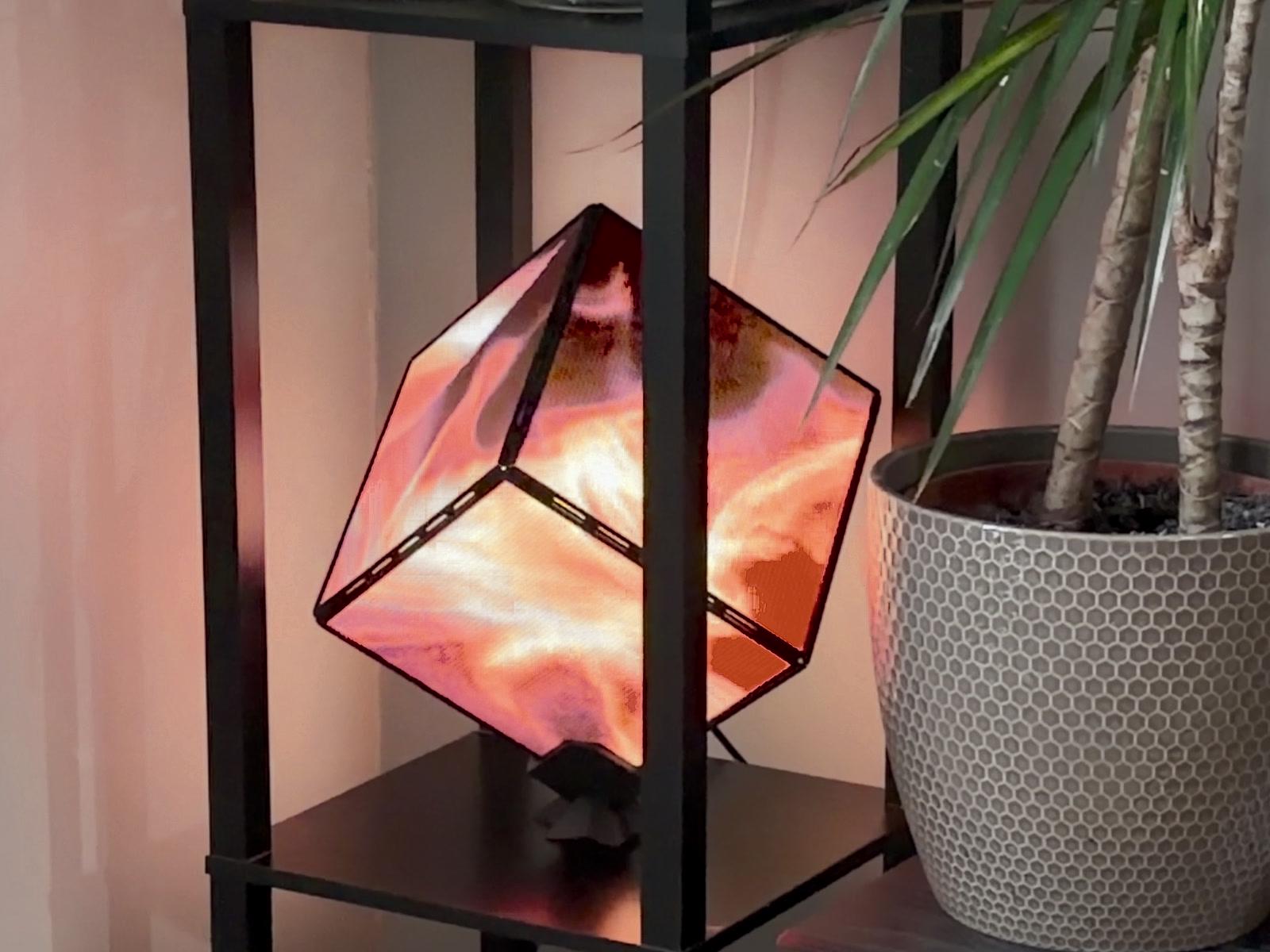
Hackaday wrote this up last week (A Big Ol' LED Matrix Cube), so here's the build for this sub. The full log with photos is on Hackaday.io.
It's six 64x64 HUB75 panels folded around a 3D-printed internal frame, driven by a Raspberry Pi CM4 on a carrier board I designed.
What took the longest:
Happy to answer anything about the panels, power or the mapping maths.

r/raspberry_pi • u/Sykotic • 1d ago
I have some plans to make a retro-go esp32 device sometime soon, but in my searching I found Arduboy and figured I could build my own with stuff I already had. Most every game came from Lorandil. Seriously huge shout out to their work.
All parts from my extras bin:
- qt py rp2040
- .96” OLED Screen
- 5 way navigation stick
- 2x buttons
- 1/3 of a piece of perfboard
- hot glue
Performance is great, but it needs a battery to make it useable. Going to see if I can dig a couple hundred mah battery out of something around the house soon.
r/raspberry_pi • u/Igor_GR • 1d ago
I'm currently trying to temporarily utilize my pi 5 as a media center for my TV, but despite it being in the package archive, and multiple people claiming to have installed it, the apt on my system can't locate it. It can find other plasma-related packages, but specifically not the plasma-bigscreen. What gives?
r/raspberry_pi • u/AdventurousLion9548 • 1d ago
This is my party bouncer. Pi Zero 2 W with a Waveshare 2.23" OLED that keeps an eye on the house with USB cameras and doubles as a music visualizer and if there’s no music, it will just display the time, weather, etc. I have a second pi with a RetroFlag GPi Case 2 acting as the speakers. The beats stream over UDP to other Pi’s and the OLED shows them live. I also have ESP32s with LED strips that pick up the same beats and light up the room.
It’s running Pietato on a basic Raspberry Pi OS Lite install. When you have more than one Pi running it, they can start a band or a party and every Pi plays music and the LEDs follow along.
https://github.com/frogCaller/pietato
Parts used:
r/raspberry_pi • u/Foxythefox2017 • 1d ago
My friend has been working on Local HTTPS, a project I originally created to manage HTTPS certificates for the services running on my Raspberry Pi.
The idea is to automate the whole process without needing a public domain or reverse proxy.
Features:
You only need to trust the local Root CA on your devices once.
It officially supports Raspberry Pi OS, Debian, Ubuntu and Armbian.
The project is completely free and open source under MPL-2.0.
r/raspberry_pi • u/KrypticRTSdub • 1d ago
[solved!!!!!]
Hello, a short disclaimer: I am a beginner all things Pi5.
After succesfully running the Pi5 os on SD, I installed a NVMe hat and want to boot it from SSD.
The SSD I had laying around: KLEVV C715 256GB M.2 SSD
I used the SD copier function, rebooted the Pi5, i see the os startup on the monitor but then it gets stuck (see attached image). I tried disabling the power limitations but that did not work.
Maybe the SSD simply isn't compatible? I'm ok ordering a new SSD, but it would be shame if there was a simple fix for the problem I just dont have the knowledge of.
r/raspberry_pi • u/Early-Wind1525 • 1d ago
Hi everyone,
I shared BreadPilot here two weeks ago. Since then I've added 22 new components, but I couldn't test them all on real hardware. The engine follows the real datasheets and safety rules, but I want to be sure they actually work.
If you have any of the new parts in your drawer (MPU-6050, DHT22, soil moisture, sound sensor, OLED and more), I'd really appreciate your help. Each part has a ready-made test project in the app. Just build it, flash it to your Pico, and tell me if it worked. After you build, the app opens a filled-in GitHub issue for you.
It's open source, so any feedback or contribution is welcome.
Thanks !!
Github Link : https://github.com/Prestical/BreadPilot/releases
r/raspberry_pi • u/E64-Project • 2d ago
I'd like to introduce a project I've been working on called E64 (Enhanced 64).
E64 is an enhanced bare-metal Commodore 64 emulation platform for the Raspberry Pi 3B+, originally derived from BMC64 5.2.6 and built upon VICE and Circle.
My goal was to retain the traditional Commodore 64 experience while expanding its capabilities through modern networking, hardware connectivity, and system management.
One of my primary interests was bringing practical serial communication and networking capabilities to the emulated Commodore 64 environment while maintaining the classic computing experience.
I've released the firmware, source code, screenshots, and documentation for the retro-computing community to explore.
E64 V1 represents the completion of my original development effort. I'm making the project available to anyone interested in experimenting with it, improving it, or continuing its development independently.
GitHub repository:
https://github.com/E64-Project/E64
Firmware downloads:
https://github.com/E64-Project/E64/releases
Official Reddit community:
https://www.reddit.com/r/E64Project/
I'd also like to acknowledge the developers behind BMC64, VICE, and Circle. Their work provided the foundation that made E64 possible.
I hope E64 will be of interest to fellow Commodore enthusiasts, retro-computing hobbyists, electronics enthusiasts, and developers.
Keeping the Commodore 64 experience alive.
r/raspberry_pi • u/Ok_Rub2503 • 2d ago
I wanted a screen at home that shows our Cozi calendar and the weather, running on a Pi Zero 2 W. So I made PiDash, an SD card image you flash and set up by editing one text file on your PC.
What it does:
- 7 days side by side with each day's weather, plus week, month, agenda and weather pages
- Works with the Cozi calendar link, and with Google, Outlook and iCloud iCal links
- Looks for calendar changes every 2 minutes
- Photo and video slideshow behind everything: just copy files into a folder on the card
- 5 layouts, 4 themes, rotation, night dimming, and touch, keyboard or button control
- Made for 512 MB of memory, with a watchdog that restarts the screen if it freezes
Honest status: this is a test release. The calendar, weather and layouts run on my Pi Zero 2 W. Videos and the splash screen are new and have only been tested on a PC so far. Photos and videos share about 420 MB, because Windows can only write to the small boot partition.
I designed it and tested it on my Pi; Warning To fix performance issues "mine you a Senior high school student" I used AI tool (Claude Code). It's MIT licensed.
Code, screenshots and the image: https://github.com/Hottuck71/PiDash
I'd love feedback, especially from anyone who can try it on their own Zero 2 W.
r/raspberry_pi • u/Wesleygmitchell219 • 3d ago
My post in r/aviation got mostly comments about aircraft looking like they are crashing. This effect is from the direction the plane was flying and the angle between the telescope and the plane. The images are mirrored though by the refractor’s diagonal.
I am using a Raspberry Pi 4 to control the telescope. The aircraft telemetry comes from an RTL-SDR Blog v4 running dump1090 to capture ADS-B packets. Aircraft that are on a track to cross through the portion of the sky visible through the window the telescope is pointed out are identified automatically. The scope then moves to a position to intercept the aircraft. Tracking is used to keep the plane in the frame for longer, but my mount can’t track at the speed the aircraft is moving. The frames in the video are cropped to keep the plane in the center for as long as possible. The camera takes 22 fps bursts through the pass.
It’s pretty fun to just let run during the day and see what aircraft I capture. Then at night I can just switch over to astronomy.
r/raspberry_pi • u/t1m0thyj • 4d ago
A few months ago I ordered this $30 pixel clock on Amazon: https://www.amazon.com/dp/B0GY3BX9QC
It has a 32x16 LED matrix and is advertised as programmable but the customization is limited to a list of presets in the companion mobile app. And it loses time whenever there is a power outage, requiring me to manually connect over Bluetooth in the app to re-sync the time.
Since I didn't love any of the presets, I gave the app APK to Claude and asked it to reverse engineer the Bluetooth communication. It successfully did so and now I can fully manage the clock without the app, including updating the display, adjusting LED brightness, and syncing the time.
The code for controlling the clock and instructions to use it are on GitHub: https://gist.github.com/t1m0thyj/4445e29c1520ac2764489865ae40da86
Now I have the following automations powered by the iledclock.py driver script on my Pi 3:
gpiozero.LightSensor to read data from an LDR (Light-Dependent Resistor).I've not shared the code for these automations yet, as they are heavily customized for my setup (e.g., the LDR readings are shared by another Python script over a socket). But I'll share relevant snippets if anyone is interested.
r/raspberry_pi • u/YvesMG1 • 4d ago
Built a Raspberry Pi 5 RC car that drives itself with a small neural network, trained with imitation learning and DAgger. In the video it drives a track layout it never saw in training: 2 minutes without a takeover.
Setup
Training I first trained it on my own driving, then improved it with DAgger: the car drives while I hold the controller, and moving the stick takes over instantly. Each takeover, plus the frames just before it when the model was already drifting, becomes training data for the next round.
Next: steering as bins on the car, and predicting action chunks instead of one step ahead. What else would you try?
Code + write-up: https://github.com/YvesMG1/keyecar-pi
Full 2-min run: https://www.youtube.com/watch?v=Jv9juVpWOz4
r/raspberry_pi • u/FozzTexx • 4d ago
Having a hard time searching for answers to your Raspberry Pi questions? Let the r/raspberry_pi community members search for answers for you!† Looking for help getting started with a project? Have a question that you need answered? Was it not answered last week? Did not get a satisfying answer? A question that you've only done basic research for? Maybe something you think everyone but you knows? Ask your question in the comments on this page, operators are standing by!
This helpdesk and idea thread is here so that the front page won't be filled with these same questions day in and day out:
Q: Does anyone have any ideas for what I can do with my Pi?
A: Sure, look right here!‡
stress and stressberry packages. Higher wattage power supplies achieve their rating by increasing voltage, but the Raspberry Pi operates strictly at 5V. Even if your power supply claims to provide sufficient amperage, it may be mislabeled or the cable you're using to connect the power supply to the Pi may have too much resistance. Phone chargers, designed primarily for charging batteries, may not maintain a constant wattage and their voltage may fluctuate, which can affect the Pi’s stability. You can use a USB load tester to test your power supply and cable. Some power supplies require negotiation to provide more than 500mA, which the Pi does not do. If you're plugging in USB devices try using a powered USB hub with its own power supply and plug your devices into the hub and plug the hub into the Pi.Q: Where can I buy a Raspberry Pi at a fair price? And which one should I get if I’m new? Should I get an x86 PC instead of a Pi?
A: Check stock and pricing at https://rpilocator.com/ — it tracks official resellers so you don’t overpay.
Every time the x86 PC vs. Pi question comes up the answer is always if you have to ask, get a PC. If you're sure want a Raspberry Pi but not sure which model:
Q: I just did a fresh install with the latest Raspberry Pi OS and I keep getting errors when trying to ssh in, what could be wrong?
A: There are only 4 things that could be the problem:
Q: I'm trying to install packages with pip but I keep getting error: externally-managed-environment
A: This is not a problem unique to the Raspberry Pi. The best practice is to use a Python venv, however if you're sure you know what you're doing there are two alternatives documented in this stack overflow answer:
--break-system-packagessudo rm a specific file as detailed in the stack overflow answerPATH and other environment variables directly in your script. Neither the boot system or cron sets up the environment. Making changes to environment variables in files in /etc will not help.vncserver -depth 24 -geometry 1920x1080 and see what port it prints such as :1, :2, etc. Now connect your client to that.Q: I want to do something that already has lots of tutorials. Do I need a Raspberry-Pi-specific guide?
A: Usually no.
Before posting your question think about if it's really about the Raspberry Pi or not. If you were using a Raspberry Pi to display recipes, do you really think r/raspberry_pi is the place to ask for cooking help? There may be better places to ask your question, such as:
Asking in a forum more specific to your question will likely get better answers!
Wondering which flair to use on your post? See the Flair Guide
† See the /r/raspberry_pi rules. While /r/raspberry_pi should not be considered your personal search engine, some exceptions will be made in this help thread.
‡ If the link doesn't work it's because you're using a broken buggy mobile client. Please contact the developer of your mobile client and let them know they should fix their bug. In the meantime use a web browser in desktop mode instead.
r/raspberry_pi • u/empty_vacuum • 6d ago
Repository: https://github.com/mt-empty/pi-inky-weather-epd
Blog post about how it all came to be: https://matada.org/posts/weather-edp-dashboard/
Hardware used:
Features:
Highly customizable UI
The binary generates a PNG image, so you can take the image and draw it on any hardware.
r/raspberry_pi • u/Fastmanu • 5d ago
Well, I’m actually working on an MP3 player/project, usable by my stepmom. Spotify, qobuz, phono, cd…. will try to open source the code, final goal is to have a bootable image that runs the project, fastboot enabled and more. Ui is made with lvgl, c++ for the backend. If you’re interested in testing, shout out.
r/raspberry_pi • u/BenjBez • 6d ago
Weekend project: thermal camera using a Raspberry Pi Zero 2W and a MLX90640 Thermal Camera Breakout.
It's basically a simple Flask server streaming the temperature frames (32x24) to a web UI, and the proper visualization is done in the browser. Automatic temperature range, predefined set of palettes, snapshot capture.
Very convenient to see cold air leaks!
Available on GitHub: https://github.com/bezineb5/temperature-camera - mostly done with AI.
r/raspberry_pi • u/varun_7452 • 7d ago
Hi everyone,
A year ago I started working on building my open source project https://github.com/berry-audio/berryaudio/. However I wanted a single, portable solution for my whole music collection, Spotify Connect, AirPlay, internet radio and an FM tuner. I also wanted to fine-tune the sound and use it as a USB sound card for a phone or laptop. After a year of weekends and late nights, I finally have a working module
The hardware: two HATs
Hardware specs
What you can do with it
In progress
I'd love to hear what you think. If you'd be interested in this hardware, let me know. It would help me gain the confidence to make it available to everyone. 🙂
r/raspberry_pi • u/clackups • 6d ago
I'm the author of Draftling, a writerdeck firmware project that was targeting esp32-s3 devices until recently, but now it supports Linux. Debian packages for 64- and 32-bit ARM are available from the flasher.
The application can run inside any graphical desktop with Wayland or X11, but the best way is to run it inside Weston in kiosk mode.
r/raspberry_pi • u/Ok_Compote_3405 • 7d ago
I built this panel in my app for my Pi-run greenhouse. It has soil moisture per bed, watering, grow light, roof vent and tank level.
The logic is simple. The Pi reads the sensors, and when a bed drops below a threshold it sends one HTTP request:
```bash
curl https://api.packlets.app/v1/push \
-H "Authorization: (PRIVATEKEY***)" \
-H "Content-Type: application/json" \
-d '{
"title": "Tomatoes are dry",
"text": "Soil at 24%.",
"elements": [
{"type": "button", "id": "water", "label": "Water for 5 min"},
{"type": "toggle", "id": "light", "label": "Grow light", "value": true}
]
}'
```
That shows up on my phone as a notification, and the message has the button and the switch in it. Tapping one sends a signed request back to the Pi with the control's id, and the script switches the matching GPIO pin.
The full view in the screenshot is one HTML file served by the Pi. I open it in Packlets, the app I wrote for my IoT stuff, which also handles the auth, so the panel didn't need its own login.
The Pi sits behind a Cloudflare Tunnel, so there's no open port on the router. Requests to the phone need my private key, and the Pi checks the signature on everything coming back.
Next I want to add a moisture history per bed, so I can see how fast each one dries out.
p.s. i published my app on appstore completly free(no subscription no payment at all). you can connect your own IoT devices to it in like 5 min with claude code.
r/raspberry_pi
•
u/hes_the_Zissou
•
7d ago
r/raspberry_pi • u/quasialex • 7d ago
I built a MagicMirror dashboard for a Pi Zero 2 W and a 7-inch touchscreen a while back. I wanted Spotify on the same screen, but running a desktop Spotify client on the Pi wasn't a good fit, so I ended up building Spotify Touch.
It's a library-first, touchscreen UI with playlists, Liked Songs, artwork, artist pages, albums, and playback controls. It runs in two intended modes: MagicMirror companion (tap a button to switch between the dashboard and Spotify) or Spotify-only (no MagicMirror required).
The architecture is split across two devices:
- Pi Zero 2 W: Wayland/labwc kiosk, touchscreen, `mpv`/PipeWire audio, optional Bluetooth.
- x86-64 Ubuntu host: rootless Podman + Spotify Headless, plus a small control API. The Pi reaches the control API through an SSH tunnel.
This keeps the heavier Spotify side off the Pi. The MagicMirror server also stays running when I switch interfaces.
Code: https://github.com/quasialex/SpotifyTouch
MagicMirror dashboard: https://github.com/quasialex/MagicMirrorPiO2W
Build log: https://packetwanderer.com/posts/spotify-touch/
Caveats: This is a beta/personal project. The original Ubuntu + Pi setup works on my hardware, but the fresh-install wizards and standalone mode still need clean-install testing. Global Spotify catalog search is not implemented. The Spotify-only Pi mode also still uses a separate Ubuntu backend; it isn't Pi-only.
I'd be interested in feedback from anyone running a Pi touchscreen or a similar home music dashboard, particularly around installation and whether a more complete search experience is worth the extra complexity.
*Unofficial project, not affiliated with Spotify.*
r/raspberry_pi • u/AbbeyDull • 7d ago
Sorry for the low quality. Made possible with the WhiteRecomp project (LLM-assisted) which allows the game to be compiled for native macOS, x64 Windows, x64 or ARM64 Linux, or an Android port that just got added but is very experimental at the moment
r/raspberry_pi • u/CTFOE_is_Free • 6d ago
I run a collection of small local LLMs on my home network.
It is a Raspberry Pi 5 with the Hailo AI Hat 2+. Using this mainly as a self teaching device, I quickly ran into a hard limitation. The pre-compiled HEF models that operate on my setup have a VERY hard token limit of 2048 tokens for each response, and in for contextual memory in general, which makes extremely long conversations something I am not able to actually fiddle with until I had an idea.
Since that 2048 token data travels to and from the OpenWeb UI chat interface where I sit on one side over to hailo-ollama, I had an out of the box idea inspired by Nintendo's old practices that they did on their old cartridge games to 'get more space'.
Bank switching -
Yes, this is a wild idea.
I conceptualized, directed, supervised, and dog-fooded a software bridge that sits between hailo-ollama and OpenWeb UI as an almost proxy. This gives the user the ability to provided a lot more input into the LLM in dynamically created 'banks' that exist on the Raspberry Pi's RAM and as needed the information that is stored in the banks is dynamically swapped in and out of the chat messages, transparent to myself. It uses the x-openwebui-chat-id for per-chat RAM state and it adds /save and /forget commands.
I dog-fooded this myself, and use it extensively to continue to test and further refine this, unfortunately, I am a network engineer, and not a coder, so I had to use vibe-coding for this, so I would REALLY like some human eyes on this thing.
With a default behavior of unless specifically told by the end user with a /save, the chat banks are automatically discarded after 5 minutes or when the Raspberry Pi 5 is restarted. Otherwise, the banks NEVER touch the microSD card and exist only in RAM, and that information is moved between the Raspberry Pi's RAM and the AI Hat's RAM. /forget tosses the banks away.
I would REALY love some human eyes on this thing, and some honest feedback.
I have put this thing up on Github, so please go through and scrutinize this.
https://github.com/varchild/hailo-bank-switching-bridge
Thank you!!