r/razer • u/depr4ved • 2h ago
Discussion How can they guarantee this? 😂
Obviously just jokes but like why does it say that?!😅
“Zero hand fatigue for all-day play”
r/razer • u/BeepBoopBopReee • 27d ago
Welcome to /r/Razer's tech support sticky for November 2026.
We recommend checking our official guides and FAQs or exploring the community discussions on Reddit for immediate troubleshooting steps. If you seek more help from Razer support and users with similar issues please post in the comments below.
Category Quicklinks:
| Laptops/Phones | Peripherals (keyboard, mouse, etc) | Audio | Software | Consoles | Other |
|---|
THREAD INSTRUCTIONS: Please place your support inquiries as a reply to the corresponding section in the comments. Please take a quick look in the category to see if the same issue has been reported already and reply to that comment. Anyone can reply to comments if they want to help. Use the Category Quicklinks for convenience. INSTRUCTIONS WITH PICS: /r/razer/comments/fbdwph/support_sticky_quickstart_guide/
Last month's thread can be found here. If you have been in contact with a Razer support agent on reddit already, do not post in this month's thread again.
Remember to keep your personal details safe, including case numbers. Due to the nature of this subreddit and RΛZΞR customer support sometimes handling customer's personal information through PMs, do not trust anyone who says they are a RΛZΞR employee unless you can find their name on the trusted accounts list and they have an official flair.
You can find unofficial FAQs, many tips, and much more in the wiki
“America is the wealthiest nation on Earth, but its people are mainly poor, and poor Americans are urged to hate themselves...." - Kurt Vonnegut, Slaughterhouse-Five | /r/quotes
r/razer • u/Cult_Of_Razer • 26d ago
Got thoughts on your Razer gear? Share your honest, unbiased review at https://rzr.to/rewards-for-the-faithful for a chance to win a Razer Firefly V2 this month.

r/razer • u/depr4ved • 2h ago
Obviously just jokes but like why does it say that?!😅
“Zero hand fatigue for all-day play”
r/razer • u/NameOfWhichIsTaken • 5h ago
My Iskur had the normal seat tearing after years of use, took a gamble with the SecretLabs skins rather than buying a new chair. Fits pretty well, a bit of "floating" due to the bolsters but settles into place while sitting.
I've seen this question multiple times but never answered... So for anyone else looking, it's not perfect, but it technically works.
Iskur v1, with SecretLabs Skins Lite size normal.
r/razer • u/Rayden9x7 • 1d ago
As a 7+ year long Razer Basilisk user I was ecstatic to see the newly released Basilisk V4 Pro. To me it looked like what I had wanted for years; "Basilisk body with Naga's brain" meaning a Basilisk with more buttons. I ordered the Basilisk V4 Pro + Mouse Dock V2 Pro bundle directly from Razer as soon as it was available, pretty much on launch day. I also sold off my Basilisk V3 Pro and Mouse Dock V1 Pro, because surely the newer generation is an upgrade right?! Unfortunately, I ended up returning both products. After roughly 3 days of use I was already contacting Razer through their support channel because of issues, malfunctions etc. Full rant below.
1. Sensor freezing - The most serious issue I experienced was intermittent, complete sensor freezing. The cursor would suddenly stop moving entirely. Moving the mouse did absolutely nothing, and I had to turn the mouse off and back on to restore functionality. I was primarily using the mouse wirelessly at 2,000 Hz with Synapse 4. I initially used the supplied wireless dongle before transitioning to the Mouse Dock V2 Pro, connected directly to the motherboard. We're talking about a flagship mouse equipped with Razer's latest and greatest sensor technology, yet I couldn't consistently rely on it to move the damn cursor.
2. RGB malfunctioning - Initially, I experienced various inconsistencies with RGB synchronisation between the Basilisk V4 Pro, Mouse Dock V2 Pro and the rest of my Razer ecosystem. Lighting effects wouldn't behave as expected, and the mouse and dock wouldn't consistently reflect the configurations selected in Synapse. Eventually, the RGB on the Basilisk V4 Pro stopped working altogether. Repeated attempts to unpair and re-pair the mouse did not resolve the issue. The lighting never recovered during the remainder of my ownership. I understand that RGB isn't important to everyone. However, it's a substantial part of the Basilisk's identity and one of the reasons I purchase Razer peripherals in the first place. It is an advertised feature of a premium product, and I expect it to work. And that's without mentioning the atrocious downgrade in lighting zones..
3. Mouse Dock V2 Pro abnormalities - The Mouse Dock V2 Pro had its own peculiar behaviour. It would sometimes display what appeared to be a charging indication despite the mouse not being physically present, and display the wrong RGB effect (for example breathing) when it was configured to battery status or literally any other option. Changing the RGB lighting effect within Synapse 4 did nothing. Sometimes the Basilisk V4 Pro and Mouse Dock V2 Pro would affect eachother and mirror these abnormalities, although this was back when the RGB actually worked on the Basilisk V4 Pro.
4. RGB downgrade - Technical issues aside, this is probably my biggest criticism of the V4 Pro's design. The Basilisk V3 Pro and V3 Pro 35K feature 13 Chroma RGB lighting zones. The Basilisk V4 Pro has a whole 7. And those 7 lighting zones are at the very back, covered by my hand when I use the mouse. I don't see how Razer can sell this and still market it as "full underglow" ... where?! Where's the damn underglow?! The previous generation had beautiful underglow extending around much more of the mouse, including the sides and thumb-rest area. It gave the Basilisk a distinctive appearance.
5. The new coating and feel - the new coating is smoother and less textured compared to the previous generation. Not as comfortable to hold or use. I prefer the more tactile and slightly rougher feel on the V3 Pro.
6. Battery life - Razer advertises improved battery life, but my experience shows the complete opposite.
7. The AI button - I'm glad Razer added another programmable button. I'm considerably less enthusiastic about the default AI functionality associated with it. I would much rather see additional controls presented as useful, freely programmable productivity and gaming features than as another opportunity to shoehorn AI branding into a peripheral.
Currently it has now been a month since I returned the Basilisk V4 Pro and Mouse Dock V2 Pro for a full refund. I'm hoping Razer has fixed several of the issues I've described through software updates.
Should I give the Basilisk V4 Pro another chance? The frustrating part is that I still want the Basilisk V4 Pro. I want my expectations to be met, don't we all? If I was completely satisfied with my previous Basilisk V3 Pro I wouldn't have sold it and purchased the Basilisk V4 Pro in the first place. I am considering buying the Basilisk V3 Pro 35K instead. The V3 generation absolutely have features I miss, features that actually worked. But I'd much prefer for Razer to fix their mistakes.
Razer if you're reading this: MAKE THE BASILISK GREAT AGAIN 🐍
r/razer • u/Dino_lover7 • 7h ago
r/razer • u/Brilliant_War9548 • 20h ago
Was looking at the 2025/2026 model of the Blade 18, while it seems good I’m skeptical on longevity and Razer’s support. Anyone with that model ? Did you run into issues ? If yes, did support help ? Thanks.
r/razer • u/deformedexile • 15h ago
Thumbstick up is shot. It's a shame, I really liked the damn thing, but you know what they say.
Fool me once, shame on... shame on you. Fool me — you can't get fooled again.
r/razer • u/ReadyMeringue5266 • 9h ago
Hi everyone
I love the design and power of blade 16 2026 and I am fine with poor trackpad palm rejection,bad synapse and the battery bloating problem because I work on laptops I will change it myself other then that I am worried about the hardware failure because I only used a ThinkPad that has been working fine for almost a decade will the blade work for 5-7years and the reason I am asking is because I am hearing good and bad about this laptop so I am in a dilemma to purchase it or buy a ThinkPad workstation laptop but it doesn't feed full power to dgpu and I the spec I am seeing for blade 16 is 5090 with 64gbram and if not the blade 16 what about blade 18 with 5090 and 128gb ram
Some guidance from the blade user veterans will help
r/razer • u/RazerTube • 5h ago
r/razer • u/RazerTube • 6h ago
r/razer • u/DrLlama-_- • 11h ago
I've had my current mouse for ~6 years and love it, it's heavy and fits my big hands perfectly, and I can't stand lightweight mice. Everything still works fine except the battery, which finally gave out and won't charge past 5%.
I'm planning to order a replacement off AliExpress. Does anyone have a trusted seller or specific battery recommendation for this model? Appreciate any help!
r/razer • u/Proud-Cauliflower873 • 8h ago
Hello everyone, I was wondering If I could get some help?
About 2 days ago I had bought a new Basilik V3 Hyperspeed and immediately noticed that it caused interference to my BlackWidow V4.
Originally, my keyboard's lighting (which i also had other issues with in the past but are unrelated to this topic) would syncronize with the games I would play and I honestly thought it was a great feature, however after installing the firmware and even letting the piece of shit mouse even make contact with my computer, has caused this wonderful feature to stop.
I've honestly tried every possible troubleshooting option, such as clean reinstalls, reinstalling drivers, deleting the basilik's firmware, as well as checking for other conflicts within my computer itself.
I know that I should have known better instead of wasting my money knowing about how terrible the app is regarding syncing. I am honestly fine with playing games without the razer chroma game integration feature, it just has been bumming me out a lot due to how i've grown to like it overtime.
I am honestly just super tired of Razer's quality. I believe that I will make a refund on both the keyboard and mouse within the next week if I ever get too frustrated and unsatisfied with being unable to fix this problem.
To add more clarity: I am basically having the same problem as this person: https://www.reddit.com/r/razer/comments/1s88ega/chroma_apps_completely_stopped_working_games/
-Lighting still works normally by default
-Once Razer Chroma detects the game, lighting freezes still and does not load into the in game lighting effects
-Only happens when the game is detected, when disabling this: the lighting effect continues but I still do not get the special in game lighting effects
r/razer • u/longtailist • 16h ago
Im very frustrated, I dont like wireless unless someone can suggest another brand/model or reassure me that the naga v2 is any good
r/razer • u/ChariotRider94 • 14h ago
Hey guys. I've always used a Razer Naga mouse for about the last 16 years. I never really want the fancy version, just the cheapest option available that gives me the 12 side buttons and hopefully lasts the longest.
I've had issues before of the left click double-clicking or some of the 12 side buttons giving me issues, and that's what always has caused me to buy a new one.
Because of that I've always wanted to have a new fresh back-up ready to go when my current one gives me an issue.
At the moment I have the Razer Naga V2 Hyperspeed Wireless (my first time with the wireless and I'm okay with it, but I'd prefer wired). Reason of course was that it was the cheapest option I found available a year ago.
Anyways, it's Black Friday sale time and I thought to buy a new one. I live in Canada and the cheapest I could find is again the V2 Hyperspeed Wireless. On Razer.com it's $86.99 and on Amazon, Bestbuy, Walmart, it's $78.98. I like saving $8 why not, but part of me has concerns that products like from Amazon often get returned and could have been used and re-packaged who knows how many times. I feel like buying from Razer has the highest likelihood of truly being brand new.
3 questions:
Thank you!
Hello!
So basically i purchased a Razer Cobra (wired) Pokémon Edition.
Very nice mouse but the mouse wheel already developed scroll issues.
Basically you scroll down, up then it glitches - basically glitchy scroll wheel.
It's my second Cobra which developed this issue.
This is unacceptable after ~1 month...
Note that I use the mouse in decent way, i don't push / pull or press hard on anything, just normal usage...

r/razer • u/extr3mematrix • 16h ago
Looking for a new keyboard as I have the Blackwidow Elite currently as the scroll wheel has started chaging volumes randomly, which i read was a common fault with that board.
I want to stay on the razer eco-system to match my other gear. Huntsman V3 / Blackwidow V4 seem to be the most popular suggestions but interested to know which people prefer...
r/razer • u/EconomyStick110 • 12h ago
What colors can you put on the naga v3? Does anyone have a picture of the options?
r/razer • u/Melodic_Platypus_511 • 17h ago
After what felt like 900 reboots, hours of troubleshooting, and nearly questioning my existence as a systems engineer, I finally managed to get my Razer Kraken Tournament Edition microphone recognized by Windows again.
I'm posting this in case someone else is experiencing the same issue.
My headset audio worked fine, but Windows would randomly stop recognizing the microphone. Sometimes the microphone would appear after a reboot, only to disappear shortly afterward.
Windows Sound Settings would simply report:
No input devices found.
The interesting part? I connected the exact same headset and USB audio controller to my MacBook, and everything worked flawlessly.
Before suspecting Windows Update, I went through the following:
None of the initial troubleshooting produced a lasting resolution.
I checked the physical USB interfaces using PowerShell:
Get-PnpDevice -PresentOnly |
Where-Object {
$_.InstanceId -like 'USB\VID_1532&PID_0520*'
} |
Format-Table Status, Class, FriendlyName -AutoSizeAll the underlying USB interfaces reported OK.
However, when checking recording endpoints:
Get-PnpDevice -Class AudioEndpoint |
Where-Object {
$_.InstanceId -match '0\.0\.1\.00000000'
} |
Format-Table Status, FriendlyName, Present -AutoSizeThe microphone reported:
Status : Unknown
Present : FalseI then checked the kernel streaming capture interfaces:
pnputil /enum-interfaces /enabled /class "{65E8773D-8F56-11D0-A3B9-00A0C9223196}"To my surprise, both the Razer and Realtek capture interfaces were registered and enabled.
Windows recognized the underlying audio hardware and capture interfaces, but the recording endpoints were not available to applications.
I checked recently installed updates:
Get-HotFix |
Sort-Object InstalledOn -Descending |
Format-Table HotFixID, Description, InstalledOnI also examined the Microsoft audio driver versions:
'usbaudio.sys','usbaudio2.sys','ksthunk.sys','portcls.sys','ks.sys' |
ForEach-Object {
Get-Item "$env:windir\System32\drivers\$_" |
Select-Object Name,
@{Name='Version';Expression={$_.VersionInfo.FileVersion}},
LastWriteTime
}Several audio subsystem drivers had modification timestamps around November 19, 2026.
This coincided with the installation of KB5132057 on November 20.
Attempting to remove the update through the conventional Windows update removal process did not change my OS build.
I then identified the cumulative update package directly using DISM and PowerShell.
Run PowerShell as Administrator:
Get-WindowsPackage -Online |
Where-Object {
$_.PackageName -match 'RollupFix'
} |
Format-Table PackageName, PackageState -AutoSizeIn my case, the installed package was:
Package_for_RollupFix~31bf3856ad364e35~amd64~~26100.10075.1.25I verified that this package corresponded to KB5132057:
$pkg = 'Package_for_RollupFix~31bf3856ad364e35~amd64~~26100.10075.1.25'
DISM.exe /Online /Get-PackageInfo "/PackageName:$pkg"Then removed it:
DISM.exe /Online /Remove-Package "/PackageName:$pkg" /NoRestartVerified the package status:
Get-WindowsPackage -Online -PackageName $pkg |
Format-List PackageName, PackageStateThe package returned:
PackageState : UninstallPendingI rebooted Windows, physically reconnected the headset, and checked the audio endpoints again.
| Component | Before | After |
|---|---|---|
| Windows build | 26300.10075 | 26300.9974 |
| USB audio driver | 10.0.26100.10068 | 10.0.26100.9974 |
| Microphone status | Unknown | OK |
| Microphone present | False | True |
Windows finally recognized all three Razer audio endpoints:
I'm not claiming that KB5132057 is definitively responsible. Reconnecting the USB controller also occurred during the recovery process, and the microphone had temporarily reappeared during previous troubleshooting attempts.
Actual recording functionality and long-term stability still need to be validated.
Also, removing cumulative updates can remove security and reliability fixes. Verify your own package information, back up important data, and don't blindly execute the package removal command just because it worked on my particular configuration. Resume normal security servicing after testing.
I'm particularly curious whether anyone running Windows build 26300.10075 has experienced disappearing USB microphones or recording endpoints despite having functional audio hardware and enabled kernel streaming capture interfaces.
It would be interesting to determine whether this is an isolated configuration issue or a wider Windows audio subsystem regression.
Hopefully, this saves someone else a few hours of troubleshooting — and approximately 900 reboots.
r/razer • u/No-Pack-2167 • 1d ago
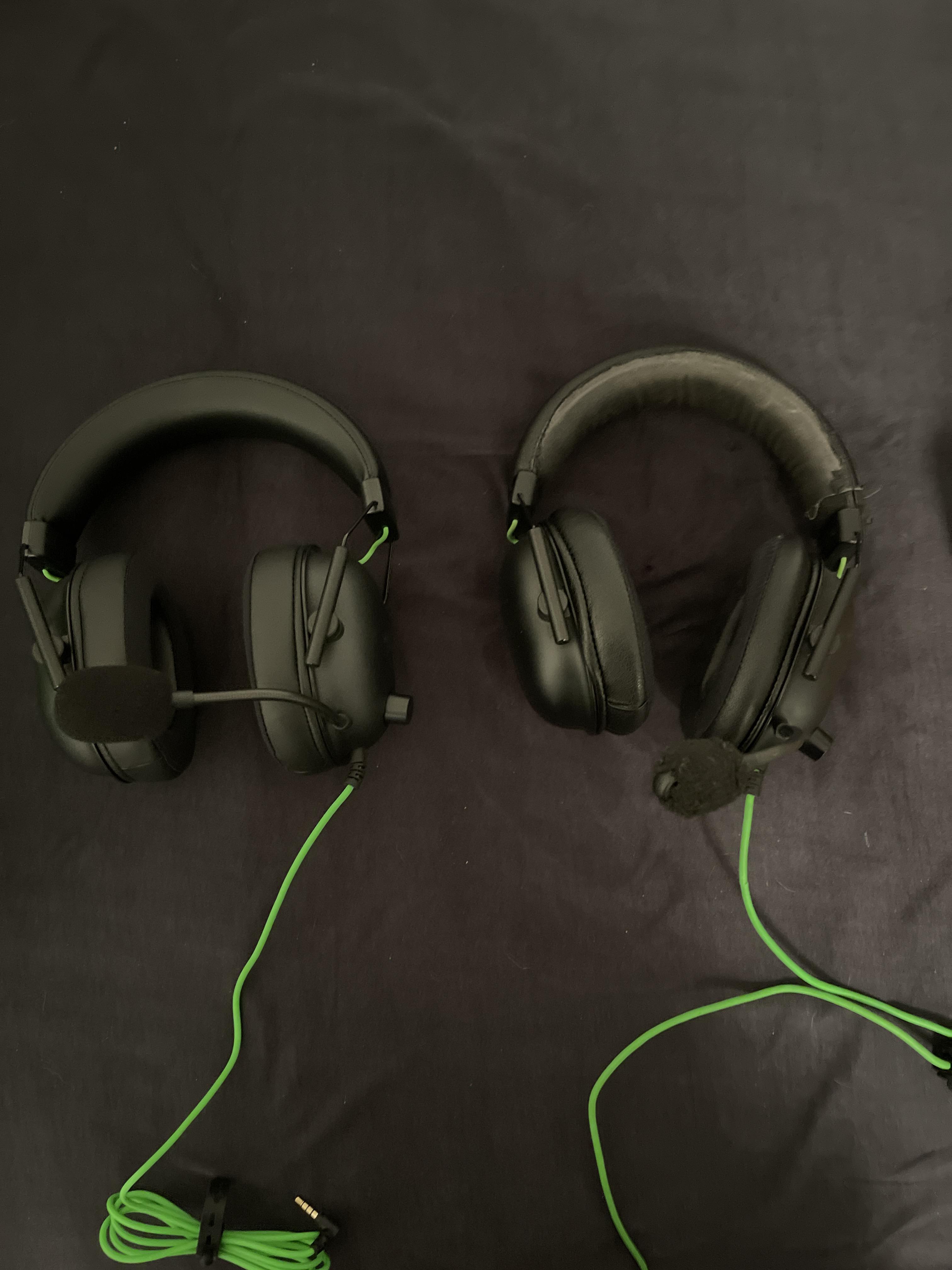
2 days ago, I bought a new Blackshark V2 (Left) to replace my old one that sadly couldn’t work properly anymore. The one fits nicely and such, but the audio just sounds very different compared to the new one?
I still use the same cable port from the old one because I assume it works just fine and all the settings are carried over from the old one. It just sounds less clear compared to the old one, if that makes sense?
Is there anything I could do about this perhaps?