r/S24Ultra • u/Klutzy-Priority9818 • 21h ago
Sun set
17
Upvotes
S24 ultra log 4k 30fps
r/S24Ultra • u/e92m3gtsfan • 15h ago
I've used Galaxy phones for years and kept running into the same thing: missing features, or third-party apps that look nothing like the rest of One UI. So I built my own: Good Utilities, a toolbox where every screen is designed to match One UI 8.5.
Some of what's in it:
The One UI part is what I spent the most time on: expanding titles, the floating blurred tab bar, frosted menus and popups, Samsung's four-dot loading animation, multi-select with the floating action bar, press highlights and corner radii matched to Samsung's own apps. Each piece went through a lot of rounds side by side with Samsung's apps.
No ads, no accounts, no tracking. It's free and open source. Built for the S24 Ultra on One UI 8.5, works on Android 10+.
GitHub (APK in Releases): https://github.com/Alpish08/Good-Utilities
Some tools (Charge limit, Private DNS) need a one-time adb command, since Samsung protects those settings. I'm working on an easier setup.
I built it with Claude as my English to Kotlin translator; the design direction and every detail call are mine. Would love feedback, bug reports, or ideas for tools you've wished One UI had!
r/S24Ultra • u/beerus_sama27 • 2h ago

This view from our window is facing this abandoned house and I used my 10x zoom on 12MP to capture pigeons because they're always there, as you can sew from my previous posts.
r/S24Ultra • u/IllustriousHat1073 • 18h ago

Shopkeeper was asking 1600 then last 1000 rupees, i went to his shop 3 times , on the 3rd time i asked for 250 or no deal , he sold me. I think he did bcz he knows he cant sell it.
r/S24Ultra • u/IllustriousHat1073 • 7h ago

It cost around 1600 rupees , ik its not original , Samsung OG cost 4k n i dnt want to spend that much. Wil this charger do the job? Anyone else using this?
r/S24Ultra • u/sengunsipahi • 18h ago

Am i the only one that thinks this is a horrible design? It is hard to click and when there is a whole screen empty why put music controller in a small island. Is there any way to change this? I know if you tap on it it gets bigger but then it is full screen showing the thumbnail.
r/S24Ultra • u/Individual_Desk_3371 • 17h ago

I get this message and when i get to connect it disconnects immediately
r/S24Ultra • u/Aic2_2012 • 17h ago
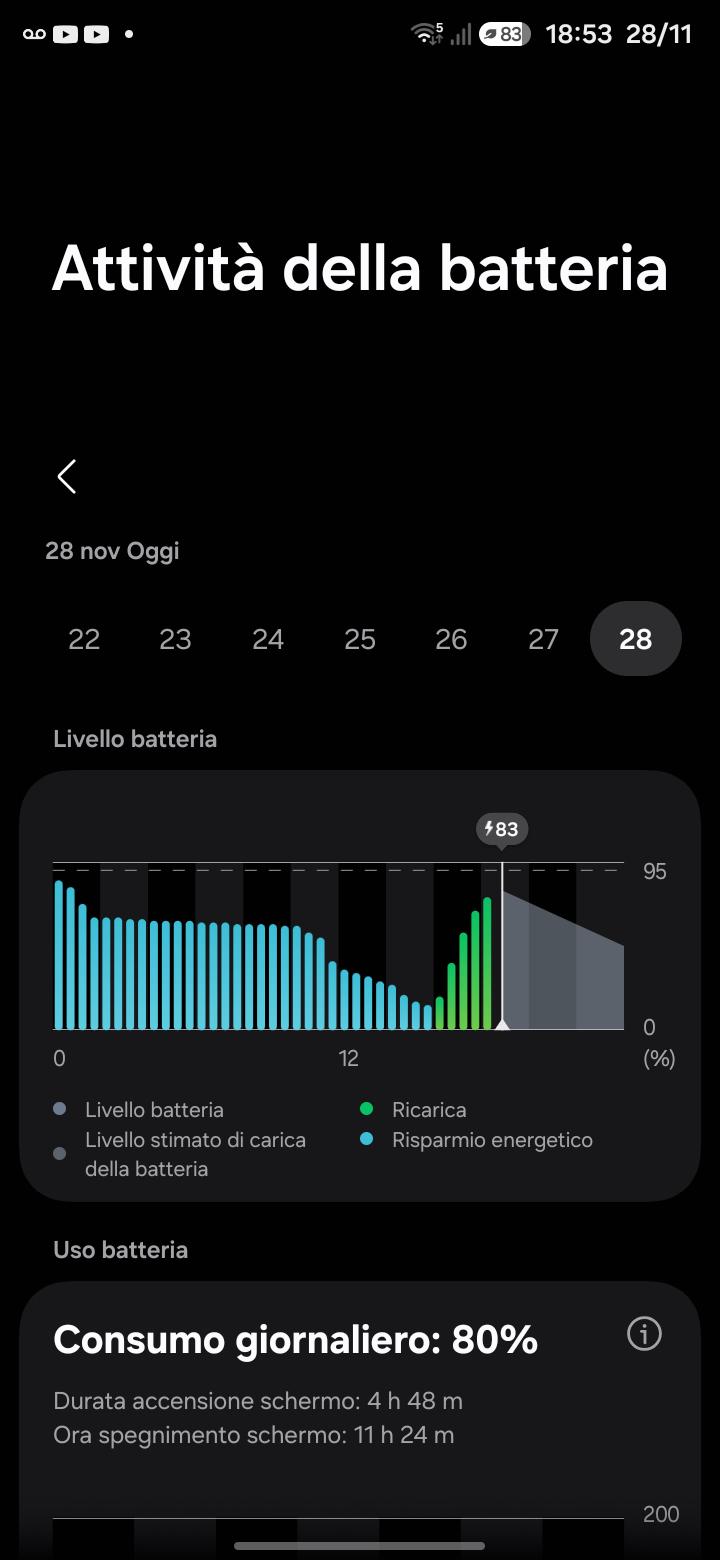
È normale che la batteria faccia così? Doveva caricare al 95%, ma si è fermata all'83%. Non ho visto quando è successo, ho visto solo che calcolava il 92%, poi ho rivisto ed era all'83%.
r/S24Ultra • u/PhaaZee • 21m ago
Hello guys,
Ever since I updated my Galaxy S24 Ultra to Android 17, Android Auto kept disconnecting nonstop. I saw a bunch of people complaining about the exact same thing in other threads, and I finally stumbled across a fix that worked for me.
Zero drops since I unchecked that
Let me know if this fixes it for you too!
