r/TpLink • u/Quickdraw209 • 32m ago
TP-Link - Technical Support Tapo RV50 Omni Pro Vacuum
reddit.com
2
Upvotes
r/TpLink • u/Ryan_TP-Link • 15d ago
Friends or family are over, someone pulls out their phone, and eventually you hear:
“Hey, what’s your Wi-Fi?”
Do you tell them the Guest Network password? Pull up a QR code? Maybe you’ve gone a step further and set up an NFC tag, printed card, smart display, or something else entirely.
Guest Networks provide a convenient way to share Wi-Fi with visitors while keeping your main network separate, and with holiday gatherings just around the corner, we’re curious how everyone actually handles sharing their network with guests.
Here are just a few ways you can get guests connected a little easier:
What's your Guest Network Setup?
QR code? Password on the fridge? Something more elaborate? Let us know how you make it easy for guests to connect!
r/TpLink • u/Quickdraw209 • 32m ago
r/TpLink • u/EntzAndrew • 5h ago
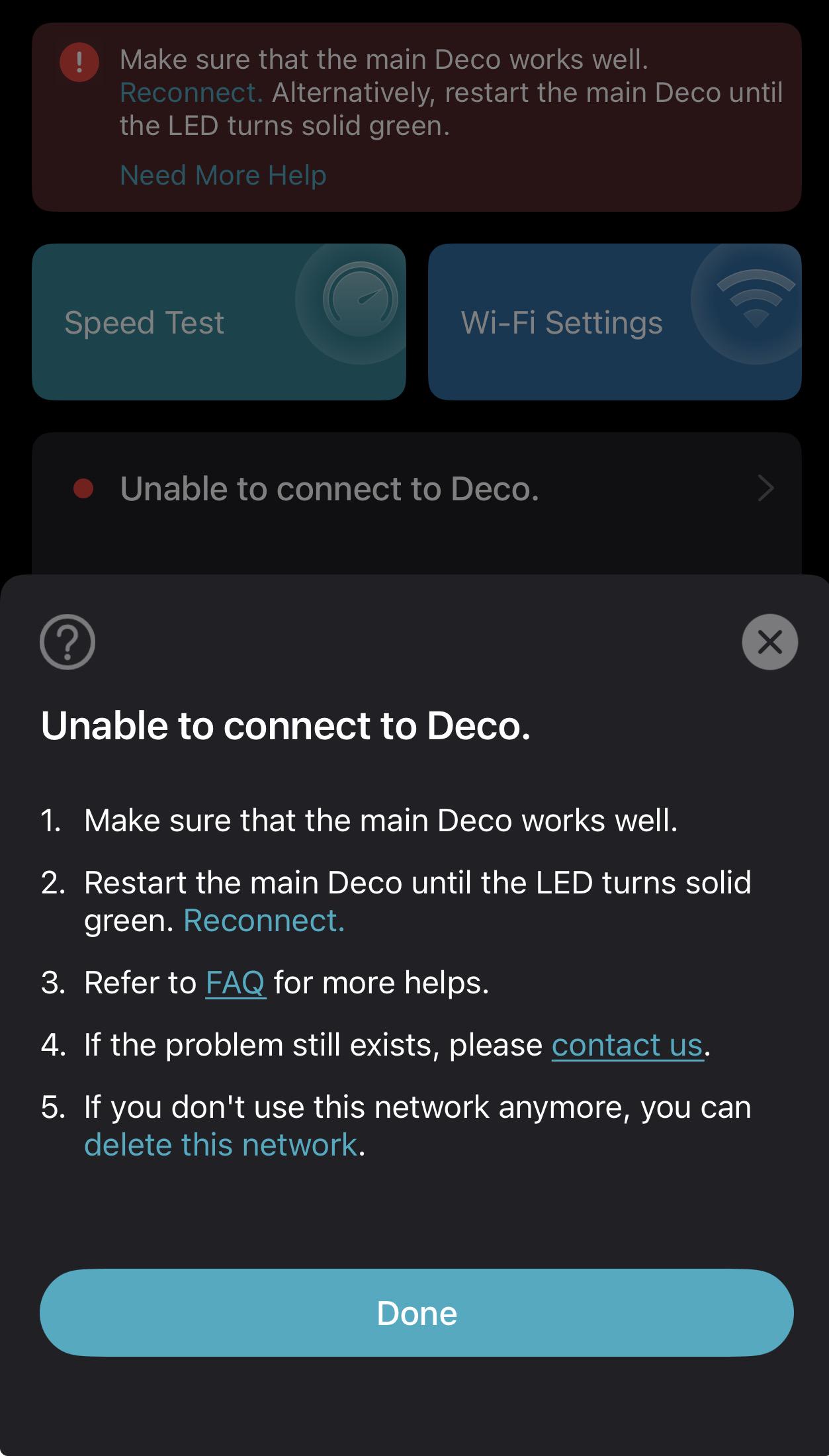
The deco app will not connect to my network but the network is working fine and I can login to the web tool with no issues. All lights on the decos are green and Internet is working fine. It does not matter if I am connected to the network over wifi or not, the app fails to connect with the same error (see image).
Things I have tried:
Network has 3 65pros and one 65. TPlink support has not been helpful at all. Anyone seen this before and have a fix?
r/TpLink • u/gustavogoto • 4h ago
Hi, I'm having a persistent reconnection issue with the TP-Link UB500 V3 (Bluetooth 5.4) and a Nintendo Switch Pro Controller on Windows 11.
Symptoms:
ReadSPI error → Error while reading calibration datas → Resetting connection → Could not connectWhat I've tried:
UB500(UN)_V3_20250702_Win10_Win11 (version 1.9.1051.3012) — same issueUB500_BT_1.9.1038.3020 (from FAQ #4188) — same issue, and it downgraded the firmware from LMP 13.x to LMP 9.x (incompatible with V3)Firmware confirmed: HCI 9.55449 / LMP 9.25805 (with beta) / LMP 13.x (with stable)
Question: Is there a beta driver or firmware update specifically for the V3 that fixes the reconnection issue? The existing beta (1.9.1038.3020) appears to target V1/V2 only and is not compatible with V3.
r/TpLink • u/TechGolfer82 • 14h ago
Since installing last Jan. Have a separate garage where we have a golf sim room setup. We have an EAP 650 in there that’s connected by a MOCA adapter running into the main house via coax.
Since day 1 Apple devices (phones and AppleTV) intermittently loses and regain connection…. Talking ever couple minutes.
We have a windows desktop running the golf sim connected to the AP with ZERO dropouts. I’ve run Ping -t test several times on phone and desktop and can see when iPhone drops connection and the desktop keeps pinging away.
It’s an Apple issue as I’ve also tried a ubiquiti AP and had same issue.
I’ve tried…
Same SSID as house and also different. Tried single word SSID along with multiple words with spaces.
Using AI and all kinds of possible setting changing on the Omada web interface with no luck at all.
I’m sure this AP has sold by the thousands not sure why it’s either not more widely reported or what makes my situation different.
I could try different settings in the iPhone but that doesn’t solve for AppleTV is I don’t think has same setting adjustments.
Anyone have any other ideas? Super frustrating.
r/TpLink • u/NiLBoG__MiLK • 15h ago
I am a noob when it comes to setting up this stuff and I just want to make sure I’m using it properly after getting it on sale for Black Friday.
I currently have a 1GB bandwidth internet plan through Verizon Fios and their CR1000A router on the ground floor (basement of a split level). It’s hardwired to a Verizon extender on the first floor above it. I have my PS5 connected to that via an Ethernet cable.
The issue is the second floor bedrooms have a weak connection to the WiFi so any gaming on the PS Portal upstairs is inconsistent at best. I want to use the Deco system to eliminate dead spots and make the remote play upstairs as stable as possible.
I guess my questions are:
1.) Should I use the Deco system as a router or access point? And what settings or tweaks should I make?
2.) If the Deco is used as a router should I turn off WiFi on the Verizon router and just use it to hardwire to the PS5?
3.) What settings or changes should I make to the Verizon router via the admin login or to the Deco system to get the best connection and eliminate bufferbloat because my latency unloaded is in the single digits most of the time but was over 100 loaded so I know that can interfere with gaming.
Any tips or advice would be greatly appreciated!
r/TpLink • u/jaydeflix • 11h ago
It says it is working well in Tether and the network and shows as online with 10 clients. Is there any logging I can configure on it to try to piece together what it thinks is wrong?
r/TpLink • u/Nusuthoid • 15h ago
I am planning shifting of my internal network from ISP router to Mikrotik, so I wanted to do some tests before I move everything. Since I have 6 BE25 units on my main home network in AP mode with wireless backhaul (no way to trace ethernet over the house), and I have 3 apartments connected to it, I wanted first to check how DHCP leases over Mikrotik will behave. I have a spare x50 unit that I used to create a new Deco network and check how devices will behave when I connect to this network. So far so good.
Well, since I occasionally check if my main Deco network is using optimal channels, I use that Network Optimization feature in mobile app that will scan the channel overlaps and change channels on Deco network if required.
So, I did that when I had x50 unit with new network really close to my main BE25 unit. After the optimization was finished, 3 out of 5 spoke BE25s wouldn't connect back to main BE25. Suspicious, since until then all was working without issue, and I'd performed optimization without issues. Nevertheless, I power cycled the disconnected BE25 units and they reconnected to main BE25.
3 days later, I did the same. Now, all 5 spoke units didn't connect back. WTF? OK, I immediately looked at my x50 and disconnected it. Rebooted my main BE25 - all spokes immediately came back and connected to BE25.
So obviously there seems to be some race condition or something where spokes will try to connect to stable unit - and in this case they thought it was a x50, but of course it's part of another network, so reconnection was not successful. But it somehow locked them from trying to search for main BE25 when it came back.
Anyone else has similar experiences?
r/TpLink • u/No-Lifeguard-1832 • 17h ago
I have an old house with 2ft thick solid stone walls and unfortunately it is L shaped and the router sits at the top end of the L with a gaming computer at the furthest point away from it.
I currently have 3 x Deco M5s which have worked not perfectly but well enough but I recently upgraded to EE 900Mbps broadband and their Smart hub 7 plus and the M5s are causing a bottleneck so I feel like it is sensible to upgrade them.
So, what is the best choice? I don't want to spend a fortune but I also don't want something I am going to need to replace again in 2 years because it is obsolete. I was looking at 3 x BE5000, is that a good choice or is there something better?
I should add that the house is rented so drilling holes in walls and hardwiring everything is not an option.
r/TpLink • u/Itz_Parth2016 • 18h ago
My TP link v5 is giving like very slow internet on 5 gigaher 2.4 gigaher the transmit power is on high and D 2.4 gigahers is on 20 Mhz head and the five gigaherts on 80 ml said and the channel is also only best one to I can find the latest version of software update is what to do now and the house is not even that big an 40mbps
r/TpLink • u/Odd-Hawk-1921 • 1d ago

I hope I can post this here as I suppose it's commonly encountered when you go on disassemble the original gear, mod the antennas, etc. This is e.g. Archer AX20, but I have noticed this on others: a couple of antennas is soldered, a couple plugged in with U.FL. Not sure which pair is which band, but I wonder if it matters, as in - is there some reason why they cannot be all just soldered (which is cheaper)?
(I basically want to take out the innards of one of these and put it into different case, so would like to know if I am likely to mess up anything.)
Thanks.
r/TpLink • u/NamSinepegraleht • 1d ago
Hello all. I bought a TP-Link BE 700 router a couple of weeks ago. I'm on a 500Mbps Fibre to the premises NBN plan. Wifi speeds are around 550Mbps. However, LAN are only 80ish.
Setup is NBN to BE700 then ethernet (Cat6+) to a QNAP QSW21042tr3 switch, then to a windows PC, a Linux PC and a NAS. Router is 3 x 2.5g ports and a 10 g port. Switch is 2 x 10 and 4 x 2.5. All plugs are in the right places. Transfer over LAN between the PC's and NAS is super fast. Plugging the PC directly into the router bypassing the switch etc gives the same low speeds so I think it's a router problem.
Please don't be offended, but I've done everything the internet has suggested I do, so I am not after suggestions or stabs in the dark. I am hoping someone has had the same problem and found a fix. I am starting to think the modem is actually faulty...
Sorry if I'm a bit short. I've been working on this for days and am a grumpy old man. Get off my lawn!
Many thanks,
Booms
r/TpLink • u/Ok_Diamond_8354 • 1d ago
r/TpLink • u/PinRemarkable469 • 1d ago

Tried to connect two TL PA 7017 power line adapters. Both devices show three green links but tpPLC app shows only one device with error message, your computer is not connected to an adapter.
r/TpLink • u/Useful-Acadia3505 • 1d ago
Every time I reboot my Lenovo Legion Gen 4 (Y700), the 6 GHz network just won't connect, even with Auto-connect on or tapping it manually in WLAN settings. Rebooting the router fixes it and lets the tablet connect (I get the Tether app join alert for `Y700`), though I've also seen it show as offline in Tether while the tablet sat on a 5 GHz network. If I reboot the tablet again, the problem comes back and I have to reboot the router all over again.
Things were working half decently before today. Before I toggled Smart Connect on (to combine 2.4 and 5 GHz while trying to fix an auto-connect issue), simply opening the saved networks page was enough for the tablet to auto-connect to the 6 GHz network. Ever since toggling Smart Connect, it's been broken like this.
Setup:
- Tablet: Lenovo Legion Gen 4 (Y700), CN firmware (ZUI). Can't update ZUI right now.
- Router: TP-Link Archer 6E in Access Point mode (in the UK).
- Security: WPA3-Personal
Stuff I've already tried:
- Factory reset the Archer 6E, let it finish booting, and set up AP mode again
- Turned Smart Connect off and used separate SSIDs
- Tested 80 MHz width, fixed PSC channels (37, 53, 69, 85).
- Forgot and re-added the 6G network . checked Auto-connect, disconnected from 5 GHz during tests, toggled WLAN, and cycled Airplane mode
- Cleared offline clients in Tether
Anyone else seen this with a CN Y700 or similar ZUI/Android tablet on 6 GHz in AP mode? Why does it need a router reboot after every tablet reboot, and is there any way around it?
r/TpLink • u/RisingPenguin • 1d ago
Wondering if the tp link xe75 is still a good option in 2026. Have xfinity 400download/35upload and live in a home about 3k sqft(basement, main floor, upstairs). They are currently on sale. If not, why and what would you recommend. I’d say my budget is like 220 but if it’s really worth it I can move it up a bit. Usage is pretty standard with stuff like gaming, youtube, netflix and i work from home so zoom calls. Family of 4. Thank you in advance!
r/TpLink • u/Severe-Ground4368 • 1d ago
Guys what will be the best router for 100Mbps fiber connection, may be 200Mbps
r/TpLink • u/Dontech1 • 2d ago
New Firmware Version:
1.1.5 Build 20261117 Rel. 43974
What's New:
New Features/Enhancements: 1. Improved system security and stability.
Anyone install yet ?
I am on 1.1.3 and seems like a rock so far....
r/TpLink • u/Onedied4all • 1d ago
Has anyone updated yet? I'm hesitant because I see reviews of other BEx that are having issues with the updates that they received.
r/TpLink • u/IAdoreSZA • 2d ago

I bought a new BE65 and for some reason it runs a different software to my older one but it says it’s up to date…
r/TpLink • u/Intelligent_Draft886 • 2d ago
Hey Everyone! I am confused if my router is behind on updates. I have a AX1450 router that I bought a few months back and haven't received any updates. I went on https://www.tp-link.com/us/support/download/archer-ax1450/ and then the emulators page, I found that there are many features on the emulator page that are not present on my router. I was really hoping I could get IoT network and the wire guard VPN server. I was hoping someone could help me with this. On the emulator page, I do notice the hardware version is 2.6 while my router is 1.0. I tried launching the emulator for my hardware version but it redirects me to AX1500. I was wondering if my router could get these features with a later software update or will it be exclusive to hardware version 2? Thanks for your help! :)


r/TpLink • u/JT_Dawg16 • 2d ago
Sorry if this comes off as not too technical, but not super great with networking. Think I narrowed the problem down, but unsure where to go from here (if anywhere).
Recently got 1Gbps Fiber and trying to get that through the house at full speed. Kept my deco setup of a XE75 router which leads to a switch (TL-SG108) and then 3 X20 decos off of that with wired backhaul. Wiring is somewhat old at cat 5e, but seems to do the job for the most part(reasoning for not blaming that below).
When running speed tests via Wi-Fi, when connected to the xe75 I get about nearly the full 1gbps. When connecting to the x20s though, I get 350mbps or so. (note - I am checking in the deco app what node I am connected too.)
With the fiber, received an eero 7 pro and decided to bring that into the mix for testing.
First set it as the router and decos as AP mode with no change in speeds.
So went back to original setup (xe75 - switch - x20s), but pulled one of the deco x20s, put the eero in it's place in Bridge mode and when connected directly to that thru the cat 5e wiring, I do get nearly the full 1 gbps as well (essentially same as xe75 router).
So I guess my question is, are the x20s being a part of the mesh network with wired backhaul just going to be slower by default or is it firmware as I have seen as a possibility when searching it or something completely different?
Still have yet to test resetting the removed x20 and set it to not be a part of the mesh and just an AP and see if that makes a difference.
Any thoughts would be great! As I am unsure what I am missing. Not terribly concerned as things run just fine with these speeds too, but I have to chase that top number if I can! 😉
r/TpLink • u/Emotional-Mobile-821 • 2d ago
I have an Archer AXE5400, maybe two weeks old, and when I use my laptop in a different room, the internet slows to crawl and most of the time the websites time out and won't load.
This is a 425 sqft garage apartment, it's tiny but it's like the walls are lined with steel or something.
Are there setting I can play with or is this a laptop issue?
Any help is appreciated
