EasyFind, 4th place in CurseForge's addon competition back in July, lets you search just about everything, with an easy to toggle search bar. This includes not only items but even UI elements like menus which let you open right to them from the results.
While the base addon already provides a lot, in an attempt to prevent bloat, there are several extensions so you can pick and choose what you want. A few current ones include:
AI disclosure: Agentic coding was used to develop this project, but didn't write this post. I developed software well before AI and continue to follow best practices with it. Additionally, this is not a one off update. I made it back in February and have been regularly updating it, and will continue to.
Hello, DaylightUI dev here. Just showing off what I'm currently rocking and an example of the customization of the UI suite.
If you missed personal resource display from Legion, I have rebuilt it completely, and you can hook your swing timers, cast bar, and cooldown manager to it, so they all move together.
Thanks a lot for all your feedback, a lot of it went straight into this update:
New options menu with a live preview beside every tab
Animated portraits: living painting, submerged in the vial, reacting 3D model or a plain animated model
Permanent health, power and XP numbers in Blizzard or custom formats, even floating on the liquid or etched into the glass
Choose your own fonts, including LibSharedMedia fonts
Settings for all frames or per frame, plus profiles
Out of the box everything looks the same as before. Keep the ideas coming!
***
I made an addon called Lucid Vials. It turns the player, target and target-of-target frames into bronze glass vials. Health and resource are liquid. It sloshes when you run, turn or jump, and settles when you stand still.
What it does:
- Health and resource glide to new values. Lost health leaves a short glowing trail.
- Hits, heals, shields and mana regeneration show as small effects inside the glass.
- Debuffs tint the liquid: green for poison, violet for curse, yellow for disease, blue for magic. In combat the game hides the debuff type from addons, so the liquid takes the colour of Blizzard's own debuff border instead.
- The XP bar becomes a liquid tube with a rested section and a level-up effect.
- The target portrait gets horns and a skull for bosses, a gold dragon for elites and a silver one for rares, plus the raid marker, the quest symbol and the level.
- In Forever the frames show the full name with surname.
- Two looks: piston chamber (default) or a plain liquid edge.
Mana RegenerationTargetXP Bar
Lucid Vials only reskins Blizzard's own frames. Clicks, the right-click menu, focus and Edit Mode stay Blizzard's. It uses no secure templates, so it also works in combat. If another unit frame addon (ElvUI unit frames, Shadowed Unit Frames, PitBull, XPerl and others) is loaded, Lucid Vials stays off and tells you why.
It is made for WoW Forever and runs on Retail from the same download. I play Forever, so Retail gets less testing. If you play Retail, bug reports are very welcome. The frames are on after installing. `/vials` lists the commands, `/vials config` opens the settings, and `/vials test` plays the effects without a real fight.
No libraries, no network access. It is a separate addon from Lucid (my immersion UI suite) and works with or without it.
I built it with a lot of help from Claude Code. Most graphics were made with Google Gemini and edited by me. The clips are real in-game recordings. For the clips I enlarged the frames and put them on a plain background.
Source and bug reports: https://github.com/even512/LucidVials/issues (for an error, please add the message from `/console scriptErrors 1` and the version from `/vials version`)
It's been a LONG time since I've been a serious WoW player (Forever pulled me back in!), but I really thought that way back when (I'm talking BC/WotLK days), I was able to use modifier keys with macros AND my MMO mouse (currently a Corsair Scimitar Elite).
However, when I created the macro, it would trigger the first spell cast (non-modified) but only look like it was being pressed on the modifier. I have my MMO keys mapped to the number pad, which got me thinking, is it because it can't register the shift, control, or alt key and ALSO register the number pad?
My original macro was:
#showtooltip
/cast [mod:shift] Swift Judgement; Judgement
Works fine if you're clicking on it directly. Doesn't work when using the MMO mouse/keybind of number pad (or anything, really).
They folks, I’ve been looking for an action bar AddOn that only shows buttons on the bar if they are keybound.
I like having my bound buttons always visible, even if there is no ability assigned to it yet. Unfortunately, to get the aesthetic I’m after, this results in using more action bars than would really be necessary. One bar for 5 buttons, another bar for 4 buttons in an offset position, another bar for 2 buttons…etc.
The over-use of action bars could be solved with an AddOn that only displays keybound buttons. For example, I could then use Bar 1 with 12 buttons, configured in 6x2, and have certain bindings spaced-out the way I like it.
Is there such an AddOn?
EDIT: Found what I was looking for. It’s called VinnyBars.
I have long had a vision of a particular UI style that I wanted, but all these all in one addons like elvui and elesmere are to be just soul less rectangle frames.
There are others that are better but it's still not quite what I wanted. So I'm a software dev. And we have claude these days so I just made it my self. This is still early days of it. It's how far I could get in 3 days while also playing.
Decided to install ElvUI for Forever finally. Wanted to test some stuff so ran over to riverglades and after I kill something I get this. Reloaded still get it. Found out it goes away after hitting escape for whatever reason. Looting seems to trigger it.
As far as other addons I'm running...
Auctionator
AtlasLoot Forever
ElvUI Forever
BlizzThreatPlates-Forever
Clique
Details
DungeonJournal
GatherLite
PallyPower Forever
Spoken
I've used ElvUI in Classic without issue. Not really sure whats going on with it in Forever.
Hey all! I kept running into players in Forever chatting in languages I couldn't read, so I built a small addon that translates their normal chat for you.
This UI is made up almost all ForeverAuras. The blue bar is to track Battle Shout and the Yellow Bar tracks demo shout. It also has dynamic buttons to include custom stance Auras, it also has a ForeverAura that shows Overpower regardless of what stance I'm in, but Execute and Revenge will only show on appropriate stances. It's very much a work in progress so I might change the Overpower to restrict that to appropriate stances.
Getting this really annoying UI thing in Dungeons. Any ideas on what is causing my buffs showing up next to ally nameplates. Only happens in dungeons. I shared the /fstack. I use Ellesmere UI Forever.
Craftseeker is a reagent and recipe browser for WoW: Forever (looks similar to the profession window). Alt+Click any item to see every recipe it goes into, how to learn each one, and where to get it.
What it shows:
Recipes that use an item
Recipes that make an item
How to learn each recipe
Where to get a reagent, with drop rates
Chests and containers, with their rates
Recipe items and what they teach
Recipes in the profession window's categories
Skill-up arrows
Which of your characters know a recipe
Reagent counts in your bags, bank and alts
Shopping list for tracked recipes
Map pins, TomTom too
Drop rates improve as you play. Every loot, gathered node and catch is counted and shared with other Craftseeker users online.
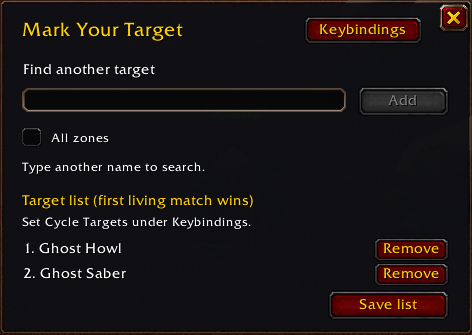
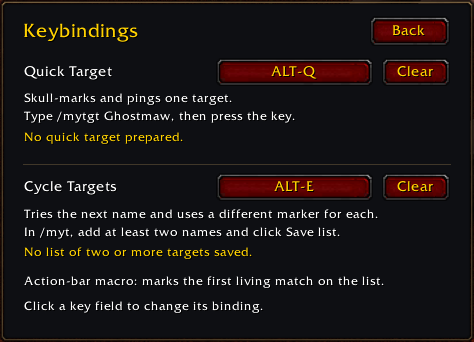
Update (v1.5.0): You can now build a list of mobs in /myt. Add the names you need and click Save list. The action-bar macro tries the names in order and marks the first living match. To try one name per press with a different raid marker for each, set Cycle Targets in the picker’s Keybindings panel. Fully restart WoW after updating. v1.5.0 download and notes.
I kept swapping the mob name in the same /tar macro, so I made a small picker for WoW Forever. Ghostmaw in Riverglades was my test case.
Type /myt or click the minimap crosshair to open the NPC picker. It puts local matches first, and Save updates the same macro. If you only need it once, /mytgt Ghostmaw opens a Quick Target button that tries to target, skull-mark, and ping the mob when you click it.
I’d like feedback on the picker. When you type part of a name, does the NPC you expect show up near the top?
Was searching for a Pink UI addon for quite a while but haven't found one before, found this and decided to test, does the job & looks pretty! Can also add custom pictures, be it a bit difficult, but pretty cool non the less.
Bänd of Bløød [Horde | Normal/PvE] is recruiting! A casual, new guild doing a little bit of everything. Beginners and veterans welcome! We are looking for people who are interested in really just not playing alone.
I’m new to wow and add ons in general. I’m having a great time with wow forever but I’m a bit overwhelmed by this giant quest list to the side of my screen. I was wondering if there’s a minimal quest ui you guys recommend or something to just make the giant list easier to digest?
Magetunnel was made to be user-friendly, and a highly visual tool with Quality of Life features. As I'm a professional User Experience Designer, I found current addons to be confusing and difficult to use.. as I've seen lots of AI slop, too much redundant text, and confusing layouts.
What is Magetunnel for?
Magetunnel is for Mages to find all players (regardless if they have Magetunnel installed) in their intended destination, request to join their party, and teleport there with a Scroll of Liminal Passage… which is an item that allows Mages to teleport to a Party Member who is resting in a city or Inn.
This UI skips the /who z-"[zone name you forgot to type] c="Mage" -> filter -> message -> request party -> find scroll flow with a dedicated interface that's easy to use and searches for people who are already likely resting, so you can get to your destination faster.
Features
Per search, find up to 50 players in a zone or town by typing,selecting from a dropdown, or selecting a town on the map
Click 'Whisper' on a player to send a template message (that you can customise for a personal touch) to message players faster
Click 'Invite to group' and 'Teleport' once a player replies to your whisper for faster interactions
See players who are likely resting, who are more likely to reply to your request!
Note: Blizz does not allow searching by Inn. Towns with Inns are denoted with a Hearthstone icon, meaning players in these areas are likely to be closer or in an Inn already.
The dropdown list for areas shows Hearthstone Icons for towns with Inns
The dropdown list shows level ranges, to help you find your next best zone for questing
Favourite a zone or town for fast repeat teleports
See how many scrolls are in your inventory and bank at a glance
Level up your Magetunnel level by teleporting and accepting other Magetunnel users requests!
Customise the theme UI with multiple colour styles and options
See the active player count of other Magetunnel users (you can still teleport to ANY PLAYER regardless if they use the addon
Full transparency: I design the addon in Figma, a UI design tool. I do a mix of manual coding and AI-assisted coding with Claude Code Opus 5.5 to convert the designs into working code 1:1. I modify code myself when necessary for bugs and other issues.