r/Zettlr • u/STvSWdotNet • 2d ago
My Zettlr 4.10 CSS
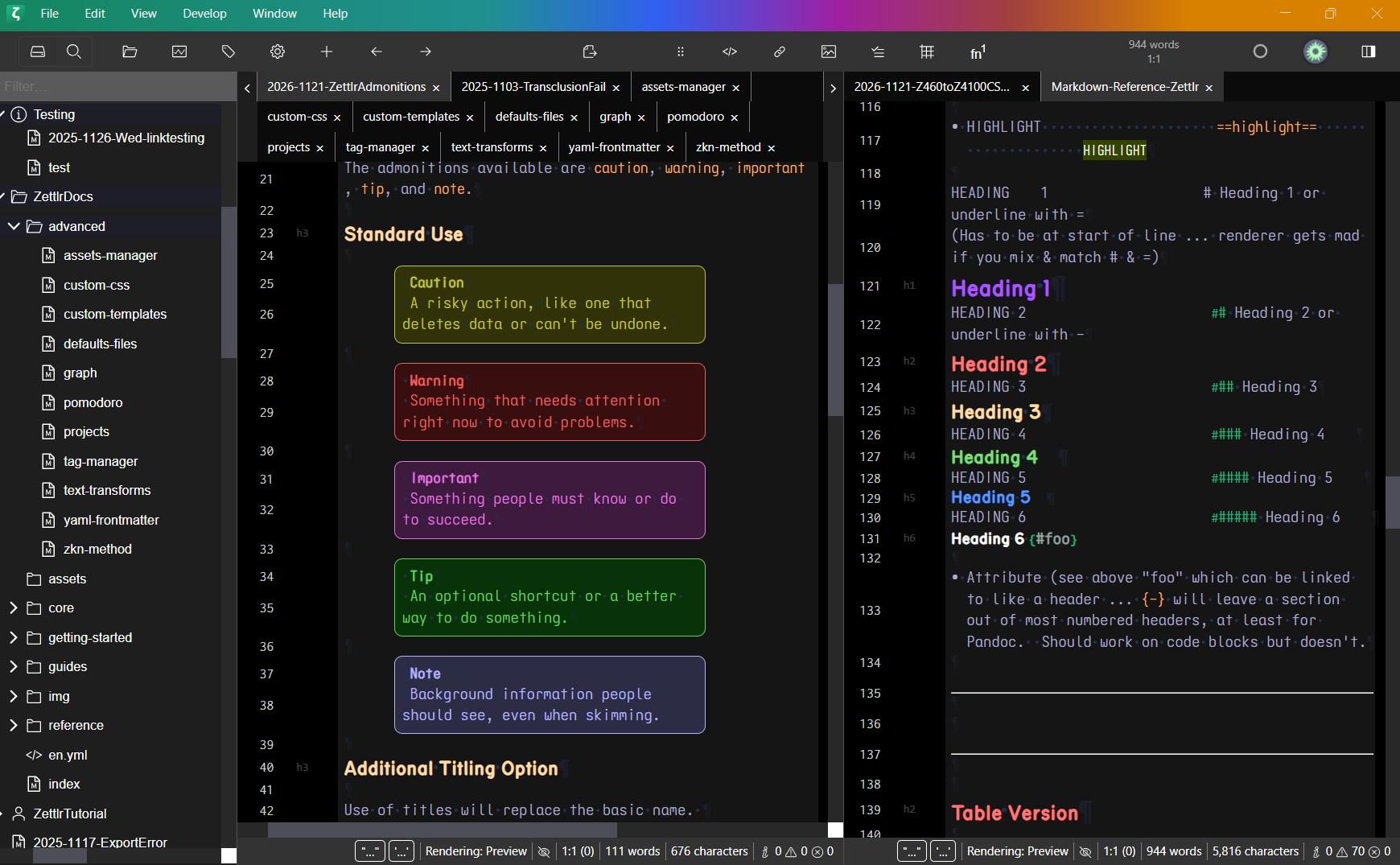
Following on from some previous posts (e.g. Zettlr Can Be Beautiful and Multi-Line Tab Container )
Please note that I am not a CSS expert by any means, and that, moreover, this may contain 'legacy' maneuvers that worked in prior versions but that I haven't noticed issues with in later Zettlr versions. Caveat emptor, your mileage may vary, et cetera.
I've tried to section off the below in an orderly way but it's undoubtedly somewhat haphazard.
Note that, contrary to Github but in keeping with the normal use in the rest of the world, I have swapped color schemes for Caution and Warning.
/* I.  PROGRAM LAYOUT ------------------------------------------------------------------------------------------------------- */

/* Adjusting the space left to the text in the editor */
.main-editor-wrapper .cm-editor .cm-scroller {
    padding: 10px 10px;
    background: #000000;
}

/* Changes top menubar into more colorful version, which is also an HTML rendered element.  */
#menubar {
  background: linear-gradient(90deg, #15865f 0%, #209090 35%, #3060F0 47%, #A020A0 60%, #A04040 72%, #d88000 85%);
    background-position: left center;
    background-repeat: no-repeat;
    background-size: contain;
}

/* MENU STUFF -------------------------------------------------------------------------------------------------------------- */

/* File left menu */
/* Allows for left/right scrolling */
body #file-tree {
    overflow-x: auto;
}

/* Changes font and kicks off the bottom scroll bar at all times.*/
body div.tree-item-container {
    font-family:  "Arial Narrow";
    width: 120%;
}

/* EDITOR / MAIN WINDOW STUFF ---------------------------------------------------------------------------------------------- */

/* FONTS and COLORS --------------------------------------------------------------------------------------- */

/* HEADINGS ------------------------------------------------------------------------------- */

/* Change Headings*/
body .cm-header-1 {
  font-family: "Routed Gothic";
  font-size: .8em;
  color: #AA55FF;
  text-shadow: 0px 0px 20px #FF00FF;
}
body .cm-header-2 {
  font-family: "Routed Gothic";
  font-size: .8em;
  color: #FF7777;
  text-shadow: 0px 0px 17px #F00;
}
body .cm-header-3 {
  font-family: "Routed Gothic";
  font-size: .9em;
  color: #FFDDAA;
  text-shadow: 0px 0px 2px #DDDDDD;
}
body .cm-header-4 {
  font-family: "Routed Gothic";
  font-size: 1em;
  color: #77DD77;
  text-shadow: 0px 0px 2px #0F0;
}
body .cm-header-5 {
  font-family: "Routed Gothic";
  font-size: 1.2em;
  color: #5599FF;
  text-shadow: 0px 0px 3px #00F;
}
body .cm-header-6 {
  font-family: "Routed Gothic";
  font-size: 1.1em;
  color: #FFFFFF;
/*  text-shadow: 1px 2px 3px #CCC;*/
}

/* PRIMARY FONT --------------------------------------------------------------------------- */

/* Change primary editor window font */
body .main-editor-wrapper .cm-content {
  font-family: "AoRA1";
/*  font-size: 0.92em;*/
  color: #AAAACC;
  background: #151515;
}

/* Change font size within tables when editing to match above
so as to avoid 'bouncy' effect.  .content would allow all the
size to change but this bump-up works better for view and edit.*/
body .main-editor-wrapper .cm-content-span {  font-size: 1.08em;}

/* SPECIAL CASES --------------------------------------------------------------------------- */

/*Change color of quoted or other monospace text*/
body .main-editor-wrapper .cm-monospace {
  color: #FFAA66;
}

/*Prevent quoted text from automatically being italicized*/
body .main-editor-wrapper .cm-quote {
  color: #CCCCEE;
  font-style: normal;
  background: #252525;
}

/* Alter bolded text for enhanced visibility */
body .main-editor-wrapper .cm-content .cm-strong {
  font-family: "AoRA1";
  font-weight: 600;
  color: #CCCCEE;
}

/* Alter italicized text so it isn't suddenly weird in 4.6 */
body .main-editor-wrapper .cm-content .cm-emphasis {
  font-family: "AoRA1";
}

body .main-editor-wrapper .cm-content .code {
  font-family: "AoRA1";
}

body .main-editor-wrapper .cm-monospace {
  font-family: "AoRA1";
}

/*Fix highlighter'ed sections for readability*/
body .main-editor-wrapper .cm-highlight {
  color: #FFFFFF;
  font-variant: small-caps;
  font-size: 1.3em;
  font-size-adjust: ex-height 0.45;
  background-color: #334400;
}

/* ADMONITION CHANGES --------------------------------------------------------------------- */

body .main-editor-wrapper {
  --zettlr-note-color: rgb(180, 180, 250);
  --zettlr-note-bg: rgba(60, 60, 100, 0.6);
  --zettlr-important-color: rgb(222, 120, 222);
  --zettlr-caution-color: rgb(193, 193, 68);
  --zettlr-caution-bg: rgba(70, 70, 0, 0.6);
  --zettlr-warning-color: rgb(227, 99, 99);
  --zettlr-warning-bg: rgba(80, 10, 10, 0.6);
}

/* OTHER EDITOR FONTS  -------------------------------------------------------------------- */

.cm-gutters {
  font-family: "AoRA1", monospace;
  font-size: 0.8em;
}

/* OTHER EDITOR BITS --------------------------------------------------------------------------------------- */

/* Changes editor selection color from too-bright green to purple */
/* Blank selections in Assets Manager remain dark green. */
body .ͼ4 .cm-line ::selection, .ͼ4 .cm-content ::selection, .ͼ4 .cm-scroller ::selection  {
    background: rgba(90, 60, 180, 0.8) !important;
}

/* The above stopped working on table text somewhere in v4 (I jumped to 4.6 from much further back).
   I lived with it until 4.10, at which point I stumbled into the fix below.  A superior technique
   likely exists, but it won't be me who finds it.*/
body .cm-table-editor-widget-wrapper .cm-editor .cm-scroller .cm-content ::selection {
    background: rgba(90, 60, 180, 0.8) !important;
}

/*Alter the space indicator to be less obtrusive in both Assets Manager and main-wrapper-editor*/
body .cm-editor .cm-highlightSpace {
  background-image: radial-gradient(circle at 45% 50%, #203050 15%, transparent 5%);
  background-position: center;
}

/*Alter the trailing space indicator to be less obtrusive in Assets Manager and main-wrapper-editor*/
body .cm-editor .cm-trailingSpace {
  background-color: #44110015;
}

/*Alter the paragraph symbol to be less obtrusive in Assets Manager and main-wrapper-editor both*/
body .cm-editor .cm-pilcrow {
  color: #203050;
  opacity: 0.35;
}

/*Alter the folded code indicator to be more obtrusive*/
body .cm-editor .cm-foldPlaceholder {
  color: #FF5511;
  font-size: 1.5em;
}

/*Alter the tab symbol to be less obtrusive in main-wrapper-editor*/
/*2025-1028 - TBH, not sure how it got so bright gray all of the sudden.  It seems to actually be a call-out to ... */
/* ... an .svg file at w3.org, which I don't particularly care for.  Anyway, I just made it more transparent to resolve.*/
body .main-editor-wrapper .cm-highlightTab {
  opacity: 0.4;
}

/* Full-width, thicker and grey horizontal lines
    Two "---" can also be concatenated  (with line return in-between
    for even thicker lines.*/
body .main-editor-wrapper .cm-hr {
  display: block;
  width: 60vw;
  margin-left: calc(-7vw + 10%);
  border: none;
  border-top: 2px solid #AAAAAA;
  height: 10;
  background: none;
  box-sizing: border-box;
}

/* Admonition box lateral size shrinkage ... by default they're almost completely full width.
   This increases the left margin from virtually non-existent and adds right margin. */
body .ͼ1 .admonition-wrapper {
    margin-left: 4em;
    margin-right: 8em
}

/* OTHER STUFF -------------------------------------------------------------------------------------------------------------- */

/* Multi-Line tabs for open files as seen in the list over the editor window. */
body div.tab-container {
    &[data-v-d18a1b94] {
  height: auto;
  display: inline-flex;
  overflow-x: auto;
  flex-wrap: wrap;
}}


