r/bmpcc • • Apr 10 '24

Applications for Moderators

12 Upvotes

Hi all,

This community has grown, and as such, it's attracted 99% fantastic members who are passionate about film, filmography, cinema and the like - but all in all a unique and common understanding and appreciation for BlackMagic Design cameras.

As such, we are looking to increase our moderator count to ensure that we are providing an active and safe space for all users; all of which are keen to showcase their work, builds, technical queries and general chit-chat.

We are looking for active users - yes we know who you are, who want to build and maintain this community for the best.

Feel free to recommend users here, and we'll follow the usual upvote counters to help make this decision.

Thank you all-


r/bmpcc • • 10h ago

I created a remote control in the browser to control Blackmagic cameras via Bluetooth.

Thumbnail
gallery
49 Upvotes

Hello everyone!

Some time ago I used the camcontrol.app website to remotely control my Blackmagic Pocket.

Unfortunately the site has ceased to exist.

I then decided to revive this site in my own way.

Remote Camera:
https://remote.sylvatools.com

Remote Camera is therefore a website where you can control your Blackmagic Camera via Bluetooth: ISO, aperture, codec, color space, frame rate, sharpness, white balance...
And of course start and stop a recording.

In addition to all this, if you have electronic lenses, you can control focus and zoom.

I really thought of this tool as a second Blackmagic OS.

Combined with a return screen, it's really a game changer, especially when your camera is out of reach.

Finally, I also added 4 features that I found very useful:
- the possibility of setting the cameras on time in one click from the time of the phone, to have the TC in Free Run always on time,
- The camera's real-time battery indicator: in V and percentage, with personalized alert if the device drops below a certain user-defined threshold,
- An automatic reconnection in case of Bluetooth out of range,
- the installation of a live marker.

Live marker installation:
From the same website you can generate markers on the TC of the camera and at the end of the shot, send them in one click to a Resolve plugin.

It avoids having to send an EDL file from the phone to Resolve (you can still do it if you prefer this workflow).

So much for the presentations.

Remote Camera is available on:
- PC via a browser and Bluetooth,
- Android via Chrome (other browsers not tested)
- iOS via the Bluefy browser, the only one that accepts Bluetooth connections to websites.

It's free, without registration, without subscription, without credit card, without driver's license...

Do not hesitate to give me your feedback, suggest improvements and report any bugs!

And if you have any questions, I am happy to answer them.
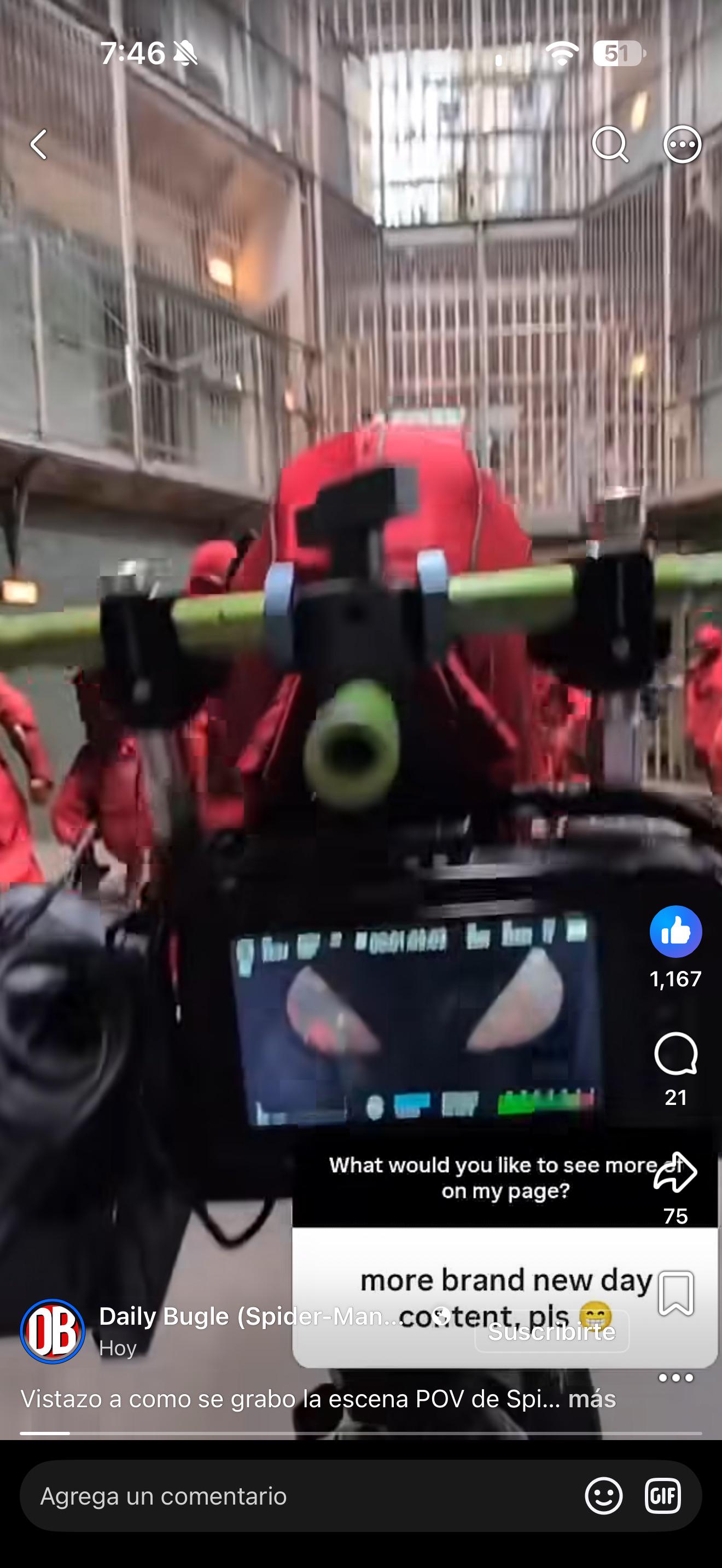

r/bmpcc • • 7h ago

Blackmagic in Spiderman brand New day

Post image
4 Upvotes

r/bmpcc • • 2h ago

Broken touchscreen on my Pocket 6K, can someone export me a preset file?

1 Upvotes

Not sure if this will work, but I want to try before paying to get the screen replaced. The middle half of my BMPCC 6K's touchscreen died, so I can't get to codec or audio input settings and the Bluetooth toggle is in the dead zone too, or else I would try an app.

The good news is the Import button on the Presets page still works. If someone with an original 6K (not the Pro) could export any preset to a card and post the file, I can edit the settings on my computer and import it back in.


r/bmpcc • • 21h ago

Took the BMPCC 6K Pro Open Gate for a spin

Thumbnail
youtube.com
24 Upvotes

I just adjusted contrast, sharpness, saturation, and a lut. No stabilization used. Looks great. I love it.


r/bmpcc • • 5h ago

P0WER — A world I built because I couldn't film it

Thumbnail
youtu.be
1 Upvotes

An experiment in 3D, VFX and sound. Shot on a BMPCC 6K and manipulated into something that doesn't quite exist in real life.


r/bmpcc • • 12h ago

2 x 🖐️SmallRig 3641 Matte Box (114mm) NMCC / ARRI XT

Thumbnail gallery
0 Upvotes

r/bmpcc • • 16h ago

Can anyone relatehttps://i.imgur.com/q1KhsdZ.jpeg

0 Upvotes

r/bmpcc • • 1d ago

anyone here tried bmpcc4k 120fps to 240fps slowmo in 29.97 timeline

1 Upvotes

i tried osmo pocket 4p slow mo 240fps and it was incredibly smooth and good but too grainy,i want to republicate the same sequence but with bmpcc4k but as you know 120fps only with 2k and maybe that would work well in davinci resolve with optical flow and AI slowmo to look like 240fps ? i want the smoothest slow mo without motion blur,its for sport shooting so too much motion,if anyone have any tips please let me know


r/bmpcc • • 1d ago

Has anyone used the Lumix S 24-105mm f/4 with the BMPCC 6K FF? Is the noise issue fixed?

2 Upvotes

Hey everyone!

I'm considering getting the Panasonic Lumix S 24-105mm f/4 for my BMPCC 6K FF. I really like this lens because of its focal range, built-in image stabilization, and overall versatility. It seems like a great all-round lens for my needs.

However, I've come across several reports mentioning that this lens can cause unusual image noise or interference when used with the BMPCC 6K FF. Apparently, this is related to some kind of interference between the lens and the camera's sensor.

I'm wondering if anyone here has actually used this lens with the 6K FF recently.

  • Is the noise/interference issue still present?
  • Has Blackmagic or Panasonic released any firmware update or fix for this?
  • If you own this combination, how has your real-world experience been?

One more thing: I'm also considering the Sigma 28-70mm f/2.8 DG DN as an alternative.

For anyone using this lens with the BMPCC 6K FF, how is the autofocus performance? Is it reliable enough for everyday shooting, especially when tracking a moving subject?

I'd love to hear how it compares to the Panasonic 24-105mm in terms of overall usability.


r/bmpcc • • 1d ago

It's Black Friday so... I bought Filmbox Looks. https://videovillage.com/filmbox-looks/

Post image
0 Upvotes

r/bmpcc • • 2d ago

I built an open-source face-tracking autofocus companion for the BMPCC 4K

39 Upvotes

I built BM4K Autofocus for using a Blackmagic Pocket Cinema Camera 4K as a webcam on macOS with face-tracking autofocus. The Pocket sends its own video to the Mac over USB-C; the app watches that Blackmagic feed, detects a face with Apple Vision, and controls the lens over Bluetooth LE. In Zoom, OBS, or another video app, you select Pocket Cinema Camera as the webcam. BM4K Autofocus runs alongside it and does not create a virtual camera.

There are now two step-by-step setup paths in the README:

  1. Agent-assisted: give your coding agent the repo link and ask it to follow the README, run the installer, and verify the Blackmagic video and Bluetooth connections. You still need to enable Bluetooth on the camera and Mac, connect the USB-C cable, and approve macOS permissions yourself.
  2. Manual: enable Bluetooth on the BMPCC 4K (Menu → Setup → Bluetooth) and Mac, disconnect any Blackmagic phone controller, connect the Pocket with a USB-C data cable in webcam mode, then run:

git clone https://github.com/Vovento/bm4k-autofocus.git

cd bm4k-autofocus

./install.sh

Open the BM4K Autofocus application, allow Camera and Bluetooth access for its service, wait for the camera preview and Bluetooth link, and enable Follow face. Finally, choose Pocket Cinema Camera as the camera in your video app. The app deliberately does not use the MacBook or iPhone camera for tracking.

The dashboard also has controls for iris, shutter angle, ISO, white balance, recording, and focus. The main tracking mode estimates distance from face size and focal length, uses a lens profile to move focus, then checks sharpness to refine it. The camera's one-shot AF is used for initial learning and as a fallback.

The measured Sigma/Metabones lens profile is included, but each new installation starts without locally learned adjustments. On first use, the app uses the camera's one-shot AF to establish an initial focus point, then learns from face size, focal length and the camera's distance reading as you use it. It keeps refining focus and sharpness references for your setup and shooting conditions, so allow some time for it to adapt. These adjustments stay in a local focus_model.json file; no face images are stored there.

I've tested this only on a BMPCC 4K with a Sigma 18–35mm f/1.8 Art EF through a Metabones 0.64× Speed Booster. With that setup, it typically gets the face back in focus around 1–1.5 seconds after I stop moving. Other lenses and 6K bodies have not been validated. A new lens can attempt calibration, but that path needs more real-world testing.

Code, full installation steps, limitations, and the measured Sigma lens profile: https://github.com/Vovento/bm4k-autofocus

It's free and MIT-licensed. If you test another electronic lens/adapter or a 6K, I'd welcome reports or PRs, especially whether your camera reports focus distance over Bluetooth.


r/bmpcc • • 3d ago

Full music video shot on BMPCC4k and one 24mm anamorphic lens

Thumbnail
youtu.be
104 Upvotes

No AI used, but some half-hazard self taught CGI work. I’ll hear about it in the comments im sure. I shot this video in one day with one crew person and a lot of favors from the artist’s (my wife) friends. Sirui 24mm was the tool I decided to use for 95% of the video simply because I didn’t have time for swapping lenses.


r/bmpcc • • 2d ago

Inflatable lights or regular softboxes for portraits?

3 Upvotes

The size and position of your light can completely change how a portrait looks, so I've been thinking about soft lighting a lot lately.

Softboxes are what most people use. But inflatable lights like the sirui A100B have the diffusion built in, so setup might be a lot quicker.

Has anyone tried one for portraits? Is it practical in real use, or would you stick with a traditional softbox?


r/bmpcc • • 3d ago

The potentials of Open Gate for BMPCC4K

Post image
47 Upvotes

https://www.sony-semicon.com/files/62/pdf/p-13_IMX299CJK_Flyer.pdf This is from the official documentation for the Sony sensor inside the BMPCC4K.

Things of note: there are two recommended recording pixel aspect ratios: 4096 x 2160 17:9 DCI which we're all familiar with, but also a 3704 x 2778 4:3 mode. So there's a 4:3 mode out there that should be perfectly executable, but also a potential full open gate resolution of 4200 x 2840 which would be close to 3:2! Hopefully we can get some more eyeballs on this and hopefully have Murdoch running for BMPCC4K soon.


r/bmpcc • • 3d ago

ALL WAITING! POCKET 4K

0 Upvotes

We are all waiting patiently for vibe coders to work on pocket 4k. It will lead the charge!


r/bmpcc • • 5d ago Bravo

My Open Gate patch for the 6K Pro is public now (and it does a lot more) 🥳

Thumbnail
gallery
460 Upvotes

Hi y'all. Earlier this month, I posted about getting Open Gate running on my 6K Pro. A bit of context: https://www.reddit.com/r/bmpcc/comments/1xkw5ff/got_open_gate_running_on_my_bmpcc_6k_pro/

I finally got the patch application good enough to share! Sorry I am a bit late (this year's ICLR sucks), but it's public now! https://github.com/Stry233/murdoch

It's called Murdoch (I know what you want me to call it, but yeah not going to happen (;´ヮ`) ), and thanks to all of your feedback, it grew into more than an Open Gate patch. These are the new recording modes. They're all BRAW, and they show up right in the camera's own resolution menu:

  • 6144 × 4144 (3:2 Open Gate) at up to 41 fps, about 20% more pixels than the stock 6K mode.
  • 2048 × 1360 (3:2 full sensor field) at up to 100 fps, nearly the same sensor area as Open Gate with much smaller files.
  • 2048 × 1152 (full 6K 16:9 field) at up to 120 fps, way wider than the stock 2.8K 17:9 crop.
  • Wider 2K slow motion: 2048 × 1080 at 133 fps, 2048 × 1024 at 140 fps and 2048 × 856 at 165 fps, all using the full sensor width.
  • 4K high frame rates: 4096 × 1712 (2.4:1) at 104 fps and 4096 × 2048 (2:1) at 87 fps.

Some extra stuff it does:

  • Your own UI colors. Recolor the camera's menus to whatever you want (see images). You can also pick which modes show in the resolution menu and in what order per your own needs.
  • Card reader mode. The camera shows its card to your computer or phone as a read-only drive, so you can grab your files over USB when you forgot your card reader.
  • Live view via USB-C. Frame your shot from your computer or phone using the USB connection. It is not implemented via UVC and a bit of slow for now, but what this method catches is the raw Bayer stream from the camera, the video before BRAW encoding even happens. Not entirely sure what you can do with that (was told it would be helpful in astrophotography but not an expert here), but `murdoch raw` pipes it out for you to play with.
  • Dual gain. The camera alternates dark and bright frames at half your frame rate. You can get theoretical +2 extra stops of DR under this mode after merging the frames in post.

Still working on some features everyone requested, like 4 audio channels and a lot of others.

It supports the BMPCC 6K Pro on firmware 8.1 and 8.6 for now. Yet, most Blackmagic cameras share a similar foundation, so feel free to try bringing yours over. The repo has a guide for adding a camera, and I'm trying it on a Pocket 4K myself. I also made some efforts to make adding cameras to this patch more modular, so it should not be very painful to do. You can also ask your agent to do so, as I hide most sensitive information that can trigger harness's safeguards in this codebase. Let's see where the community can take it.

For ordinary users, the easiest way to try it is to grab the Android APK from the release page (https://github.com/Stry233/murdoch/releases/tag/v0.2.709) and plug your camera into your phone to run the patch based on an example scheme. There's also a terminal app for Linux, macOS (Apple silicon), and Windows. The README has the one-line install command for all of them.

Kudos to everyone for providing suggestions in that earlier thread, and special thanks to u/Thomaswb2000, 高房价pigs, and 等二月花开 (both on Bilibili) for the app dev help and dogfooding. Make sure to star my repo if it helps! And let me know what you think :-D

Nov 23 Edit: Ouch! Just got a request from Blackmagic to take the repo down 😣. It seems that there are some alignment issues when I disclosed the patch earlier to them. I've made this patch private for now to give them time to take a closer look and review the patch. I'll keep everyone posted here if there are any updates.


r/bmpcc • • 5d ago

Cage + Rig Parts List for BMPCC 6K?

3 Upvotes

Would love to stay in the Smallrig ecosystem... but want to build up a rig/mount system that would allow me to attach a v-mount battery + rod system that would live on a manfrotto (manfrotto QR plate) tripod 75% of the time, but could be pulled off to do some quick mobile shots as well.

Everything I'm looking at seems to be for the BMCC 6K... but nothing for the OG BMPCC line.


r/bmpcc • • 6d ago

winter with the OG

94 Upvotes

Switar 10/1.6 & Navitar 16-160/2


r/bmpcc • • 5d ago

Shot this wedding film on the 6K FF two years ago. Watched it again today and it hit me harder than expected.

Thumbnail
reddit.com
7 Upvotes

r/bmpcc • • 5d ago

Live Show: What does Xmas mean?

Post image
0 Upvotes

Hi everyone! If you love film and TV, work in the creative industries or are trying to break into them, or just want a Christmas night out that's a bit different, we'd love to see you at Hidden in the Credits: Xmas Show this December.

The show asks one simple question: what does Christmas really mean? Four actors tell the story, a live jazz band and musicians set the mood, and special guests from Die Hard and The Snowman and the Snowdog share their take. It's a celebration of the stories and the people behind the screen, and a great chance to connect with others who share your passion.

We'll also be selling hot chocolate, chocolate-dipped strawberries and popcorn, so get cosy and make a night of it. 🍫🍓🍿

Saturday 12 December · Doors 6pm · ArtsOne Building, Queen Mary University of London (Mile End, E1 4PD) · Tickets £15: 

Bring your friends, and drop any questions below!

Ticket Link: https://www.eventbrite.com/e/hidden-in-the-credits-the-christmas-show-tickets-2005207803519?aff=oddtdtcreator.


r/bmpcc • • 6d ago Bravo

A free Mac app to trim BRAW clips losslessly, without opening Resolve

77 Upvotes

I shoot on a BMPCC4K and I found it frustrating to have to go into Resolve just to cut the useful bit out of a long clip. So I built a small Mac app that does one thing: open a .braw, preview it, set in/out points, and export a trimmed .braw — no re-encode, no quality loss. It uses the official Blackmagic RAW SDK.

  • Lossless .braw → .braw trims
  • Creates multiple separate files from a single .braw if that suits your workflow.
  • Fast scrubbing and preview
  • Developer ID-signed and notarised
  • Requires macOS [14 Sonoma] and [Blackmagic RAW installed / nothing else]

Languages: English · Cymraeg · 日本語 · Español [in version 1.1, so update if you have 1.0]

- I speak neither Japanese nor Spanish, so if you are a native speaker please let me know where the AI went wrong.

It's free: https://github.com/andreasapdon/DarnToc

I'm the developer. Feedback and bug reports are very welcome, especially from anyone shooting on the 6K/6K Pro or newer bodies, since I've only tested on 4K footage so far.

Not affiliated with Blackmagic Design.


r/bmpcc • • 6d ago

bmpcc og night experiments

177 Upvotes