r/cachyos • u/EktaRandomUsername • 1h ago
r/cachyos
•
u/ptr1337
•
7d ago
[Announcement] CachyOS November 2026 Release Changelogs
Hello CachyOS Enthusiasts,
This is our sixth release of the year.
This release brings support for Easy Anti-Cheat Linux v2. EAC only lets games start when it can verify how the system was booted: Secure Boot with a kernel signed by a key that Epic trusts, a TPM 2.0, an enabled IOMMU, and a kernel running in lockdown mode that only loads signed modules. For this we provide a dedicated kernel, linux-cachyos-eac, together with a systemd-boot signed with the same key. The EAC kernel gets its own boot entry and your normal boot entries are kept, so you only boot into it when you want to play a game that uses EAC. The new eac-setup script does the setup for systemd-boot, Limine and rEFInd, with experimental support for GRUB, and eac-status verifies the result. DKMS modules do not work with the EAC kernel, so the NVIDIA (open and 580xx), ZFS and r8125 modules are shipped as linux-cachyos-eac-* packages instead. Please read the Easy Anti-Cheat guide in our wiki before you start, especially if you use BitLocker or unlock your disk with the TPM.
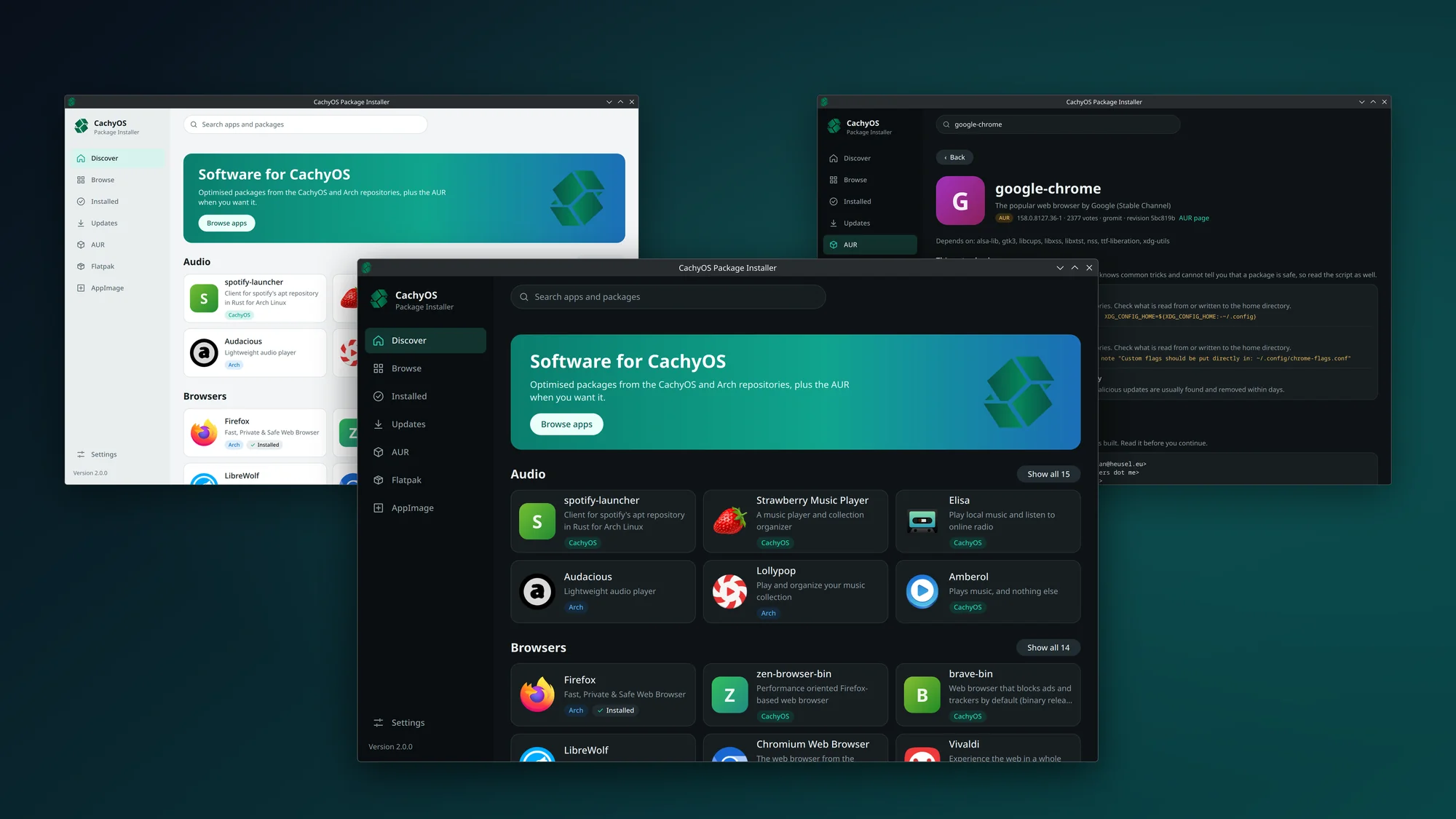
The CachyOS Package Installer has been fully revamped with a new UI for its 2.0.0 release. Besides the CachyOS and Arch repositories, it can now build packages from the AUR and install Flatpak apps and AppImages, each of them opt-in. Before an AUR package gets built, the PKGBUILD and its install scripts are shown for review, and a static analysis marks the lines which should be looked at. When reviewing an update, it shows what changed since the installed version. AppImages can be added from a local file or from a GitHub project, which also offers newer releases as updates, and AppImages which were added with Shelly or Gear Lever can be taken over. The new settings page offers several colour themes and a button to rank the mirrors.
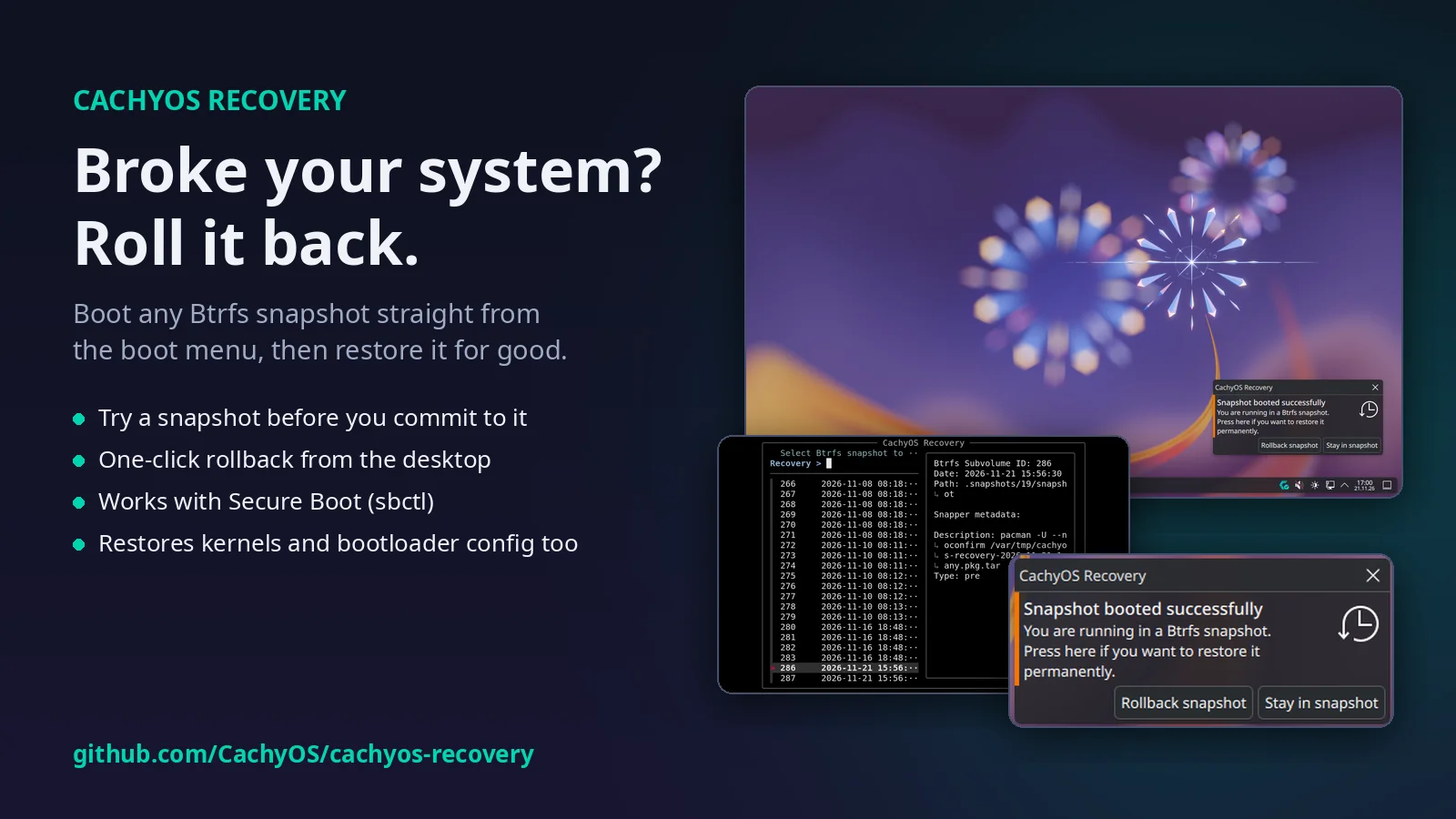
cachyos-recovery is our new recovery environment. It is a self-contained image, which can be booted from your bootloader or directly from UEFI, so rolling back a broken system no longer needs a live USB. From its menu you can boot any Btrfs snapshot with a writable root to try it first, and then roll back to it permanently, either from the notification on the desktop or directly from the recovery menu. The rollback also regenerates the kernel and initramfs files and the bootloader configuration for the restored snapshot, and signs them if Secure Boot is set up with sbctl. It works independently of Snapper, supports LUKS encrypted installations and takes about 70 MB on the ESP. It can be installed with sudo pacman -S cachyos-recovery, or cachyos-recovery-legacy on BIOS systems.
cachyos-drm-awaiter is a new package, which replaces early KMS and the nvidia-module-loader. It waits for the GPU drivers to be loaded before the display manager gets started, for any driver and not only NVIDIA, and shows a QR code if the driver failed to load. chwd and the installer have been adjusted for it, so the kms hook is no longer added to the initramfs by default.
The installer now uses the shared CachyOS installer libraries (gucc) from the CLI installer as backend for the initramfs, machine-id and post-install steps. We are slowly transitioning to our new installer backend, and for now Calamares is switched over to it step by step. The root partition is created with the SD_GPT_ROOT_X86_64 partition type by default, Plymouth is now optional and can be deselected in the package selection, and the rEFInd + AI SDK bootloader option has been removed. It only differed from the regular rEFInd installation by installing the AI SDK, which can still be done afterwards with sudo chwd -a --ai_sdk. The CLI installer got a large refactor onto the same library, with reworked LUKS and LVM handling for the bootloader.
In chwd, intel-lpmd is now only used on hybrid CPUs and got Wildcat Lake support, NVIDIA PRIME profiles match on convertibles, and the Framework Laptop 12 got tablet mode support. Simplified Chinese, Hungarian and Arabic localizations have been added.
cachyos-settings brings back the systemd-oomd configuration and enables it by default; it kills based on swap usage and ignores the user session. Dirty ratios are now used and the writeback is capped on slow disks and USB drives, REISUB can be performed by default, and game-performance got tlpctl support.
On the package side, this release comes with Linux 7.3.5, NVIDIA 620.73.04 and Mesa 26.3.1. The nvidia-580xx modules are now prebuilt for our kernels, the kernel can be built with Rust together with ThinLTO, and mutter is shipped with the tearing patches merged.
CachyOS now also provides an image for the Windows Subsystem for Linux. See the CachyOS on WSL wiki page for the installation.
Features:
-
Easy Anti-Cheat:
- Added
linux-cachyos-eac, an EAC-compatible kernel variant signed with the CachyOS key, including NVIDIA (nvidia-open,nvidia-580xx), ZFS and r8125 module packages - Added
cachyos-eac-signing-key,systemd-boot-cachyos-signedandcachyos-eac-grub-hookpackages - Added
eac-setupandeac-statusscripts to cachyos-settings to set up and verify the Secure Boot chain, with experimental GRUB support sbctl-batch-signnow skips files which are already signed by CachyOS- Wiki: New Easy Anti-Cheat guide for systemd-boot, Limine, rEFInd and GRUB (experimental), including migration from existing Secure Boot setups
- Added
-
Kernel:
- Linux 7.3.5, LTS 6.18.64
- Added support for Rust together with ThinLTO
- Enabled Rust Binder
nvidia-580xxmodules are now prebuilt for the kernels- linux-cachyos-server defaults THP to
madvise - Build the
applesmcmodule
-
Packages:
- NVIDIA 620.73.04
- Mesa 26.3.1
- Limine 12.10.0
- proton-cachyos 11.0-20261015, proton-cachyos-native is now wow64-only
- mutter is now shipped with the tearing patches merged
- Added bpftune-gaming, pahole and a custom plymouth package
- Dropped the Void editor
-
CachyOS Package Installer: Fully revamped with a new UI
- Added AUR support (opt-in), including updates for installed AUR packages and a diff since the installed version when reviewing an update
- PKGBUILDs and install scripts are reviewed in the app, with a static analysis that flags suspicious patterns before anything gets built
- Added Flatpak support (opt-in)
- Added AppImage support (opt-in): local files get a menu entry and icon, and AppImages can be installed from a GitHub project URL, including updates to newer releases
- AppImages which were added with Shelly or Gear Lever can be taken over
- Added a settings page with colour themes and a button to rank the mirrors with cachyos-rate-mirrors
-
cachyos-recovery: New self-contained recovery environment, which can be booted from the bootloader or directly from UEFI without needing a live USB
- Btrfs snapshots can be restored from a TUI, independent of Snapper and mostly bootloader agnostic
- Snapshots can be booted with a writable root via overlayfs before restoring them
- Shipped as UKI on UEFI systems (takes about 70 MB on the ESP) and as
cachyos-recovery-legacyfor BIOS systems, installed via a pacman hook - Adds a UEFI boot entry, a Limine entry (UEFI and BIOS) and a GRUB entry on BIOS systems
- The image is signed for Secure Boot if sbctl is set up
- Supports LUKS encrypted installations
-
cachyos-drm-awaiter: New package replacing early KMS and
nvidia-module-loader- Waits for the GPU drivers before starting the display manager, for any driver and not only NVIDIA
- Shows a QR code if the driver failed to load
- Supports kmscon and can be disabled via kernel parameter
-
Installer:
- Calamares now uses the shared CachyOS installer libraries (gucc) from the CLI Installer as backend for the initramfs, machine-id and post-install steps
- Root partition is now created with the
SD_GPT_ROOT_X86_64partition type by default - systemd-boot now uses the max console-mode by default
- Plymouth is now optional and can be deselected in the package selection
- The
kmshook is no longer added to the initramfs by default, plymouth uses simpledrm to show the splash screen - Added
gvfs-mtpandgst-plugin-dav1d - Removed the rEFInd + AI SDK bootloader option, the AI SDK can be installed with
chwd -a --ai_sdk - Removed the Iridescent KDE theme from the defaults
-
CLI Installer:
- Large refactor onto the shared gucc library with a typed installer state and reworked bootloader handling
- Username and hostname are validated at config validation
- Creates a cmdline file by default for systemd-boot
- Root partition is now created with the
SD_GPT_ROOT_X86_64partition type by default - Reworked LUKS and LVM handling for the bootloader,
rd.luks.uuid=is used when possible - Added LUKS passphrase and console keymap options to the config
- Hardware clock defaults to UTC
- Initramfs is now generated only once and the
kmshook is removed - Dropped the
EraseAndAutolayout
-
ISO:
- Synced the GRUB configuration with archiso 92
- Added
ghostty-terminfoandkmscon-terminfo - Dropped linux-atm
-
chwd:
- Eliminated early KMS in favor of proper systemd chainload via cachyos-drm-awaiter
- Added
cpu_hybridprofile check, intel-lpmd is only used on hybrid CPUs - Added Wildcat Lake to the intel-lpmd detection
- Added tablet mode support for the Framework Laptop 12
- NVIDIA PRIME profiles now match on convertibles
- Dropped the nvidia-dkms-470xx profile
- Added Simplified Chinese, Hungarian and Arabic localization
-
cachyos-settings:
- systemd-oomd configuration returned and is enabled by default; it kills based on swap usage and ignores the user session
- sysctl: Use dirty ratios and cap writeback on slow disks and USB drives
- sysctl: REISUB can be performed by default
- game-performance: Added tlpctl support
- Added xswap configuration handling
- cachyos-bugreport: Redacts SSID, IPv6, MAC, UUID and
file://paths - Dropped
DefaultTimeoutStartSec
-
Desktops:
- Hyprland Noctalia: Swapped Satty for Swash, added qview to the mimeapps and a keybind for silent workspace moves
- Mango Noctalia: Added plugins for easier keybind and layout management, reworked keybinds
- Added the
cachyos-jay-noctaliasettings package for the Jay compositor, available from the repo but not in the installer
-
cachyos-handheld: steamos-gamemode now uses
steamosctlto switch to game mode -
systemd-boot-manager: Added support for UKI images,
LINUX_OPTIONSis appended to the cmdline -
cachyos-hooks:
- Rewrote
update-initramfswith better booster detection - reboot-required: Triggers on nvidia-utils and nvidia-open too, notification is now translated
- Rewrote
-
Cachy-Update: Updated to Arch-Update v4.4.7 - systray status follows the system state, hardened temporary and lock file handling, Vietnamese translation
-
cachyos-rate-mirrors: Synced with upstream rate-mirrors, added
--include-countries, retries on transient HTTP failures, skips mirrors with an error status and no longer forces top priority mirrors -
scx-manager: Added French and Chinese (Simplified and Traditional) translation, dropped scx_cake profiles
-
ananicy-rules: New rules for several games and applications, added a linter and JSON schema for the rules
-
WSL: CachyOS now provides an image for the Windows Subsystem for Linux
-
Docker: Added
cachyos/distroboximage -
Mirrors: New mirrors in South Korea, India, Switzerland (init7) and two in US East
-
Wiki: Added Simplified Chinese translation, TRIM on LUKS and Vivaldi hardware acceleration
Fixes:
- Installer:
- Disabled
GRUB_BOOTNEXTin the GRUB configuration - Removed the duplicated cosmic-greeter entry
- plymouthcfg now only changes the uncommented section
- Disabled
- CLI Installer:
- Fixed user supplied kernel being ignored
- Fixed fallback of the root partition filesystem name
- Properly cleans up on installation abort, failure and success
- Fixes for removable devices and the systemd encrypt hook parameters
- ISO:
- Fixed the memtest86+ entry paths for systemd-boot and syslinux
- Removed the leftover broadcom-wl modprobe configuration
- dmcheck now targets noctalia-greeter instead of greetd
- chwd:
- Removed RTD3 workaround for NVIDIA dGPUs, DynamicPowerManagement is only set for Turing
- Do not use lspci to check on NVIDIA dGPUs
- Check on hooks even if no packages were found
- Updated T2 module names
- cachyos-settings:
- Removed
NVreg_DynamicPowerManagementfrom the NVIDIA modprobe configuration - udev: Fixed hdparm ATA match and do not use hdparm on USB drives
- udev: Misc fixes for audio power management
- iw-set-regdomain: Broadened no-country zones, resolve timezone aliases
- Blacklisted
wdat_wdt - oomd: Generate the user slice drop-in only if PID 1 is visible
- eac-status: Requires
intel_iommu=ononly on Intel CPUs, clearer failure messages and more checks
- Removed
- Desktops:
- Hyprland Noctalia: Fixed workspace keybinds on AZERTY layouts and the Noctalia config for the latest release
- Fixed the qt6ct path to the Noctalia template in the Mango and Jay variants
- cachyos-kdump-tools: Support the deploy filenames of limine-mkinitcpio-hook >= 1.37
- cachyos-hooks: reboot-required no longer blocks pacman when no notification daemon starts
- systemd-boot-manager: UKI images are only removed after successful generation
- cachyos-rate-mirrors: Pull in network-online from the service instead of the timer
- Packages:
- nvidia-utils: Fixed runtime D3 on Linux 7.3, do not force loading nvidia-uvm
- nvidia-580xx-utils: Fixed plasmashell crash by using egl-wayland2 on KWin
- mutter: Fixed crashes in the tearing cleanup
- gcc: Fixed cc-rs symlinks on v4
- WSL: Masked systemd units discouraged by Microsoft
Manual changes for existing users: Since cachyos-drm-awaiter replaces early KMS and nvidia-module-loader, please update your system and then reinstall your driver profiles with chwd:
sudo pacman -Syu
sudo chwd -a -f
Download:
Desktop Edition:
Grab your copy of the latest ISO from our mirrors on SourceForge:
- CDN: https://iso.cachyos.org/desktop/261122/cachyos-desktop-linux-261122.iso
- Germany: https://mirror.cachyos.org/ISO/desktop/261122/cachyos-desktop-linux-261122.iso
- Sweden: https://mirror.zyner.org/cachyos/ISO/desktop/261122/cachyos-desktop-linux-261122.iso
- USA: https://us.cachyos.org/ISO/desktop/261122/cachyos-desktop-linux-261122.iso
- China: https://mirrors.tuna.tsinghua.edu.cn/cachyos/desktop/261122/cachyos-desktop-linux-261122.iso
- https://sourceforge.net/projects/cachyos-arch/files
Support Us:
Your contributions help us maintain our servers. Consider supporting CachyOS through:
- Patreon: https://www.patreon.com/CachyOS
Thank you for your continued support!
The CachyOS Team
r/cachyos
•
u/ptr1337
•
Oct 14 '26
Announcement Announcement: Framework Is Tripling Its Support for CachyOS
Hey CachyOS Community,
We have more great news to share. Framework is increasing its support for CachyOS. The donation goes from $250 per month to $10,200 per year ($850 per month), more then three times the original amount.
When Framework first started sponsoring us, they sent us a Framework Laptop 16 for optimizing our kernel and packages, and committed to a monthly donation. You can read the original announcement here:
https://discuss.cachyos.org/t/framework-sponsorship-for-cachyos/19376
Having Framework triple its support says a lot about how much they care about Linux on their hardware and about the open-source projects their users rely on. For a community-driven project like ours, this kind of steady funding makes a real difference. It helps us:
- Keep our build servers, mirrors and infrastructure running reliably
- Spend more time on kernel optimizations, packaging and hardware support
- Move closer to our long-term goal of working on CachyOS full-time
A big thank you to Framework for believing in CachyOS, and to every one of you who uses, tests, reports bugs, and donates. You keep this project going.
If you’d like to support CachyOS too, take a look at our donation page: https://wiki.cachyos.org/support/donation/
Thanks to Framework, and thanks to all of you for using CachyOS!
— The CachyOS Team
r/cachyos • u/itsuka_h1r0 • 15h ago
Question Question about systemd. It's not hate and I'm just curious.
I recently switch to CachyOS KDE from Windows, all in no dual boot, and except some minor about OBS and Davinci Resolve, it's all good.
But I read online something about systemd. I just dont really understand the hate. So...
- Why hate it?
- I know CachyOS run with systemd. Is there any plan of changing or not?
- Should I change it myself?
Desktop CachyOS Logo Rework [Concept]
Made this Cachy OS logo rework couple of days ago.
This is not in any way official work, I'm looking into brand design from software design and this is just exercise.
My aim was to simplify and balance the current logo, but still keep the recognizable shape and colors. Also in effort to simplify the brand as a whole, i dropped the "OS" just "cachy"
Let me know what you think?
r/cachyos • u/LillianaVessFanboy • 8h ago
Help I really want to stay on Linux and CachyOS but VRR just won't work for my screen
I got all my games to work and i now know how to make games work.
I even got my keyboard and mouse to be configurable through their respective web drivers so i wont need windows to do it.
Everything looked perfect and im really enjoying CachyOS ( Been wanting to switch to Linux for years now ).
My only issue and i can't for the life of me solve it no matter what i do is that some games make my screen just flicker uncontrollably due to VRR.
I checked EDID my screen is 48-200 Freesync Premium. It's NOT an OLED fyi.
I capped FPS, i use frame gen or not frame gen...some games ( Neverness to Everness ) just won't cooperate. I feel like i'll have a seizure when im playing the game and i also get this issue sometimes in Wuthering Waves to name a few.
I've been looking at forums for at least 2 weeks now and i can't find a solution besides the "Just disable VRR" and i did but i can't stand the feeling of gaming without it. It feels super sluggish.
Sadly... and i say that with a heavy heart ill need to install Windows again and dual boot ( Windows is just awful for AI inference ).
I love, LOVE Linux and i really like the CachyOS distro but i just cant enjoy some games without feeling ill have a seizure.
Im still at 15% downloading windows... so if someone knows a solution to this problem, im willing to try more.
A big thank you to everyone who worked on CachyOS and on Linux all these years by the way
r/cachyos • u/Dangerous-Shape4096 • 5h ago
Help Mesa 26.3.1 issues
Hello, I want to know how to safely revert to a previous version of MESA because I'm facing a strange problem with some games where I used HD resolution instead of my original screen resolution of Full HD, causing the screen to go completely black. However, the game works and I hear sounds, and when I switch the game back to full HD resolution, the problem is solved. I think this is a Misa issue because before the update these games worked without problems.
r/cachyos • u/Xtrabytez • 12h ago
Review New comer around here...
Hello all!
I recently swapped to cachy os from windows 11 (yuck!) and id like to say what I have been thinking about it. It's so much better than windows in so many ways, the customization is INSANE, the weight is crazy and it just feels better not being spied on.
Anyways thats it, if you guys have anything I should know as a newbie, it would be really lovely to hear. Bye bye!
r/cachyos • u/karmic_1 • 2h ago
Bug Report creative pebble v3 speaker not detected after kde plasma boot
on cachy kde, have noticed that after logging in/reboot ,it does not seem to detect audio device (creative pebble v3). had to turn off the knob on the speaker and turn it back on. this is the case 80-90 percent of the time which leads me to believe it is a timing issue. (never had this issue in the past with other kde distributions for the same speaker) . is there a specific repo under which this issue needs to be created for tracking?
r/cachyos • u/Im_Dough • 1h ago
Bug Report PC just kept randomly shutting off monitor and flicker mid game and booted to this red screen
I shutoff my pc holding power button because my screen just randomly became black midgame nothing worked and it booted up in safe mode and I got the red screen Im still not 100% sure if this is on my hardware side (hdmi not seated properly or gpu dying) but what made me suspect its cachyos was when it booted up into desktop login it just became fine no artifacts nothing
r/cachyos • u/Scheffchen • 2h ago
Question Wechsel zu Cachy?
Hallo,
mein System:
Gigabyte B660 Gaming x DDR4
32 gb ddr4 3200
I5 12500
Gigabyte RX 9060 xt 16 gb Gaming OC
1 TB nvme pcie3 Samsung 970 evo
500 gb und 256 gb SSD
Nutze Dualboot Win 11 Pro und seit ca. 8 Monaten Fedora KDE. Von 43 über 44 jetzt 45. Habe einige Optimierungen und es läuft sehr gut. Zur Zeit spiele ich wieder viel Rdr 2 und habe einige nervige Bugs. Kann z. B. nicht auf Vulkan wechseln. Alles schon hundertmal versucht. Jetzt überlege ich Cachy zu installieren und zu testen.
Was mich abhält ist v. a. Secure Boot. Es soll zwar möglich sein, aber ich habe Respekt die Keys im Bios zu löschen wegen Win 11. Das boote ich nur noch für die Arbeit. Die wichtigsten Spiele sind auf SSD, müssten also nicht neu geladen werden.
Was meint ihr? Lohnt es sich und ist die Umstellung schwierig?
Help Not getting 240Hz on Rocketleague but everything else is fine.
Hi,
I am able to play everything on 240Hz, but not Rocket League.
I will have 240+ FPS and everything is set to run at 240Hz but for some reason it is not.
Nvidia GPU using wayland.
Running game through steam. Tried different proton versions, same outcome.
r/cachyos • u/amine2crf • 19h ago
Question Planning a full switch to CachyOS (coming from Windows) - a few setup & game compatibility questions
Planning a full switch to CachyOS (coming from Windows) - a few setup & game compatibility questions
Hey everyone,
I'm looking to make the full switch to Linux on my main PC. Windows has been giving me way too many random crashes lately, and as a CS student, I've been wanting to properly learn Linux anyway. I don't want to start with an overly complex distro right off the bat, so CachyOS caught my attention for having an Arch base with performance tweaks already set up.
Before I go ahead and wipe my drive, I wanted to double-check a few things about my hardware and storage layout:
System Specs:
CPU: Intel i5-14400F
GPU: AMD Radeon RX 6800 XT
RAM: 32GB
Storage: 256GB SSD (current OS drive) + 1.5TB HDD (secondary drive with files and games)
A few specific questions:
Hardware compatibility: Are there any known quirks with this CPU/GPU combination on CachyOS, or is it mostly plug-and-play with Mesa drivers?
Secondary HDD behavior: If I format only the 256GB SSD to install CachyOS, will the OS automatically mount my 1.5TB HDD? It’s currently formatted as NTFS. Will Linux be able to read my existing files and run games directly off that drive, or should I reformat it to native Linux filesystems like EXT4/BTRFS first?
Game performance & launcher compatibility:
Brawlhalla & THE FINALS (Anti-cheat status on Cachy)
Single-player games like Elden Ring
CoD BO2 via Plutonium launcher
Quacked / Online-Fix games (how straightforward is running these via Lutris, Bottles, or GE-Proton?)
Appreciate any advice or tips for a first-time installer!
r/cachyos • u/Teabiscuit119 • 14h ago
Bug Report Screen tearing that isn't quite tearing, KDE and kwin
Had an issue a spell ago that I've finally got down to solving (unfortunately it was with AI help). I had a screen tearing like effect on all tested proton (but not native vulkan) games. Turns out that it was the kwin 6.8.3 update. What exactly in that isn't certain as well. In the gobbledygook that the AI spat out as possible reasons, seemingly most likely is the triple buffering changes. Downgrading to 6.8.2-2.1 solved everything so far
Anyways, once they release 6.8.4, I'll upgrade and see if the issue still persists and add an edit at the bottom.
For posterity: It looks like a thin strip of digitized pixels in the middle of the screen (though it does drift up and down occasionally) that appears while moving the camera, particularly vertically. The bottom half of the image isn't actually shifted over at all, but otherwise looks ridiculously similar to screen tearing. It also didn't show up on a screen record.
Hardware is 12400f (no igpu) and rtx 4060 btw
r/cachyos • u/shortaryanjew • 38m ago
Question Which DE/WM should it try
I am quite new to Linux and I've only really tried cinnamon and Kde plasma but I wanna see some other desktop environments
r/cachyos • u/Scary-Peace1240 • 13h ago
Question Anyone else having issues in Cyberpunk?
Im wondering if anyone on similar hardware is being odd GPU behavior in Cyberpunk since mesa 26.3.
Im running a 9070xt /7800x3d in Cachyos latest kernel and I game through game mode. Just in the last couple days I picked Cyberpunk back up but have had some odd behavior. At first it was fine. I had a few crashes and thought maybe it was my GPU tuning such as my undervolt. But it kept crashing. After 10-15 minutes. I got it not crashing really on default settings, but the GPU does like 70-75% utilization and is pulling a lot less power. Vram frequency is lowered. Clocks are lowered.
Every time I boot in now it's the same thing. But oddly in the benchmark it runs full power. Im not seeing this behavior on any other games.
r/cachyos • u/InfamousLegend • 10h ago
SOLVED If Secure Boot Stops Working After a BIOS Update, Verify Your Boot-loader (For Example, Limine) is Still There.
I did a BIOS update and noticed Limine was no longer a boot option. Before I could act on that information I proceeded to setup my BIOS (enabling SMT, REBAR, 1:1 clock frequency between memory and infinity fabric, etc. etc.)
Next thing I know Secure Boot is borked and I can't figure out why. I re-enrolled my keys, that didn't work. I deleted the sbctl file and re-enrolled my keys again. That didn't work. I thought maybe I need to sign the kernel image and boot manager again. That didn't work.
After tearing my hair out for about 90 minutes I remembered Limine no longer showed up in my BIOS as an option to boot from. The sexiest motherfucker in the world just so happened to be on Discord, pipewire-jack. He pointed me to the Boot-loader Recovery page on the wiki and I was back up an running in about two minutes.
r/cachyos • u/KFCBUCKETS9000 • 1d ago
Question In cachyos plasma desktop is it normal to not see boot splash screen in the settings.
I put cachyos on my laptop and I see splash screen but not boot splash screen. My desktop has both, but it was from a older iso.
r/cachyos • u/xkevsss • 22h ago
Review I been using CachyOS for a week here is my review for it (and to add kinda new to linux and this is my genuinely first linux distro)
Before anything else here is my pc specs
Mobo Asus tuf gaming b450m pro ii
Ryzen 5 2400g
RTX 3050 8gbVram
16gb 3200 mhz
Now that out of the way (kde plasma, wayland)
Pros
I really like it some of my games went up and gain well a little fps 10- 20.
It's really not a beginner friendly but it's also not hard at the same in the middle ground of it.
and lastly I like the design of the os easy to navigate
cons (for me)
I cannot play any competitive fps game and some gacha games. but I think it's a good thing less stress when you don't play those games.
sometimes dota 2 runs well and sometimes not I just gave up proceeded not to play it.
last for some reason whenever I try to actually open overwatch cs2 on steam instead of the GPU getting the hit. it's always the cpu but yeah idk what wrong but nevertheless if is a me issue or I just can't fix it the solution is there
anyway that's about it and if you have any tips for me as a beginner do lemme know since most of time I'm tweaking/searching for the solution settings instead of playing
edit: I will still use CachyOs I enjoy using this
Question Switching permanently from Windows to CachyOS.
Hi everyone,
I'm finally making the permanent switch from Windows to CachyOS after getting tired of Windows updates and recurring system quirks.
Here are my PC specs:
- CPU: AMD Ryzen 7 5700X3D
- GPU: AMD Radeon RX 6600 (8GB VRAM)
- RAM: 16GB DDR4 3600MHz
Storage:
- 500GB M.2 NVMe (for OS + programs)
- 2TB M.2 NVMe (for main games)
- 4TB HDD (for lighter games and general file storage)
My gaming habits are mostly singleplayer and multiplayer titles without EAC (currently playing Phantom Blade Zero and Forza Horizon 6), plus I also use RecompLauncher for some ports and play across several external storefronts: GOG, Ubisoft Connect, Rockstar Games, Battle.net, and EA.
Before and right after installing CachyOS, I'd love your advice on:
- Storage & Swap setup: How would you recommend formatting/mounting my 3 drives, and should I create a dedicated swap partition (given 16GB RAM + 8GB VRAM) or rely on CachyOS's default zram / swapfile setup.
- Fan curves & GPU/case cooling: What's the cleanest way on CachyOS to manage RX 6600 and case fan speeds/curves?
- Fan LEDs / RGB control: Which tools work best on CachyOS to control case/fan lighting without bloated vendor software?
- External launchers & RecompLauncher ports: What setups/workflows work best for GOG, Ubisoft Connect, Rockstar Games, Battle.net, and EA on CachyOS, and any tips for running RecompLauncher ports smoothly on Linux?
r/cachyos • u/MeepStumpp • 21h ago
Help How do I change my bootloader from GRUB to Limeine?
Title says all, I want to change it to Limeine to use the new anticheat kernel, and I just want to go along with the recommended CachyOS settings
r/cachyos • u/Single_Possible_6980 • 21h ago
Question Recomendations for gaming laptops with full cachy support
Ive been looking for a gaming loptop for hours yet i cannot find a compatible one. The specs im looking for are.
Gpu: 5060 ti
ram: 16gb
ssd: 1tb
cpu: around I5 or I7 level
monitor hz: 144+
Also looking for full out of the box compatibility no bs with the bios or fan issues under 1.2k
r/cachyos • u/Natural_Video_9962 • 13h ago
Question Cutefish-dm
HellO Cachyossian,
Does someone test Cutefish-dm on Cachy ?
If yes, give me your feedback plz !