r/colorists • • 5d ago

Announcement Black Friday/Cyber Monday Deals 2026

5 Upvotes

This year's Black Friday and Cyber Monday deals thread for five post subs is on r/editors: Black Friday/Cyber Monday Deals 2026. Post your deals there, by category. This one is locked so the deals stay in one place.

We met in person three times this year, free each time because sponsors paid for it:

Thank you to our sponsors:

While you're here:


r/colorists • • Jul 18 '26

Welcome to r/colorists

10 Upvotes

r/colorists • • 1d ago

Feedback Color grading for Cartier ft. Tilda Swinton

Thumbnail
gallery
257 Upvotes

More of my work on Instagram: gentilhommesamuel

Honestly, most of the look on this one came down to me doing a million power windows, using Magic Mask and tracking to get every little detail of her face where I wanted it. Tilda has such a specific skin tone, and I really wanted to preserve that while giving the project a certain filmic quality.

Shot on Arri Alexa 35
Graded on Resolve


r/colorists • • 4h ago

Novice My strong point in editing is the colors. Let me know your thought and critiques on the color choices

Thumbnail
youtu.be
0 Upvotes

All filmed on A7s 2 by me and edited on capcut pro by me. My friend plays in the video. Used Nanlites Pavotubes and some of the lights that were already there (tunnel color changing lights). Filmed in 3 hours. One of the most beautiful projects i've done i'm really proud


r/colorists • • 7h ago

Business Practice What's your prefered workflow for remote live supervision by the DP/client?

1 Upvotes

What do you use to share your screen? Do you share clean picture only?

How much time do you like to have with the project alone, before you start the session with the DP?


r/colorists • • 23h ago

Novice Nikon ZR Cinematic Footage | 16mm Film Emulation

0 Upvotes

https://youtu.be/K89dVcpVpUY?si=F3UhTfy8Wx9IlWVD

Testing the Nikon ZR with these shots in Meiji Jingū, Tokyo. Messing with the grading to push the image to have some filmic quality to it, not an attempt to replicate a specific film stock.


r/colorists • • 12h ago

Novice 50$ for 2, 2 hour discord calls teaching me to color grade

0 Upvotes

Ideally you would be intermediate, maybe 1 year experience, and you could take me through your process and tell me what I'm doing wrong in mine. I have two clips, one inside one outside that I want to look short film or cinematic. If you have lighting/cinematography experience that is a bonus. I'm ok with either video calls or just vc, it'd probably be 4 hours total.


r/colorists • • 15h ago

Other [Hiring] Would you let that grade go to mastering? | Senior Colorist | US Remote | $560–$880 per 8-hour day equivalent 🎨

0 Upvotes

Do you spot a skin tone shift before anyone else in the room sees it? That’s the eye this role needs.

I’m looking for candidates for a Colorist & Finishing Editor opening. You’d review AI-generated sequences for shot-to-shot color shifts, inconsistent skin tones, banding, and HDR issues, then write notes on what needs to change.

It’s U.S. remote, about 40 hours/week, and W‑2. The listed pay is $70–$110/hr. We are looking for 7+ years of professional post-production experience, credits on at least two professional films, and hands-on experience with generative tools. Senior DI and finishing colorists working in Resolve or Baselight are a strong fit.

Interested? Comment COLOR and I’ll DM you the details.


r/colorists • • 2d ago

Technique Recreating the Primetime (2026) Look (with node tree)

Thumbnail
gallery
357 Upvotes

Primetime was one of the most visually striking films, and the colour grading played a huge part in that.

I had a play around with some existing footage I had laying around (shot on Ursa Cine 12K LF, BRAW 5:1 8K 24fps) and tried to mimic the look. The RAW clip is set to Gen 6 which is in DWG DI color space.

Paying attention to blow out the highlights, make everything crazy saturated, having some funky white balance, and just having some fun with it.

It's not an exact 1 to 1 replica, but I think it gets pretty close and captures the spirit.

Let me know what you guys think and if you want a more in depth tutorial into the look.

(sorry for the repost, missed a few of the rules for feedback posting, my bad)

Break down of the node tree (post-group):
#1 Sat Curve - using HSV model and adding saturation to the low-mid range while limiting the top of the range.
#2 HL blow - making the highlights brighter and blowing them out
#3/4 Glow 1 & 2: set to screen, drawing a custom S-curve and softening
#5/7 Glow 3: Masking the highlights and using the native Glow effect
#8 PhotoChemist plugin from Dec 18 studios (Film Emulation)
#9 SpektraFilm plugin (Film Emulation)
#11 Custom curves to gently raise the green and blue channels in the toe

You could probably get better results using an exponential glow plugin or something like Scatter, but don't want to spend that sort of money right now haha.

The specific film emulation used won't make too much of a difference, up to your personal taste as to what you prefer. I love how PhotoChemist looks but it has some weird and funky behaviour in the highlights and saturated areas, so I've added SpektraFilm as a layer mask for those bits.


r/colorists • • 1d ago

Monitor LG OLED C5 + Mac calibration ColourSpace

1 Upvotes

I was looking at getting the LG c5 or c6 and upon further reading finding it becomes exponentially more complicated to get it calibrated using Mac. I have a m1 ultra Mac Studio and m4 max MacBook Pro.

I was looking at ColourSpace but it seems I might be better off just grabbing the ASUS PA32UCDMR-K given the non windows ownership. Any advice appreciated.


r/colorists • • 1d ago

Novice Exporting a down-converted, tone-mapped SDR-video from a HDR10+ project?

0 Upvotes

I've asked a few Ai's and checked Resolve Studio manual but I keep running into conflicting info on how to properly render a down-converted, tone-mapped SDR-video from a HDR10+ project (In DaVinci 21.2 / Windows 11)?
The manual gives clear directions on Delivering HDR10+
But no real instructions what to do with the tone-mapped version, after simply saying:

After you’ve graded an HDR version of each clip in your program, a set of HDR10+ specific commands let you auto-analyze each clip to create custom HDR to SDR downconversion metadata that give´you a starting point for the SDR trim pass you need to do. These commands are available in the Color > HDR10+ submenu:

‚ Analyze All Shots: Automatically analyzes each clip in the Timeline and stores the results individually.

For tone-mapped delivery, I understand that (in the advanced settings) I need to tag the output as rec.709 and tag the gamma to 2.4 and select 'Tone Mapping' -- 'HDR10+'
and I guess (I'm not 100% sure) that I'm supposed to change the 'Output Color Space' and 'Output Gamma' also to rec.709 and 2.4 (in basic settings)?
Then I think I should have the preview check button unchecked in the Color-page's 'HDR10+' settings.

Am I missing something obvious?

edit: seems like I'm only able to change
either
the 'output color tag' as rec.709 and 'gamma tag' to 2.4, in advanced settings
or
'Output Color Space' and 'Output Gamma' to rec.709 and 2.4, in basic settings
Because changing the
'Output Color Space' and 'Output Gamma' to anything else than the default
makes the 'output color tag' & 'gamma tag' options greyed out.

edit2: My "tonemapped SDR render" looks like crap. Not at all as good as the 'Preview' in Davinci Studio (after I've selected 'Analyze All Shots' from the 'Color > HDR10+' submenu). Mainly, the blacks are crushed. I'd very much like my down-converted, tone-mapped SDR-render to look like in that preview.


r/colorists • • 2d ago

Color Management Interview with Alexis Van Hurkman who helped create color panel in PP27

4 Upvotes

Great interview with Alexis van hurken on the podcast “art of the frame”. He created the new color correction system in PP27. i was like most people and tried it in testing but didn’t like it. But after hearing the motivation behind the design I’m interested in trying again.


r/colorists • • 2d ago

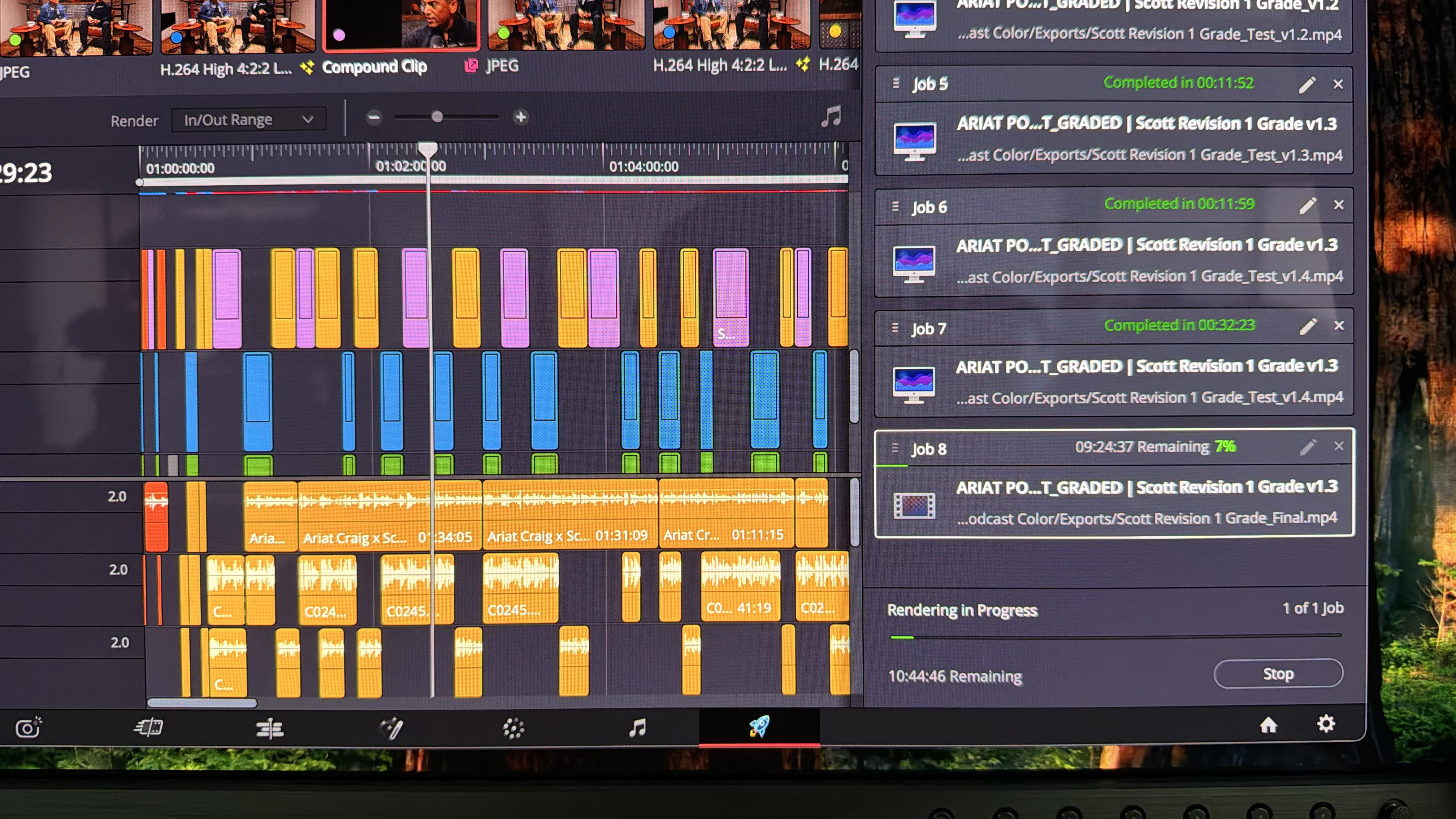
Technical Long export time

Post image
2 Upvotes

I’m editing a 30 minute podcast shot on 3 cameras at 4K 24fps on a 4k timelines. All Sony FX30’s S-Log 3 / S-Gamut3.Cine. Looking for some advice on how to better execute noise reduction in post. I currently have the temporal on and spatial nr set to the ultra ai mode. I know its the most gpu heavy effect on my node tree and it just takes forever to render cache and export. I tried the other modes and I can get it to a pretty close result to the ultra ai mode but there’s this wierd shift that’s happening around the subjects and the ultra ai mode fixes that. I also have my NR as the first node before converting to rec709. I turned off background caching and background rendering and have my render cache set to pro res 422 which helped speed up the process a bit. But 9 hours to export is insane and that’s without all the clips render cached. And if I did try to render cache all my clips first and then export it would still take the same amount of time just to render cache it. Any suggestions or recommendations would be great 🙏🏽 I’m also editing on a macbook pro m2 max 2TB 64GB Memory and editing on the current version of Davini Resolve Stuio


r/colorists • • 2d ago

Hardware Datacolor Spyder Pro vs Calibrite Display Pro HL for Theatrical Color grading.

1 Upvotes

Planning to buy calibration hardware for my ProArt PA27JCV monitor. Currently not using any video capture and playback device but planning to invest in Blackmagic UltraStudio 3G to begin with and then upgrade to blackmagic UltraStudio Mini Monitor 12G.

Which of the below calibration hardware is better for Theatrical DCI-P3 grading, Datacolor Spyder Pro or the Calibrite Display Pro HL? Some says Spyder calibration is not that accurate compared with the other. So looking for your expert advice on the same.

Thanks.


r/colorists • • 3d ago

Technical CDL and I feel like a dumb dumb

4 Upvotes

Okay so how do you make a CDL out of Resolve?

It keeps giving me EDL and the VFX people I'm working with say it won't work.

Can resolve make .ccc's natively?


r/colorists • • 3d ago

Novice Monitor Black Friday suggestions - 2K USD budget

1 Upvotes

Hoping to snag a Black Friday deal, but if not its time to upgrade.

First of all I am not a colorist but I do often grade my own commercials and documentaries when time is crunched and unable to send to my colorist. I do self color all of my social projects and probably 25% of my commercials - small stuff like CTV spots on Hulu, Disney all the way to broadcast superbowl spots. I have so far only worked in SDR and maybe HDR is around the corner for me so take that with a grain of salt.

Simple is the answer for me here. I don't want complex calibration, or 40 steps to get a clean image. I am in the world of done is better than perfect I would rather be 90% there without a heachache than 100% and fighting for my life.

I have considered the PA32UCDM, PA32UCDMR-K, LG OLED TV, but open to others and also trying to get a better understanding.

Assuming I will need an UltraStudio Mini Monitor 12G or similar and then if it doesn't have built in calibration a probe as well.

Trying to keep my entire budget at 2K or less. Monitor, calibration tools, mini monitor etc.

Truly open to any and all suggestions! Thanks

Currently using a MacBook Pro M4 MAX and Mac Studio M1 Ultra.


r/colorists • • 3d ago

Hardware ColorChecker Classic Mini for underwater video + DaVinci studio

Thumbnail
gallery
4 Upvotes

Looking to get color checker classic mini on Black Friday for 70€

The size its perfect for underwater filming, but the card its not waterproof

Kelden sells one that is waterproof with resin coating but its 220€, I believe its the same card

Any ideas how to apply the same resin coating or other waterproof methods or underwater color check cards compatible with DaVinci studio.


r/colorists • • 3d ago

Hardware How much can or should I trust my new M5 Pro Macbook colorwise?

3 Upvotes

Everyone is probably completely sick of these questions, but I gotta try anyway.

Awhile back I got a new M5 Pro Macbook, and I just kind of assumed that it would have kick ass colors. And hopefully a lot more accurate compared to my old gear since they are pretty old at this point.

However, I just do not like the colors on the Macbook at all. The differences are pretty minor, but big enough to be extremely distracting. At first I started to worry that my external LG has been horrendous all this time. But I feel like I've dialed it in pretty well over the years. And when remote monitoring to my iPhone the colors on my LG and my iPhone are almost identical. And since most people watch stuff on their phones I put a lot of value on things looking good on the iPhone.

I tried putting the Macbook on BT.709 since I've read that is the most accurate color profile. But it adds a lot of contrast to the image and makes it look very saturated compared to the LG/iPhone. Apple XDR at half brightness is looking a lot more like the LG/iPhone, just slightly more saturated.

I know the answer is 'get a calibrated device'. But for now that is not an option. And I would just dearly love to know what I can or shouldn't trust in this situation.

Do I go with the LG/iPhone as a baseline that has treated me well all these years (as far as I could tell)?
Do I trust the new Macbook on BT.709 mode?
Do I trust the new Macbook on Apple XDR?


r/colorists • • 5d ago

Announcement NAB NY meetup: thank you (over on r/editors)

Thumbnail
302.s.gy
3 Upvotes

r/colorists • • 6d ago

Technical Question about FX3 S-Log3 ISO

Thumbnail
gallery
9 Upvotes

I noticed this shot on Gawx’s FX3, and the monitor shows ISO 320.
I thought the FX3’s base ISO for S-Log3 was 800. How is he shooting at ISO 320? Is this Flexible ISO, or Cine EI with an EI setting of 320?
Would love to understand how this works!


r/colorists • • 6d ago

Reel Review! (2x a month!)

1 Upvotes

This alternates on Sundays

## Would you like feedback on your reel? This is the place to do it!

**An essential point to remember**: A reel won't secure you a job any more than a business card or website will. While it might be necessary, it is not the primary means of obtaining work.

**You gain employment through a network you develop,** not via any online job site. Building a network takes time, which is advantageous, as it allows you to learn the field.

## Rules

* **Rule 1**: Submit your reel *and its running time* as a top-level comment (meaning you reply to this post directly)

* **Rule 2**: *Specify your professional experience in years* (paying taxes = years as a pro, novice).

* **Rule 3**: Indicate how you're monitoring. Is it with a mini monitor + a LG CX?.

* **Rule 4**: You must review two other reels. **TWO**. You have seven days to complete this task, responding to two different reels. **Then** edit the comment where you post your reel: and put and put the two user names.

**Acceptable platforms for posting**: Your Vimeo site or an unlisted YouTube link. If we find a link to a channel or a video with 10k views, we want you to know that this thread is not meant for such content.

The moderation team will monitor this, and we are trying to encourage the community (that's you) to offer assistance. That's why providing two reviews is crucial.

Lastly, as someone who evaluates people's reels, if you start off with **log** footage, I expect to see the color work in passes. If color grading is a skill, and you transition from Log to finished grade, that's a definite red flag.

***Copy/paste this section:***

* Reel Link: (don't forget the running time )

* Experience:

* Monitoring:

* Two reels I reviewed:


r/colorists • • 7d ago

Novice can a color grading panel be used in other visuals software?

3 Upvotes

I'm a complete noob to color grading. I used DaVinci resolve to color grade a video, and I instantly enjoyed using the color grading controls. I'm interested in getting a hardware controller, such as the one linked. can i use it outside of DaVinci resolve as well, for example to control color grading or color picking, in Resolume and GIMP?

https://www.sweetwater.com/store/detail/ResMicroCPanel--blackmagic-design-davinci-resolve-micro-color-panel


r/colorists • • 7d ago

Novice Artefacts with CSTs

Thumbnail
gallery
11 Upvotes

Hey guys, beginner/learning colorist here: I've been facing an issue with gamut and tone mapping/compression with my input and output color space transforms for the past few hours and I can't wrap my head around how to fix it.

For some context, the clip I'm working on is the Mercedes AMG A35 from https://www.blackmagicdesign.com/products/blackmagicpocketcinemacamera/gallery.

I currently have set up two nodes: an input CST from Blackmagic Wide Gamut Gen 4/5 and BMD Film Gen 5, to Davinci Wide Gamut, and Davinci intermediate, and then an output CST from DWG/DI to R709 and Cineon Film log (as I plan to finish with a LUT). *The LUT node is not turned on

The project settings uses Davinci YRGB (not color managed) with timeline colour space as DWG/DI and output color space as R709 (scene). The input CST has no tone mapping and gamut enabled as I am going from a smaller color space to a larger one (DWG/DI), but the output CST has some settings (see attached). I've tried just about every combination of tone mapping/gamut mapping but nothing seems to remove the two artefacts I've seen (see attached). Putting the tone mapping on simple seems to fix artefact 1 but not 2...that's the best I've gotten the footage thus far.

I've seen https://www.youtube.com/watch?v=O6InkdLC1-g&list=PLajBtqBeb7Nc&index=7 and https://www.youtube.com/watch?v=IfWcqrY8-FA&list=PLajBtqBeb7Nc&index=6 so I think my issue might have something to do with tone/gamut mapping, but I just can't figure it out.

Any help is appreciated.

Edit: Issue has been resolved, thanks for the help!


r/colorists • • 7d ago

Technique Is it possible to replicate technicolor in color grading?

0 Upvotes

Title speaks for itself. How would this be possible and does anyone have examples of it being done?