r/gopro • • 15h ago

Mission 1 Pro + Media Mod 2.0

11 Upvotes

I have not found this listed clearly elsewhere, and I did some testing with this combo myself, so I figured I'd post here in case it could help someone else in the future.

The Media Mod 2.0 has three 3.5 inputs:

  1. A standard mic input
  2. A line-in level input
  3. A headset input

Just to get it out of the way, the line-in input, even when set to mic level sound, requires a powered mic or input of some kind. So, this is really only useful for a soundboard input or other specific input. I didn't have a chance to try it with a powered shotgun, but for use with a normal lav mic or similar the noise floor is much too high to be useful. The second use of this input is for timecode generators, and it does work well for that.

The mic input will record an independent stereo track to the MP4 file, and two tracks to the WAV file (if you select the option to record independent 32 bit float WAV files). I was able to get two distinct inputs/tracks by using a simple stereo splitter. It works as expected, with one mic going to the left channel and one to the right. If you want to record and edit using the audio from the MP$ (vs the WAV) just interpret the stereo track to two mono tracks.

Then, the headset input can also record as an input. This is intended to work with headphones with a mic included, and works great like that, but I was also able to get it to work with a TRS to TRRS adaptor and a normal mic. This will also record another stereo track (or two WAV tracks) but it does not split left and right, so it's only one extra audio track.

You get a maximum of three sets of stereo tracks, so if you use the line-in port for a timecode, you can not use both the headphone input and mic input. One track is the built in mic on the Media Mod.

In short, using two cheap adaptors, I was able to get up to three distinct audio inputs alongside the included Media Mod mics. Probably only a small subsection of people would ever use this many, but it is possible, and for unique applications, could solve some problems for people.

Finally, I did not note any static, ground loop, or audio issues with the GoPro camera connected to external power via the Media Mod while recording.

All that said, in extreme situations an external recorder + a scratch track out to to GoPro or timecode is probably best, but overall it's cool that the Media Mod is finally a really functional item.


r/gopro • • 5h ago

HERO13 SKI: Can GoPro Labs + DAMP help prevent blown-out sky?

Thumbnail
youtu.be
2 Upvotes

When filming with my GoPro HERO13 Black while skiing through forests, sunlight coming through gaps in the trees causes frequent sky overexposure and blown-out highlights.

Is increasing the DAMP value the easiest way to prevent sky blowouts? Does anyone have experience with this? Will it work?

DAMP INFO: DAMP (0.1–1000) controls how quickly automatic exposure adjusts: 1 is the default, higher values slow exposure changes (DAMP=10 makes them 10 times slower, while DAMP=60 can take up to a minute), and lower values (e.g. 0.2) make adjustments faster.

PS: Increasing DAMP seems like the most practical solution for me, as I'm not very familiar with manual exposure settings. However, if anyone could recommend the complete exposure settings (shutter speed, ISO, EV compensation, etc.) for this particular situation, I'd really appreciate it.


r/gopro • • 13h ago

ILS where to buy?

3 Upvotes

Short time lurker but where are you all finding the M1P ILS for sale? I have multiple stock alerts set up at all of the places but having zero luck


r/gopro • • 15h ago

Not turning on after updating

Post image
1 Upvotes

I know we have this GoPro Hero 4 Silver but we never used it since 2018.

I cleaned and charged the GoPro itself and the batteries and it was still working to my surprise. I was even able to look at the previous photos from the year, was able to take photos and videos, was able to download the app and connect it.

Then I saw that it has an available update. I clicked it cause it’s been years of no updating. So I was updating it through the Quik app, the camera was turning on and off and the app says it was supposed to do that. Then it suddenly turned off and I was not able to turn it on anymore.

I already tried pressing the power and shutter button, still not turning on.

I tried removing the SD and battery and plugging it in a call charger, still no.

I tried changing the batteries, still no.

I already messaged the Support, it’s a Sunday here, so I know I’m not getting any help soon.

My last resort is here. So please help.. :( I saw the quality when I tried using it, it’s still nice. I shouldn’t have updated it, now I’m regretting. :( I want to use it in our Japan trip this coming December. :( Is it dead like paperweight now? I’m so sad. Please help. Thank you so much.

Photo: No red LED light while charging. I noticed it has a red LED light when I was charging it the night before. I did not drop it at any rate. GoPro was handled with care.


r/gopro • • 19h ago

ILS setup done! Testing it out tomorrow

Post image
24 Upvotes

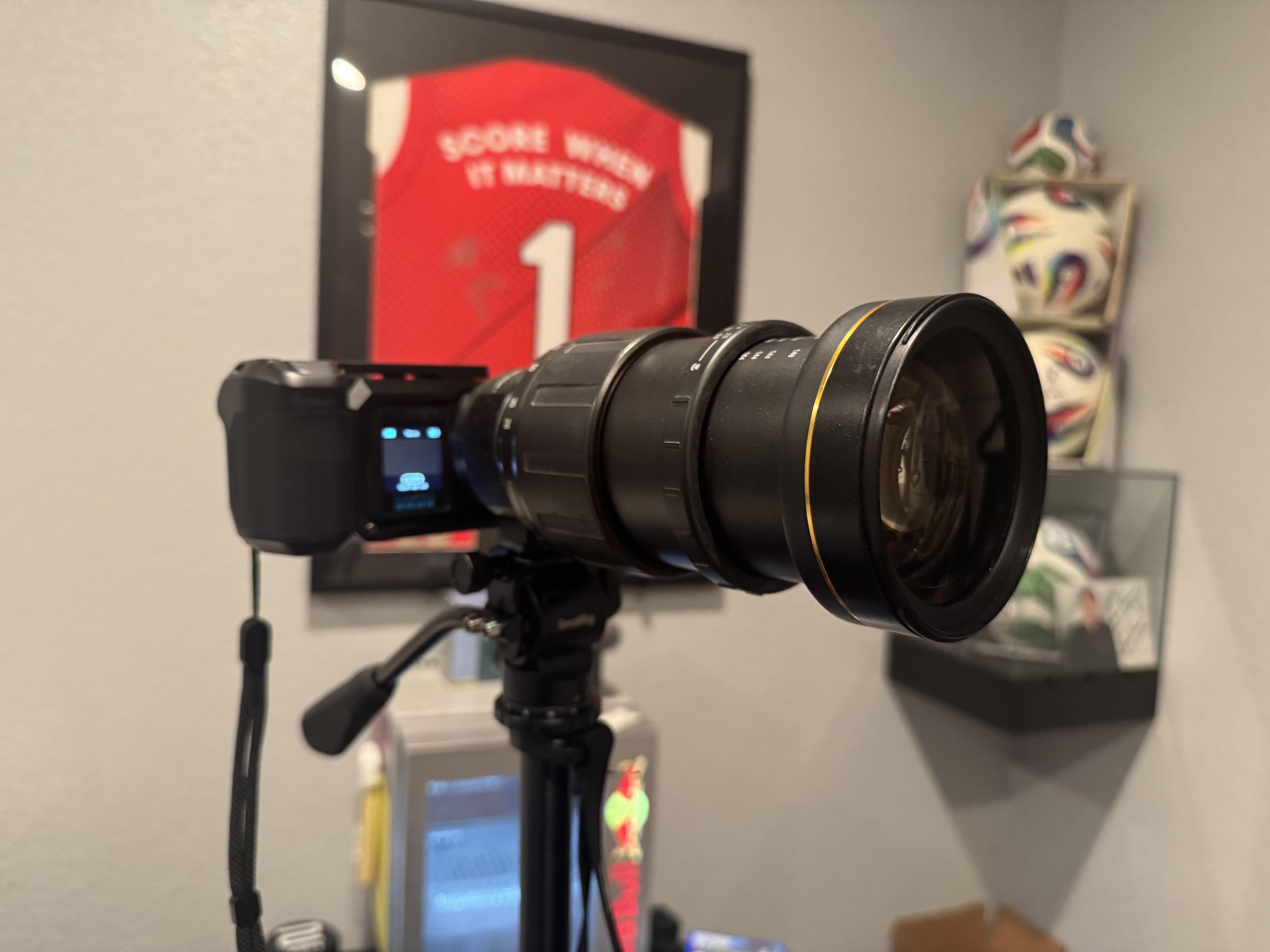
Using a Nikon F to MFT adapter that mounts to the tripod, and using a Tamron 28-105mm f/2.8 lens. So excited to try it out tomorrow! Also planning to mount a 5.5 inch monitor to the tripod since I have a Media Mod so I don’t have to move my head with the camera too much. How do your guys’ setups / rigs look? I’d love to see them


r/gopro • • 21h ago

Mission 1

2 Upvotes

HI, So I'm in Valencia and am using my mission 1 with the grip however after the recent update it's really hard to only take one photo at a time! Is there a adjustment to grip or a setting to change to prevent this? I'm trying to be smooth with the shutter button but generally I end up taking 2 or 3 photos at a time!!!


r/gopro • • 23h ago

Trying to Make Friends with My GoPros | MISSION 1 PRO & ILS – One Month Later

Thumbnail
youtu.be
5 Upvotes

First off, I'm Korean.

Why am I mentioning that right away? Well, because my English isn't very good. LOL.

So I used AI to translate everything and added English subtitles to the video.

I've actually been having a lot of fun sharing my videos on Reddit, so this time I figured I'd just take my GoPros out, shoot whatever caught my eye, and share the results here.

I find GoPro cameras really fascinating.

GoPro first came out around the time I started making videos. Back then, they were pretty revolutionary, but I never actually ended up buying one. Funny enough, it's only recently that I've started using them.

There are two main reasons for that.

First, I wasn't particularly interested in cameras that couldn't really give me much control over depth of field and selective focus.

Second, over time, I've started enjoying a more immersive, in-the-moment style of shooting.

And of course, the fact that they're so small and easy to carry around is a huge plus.

That's what eventually led me to buy the GoPro MISSION 1 series.

I've had chances to try action cameras from other brands too, and ultimately, I think a lot of it comes down to personal preference.

But what I really enjoy about these GoPros is that the more time I spend using them, the more possibilities I seem to discover. The more familiar I get with them, the more ideas I have for different kinds of shots.

I'm also thinking about picking up a variety of accessories next year and experimenting with those.

A few additional notes:

1. About the wind noise near the end of the video

The wind noise gets ridiculously loud toward the end. I think I might have accidentally turned the wireless mic off. LOL.

2. About the text captions throughout the video

There are a few sections where I stopped talking and just put my thoughts on screen as text instead.

It's not because I was being lazy... I just didn't have much time to put this video together. Haha.

3. About the GoPro Wireless Mic Kit

One of the things I liked most about the GoPro Wireless Mic Kit is that it seems to let me record the camera's ambient audio and the wireless mic audio at the same time, on separate tracks.

That's actually a pretty useful feature.

I haven't compared it with other action cameras yet, so I'm not sure whether they can do the same thing.

I actually own both the Insta360 Luna Ultra and the Insta360 Mic Pro, so it might be fun to test whether that combination offers something similar.

Of course, I could always enable internal recording on the Insta360 Mic Pro and record ambient audio separately on the Luna Ultra without connecting the mic.

But honestly, that's just extra hassle. LOL.

The second big advantage is how lightweight the GoPro mic is.

It's genuinely tiny and light, which means that if you mount it properly, it's less likely to get in the way of your clothes or fall off while you're moving around.

Anyway, I want to spend some more time with this mic kit before making a proper video about it.

Thanks for checking out my footage!