r/homeassistant • • 8h ago

🧩 Custom Integration EV Cockpit – Local Home Assistant integration & dashboard card for EVs (looking for feedback & feature requests)

Thumbnail
gallery
2 Upvotes

Hi everyone,

I'm currently working on a custom Home Assistant integration with a matching dashboard card called EV Cockpit, and I'd like to briefly share the project here.

My goal was to build a clean, brand-agnostic EV dashboard that runs completely locally in Home Assistant — no manual YAML, no custom helpers to set up, and no external cloud subscriptions.

Full transparency up front: This project was coded with the help of Gemini. I'm not a full-time developer, so it allowed me to turn my own ideas for an EV cockpit directly into something usable.

What EV Cockpit can do so far

  • Simple UI setup: Just pick your vehicle device and the integration auto-detects available sensors. Missing sensors (like external GPS or OBD2 trackers) can be added manually — any feature your car doesn't provide sensors for is automatically hidden on the card.
  • Customizable dashboard: Reorder, resize, or hide tiles directly in the visual editor. Supports Light/Dark Mode as well as custom vehicle images (idle & charging).
  • Trip log & route map: Automatic trip detection (via ignition state or odometer), per-trip consumption curve (kWh/100 km or Wh/km), and an interactive map view with road routing.
  • Charging, curves & costs: Live charging curve (including DC tapering correction for a more realistic ETA), charging history as a calendar or list, cost tracking, and management of monthly or one-time charging subscriptions. Effective cost per kWh and per 100 km is calculated automatically.
  • Climate, timers & Camping Mode: Controls for preconditioning, window defrost and seat heaters, departure timers, an optional evening frost/weather check, and a Camping Mode (restarts climate on an interval and protects the battery via a minimum SoC cutoff).
  • Local & extensible: All long-term data is stored locally in Home Assistant storage. Also includes dynamic polling while charging/driving, an optional HA-managed charge limit, and ABRP telemetry support.

Looking for your feedback

The project is still actively in development, so I'd really appreciate your input:

  • What are you still missing for your EV in your Home Assistant dashboard?
  • Which features would you like to see added or handled differently?
  • Are there any quirks with your specific vehicle integration that I should account for?

Thanks in advance for any honest feedback and suggestions!

https://github.com/mrtzjpg/EV-Cockpit


r/homeassistant • • 18h ago

❓ Support Weird apk file in /local/www

0 Upvotes

Hey,

i got a message from spook there is a file in the www/ folder, which is accessable by everyone. What i found was a apk file called HOCamera.apk I deleted it, because it feeled very suspicious to me. Can anyone relate to this or explain how it went there?

Thanks!


r/homeassistant • • 17h ago

❓ Support Access while traveling

0 Upvotes

So far I've got quite a bit setup on my newly installed HAOS; doorbell, garage door, and a bunch of stuff for at home use like Spotify and lights. If like to make a dashboard for use while away from home that would show garage for status and doorbell interactions. What is the best way to interact with HA white nut in the same network?

UPDATE: Thanks for the advice. I registered for the free tailscale account, installed the app within HA and got them connected last night. A little configuration in the HA companion app in my phone and I got it working when I turn off wifi. And I the tailscale app on my phone I checked to only have it used for HA companion app traffic.


r/homeassistant • • 15h ago

🤖 Automation Climate Advisor: I stopped touching my thermostat and whole-house fan, I just open and close windows when it tells me to

56 Upvotes

A normal thermostat only reacts to the temperature inside. It doesn't know this evening will be cooler outside than in, that a window is open, or that nobody's home. So you end up running the AC when opening a window would have done the job, or babysitting the fan and thermostat yourself.

Climate Advisor is a Home Assistant integration that plans each day from the weather forecast and runs your thermostat (and whole-house fan, if you have one) around it. What I actually do now is open and close windows when it tells me to. That's it.

Each morning it sends a plan like this (from a mild-day test):

Your Home Climate Plan for Today

Mild (67°F) ¡ Windows: close by 5:00 PM ¡ Tomorrow: stable

A day where the house practically takes care of itself. I warmed to 68°F before sunrise; now the weather does the rest. Open south and east windows for a cross-breeze. Close up by 5:00 PM to trap the warmth.

During the day it reminds you before each window step. It pauses the heat or AC while a window is open and runs the fan when outside air will cool the house. It won't suggest windows on a muggy night, and it leaves your own thermostat changes alone for a while.

It learns how your house behaves. Every night it updates what it knows about your house:

  • how fast your system heats and cools it;
  • how well it holds heat;
  • how much the sun warms it;
  • how quickly open windows or the fan cool it down.

The Analysis tab tells you what it learned in plain terms, for example "holds heat well: closes half the indoor–outdoor gap in about N hours". It plans with that, so it knows how early to pre-cool before a hot afternoon, or how far it can let the house drift overnight and still be on target by morning. It starts on sensible defaults and gets sharper over the first days and weeks.

Savings and/or comfort: you pick the balance- yes you can have both. Set the temperature range you're happy with and how far it may drift while you're away or asleep, or flip on Prefer savings over comfort.

Works with your setup:

  • Heating and cooling, heat-only or cool-only. Furnace and AC, heat pumps, baseboards or a cooling-only system. It only plans what your system can actually do.
  • Multiple zones. Add one per thermostat. Each zone learns its own part of the house and gets its own plan and dashboard.
  • A bedroom sensor at night. Most thermostats sit in a hallway, so the bedroom ends up too cold or too warm overnight. Add any temperature sensor in the bedroom, and while you sleep Climate Advisor keeps the bedroom on target. It nudges the thermostat up a step at a time, so the heat actually runs for the room you're in. It steps back down once the bedroom is there. It also learns how the bedroom behaves overnight, separately from the rest of the house.
  • Whole-house fan, run like a thermostat. With the windows open, it cycles the fan on and off to hold your target temperature. It stops the fan if the house is closed up and never runs it alongside the heat or AC. No whole-house fan? It can use your HVAC blower instead.
  • QuietCool RF remote. With the companion QuietCool fan firmware, it hears the wall remote, and can transmit commands as well. Use your existing control if you’d like, or let automation do its thing.

It shows its work:

  • 3-day indoor forecast: shown against what actually happened. On my house it's typically within about 0.7 °F, 4 hours ahead.
  • How your system is doing: how fast the house heats and cools, daily runtime, a comfort score, and how often you followed its window advice.
  • Problem warnings: it warns you if the house drifts off target while the HVAC sits idle, or if a sensor or the weather feed goes quiet. It also catches an Ecobee misreading the room after the furnace trips its overheat safety. In testing it caught 10 out of 10 episodes, with no false alarms.

What's next:

  • Secondary heat such as pellet stoves and fireplaces, planned alongside your main system.
  • Several sensors in one zone, so a single thermostat can serve the whole floor, not just the hallway.
  • Duct dampers and diverters. If you've built your own automatic dampers or diverters, Climate Advisor will publish Home Assistant sensors that recommend which way to route the airflow. Your automations then do the switching.

Try it without handing over control. Observe-only mode lets it plan and report while your thermostat runs as normal. Switch it on when you trust it.

What you need:

  • Home Assistant 2026.3 or newer.
  • A thermostat HA can control. I test on Ecobee; people run it on Nest, Honeywell, mini-splits and more.
  • A weather integration.

Door/window sensors are what make the window part work.

It's in the Marketplace: search for Climate Advisor. To get v0.9.95 (the latest pre-release), turn on Show beta versions or use Redownload and pick it. Self-assessed Gold on Home Assistant's quality scale. Free and open source.

Repo and docs: https://github.com/gunkl/ClimateAdvisor ¡ Release notes: https://github.com/gunkl/ClimateAdvisor/releases/tag/v0.9.95


r/homeassistant • • 13h ago

🛠️ DIY / Hardware Trying to Put together Z-Wave Controlled LED Strips

0 Upvotes

I'm trying to piece together an LED lighting solution for my desk using Z-Wave.

I'm looking at the following dimmer from Zooz: Zooz Z-Wave Long Range RGBW Dimmer ZEN56 800LR for 12-24 V LED Strips - The Smartest House

I'm good on the software / configuration side, but I'm awful with hardware, so I wanted to check if my plan makes sense before pulling the trigger on a handful of products. Here is the Parts list I'm looking at:

Based on the wiring diagram shown on the Zooz dimmer, I think I'll need some of that copper wiring to connect the voltage line to the strip.

My questions are:

  1. Does this make sense?
  2. Are there any better recommendations for the power supply? I was hoping to find something I could mount under my desk instead of having another brick laying on the floor.
  3. Are there any product recommendations that would make it easier to connect the dimmer's wires to the LED strip?

Thanks for any help / advice!


r/homeassistant • • 7h ago

📊 Dashboard LCARS Dashboards and Automation

Post image
1 Upvotes
Main
Energy
Stats
Rooms

As for whom it may interest. This is my actual dashboard Setup in LCARS Design. The stats are many, but if used to quite good to read.

Accompanied it is with a lot of automation, so the plan is to set it once and it will do everything on it's own. The automation control the charging of the vehicle and the heating in accordance to solar production, estimated power consumption of the whole house and heating, the calendar, the SoC of the house battery and a lot more. Coding I did mainly with Claude.

AutomationWas sie machtStatusBereichAuslĂśser
EVCC: Zentrale Entscheidungs-Automation 3.1Zentrale Steuerung für Wallbox, Hausspeicher (GoodWe) und EVCC: setzt Speicher-Ziele, Ladepuffer und Priorität und wählt den Lademodus (Tesla-Notladung bei niedrigem SoC, Nachtladen, PV-Restboost, PV-Freigabe, Winterlogik; im Urlaub Wallbox aus). Pausiert bei aktivem Override.anTesla / WallboxMehrmals täglich, Sonnenauf-/-untergang, bei Änderung von Speicher-/Auto-SoC, PV-Leistung, Prognosen, Modus
EVCC: Zentrale Entscheidungs-Automation 3.0Vorgängerversion der Zentralen Entscheidungs-Automation, durch 3.1 abgelÜst.ausTesla / Wallboxwie 3.1
EVCC: Override-Status automatisch erkennenSchaltet den Override ein und setzt Sonderzustände (Sofort 95 %, Nachtladung, manueller Modus) zurßck, sobald der Wallbox-Modus von Hand verstellt wird (nicht im Urlaubsmodus).anTesla / WallboxWallbox-Modus ändert sich
EVCC manueller Override aktivSchickt eine WhatsApp, wenn der Override-Schalter eingeschaltet wird.anTesla / WallboxOverride-Schalter geht an
EVCC manueller Override ausSchickt eine WhatsApp, wenn der Override-Schalter ausgeschaltet wird.anTesla / WallboxOverride-Schalter geht aus
EVCC Modus GrundSendet per WhatsApp den aktuellen Grund für den EVCC-Modus und den Tesla-Ladestand.anTesla / WallboxWallbox-Modus ändert sich, oder WhatsApp „wallbox“ / „evcc“
EVCC Modus Grund geändert - Nachricht an PCZeigt den neuen Modus-Grund als Benachrichtigung auf dem Büro-PC; reine Prozentänderungen werden ignoriert.anTesla / WallboxText „Modus Grund“ ändert sich
EVCC: Ladekabel entriegelnWeckt den Tesla, spielt einen Sound ab, stoppt die Ladung und entriegelt das Ladekabel.anTesla / WallboxNur manuell (z. B. Dashboard-Button)
EVCC: Reset nach Abstecken (PV-Automatik & Override zurücksetzen)Setzt das Ladelimit auf 80 %, beendet Timer, Override und alle manuellen Modi und stößt die Zentrale Automation neu an.anTesla / WallboxAuto wird abgesteckt
Wallbox: Nachtladung-Merker zurücksetzen beim AbsteckenSetzt die Merker „Nachtladung“ und „manueller Modus“ zurück, solange die Wallbox-Automatiken nicht gesperrt sind.anTesla / WallboxAuto wird abgesteckt
Wallbox Automatik einSchaltet manuellen Modus, Nachtladung, Sofort-95-% und Override aus, die Wallbox ist wieder in der Automatik; Bestätigung per WhatsApp.anTesla / WallboxWhatsApp „aus“ / „automatik“ / „off“
Manuell: Schnell laden 80%Sofort-Laden mit 3 Phasen und 16 A bis 80 %, Override an; WhatsApp-Bestätigung. Nur bei angestecktem Auto.anTesla / WallboxWhatsApp „schnell“ / „fast“ oder Dashboard-Button
Manuell 95%Sofort-Laden mit 3 Phasen und 16 A bis 95 %, Override an; WhatsApp-Bestätigung. Nur bei angestecktem Auto.anTesla / WallboxWhatsApp „schnell95“ / „fast95“ oder Dashboard-Button
Whatsapp Befehl: Schnell laden (Dynamischer SoC)Fragt per WhatsApp nach dem Ziel-SoC (1–100 %) und startet danach das Schnellladen auf diesen Wert; bricht nach 5 Minuten ohne gültige Antwort ab.anTesla / WallboxWhatsApp „soc“ (Auto angesteckt)
Manuell PVStellt die Wallbox auf PV-Modus (smart) mit Limit 80 %, Phasen automatisch, 16 A; Override an; WhatsApp-Bestätigung.anTesla / WallboxWhatsApp „smart“ / „pv“ oder Dashboard-Button
Sofort-Laden vor Termin (SOC fest 95%) v4.3Für Kalendertermine mit „tesla“ oder „HA“ im Titel: startet einen Ladetimer, sodass der Tesla zum Termin auf 95 % geladen ist (Ladezeit + 4 h Fahrt + 1 h Puffer); WhatsApp mit Termin und Wartezeit.anTesla / WallboxKalender, 24 h vor Terminstart, und stündlich um :15
Automatisch: Schnell laden (Dynamischer SoC per Kalender + WhatsApp Abfrage) v3.1Für Termine mit „SoC“ oder „Ziel“ plus Zahl im Titel: fragt einmal pro Termin per WhatsApp nach dem Ziel-SoC und startet den Ladetimer (Puffer 5 h + Ladezeit vor dem Termin).anTesla / WallboxKalender, 24 h vor Terminstart, und stündlich um :15
Sofort-Laden nach Timer mit SoC fest 95%Startet nach Timer-Ablauf das Sofort-Laden (3 Phasen, 16 A) und setzt, sobald die Ladung läuft, das Tesla-Ladelimit auf 95 %; warnt per WhatsApp, wenn das nicht klappt.anTesla / WallboxTimer „Sofort laden“ läuft ab (Auto angesteckt, SoC unter 95 %)
Sofort-Laden nach Timer (Dynamischer SOC und WhatsApp)Wie die 95-%-Variante, aber mit dem per WhatsApp/Kalender gewählten Ziel-SoC; Tesla-Ladelimit danach 100 %.anTesla / WallboxTimer „Anpassbarer SoC“ läuft ab (Auto angesteckt, SoC unter Ziel)
EVCC Nachladen merken (Timer abgelaufen, Auto nicht angesteckt)Merkt sich den Ladebedarf, wenn ein Ladetimer abläuft, während das Auto nicht angesteckt ist, und informiert per WhatsApp.anTesla / WallboxEiner der beiden Ladetimer läuft ab
EVCC Nachladen beim Anstecken (nach abgelaufenem Timer)Startet beim Anstecken das gemerkte Sofort-Laden, wenn der Termin noch in der Zukunft liegt und das Ziel nicht erreicht ist; WhatsApp mit Restdauer.anTesla / WallboxAuto wird angesteckt
Tesla weckenSpielt werktags morgens einen Sound im Tesla ab (Weck-Signal), wenn das Auto angesteckt ist.anTesla / WallboxMo–Fr um 07:50 Uhr
Auto vorheizen morgens (nur Werktage, außer Ferien/Urlaub)Schaltet Klima und Sitzheizung des Teslas ein, wenn das Auto angesteckt ist, es kalt ist (unter 15 °C) und weder Ferien noch Urlaubsmodus aktiv sind.ausTesla / WallboxMo–Fr um 07:40 Uhr
Heizung Tesla anSchaltet Sitzheizung (mittel) und Klima-Preset „dog“ im Tesla ein; Bestätigung per WhatsApp.anTesla / WallboxWhatsApp „vorheizen“ / „heizen“
Tesla fährtMeldet per WhatsApp „Tesla fährt“, wenn der Tesla fährt (über 10 km/h bzw. Fahrer anwesend), während ein iPhone zuhause und das andere nicht zuhause ist; danach 15 Minuten Pause.anTesla / WallboxGeschwindigkeit über 10 oder Fahrer anwesend
Tesla: Reifendruck-Warnung (WhatsApp)Warnt per WhatsApp vor Reifen unter 2,9 bar, hĂśchstens einmal pro 24 Stunden.anTesla / WallboxReifendruck unter 2,9 bar, Auto abgesteckt oder Fahrer anwesend
Heizung – Flexibler Boost, dynamische Rampe & Vorlauf-Bremse (v9.3)Regelt Raum-Soll und Mindestvorlauf der Vaillant-Wärmepumpe: Boost (leicht/voll/manuell) bei PV-Überschuss und ausreichend Batterie, Nachtdrosselung bei guter PV-Prognose, Vorlaufgrenze nach Außentemperatur; WhatsApp bei Stufenwechsel.ausHeizung / WärmepumpeStündlich, HA-Start, Änderung von Prognose, Batterie, Raumtemperatur, Vorlauf
Heizung – Manueller Boost per ButtonSchaltet den manuellen Boost-Merker ein, maximal 2 Stunden oder bis der Raum-Durchschnitt 22,5 °C erreicht.anHeizung / WärmepumpeDashboard-Button „Heizung Boost“
Heizung: 36h Wärmebedarf berechnenBerechnet aus Wettervorhersage und gelerntem Verbrauch den erwarteten Heizstrombedarf der nächsten 36 Stunden.anHeizung / WärmepumpeAlle 30 Minuten und HA-Start
Geschätzter Verbrauch Heizung kWh gesternSpeichert die Heizungsprognose des Tages, um sie am Folgetag mit dem Ist-Verbrauch zu vergleichen.anHeizung / WärmepumpeTäglich 23:59 Uhr
Heizung Chart Helfer kWhHängt Tagesdurchschnittstemperatur und Heizungsverbrauch an eine Liste der letzten 15 Tage fßr das Diagramm an.anHeizung / WärmepumpeTäglich 23:57 Uhr
Heizkabel prßfenWarnt per WhatsApp, wenn das Heizkabel der Wärmepumpe ßber 40 W zieht.anHeizung / WärmepumpeLeistung ßber 40 W
PV Überschuss: Warmwasser Boost (Tageshoch flexibel -2h)Heizt das Warmwasser bei PV-Überschuss auf 60 °C (Boost) ab 2 h vor dem Tageshoch; zurück auf 45 °C bei fehlendem Überschuss oder 1 h nach dem Tageshoch.ausHeizung / WärmepumpeEinspeisung über 1000 W (5 Min) bzw. unter 500 W; Zeitfenster um das Tageshoch
Außentemperatur Tagesdurchschnitt ab 00:00 UhrBerechnet den laufenden Tagesdurchschnitt der kombinierten Außentemperatur; um Mitternacht werden die Helfer zurückgesetzt.anWetterNeuer Temperaturwert, Mitternacht
Wetter: Durchschnittstemperatur nächste 3 Tage berechnenBerechnet den Mittelwert aus HÜchst- und Tiefstwerten der nächsten 3 Tage fßr den Standort.anWetterStßndlich und HA-Start
Wetter – Tageshöchsttemperatur ermittelnHolt die Stundenvorhersage und speichert den Zeitpunkt des Tagesmaximums („Tageshoch“).anWetterTäglich 05:00 Uhr und HA-Start
Wetter: Vorhersage-Temperatur morgen aktualisierenSchreibt die mittlere Temperatur von morgen in den Helfer fĂźr den erwarteten Heizverbrauch morgen.anWetterStĂźndlich um :05 und HA-Start
PV Tagesrekord aktualisierenSetzt den Allzeit-Tagesrekord des PV-Ertrags nur nach oben.anPV / EnergiePV-Tagesertrag ändert sich
GoodWe: Watchdog (Integration bei ausbleibenden Daten neu laden)Lädt die GoodWe-Integration neu, wenn seit ßber 10 Minuten keine Werte kommen (hÜchstens einmal pro Stunde); meldet das Ergebnis als Benachrichtigung.anPV / EnergieAlle 5 Minuten
Klimasteuerung & Licht: Rollladen-Automatik V2Öffnet Rollläden tagsüber bei Anwesenheit (werktags früher als am Wochenende), fährt bei Kälte ohne Anwesenheit zu und bei Hitze auf 50 %, senkt die Küche abends auf 70 % und schließt abends/nachts alles samt offenen Garagentoren. Nicht im Urlaubsmodus.anRolllädenUhrzeiten, Temperatur, Bewegung, Kamin/Anwesenheit, Sonnenuntergang
Rollladen: Manuelle Bedienung erkennenSetzt den Merker „Rollos manuell geöffnet“, wenn ein Rollladen von Hand bewegt wird (Automatik-Fahrten werden per Timer ausgeblendet).anRolllädenStatuswechsel eines Rollladens
Manuelle Bedienung Rollos aus nach 1 hSetzt den Merker „Rollos manuell geöffnet“ nach 1 Stunde zurück, damit die Automatik weiterläuft.anRolllädenMerker seit 1 Stunde an
Rollläden: Morgendliches ÖffnenFährt werktags alle Rollläden auf 100 %, sofern keine Ferien und kein Urlaubsmodus sind, und setzt den manuellen Modus zurück.anRolllädenMo–Fr um 07:00 Uhr
Urlaubsbeginn: Heizung & Warmwasser AUSSchaltet bei einem Urlaubstermin (Stichwort wie Urlaub, Reise, Camping, Heizung) den Urlaubsmodus ein, Heizung (Away-Modus) und Warmwasser aus und setzt das Hausspeicher-Limit auf 80 %.anUrlaubsmodusKalendertermin beginnt
Urlaubsende: Heizung & Warmwasser EINSchaltet 2 Tage vor Urlaubsende Urlaubs- und Away-Modus aus, Warmwasser und Heizung wieder ein und das Hausspeicher-Limit auf 100 %.anUrlaubsmodusKalendertermin endet in 48 Stunden
eMail Urlaubsmodus AktivSendet E-Mail und WhatsApp „Urlaubsmodus an“.anUrlaubsmodusUrlaubsmodus wird eingeschaltet
eMail Urlaubsmodus ausSendet E-Mail und WhatsApp „Urlaubsmodus aus“.anUrlaubsmodusUrlaubsmodus wird ausgeschaltet
Rollos Urlaub schließen SonnenuntergangSchließt im Urlaubsmodus abends alle Rollläden.anUrlaubsmodusBürgerliche Dämmerung am Abend
Rollos Urlaub öffnen SonnenaufgangÖffnet im Urlaubsmodus morgens die Rollläden in Keller und Erdgeschoss.anUrlaubsmodusBürgerliche Dämmerung am Morgen
Urlaubsmodus Beleuchtung & KaminAnwesenheitssimulation im Urlaubsmodus: schaltet abends Licht, Kamin und KĂźchen-Steckdose ein; um 22:30 Uhr werden Kamin und Steckdose ausgeschaltet.anUrlaubsmodusSonnenuntergang und 22:30 Uhr
Urlaub Bewegung Flur oder Garage offen erkanntMeldet im Urlaubsmodus Bewegung im Flur, eine geĂśffnete Nuki-TĂźr oder ein entriegeltes Schloss per E-Mail und WhatsApp.anUrlaubsmodusBewegung, TĂźr offen oder Schloss entriegelt
Tesla Abgesteckt UrlaubSchickt im Urlaubsmodus eine E-Mail, wenn der Tesla abgesteckt wird.anUrlaubsmodusAuto wird abgesteckt (nur im Urlaubsmodus)
Beleuchtung FlurFlurlicht per Bewegungsmelder: 15–21 Uhr hell (100 %) plus Zusatzlampe, 21–9 Uhr gedimmt (30 %), aus nach 5 Minuten ohne Bewegung.anLicht & GeräteBewegung erkannt bzw. 5 Min keine Bewegung, Wohnzimmerlicht ändert sich
Küche LichtKoppelt das Küchenlicht an den Küchenschalter: Licht an (nur 15:00–21:30 Uhr), wenn der Schalter an ist; aus, wenn er aus ist.anLicht & GeräteKüchenschalter ändert sich
Fernsehzimmer RelaxlampeSchaltet die Relaxlampe bei Bewegung im Fernsehzimmer ein und nach 5 Minuten ohne Bewegung aus.anLicht & GeräteBewegung im Fernsehzimmer
Fernseher ausSchaltet die Fernseher-Steckdose 1 Minute nach Leistungsabfall unter 30 W aus.anLicht & GeräteLeistung unter 30 W
Luftreiniger Bßro ein und ausSchaltet den Luftreiniger ein, wenn der Shelly-Stecker im Bßro ßber 10 W zieht, und 20 Minuten nach Absinken unter 9 W wieder aus.anLicht & GeräteLeistung Shelly-Stecker ßber 10 W bzw. unter 9 W, Bßro-PC online/offline
Homeoffice runter fahrenFährt den Homeoffice-PC herunter, wenn das iPhone die Zuhause-Zone seit 10 Minuten verlassen hat.anLicht & GeräteiPhone verlässt die Zuhause-Zone (10 Min)
Bewegung FlurZeigt bei Bewegung im Flur die Meldung „Bewegung im Flur erkannt“ auf dem Büro-PC.anSicherheit & MeldungenBewegungsmelder Flur
Badezimmer Fenster offenWarnt per WhatsApp, wenn ein Badfenster oder die Wohnzimmer-/Schlafzimmertür länger als 15 Minuten offen ist und es draußen unter 20 °C hat.anSicherheit & MeldungenFenster/Tür seit 15 Minuten offen
Meldung Tür geöffnetMeldet per WhatsApp „Haus Bewegung erkannt!!!“, wenn die Haustür geöffnet oder entriegelt wird, während seit 5 Minuten niemand anwesend ist.anSicherheit & MeldungenHaustür offen oder entriegelt
Haustüren und Garagen verschließenVerriegelt die Haustür und schließt offene Garagentore, wenn 5 Minuten niemand mehr da ist und die Tür zu ist; WhatsApp-Bestätigung.anSicherheit & MeldungenNiemand anwesend seit 5 Minuten
Garage verzögert nach Abstecken öffnenÖffnet das Garagentor nach 10 Sekunden Verzögerung, falls es geschlossen ist.anSicherheit & MeldungenTimer „Garage öffnen Verzögerung“ läuft ab
Garage Kamera: Neustart bei VerbindungsverlustSchaltet den Shelly der Garagenkamera aus und nach 1 Minute wieder ein, wenn die Kamera 2 Minuten nicht erreichbar ist.anSicherheit & MeldungenKamera nicht verfĂźgbar (2 Min)
Batterie schwach: WhatsApp-Warnung (unter 30 %)Sendet eine WhatsApp mit Gerätenamen, wenn eines von 29 batteriebetriebenen Geräten (Sensoren und Melder) unter 30 % fällt.anSicherheit & MeldungenBatteriestand unter 30 %
iPad fast leerMeldet per WhatsApp „iPad Batterie fast leer“.anSicherheit & MeldungeniPad-Akku unter 30 %
Luftreiniger Bßro Filter tauschenWarnt per WhatsApp, wenn die Filterlebensdauer des Bßro-Luftreinigers unter 25 % fällt.anSicherheit & MeldungenFilter unter 25 %
Abfrage Optionen WhatsappAntwortet mit der Liste aller WhatsApp-Befehle (Lademodi, Tesla-Heizung, Status).anBriefings & WhatsAppWhatsApp „?“ / „optionen“ / „hilfe“
Morning BriefingSchickt Wetter, Termine, offene Aufgaben und Einkaufsliste per WhatsApp (Aufgaben und Einkauf auch an den Büro-PC); nicht im Urlaubsmodus.anBriefings & WhatsAppMo–Fr 08:00 und 11:30 Uhr, neuer Eintrag in Einkaufs-/To-do-Liste
News BriefingSchickt Schlagzeile, Kurzfassung und Link zu Deutschland, International, Wirtschaft und Tagesschau per WhatsApp.anBriefings & WhatsAppMo–Fr 08:00 und 11:30 Uhr
Heizung Morning BriefingSendet Energie- und Heizungswerte (PV, Hausverbrauch, Einspeisung, Netzbezug, Heizverbrauch Soll/Ist, COP, Batterie-SoC).anBriefings & WhatsAppTäglich 08:00 Uhr oder WhatsApp „heizung“ / „status“ / „werte“
Urlaub Zweitgebäude: Thermostate auf 15 °C und danach zurßckStellt während eines bestimmten Kalendereintrags alle Heizgruppen im Zweitgebäude auf 15 °C und stellt den vorherigen Zustand am Ende wieder her.anZweitgebäudeKalendereintrag: Start / Ende
Heizung: Öl-Basiswert aktualisieren (6.000l-Intervall oder Tanken-Button)Setzt den Öl-Basiswert auf den Zählerstand, wenn 6.000 l verbraucht sind oder der Tanken-Button gedrückt wird; bei 6.000 l zusätzlich Benachrichtigung und automatische E-Mail mit Heizölbestellung.anZweitgebäudeVerbrauch seit Basiswert mindestens 6.000 l oder Tanken-Button
Einkaufslisten bidirektional synchronisieren (nur aktive Einträge)Gleicht offene Einträge der Apple- und der Alexa-Einkaufsliste in beide Richtungen ab.ausSonstigesÄnderung einer der Listen, stündlich um :15

r/homeassistant • • 22h ago

🖼️ Show & Tell Claude Project: House Brain

Thumbnail
gallery
0 Upvotes

Most of what I’m showing here is a work in progress, so it’s not anything I feel confident sharing yet. This was developed with HA using the AppDaemon app. I have a Nvidia RTX 4070 running Ollama for the AI brain so the design, build and testing is as in Claude, but it operates completely local.

I was seeing all the cool things people were doing with Obsidian and built around that same concept, but event-driven on the wealth of data in HA. There is an element of machine learning built in where it adapts and learns habits. I had Claude also read a few good psychology books on habit loops and behaviors. Essentially, you’re taking this idea of static automations and having the house self adapt instead taking actions based on what it knows is going on.

It learns things like I run the dishwasher every night. If I go to bed and I don’t start the dishwasher, it’s poking me about it. Stuff like that. I didn’t have to tell it that I run the dishwasher every night. It saw the pattern and gave me a proposal on how to handle it in the future.


r/homeassistant • • 3h ago

🖼️ Show & Tell [Project] Verdant – A self-hosted plant care add-on for Home Assistant, built with vibe coding

Thumbnail
gallery
3 Upvotes

Hi r/homeassistant,

I'm the author of this project, so consider this a small introduction to something I've been working on. There's nothing for sale here.

Verdant started as a personal experiment in vibe coding.

My Home Assistant setup already collected soil moisture readings from a few pots, but I wanted to go a bit further. I was looking for a way to keep track of plant care: what needs watering today, what I've already watered this week, when I last fertilized a plant, and how a plant's health has changed over time.

Rather than building just another dashboard, I decided to experiment with AI-assisted development and see how far I could take the idea.

The result is Verdant, a self-hosted plant care add-on for Home Assistant, with its own UI accessible directly through HA Ingress. No exposed ports, no port forwarding.

It's been an interesting journey, both from a plant-care perspective and as an experiment in building a fairly substantial application through vibe coding.

Here's what it currently includes:

  • Care management: daily, weekly and monthly care rounds, watering and fertilizing schedules, history, deferrals and treatment cycles.
  • Plant records: rooms, products, photos, growth diary and an annotated health album.
  • Sensor integration: temperature, humidity, light, soil moisture and conductivity sensors can be associated with individual plants or rooms. Recent and reliable soil moisture readings can postpone watering when the soil is still wet, but never advance it.
  • Scheduling: configurable intervals, species profiles, seasonal rules and optional Open-Meteo weather integration.
  • QR/NFC labels: open a plant's page directly from your phone.
  • AI assistance: optional Gemini or OpenAI integration for structured suggestions, with preview and selective application. Disabled by default, with automatic application turned off.
  • Plant knowledge: Pl@ntNet identification, iNaturalist catalog, Perenual / Open Plantbook profiles and guided symptom checks.

Data storage and privacy

Everything is stored locally: SQLite database and photos under /data (or /share), included in Home Assistant backups.

There are also ZIP exports with SHA256 checksums and a restore procedure that creates a snapshot before replacing existing data.

No account, no telemetry, and no external services are required for the core functionality. API keys are only needed for optional integrations.

Installation

  1. Settings → Add-ons → Add-on Store → ⋮ → Repositories.
  2. Add: https://github.com/kriptos1970/verdant-ha
  3. Refresh the store, install Verdant, start it and open the Web UI.
  4. Optionally configure your existing HA sensor entities.

Links:

A few limitations worth mentioning:

  • Requires HA OS or a supervised installation. No standalone HA Container support.
  • No live synchronization with other plant applications; existing archives can be imported.
  • Still under active development and maintained by one person. The UI is a hobby project.

The current CI pipeline runs 289 backend tests and 60 Playwright/axe browser tests.

I'm sharing it mainly because I thought some people here might have similar needs. I'd be happy to answer questions, hear suggestions or discuss the development experience, especially with anyone else experimenting with vibe coding.

Not affiliated with Home Assistant or the "Verdant Grow Intelligence" iOS app.


r/homeassistant • • 21h ago

🧩 Custom Integration at: Scheduled Jobs, run any Home Assistant action once, later, by voice, text or automation

Thumbnail
gallery
0 Upvotes

Hi all! For as long as I've run Home Assistant I've wanted a way to tell it "do this later, once" without building anything.

To a person you'd just say "turn off the porch light at 11 pm". To Home Assistant, that meant a timer helper, an automation you'd delete again tomorrow, or a delay that's gone the moment HA restarts. So I built at. It's named after the Unix at command, which has done this job on servers for decades.

https://github.com/wonderslug/ha-at

Phrases it understands

Say or type the command the way you already would, and put the time before or after it:

  • turn on the porch light at 11 pm
  • at 6 am turn on the kitchen lights
  • close the garage door in 20 minutes
  • run the bedtime script in half an hour
  • turn off the TV on Friday at 6:30 pm
  • at 8 pm tell everyone upstairs it's time for bed

It also takes times in words ("at seven thirty"), 24-hour time ("at eighteen hundred"), days ("tomorrow", "on Friday evening") and relative times ("in two and a half hours"). Ask "what's scheduled for tonight?" to hear what's coming up, or say "cancel the porch light job" if you change your mind.

Six ways to add a job

The last slide shows how they fit together.

  • Voice, from any Assist satellite or the companion app.
  • Typing into Assist, if you don't have voice hardware (slide 2).
  • An LLM conversation agent, which gets AtSchedule, AtList and AtCancel tools.
  • The Scheduled Jobs panel in the sidebar (slides 3 to 5). It shows upcoming jobs above their history, and its Add job dialog lets you type a sentence, pick an action the way the automation editor does, or build a multi-step sequence.
  • The to-do list todo.at_scheduled. Add an item to schedule it, change its due date to move it, or check it off to run it now.
  • Automations and scripts, through the at.schedule action.

From an automation, "do this later" is a single step, and it survives a restart:

triggers:
  - trigger: state
    entity_id: binary_sensor.front_door
    to: "on"
actions:
  - action: at.schedule
    data:
      command: turn off the porch light
      delay: "00:30:00"

What happens to a job

Jobs are saved in HA's storage, so a restart doesn't lose them. If one comes due while HA is restarting, it still runs as long as HA is back within the grace window (5 minutes by default). After that it's marked missed, so you won't have the lights switch off three hours late.

A spoken or typed command is accepted only if HA's built-in agent understands it and the device is exposed to Assist. at checks again when the job runs. Sentences it can't use go back to whatever conversation agent you were talking to, so your normal Assist and LLM conversations keep working.

Any signed-in user can schedule a single action. Jobs with several steps or templates, and jobs an admin or an automation created, need an admin to change them or run them early.

Every job fires an event when it's scheduled, runs, fails, is cancelled or is missed, and each one shows up in the logbook. sensor.at_next_job and sensor.at_pending_jobs are there if you want the queue on a dashboard.

Installation

at is in the default Marketplace list, so there's no custom repository to add. Search for "at: Scheduled Jobs" in the Marketplace (Home Assistant 2026.11 and newer) or in HACS on 2026.10, or open it in the Marketplace with My Home Assistant.

Then add the integration. Setup has no questions. Once it's added, say "turn on the porch light in 5 minutes" and the job appears in the panel.

Limitations

  • Voice and text scheduling only works in English for now. The panel, the to-do list and the at.schedule action work in any language. I'd love help adding more: the translation guide explains how a language pack is put together.
  • It can only schedule commands that HA's built-in agent already understands. It doesn't add new intents.
  • A job that runs a script or automation counts as done when the script starts, so a failure inside the script won't mark the job failed.

Docs and feedback

If a phrase doesn't work for you, or something breaks, please open a GitHub issue so it doesn't get lost in the comments. Attach the diagnostics download from the integration page; it has no job text or user IDs in it. Phrasing that fails is what I most want to hear about, because that's how the time parser gets better.

Happy to talk about it in the comments too. There's also a thread on the Home Assistant community forum for longer discussion.

If you find it useful, a ⭐ on GitHub helps other people find it. Thanks for reading!


r/homeassistant • • 10h ago

💬 Discussion Which AI Assistant are you using?

0 Upvotes

As Claude appears to be getting dumber and more restrictive, I’m thinking about jumping ship.

I asked it if it could see my printer on my network and the safeguard went off and flagged my entire HA project folder. So now I need to make a new HA project and that’s frankly just really annoying.

I just wanted to know if my printer had any sort of network presence because I could’ve sworn it did, but apparently it’s usb only. And my reward for investigating that was Claude fucking up my project and downgrading its intelligence in retaliation for a simple question.

What are you using, and if you have experience switching between AIs how was that? Any tips? I just got billed so I’ll probably wait another month unless Claude continues to aggravate.

And PS, I know this is a bit loose on the HA topic, but it’s like 50% of what I use Claude for. So I’m curious how others are managing.


r/homeassistant • • 9h ago

🛠️ DIY / Hardware Smart thermostat

Post image
1 Upvotes

I don’t really know how thermostats work. I have several dumb ones at home that are wired like in the picture. They control the floor heating and cooling of aerothermics. Can I replace them by smart thermostat like this one? https://sonoff.tech/en-es/products/sonoff-thermostat-core-zigbee-smart-thermostat-tp-wgzba

If not, what should I look at?


r/homeassistant • • 16h ago

❓ Support HomeView Integration

0 Upvotes

Is it possible to control a HomeView with Home Assistant, like pausing music playing not he HomeView?


r/homeassistant • • 19h ago

🖼️ Show & Tell I made a free card that moves SmartThings devices to ZHA, Z-Wave or Matter and keeps their entity IDs, history and automations (beta, testers wanted)

0 Upvotes

The free SmartThings connection to Home Assistant ends after 15 December. Unless you pay for the new Developer Plan (which isn't sold everywhere), your SmartThings devices stop working in HA.

Moving Zigbee and Z-Wave devices to your own stick isn't the hard part. The hard part is what comes after: every device comes back with new entity IDs, the names and rooms are gone, and automations break.

So I made a free dashboard card to do that part:

• Snapshot first: it saves every SmartThings device, with its names, rooms, labels, and which automations and scripts use it. Nothing changes.

• Move a device: remove it in the SmartThings app and add it to ZHA, Zigbee2MQTT, Z-Wave JS or Matter. The card spots it by its Zigbee address or Matter serial number, or you pick it from a list.

• Hand over: it shows you every change first. Then the new entities take over the old entity IDs, so dashboards, automations and history carry on. Device triggers and actions get pointed at the new device, and the name, room, labels and Alexa/Google sharing come across.

• Undo if you change your mind.

Honest bits:

• It's a beta. It's tested against a pretend Home Assistant built from HA's own source code, but it hasn't been run on many real homes yet. Please make a backup first.

• I built it with a lot of help from Claude (AI).

• Moving needs HA 2026.8 or newer. The snapshot works on older versions, so you can take it now.

• Samsung appliances can't come across: they only work through Samsung's cloud.

• It's free and MIT licensed. There are no servers: it only talks to your own HA.

Install: Settings > Marketplace > Add from link > LifeboatLabs/done-with-smartthings (or add it in HACS as a custom repository, type Dashboard).

https://github.com/LifeboatLabs/done-with-smartthings

If you try it, please tell me how it went, good or bad. Bug reports help most right now, before the 15th.


r/homeassistant • • 14h ago

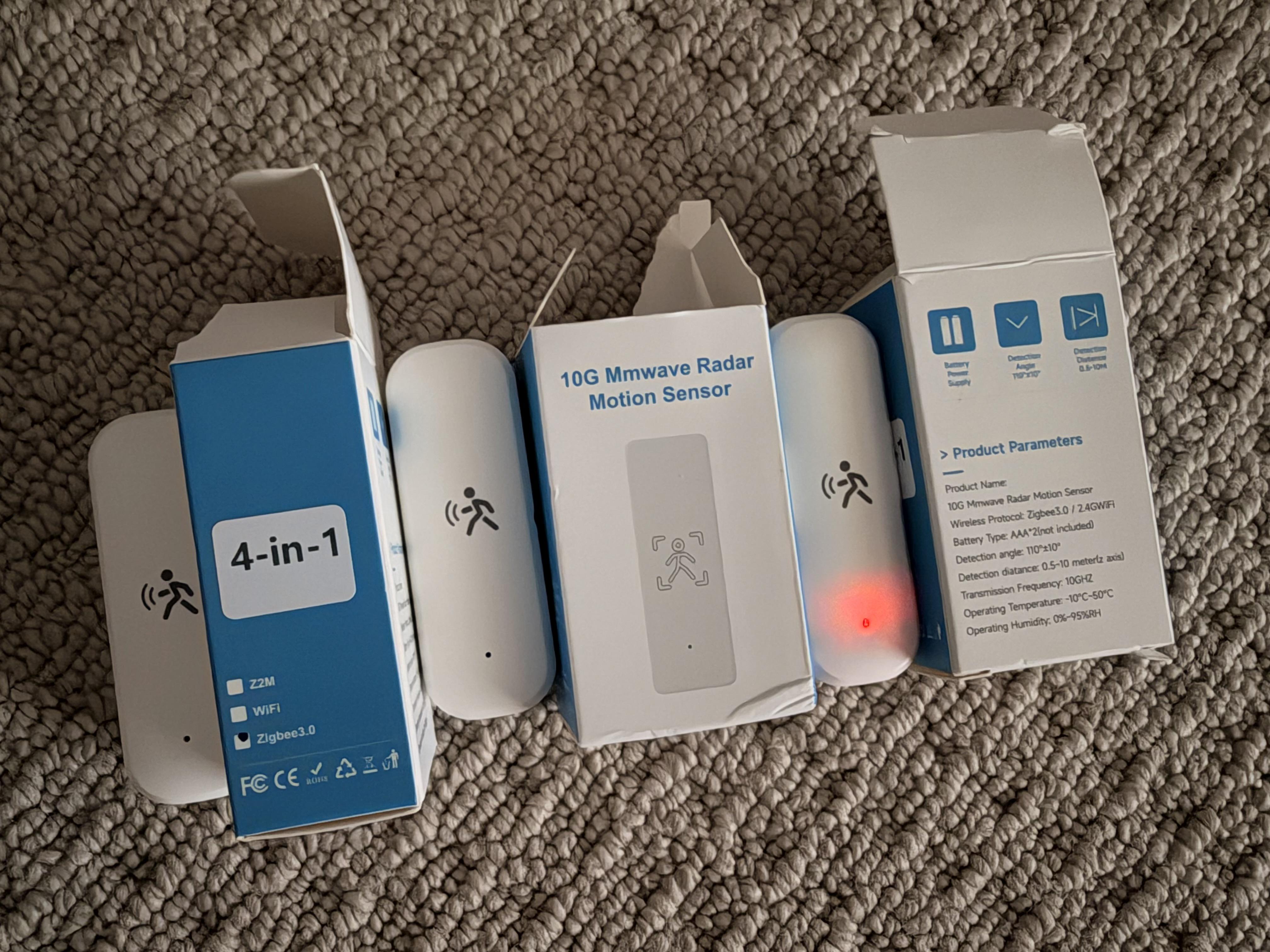
❓ Support Anyone successfully paired these generic 10G mmWave Zigbee 3.0 motion sensors (CB3S) with Home Assistant?

Post image
0 Upvotes

I purchased several inexpensive 10G mmWave radar motion/presence sensors from AliExpress, but I cannot get any of them to pair with Home Assistant or even a Tuya Zigbee gateway.
I’m hoping someone here recognizes these sensors or has successfully gotten them working.
Sensor details:

  • Product: 10G mmWave Radar Motion Sensor (4-in-1)
  • Model printed on back: CB3S
  • Manufacturer: Shenzhen Yihong Lighting Co., Ltd.
  • Power: 2× AAA batteries
  • Packaging has three variants: Z2M, Wi-Fi, and Zigbee 3.0
  • My boxes have the Zigbee 3.0 version marked.

My setup:

  • Home Assistant OS running in a Proxmox VM
  • Aeotec Z-Stick 10 Pro
  • Zigbee Home Automation (ZHA)
  • Zigbee channel 20
  • Other Zigbee devices pair and operate normally

Troubleshooting I’ve already tried:

  1. Put ZHA into pairing mode before inserting the batteries.
  2. Reset the sensors and confirmed the red LED blinks rapidly.
  3. Tested multiple sensors individually using fresh AAA batteries.
  4. Placed the sensors approximately 3 feet from the coordinator.
  5. Enabled ZHA debug logging. The coordinator successfully enables joining, but no device join events appear.
  6. Tried pairing through a separate Tuya Zigbee gateway using Smart Life. Nothing was discovered.
  7. Tried Smart Life Auto Scan with Wi-Fi and Bluetooth enabled. Nothing appeared.
  8. Verified that another new Zigbee device pairs successfully with ZHA.

The seller’s listing says these sensors only support Tuya/Smart Life and explicitly warns that Home Assistant and Zigbee2MQTT are not supported.
However, I can’t even get them recognized by the Tuya gateway.
One thing that caught my attention is the CB3S model marking, which appears to be associated with Tuya Wi-Fi/Bluetooth modules. I’m wondering whether these are actually Zigbee devices or if the seller shipped the wrong hardware/firmware variant.
Has anyone successfully paired these exact sensors?
Specifically:

  • Does anyone recognize the CB3S model?
  • Have you gotten them working with ZHA, Zigbee2MQTT, or a Tuya gateway?
  • Is there a specific reset or pairing procedure?
  • Could these be mislabeled Wi-Fi devices rather than Zigbee?
  • Is there a known compatibility issue with these generic 10G mmWave sensors?

I’ve attached photos of the sensors and packaging.
I’d appreciate any insight before I give up and return them. Thanks!


r/homeassistant • • 9h ago

📊 Dashboard Floorplan 3D card: my house as a live 3D model in Home Assistant, plus a designer so you can draw yours (or trace a photo of your plan)

4 Upvotes

Wanted to see the whole house at a glance, so here's a dashboard card that shows the floor plan in 3D, with every device where it actually is, reacting live.

**What it shows**

- Lights glow in their real colour and brightness

- Fans spin at their set speed; the AC blows air coloured by its mode

- The TV lights up, tinted by the app that's playing

- PTZ cameras turn with their view cone as you pan and tilt them

- A motion sensor links to the light it switches, with an animated pulse

- Door/window sensors, water tank level and overflow, pump, UPS on battery, EV charging, string lights

- Tap a device to toggle it, long-press for more-info

**Design your own home**

Edit the card → Design floor plan:

- Draw rooms and let it add the walls, then click a wall to add a door or window

- Or upload a picture of your plan, set the scale using one wall you know the length of, and it detects the walls and rooms for you

- Drop in furniture and devices, pick their entities, and watch a live 3D preview

- Export or import the plan as JSON to share layouts

It starts with a sample home in demo mode, so you can play with it before drawing yours.

**Install:** HACS → Custom repositories → https://github.com/gera-devp/gsd-floorplan-3d (type: Dashboard). Free, MIT licence.

**How it was made**

Since it came up on my last post: the code was written with Claude. The idea, how it should look and behave, and the testing on my own dashboard and wall tablet were mine, and it took a lot of rounds to get the details right (camera tracking, framing, the designer). I'm sharing it because the idea might be useful to others, not to claim I hand-wrote it.

**Limits**

- One floor for now

- Walls are cut away (dollhouse view), not full height

- Wall detection works best on clean plans with solid dark walls

- Tapo-style cameras have no position entity, so the card counts move-button presses (an optional package keeps every screen in sync)

Feedback welcome, especially device types you'd want next.


r/homeassistant • • 7h ago

💬 Discussion Is the UI consistently inconsistent?

10 Upvotes

I'm new to HA. As I explore its features, I keep bumping into UX friction. Here's an example: I was trying to rename a to-do list and couldn't find "Edit" or "Rename". In other parts of the software with a strikingly similar layout, the same functionality is one or two clicks away and often visible enough that no head-scratching is needed.

To rename a To-do list you have to:

  1. Click three-dots menu.
  2. Click More info.
  3. Click the gear icon.
  4. Type in the new name.
  5. Click update.

To rename a device:

  1. Click device.
  2. Click gear icon.
  3. Type in the new name.
  4. Click update.

To rename a dashboard:

  1. Click the dashboard in the side pane.
  2. Click ✏️icon in top-right corner.
  3. Click ✏️icon next to dashboard name in top-left corner.
  4. Type in the new name.
  5. Click update.
  6. Click Done button in top-right corner.

Some times Edit is in the three-dot menu (two clicks), some times it's the ✏️ that's right there on the top level (one click away).

I wish the UX was more consistent across the board.


r/homeassistant • • 21h ago

❓ Support Automation Editor Simple way to run two automations in one?

0 Upvotes

Would like to be able to turn on my Christmas lights on at 15 minutes before sunset and turn them off at 2030 Sun-Thur and midnight on Friday / Saturday when we come back late.

It seems really complicated to try and do that with the current automation editor with blocks of option one option two. Is there a better way to do this now than having multiple blocks?


r/homeassistant • • 4h ago

🖼️ Show & Tell Home Assistant on Logitech Harmony Remote With Spotify Integration

Thumbnail
gallery
7 Upvotes

Hey everyone, I recently made a post elsewhere online and it was more popular than I expected. I basically rooted my Logitech hub and got it to work with Home Assistant. I then took it a step further and got the remote to work with my Spotify integration. Now, I can use the remote to control Spotify by touch and it even has the album art.

See it i action here...

https://youtu.be/sefODhYq9lk?si=sdtGMEvoHBVo8AfV

So yeah, you can definitely code this yourself. However, you can go the easy route and have AI to do it for you.


r/homeassistant • • 20h ago

🖼️ Show & Tell Luciferin 3.0 is out! Next gen DIY Ambilight for your PC, now with HDMI capture for consoles and TV sticks

12 Upvotes

Hey everyone, the developer of Luciferin.

It's an open-source project that syncs an LED strip behind your monitor or TV with what's on screen. If a game shows a blue sky on the left and a campfire on the right, the wall behind your display glows blue on one side and orange on the other. An ESP32 running the companion Glow Worm Luciferin firmware drives the LEDs.

The biggest change in 3.0 is that you can now get the same effect from an Xbox, PlayStation or streaming stick. Luciferin still captures your PC screen directly. For an external HDMI source, you can use a USB capture card and run Luciferin headless. A Raspberry Pi next to the TV is one way to do it, and the new web interface lets you control it from your phone.

A few other things you might notice in 3.0:

  • Better colors in dark scenes and HDR. Adaptive gamma helps the LEDs pick up subtle colors in shadows. HDR-to-SDR tone mapping supports custom .cube LUTs, and 32-bit color processing makes slow fades smoother.
  • Smart home support via Matter over Wi-Fi. Compatible controllers with at least 8 MB of flash can appear as lights in Apple Home, Google Home or Alexa.
  • Natural-language control via MCP. You can control Luciferin from a compatible AI assistant.
  • Native ARM64 support on Linux and improved GPU acceleration.

If you're upgrading, 3.0 requires Glow Worm Luciferin 6.0.0. The built-in updater can update both the app and the firmware.

Download and full release notes ¡ More info on GitHub ¡ Join the Discord

If you try it, I'd love to see your setup. I'm especially curious which capture cards people are using with their TVs and how the colors look with HDR games.

If you like the project, consider following me on GitHub and leaving a ⭐ on the repo. It really helps the project get noticed. And if you have questions or need help with your setup, come say hi on Discord.

Home Assistant integration can be setup via MQTT Discovery or via Matter over Wi-Fi


r/homeassistant • • 20h ago

❓ Support Esp32 users - what part am I not getting?

Thumbnail
gallery
0 Upvotes

I ordered the esp32 unit (esp32 devkitC) and a terminal adapter . The pins dont line up.

How can I determine what board will work?

Should I try bending the female rails on the board? Should I bend the pins on the esp32?

What a waste of money


r/homeassistant • • 19h ago

🖼️ Show & Tell HA Configuration Tool

Post image
0 Upvotes

I'm 6 months into my HA journey. I've built this card to navigate around my HA configuration files, subfolders, and display different filetypes stored in /www.
I'd put up with using File Editor and SCS, but this makes the lookup/readonly functionality much simpler, with no folder navigation required.
Have I created yet another wheel, or are there some tools that are functionally better.
Regards Michael


r/homeassistant • • 20h ago

🖼️ Show & Tell Guide: know which room your people and pets are in (BLE + ESPHome proxies + Bermuda)

Thumbnail
gallery
140 Upvotes

After years of ESPresense, mqtt_room and Bermuda, room presence for people and pets finally works reliably in our house - it's been my pet project for the past 4 months, trying to get the HA platform to match reality. Lots of people asked how as I've socialized the solutions, so I wrote a beginner's guide - which also includes soldering and some light development work if you're into that.

https://github.com/davidcoulson/home-presence-guide

You need: Home Assistant, 3 or more ESPHome Bluetooth proxies (a $10 ESP32 or an ESPHome bulb), and a ~$9 collar tag per pet. People need nothing new: their phone and watch already work. We're Apple people, but I hear Android is easier to use.

People use it for lights that follow you, announcements only in your room, locking up when the last person leaves, and an alert when the cat's tag goes quiet or gets stuck in the pantry.

Privacy is page 0. It all stays on your own HA, and the guide says to agree it with your household first. In my house this is certified Spouse Approved(tm).

Disclosure: the room part runs on Sextant, a free (like MIT licensed), open-source integration I forked from BPS-Improved, which itself is a fork of BPS. I'm also driving Ashley bonkers with my Bermuda PRs to optimize that integration for 100+ proxies - I don't care if you my tools, but Bermuda is best thing ever.

Questions and your own automations are welcome. They'll go into the guide with credit!


r/homeassistant • • 8h ago

🛠️ DIY / Hardware Is it a good idea to switch to matter?

17 Upvotes

Update: There have been enough replies to this post to convince me that such a switch is not worth it at the moment, that I wouldn’t gain much from it, and that I might even encounter stability issues. I’d also like to apologize for not searching through the sub’s history, as someone pointed out that this is a frequently asked question. Thanks to everyone who shared their thoughts.

——————————

I’ve been using HA for about 2 years with Zigbee ZHA and I am quite happy. I really like that some (especially the light bulbs) form a mesh and extend the coverage as I live in a multistory home and upper floors can be hard to reach from a central unit otherwise.

I mostly used IKEA components if available as I find them cost-effective and I don’t have access to a very wide variety of smart products (We can’t order from China anymore because of customs restrictions).

Now IKEA and some other brands that I use are jumping on the ‘Matter’ wagon and though most still offer Zigbee support (albeit sometimes undocumented) or still sell Zigbee variants besides Matter ones, the shift is evident.

Is getting a Thread dongle and switching to Matter for future purchases the logical way to go at this point?

Thanks.


r/homeassistant • • 3h ago

❓ Support Strong magnet for big tablet

0 Upvotes

Any recommendations for strong magnet stick or even for 3d print case to hold 14’inch tablet?

Better from aliexpress.

There is tons, but i want from experience