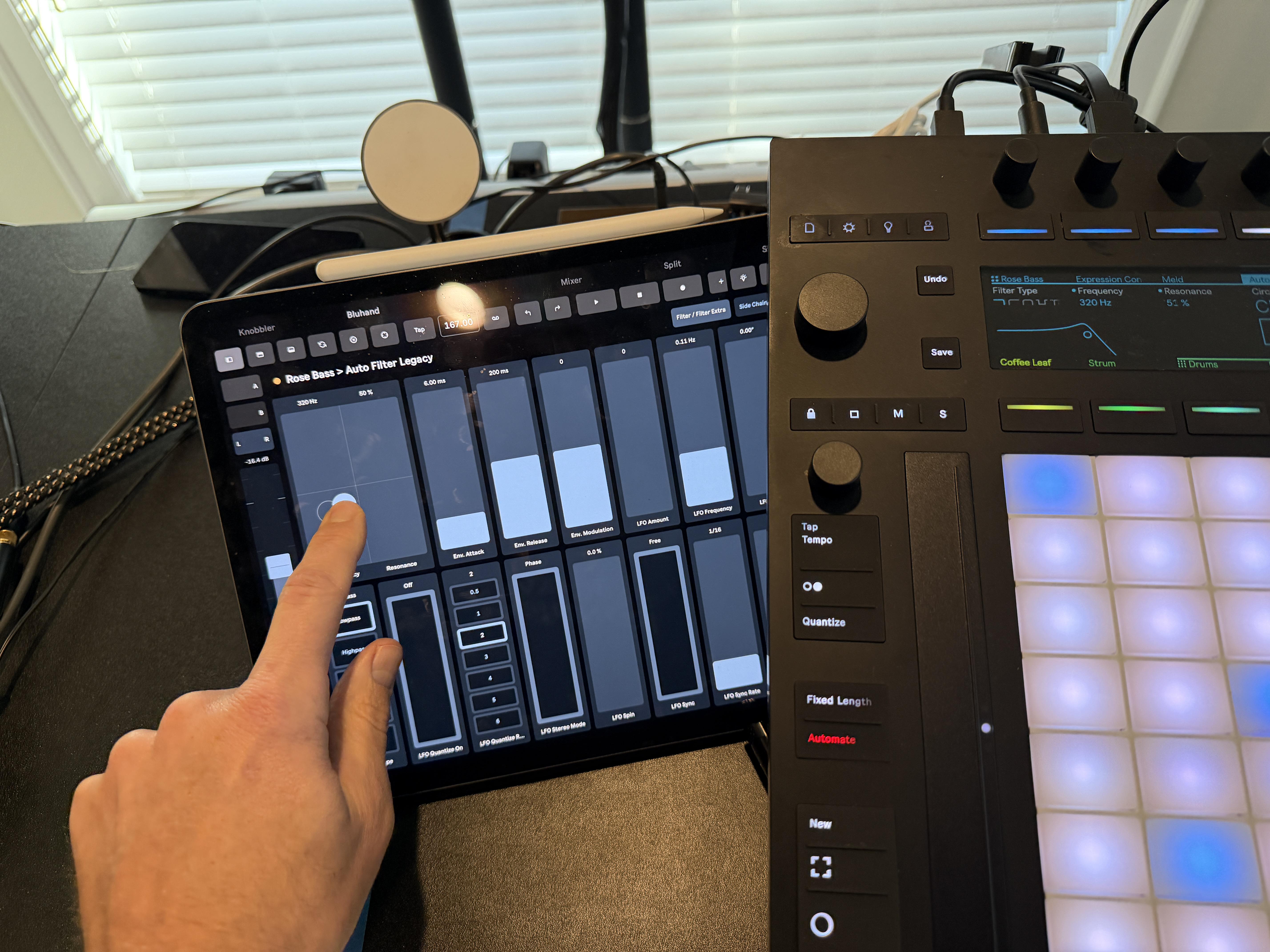
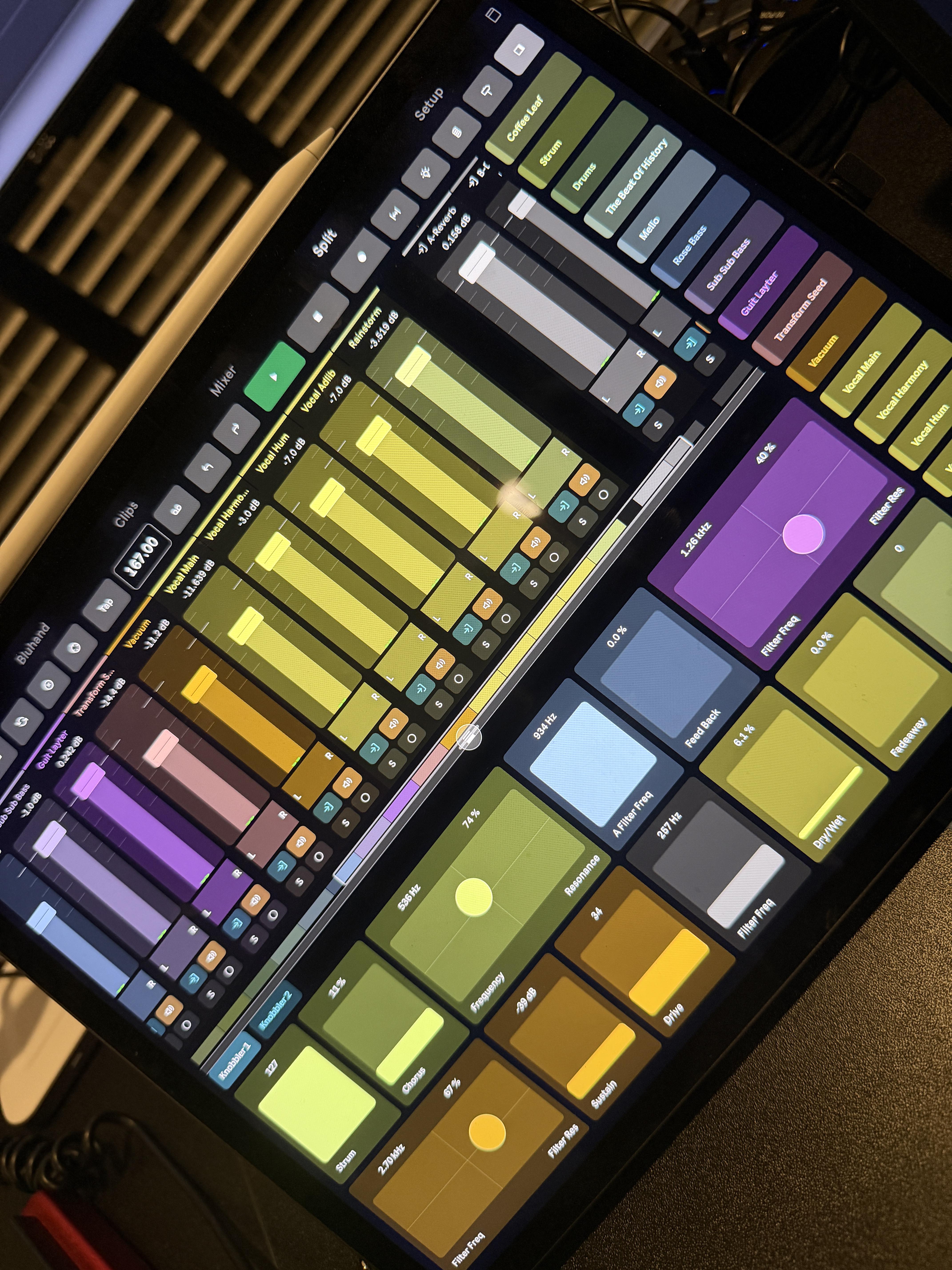
There have been seven app updates and seven Knobbler4 device updates (v73–v79) in the last seven weeks.
Highlights
Named Knobbler pages. Up to 16 per Live set, which you can rename, reorder and delete. A new Layout mode lets you drag faders and XY pads around, even onto another page.
Button slots. Any Knobbler slot can be a Momentary or Toggle button that jumps between two values you choose.
Split page. Two panes side by side, each showing the Mixer, Clips, Knobbler or Bluhand. Put Knobbler in both to see two pages at once.
Wired connections that set themselves up. Plug in over USB or Ethernet and your computer (or Push 3 Standalone) shows up under Available devices, marked USB. Tap it to connect, with no IP address to type. Detailed Instructions
Push 3 Standalone discovery. The Push now appears in Setup just like a computer.
Bluhand Auto XY. Neighboring parameters that belong together, like Frequency + Resonance or X + Y, become an XY pad on their own.
Lock Bluhand to a device while you keep moving around your set.
Live 13: rack macros as buttons. A macro mapped to a filter type or oscillator shape shows its named values as buttons.
Rack variations on a Knobbler page, recallable with one tap.
Smoother all round, especially on big sets.
2026.10.9: Name your Knobbler pages
Name your Knobbler pages, and have up to 16 of them per Live set instead of two. Tap a page button to switch, hold one to rename or delete it, hold and drag to reorder it, and tap + to add a page. (device v73)
Layout mode replaces XY Join. Tap Layout above the sliders to join or split XY pads. On tablets you can also drag any fader or XY pad to another spot, or hold it at the edge of the screen to move it to another page.
Cue volume on the Main strip: the slider just above the Main fader sets Live's Cue level for your headphones. Double-tap it to reset. (device v72)
2026.10.10: Rack variations on a Knobbler page
Rack variations on a Knobbler page
Put a rack's macro variations on a Knobbler page: on Bluhand, tap Map, tap the rack's variations, then tap a Knobbler slot. Tap a variation to recall it. Once you move a macro it shows an asterisk ("2*"), and tapping it again restores what the variation stored. (device v74)
On Clips and Session, a scene button blinks while its scene waits to start, and Stop All blinks while everything waits to stop. (device v74)
Parameters with many choices, like a delay's time divisions, keep comfortable button sizes and scroll when they don't all fit.
Fix: on phones in landscape, opening a window like Pan & Sends no longer flips the screen to portrait.
2026.10.21: Automatic USB discovery
Android (Android 14+): plug into the Windows computer running Live and turn on USB tethering. The computer shows up marked USB. If it says "No response", allow Ableton Live on Public networks in Windows Firewall.
iPad / iPhone: plug into the Mac running Live and the Mac appears a second time under Available devices, marked USB. Tap it to connect through the cable.
A Knobbler slot can now be a button instead of a fader. In Layout mode, set any mapped slot to Momentary or Toggle, and it jumps between two parameter values you pick (the full range by default). (device v74)
The Session page is now Split: two panes, each showing the Mixer, Clips, Knobbler or Bluhand. Tap the bar at the top of a pane to switch it. Put Knobbler in both panes to keep two pages on screen, each on its own page.
2026.11.16: Bluhand Auto XY + Push 3 Standalone discovery
Push 3 Standalone now appears under Available devices in Setup. Tap it to connect, with no address to type. (device v76)
Bluhand Auto XY: two neighbouring parameters that belong together (Frequency and Resonance, X and Y, Pan and Tilt, Time and Feedback) become an XY pad automatically. Rename two rack macros to X and Y and they join straight away. Turn it off with Auto XY Pads in Bluhand under Settings → Device. (device v77)
Connect over Ethernet: a USB Ethernet adapter on your tablet or phone, cabled to one on your computer or in the Push 3 Standalone's USB-A port. On iOS it just shows up, marked USB. On Android, set a manual IP once in the tablet's Ethernet settings (see Manual IP in the setup guide).
Setup responds instantly, and connecting is more reliable: tapping a device always connects afresh.
Switching Bluhand banks is snappier.
New Pan Above Fader option in Settings → Mixer.
2026.11.22: Lock Bluhand to a device
The new lock button, to the right of Bluhand's banks and variations, holds Bluhand on the device it's showing. While it's locked you can select other tracks and devices, in Live or in Knobbler, and Bluhand stays put. (device v78)
2026.11.25: Live 13 rack macros as buttons
In Live 13, a rack macro mapped to a parameter with named values, like a filter type or an oscillator shape, now shows as buttons on Knobbler and Bluhand pages, one per value. (device v79)
Playing clips have a border in their own color, and playing and triggered clips flash in time instead of pulsing.
Refresh is now a full reconnect, with one name everywhere: the toolbar button and the connection status in Setup do the same thing.
Pan Above Fader is now on by default.
Fixed the sidebar mixer strip when soloing: Solo lights up whether you solo in Live or in Knobbler, and the strip no longer greys out. (device v79)
Fixed a volume fader springing back to the wrong level.
Lighter and smoother overall, especially on large sets.
Return tracks no longer log input-routing errors. Live 13 reports them as armable even though they have no input routing.
Bluhand now handles racks with more than 16 macros, which Live 13 allows (up to 32). Racks with an odd number of macros no longer throw an error either.
Macros set to "Show Macro As Button" in Live 13 now appear as buttons on the Bluhand page. A change made in Live shows up the next time the macro's value changes.
Switching sets no longer logs errors about missing properties on the Song. Knobbler now checks that ids from the app still point at a track, device or chain, and the mixer waits for a valid track.
Live 13's new Mid/Side and Multiband racks work like any other rack. Their chains, macros and devices show up in navigation and on the Bluhand page.
Greetings! I'm happy to announce that Knobbler app version 2026.11.6 is now available in the Apple App Store and Google Play Store.
This release, when combined with v74 or newer of the Knobbler4 Max for Live device, brings two major features: Split View and Knobbler Buttons.
Split View! On tablets, the Split page allows you to put any two Knobbler pages on the screen at once. Clips + Mixer is the old Session View. But Clips + Bluhand could be a very powerful performance device. Bluhand + Knobbler is awesome to use, and for the true Knobbler stans out there, you can have two Knobbler pages on screen at once. Coupled with the recent change that gives you up to 16 named Knobbler pages, and this is very powerful.
Knobbler in Split view with the Mixer on top and Knobbler page on bottom.
2) Knobbler Buttons! This was one of the most popular user requests. On Knobbler pages, you can turn any fader into a Momentary or Toggle button. You can customize the "off" and "on" values right on the tablet, and of course it's all saved with your Live Set.
Animation showing a Momentary button in action controlling the Dry/Wet mix of a Reverb effect.
Tap the "Layout" button on a Knobbler page to go into edit mode, where you can then tap the pencil icon on the fader you want to change to a button.
Check out other changes on the release timeline here:
Rolling out to App Stores now (iOS and Android) -- Knobbler app version 2026.10.21 -- USB connections with Knobbler is now a one-tap situation.
This works on Mac+iOS and Windows+Android by making use of the private ethernet network that is automatically set up by the combinations of operating systems in question. Knobbler now makes full use of that network.
It works with any recent version of the Knobbler4 Max for Live device. This is purely an app-side change.
Reconnects are handled fairly gracefully, but there can be a 30 second lag due to the underlying operating system shenanigans.
What I've noticed is that it's a noticeably lower latency connection.
Tell your friends! :) And let me know how it works for you.
Now available: Knobbler app version 2026.10.9 and device version v73 together let you define up to 16 Knobbler pages, rename them, and reorder them. This lets you build the set controller of your dreams, with every important parameter just a tap away.
Also, this release adds a Cue Volume control to the Main channel, and improves legibility of labels on horizontal sliders like sends and pan.
I don't know why I didn't think of this sooner! Thanks to a user for getting me to think about the "too many items to show at once in a multi-button arrangement".
I think a scrolling list of buttons at legible size is better than falling back to a fader. What do you think?
This is just now running in my development environment. Should be getting to testers later today, fingers crossed. :)
ps, 2026.9.22, which is the current production version (available now for Android and waiting for review on iOS) is shipping direct renaming, recoloring, reordering tracks and devices from the nav panel, along with with support for toggling Auto-Open Plugin Windows. Both features require v71 of the device or newer. https://plugins.steinkamp.us/knobbler
New opt-in Auto-Open Plug-in Windows mode from the checkbox on the device's Bluhand page: as you move between devices, the plug-in editor window for the one you left closes and the new one's opens. Off by default. Needs Live 12.4.3 or newer — on older versions the control is disabled rather than quietly doing nothing.
The nav panel is no longer read-only. Long-press any row to rename it, recolor it, reorder devices, or delete one — tracks, devices and chains, without reaching for the computer. Live snaps colors to the nearest one in its own chooser, so you get the same color you'd have picked in Live. Also requires the Knobbler app 2026.9.22 or later.
Deleting is deliberately narrow: devices and racks only, never a track or a chain, and never the Knobbler device your app is talking through.
Fixes
Recoloring a track now updates its channel strip immediately, instead of holding the old color until you navigate away and back.
Jumping to, renaming or deleting a cue point no longer acts on the wrong cue after the cue list has changed.
Under the hood, another round of the memory work from v66. Reconnecting the app used to throw away and rebuild a whole channel strip's worth of Live watchers every time, and browsing devices on the Bluhand page leaked a little on every device and bank change. Both now reuse what they already have, so long sessions on large sets hold their performance better.
Here is the new nav experience, this time with a Push 3 Standalone:
Just a heads up that future versions of Knobbler will require iOS 16.4 or newer. Previously the minimum was iOS 15.
The reason for this change is an update to the app framework I develop Knobbler in (Expo) for improved performance and stability.
There is a noticeable improvement in render speed the latest Expo 57, and so I made the executive decision to give a better experience to the 99.7% of monthly Knobbler iOS users who are on a compatible device, and not let that 0.3% of users hold back making improvements.
This means that the following hardware will not receive app updates:
iPads
iPad Air 2 (2014)
iPad mini 4 (2015)
iPhone and iPod
iPhone 6s and 6s Plus (2015)
iPhone SE, 1st generation (2016)
iPhone 7 and 7 Plus (2016) — iOS 16 requires iPhone 8 or newer
iPod touch, 7th generation (2019)
If you are affected negatively by this, I think there are three solutions:
Update to newer hardware. 10 years of hardware evolution is pretty grand.
Stick to the current app version. If Knobbler is just what you want, you're done. Just let it not update, and keep using the current version of the Knobbler4 device. I try to make everything forward and backward compatible as much as possible, but I don't make guarantees.
If this makes you want to stop using Knobbler, email me and we can chat about a refund. Please include a screenshot of the Debug page when doing so.
Hey all just wanted to drop a note about the latest releases of the Knobbler device and app on all platforms -- Windows, Mac, iOS, Android, Push 3 Standalone.
The combination of the Knobbler4-v70 device and 2026.9.14 app brings a big improvement in page loads and scrolling.
The app now uses native scroll controls for all scrolling surfaces. This gives you a platform-optimized experience everywhere, running at maximum display framerate when possible. Previously, I hand-rolled a solution for the Clips, Mixer, and Session pages due to a limitation in the standard Android component library.
Channel strips and clip slots that are off the screen are lazy-loaded in the background so that when it's time to scroll, everything is there already. It used to be that only after you scrolled to a new area, the app would request the details of the channel/slot, so there was a lag between scroll and display.
Pages now pre-warm on connect. Switching pages should always be instant, and now that's more true even from app launch.
So those of you with larger sets should feel a significant performance improvement.
Hi all, I love the look of Knobbler. Just wondering if it has good visualisation for the Looper Device specifically? I use it for live sets to set the tempo (based on the first loop), and also often for the sound on sound aspect. I'd love to have visualisation of this.
Just wanted to spread the word that Knobbler is now a free download in the Play Store. The app has a 30 day trial of the Clips, Mixer, and Session views, with options of one-time purchase ($20) or subscriptions ($10/yr, $1/mo) to unlock those pages. The Knobbler and Bluhand pages work regardless of whether the app is paid or not, for even more Free Knobbler.
I just wanted to gather thoughts on what I plan to release in the Knobbler app this week.
The change allows for access to the Knobbler and Bluhand pages and Device Shortcuts for free (unpaid) users past the Trial Period. So these core, OG Knobbler features that were free and available when Knobbler used TouchOSC for the UI will be free again. Currently there is a hard paywall when the trial expires. That didn't ever sit too well with me.
The things I've added since I took the app native are what are available to paid users and during the Trial Period. Knobbler can be had via one-time payment or a subscription on annual or monthly basis.
Also -- As a part of this release I will make the Android version a free app and have the same trial logic as the iOS app. Since the app is currently not free, any existing Android users are considered paid, so existing users should not see any change at all.
Just wanted to give a heads up and invite comments or thoughts here. 🫶
Track width adjustment. Control the width of tracks in Mixer and Clips displays with a gesture.
Scroll lock. Enable this setting to prevent accidental horizontal scrolls when adjusting faders on the Mixer page.
It's probably auto-updated on your devices, but check your app store just in case.
Knobbler4 v69 - Live and Push 3 Standalone
This version update fixes a problem where if a rack chain is clicked with the mouse, the Bluhand page display does not change its display to match the blue hand icon. Requires a control surface to be configured to get the fix. (I use "ADVANCE")
So I know we can change which device is currently selected using the right panel, but I can’t help but feel like there’s room to view track Devices on the Bluhand tab above the parameters, next to the pages. Would be really nice to be able to switch devices on a selected track without having to have the side panel open. It’s just dead space right now.
I took some photos to update the Knobbler website today. This is "Actual Size" running three instances of Knobbler in the same set and showing on Android tablet, iPad, and iPhone. https://plugins.steinkamp.us/knobbler
App version 2026.6.15 is now in testing. Most importantly it adds progress indicators to playing clips when used with v67 of the device or newer.
One thing I've also clarified in the docs is that Knobbler is flexible in mixing and matching app and device versions. I have taken the approach of having each end of the conversation (app and device) advertise their capabilities, so the other end can behave accordingly. It's a very flexible design that I don't see in enough places. People tend to focus on version numbers, but that is a cryptic layer of indirection that you have to wade through. Capabilities give you a flexibility to have dynamic capabilities that version numbers lack and force a more productive (read: simplicity-seeking) mindset in designing complex software systems.
I'm happy to announce that the Knobbler app version 2026.5.25 is now available on iOS and Android!
Key updates:
Multiplayer Knobbler! Use the "Follow Sel" (padlock icon) button in the toolbar, on the right side of the scrolling middle area. This unlocks Knobbler from Live's currently selected track / device and lets you navigate the set independently. Navigating in Live will not affect Knobbler and vice versa. Pair with a Push or another instance of Knobbler for lots of new possibilities.
Knobbler Swap Assignments! Press the "Map" button (crosshairs) to enter mapping mode. When in this mode, you can tap a Knobbler slider as a source and a destination. In this case, the two slots are swapped. This works with empty slots and XY pads too.
Tempo Nudge! (iOS only at the moment) Long press the tempo display in the toolbar and it will highlight yellow. You can then slide your finger left and right to adjust the tempo.
Enhanced Cue Points! Added a timeline display with direct tap to position, a scrub strip, loop in/out control, and cue point creation. The currently active cue point is highlighted.
My apologies if v61-63 were problematic for you. There was an issue with one of the performance optimizations I made that broke Knobbler if you had a UTF-8 character in track, device, or clip names. Fixed in v64.
v64 also includes support for a forthcoming app feature that enables Multiplayer Knobbler. What does this mean? Up until this feature, Knobbler and Live remain in lock-step in terms of selected track and device. Change one in one, and it changes in the other.
With this new feature, Knobbler can be decoupled from Live's selection and navigate the Set without changing what is selected in Live. This enables multiple people to be interacting with different aspects of their Live Set simultaneously. Parameters, clips, mixer, you name it. I will do a bigger post on that when it's released.
A technical writeup on some challenges and evolution of Knobbler's use of the OSC protocol. From simple to coalesced to batched to chunked and finally to columnar. Nerds only!
That kicked off a bit of a journey for getting data out to the app: I tried stashing it in Dicts, then passing String objects, then building raw OSC packets and sending them with rawbytes — before circling all the way back to plain udpsend, which turned out to be the simplest and most robust.
But the bigger win came from a different direction. I consolidated about a dozen separate [v8] objects into a single extensible message-delegation system with a shared active context. The result is simpler and faster — roughly 2x more responsive — and adding features is now a pure code change instead of code + patching.
Grab v61 — it runs on Live 12.3, 12.4, and Push 3 Standalone.
Also, the app update (2026.5.19) just dropped, bringing mapping mode (https://plugins.steinkamp.us/m4l-Knobbler4/mapping), full-screen mode, page tabs at the top or bottom of the screen, and dozens of other UX/UI changes.