r/vitahacks • • 2d ago

Discussion Bi-Weekly Questions Thread (new edition)

2 Upvotes

Welcome to the r/vitahacks Bi-Weekly Question thread!

Please post all questions here.

!!NEW!! 3.65-3.74 USERS: Use HENlo to install Henkaku WITHOUT PC/Content Manager/PSN account!!!

PSN ACCESS/LOGIN ON VITA MAY REQUIRE ADDITIONAL VERIFICATION, SEE HERE

Before you post a question, please note:

-Please refer to the Official Vita Troubleshooting Guide; this is a comprehensive guide (maintained by Cimmerian_Iter) that covers a wide range of common issues and how to resolve them

-The vita hacking guide covers everything from 'what is homebrew' to hacking the vita and installing essential plugins

-For a comprehensive database of all available vita homebrew, please refer to VitaDB. You can access it and install homebrews directly from your Playstation Vita using the official VitaDB Downloader app.

-The older app VHBB made by u/devnoname120 is not currently supported.

-Rule #1 - "No discussion of piracy/backup/warez/dumps" is strictly enforced; there are other resources to discuss this subject matter

3.65-3.74 Users:

-HENlo replaces Hencore2

-Use Vitadeploy to downgrade firmware/install ENSO

Firmware Guide:

Vita Firmware VersionAvailable Hack(s)1.03-3.57Update to *3.60 or 3.653.60*3.60 Henkaku/Enso3.61-3.63Update to 3.653.65*3.65 H-encore/Enso3.65-3.74Install Henkaku/Vitadeploy using HENlo (via Vita Browser)

*Recommended

3.74 Firmware notes:

-Change requiring 2-step verification for PSN login/access

3.73 Firmware notes:

-Very minor changes. See here (Credits to PSSDude for the report)

3.72 Firmware notes:

-3.72 firmware was released by Sony for...System stability?

3.71 Firmware notes:

-3.71 firmware was released by Sony to patch the Trinity exploit

-3.71 firmware also breaks Modoru by adding checks in lv0

3.70 Firmware notes:

-The Vita master key was changed in the 3.70 firmware release, shortly after it had been publicly "unveiled" by the vita hacking community

-Game decryption keys have not been changed with the 3.70 release (reF00D/compatibility packs have not been broken)

3.69 Firmware notes:

-3.69 firmware was released by Sony to patch the h-encore exploit

PSN Access for 3.60-3.73 Users:

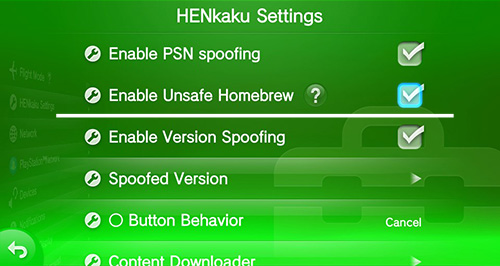
-Open Henkaku settings and enable Version Spoofing and set 'Spoofed Version' = 3.74

-Setup your network with Henkaku DNS settings

Sync Legit Trophies? -YES

Online Multiplayer? - YES

PSStore Access for Purchase and Download? - YES

Use Vitacheat and TropHAX online? - At your own risk

Prevent your Vita from Updating:

NOTE: PSVita firmware updates are not a typical modern-day concern, since downgrading firmware is available and simple to execute. Known exploits continue to work on most recent firmware (3.74). Preventing update is still a good practice in general.

-To disable the download of automatic firmware updates: Settings --> System --> Auto-Start Settings --> Uncheck "Download automatic update files"

-Setup your network with Henkaku DNS settings for an additional layer of update prevention. See here.

-If your console has downloaded the 3.73 update file, simply deleting the notification in LiveArea should remove the file from your system. Otherwise, firmware update files can be found in ud0:PSP2UPDATE/*

-Remember, unless you are running your vita in Demo mode, your console will not spontaneously install/update firmware software. There are legal reasons for this. Installation of any new software on your device requires your consent, (EULA).

Essential Vita Plugins/Homebrew Applications:

0syscall6 lv0 secure_kernel syscall6 patch - can replace reF00d (SKGleba)

Adrenaline Software that converts the official Vita PSP emulator into a PSP 6.61 with custom firmware (The FloW)

DolcePolce PSTV blacklist hack, replacing Antiblacklist and Whitelist (Silica)

Download Enabler Allows the user to download any content from the vita web browser (The FloW)

ElevenMPV-A Vita music player that supports a wide variety of formats (GrapheneCt)

iTLS-Enso Adds TLS v1.2 to devices running Enso (SKGleba)

Modoru Vita firmware downgrader (The FloW)

Modoru 2.1 Vita firmware downgrader, required for 3.71/3.72/3.73 users (SKGleba)

PSVShell Overclock application that supports per-app profiles; highly recommended (Electry)

reF00D Allows user to bypass firmware requirements on games and system applications (dots-tb)

rePatch Serves as a replacement for ux0:patch; can be used to load decrypted content on 3.60+; required for use of "compatibility packs" (dots-tb)

Save Manager For dumping and restoring decrypted save files (d3m3vilurr)

Shellbat A simple plugin that displays the battery percentage in LiveArea (nowrep)

Simple Account Switcher Allows the user to change/delete PSN accounts without a system restore (Silica)

Storage Manager A Kernel plugin that automatically mounts/redirects any storage device to any mount point; Popular plugin for mounting sd2vita (CelesteBlue)

VitaDeploy Tool that makes homebrewing the Vita/PSTV easier (SKGleba)

VitaGrafix Allows user to change resolution and FPS caps on vita games (Electry)

vita-udcd-uvc Stream your vita to a computer using USB (xerpi)

YAMT sd2vita/Remount tool for vita running Enso

Vitahacks AutoModerator

Note on AutoModerator: AutoModerator seeks keywords in comments/questions that may indicate piracy, but is not always proficient. In order to keep it under control, we have been monitoring the Automod for faulty dismissal of posts/comments. If you believe Automod has made an error in deleting your question/comment, please contact the moderator team, and we will review the question/comment and validate it (when possible).

2:00 am Greenwich Mean Time (GMT) every 2 weeks is the current new schedule.


r/vitahacks • • Sep 17 '26

Discussion Bi-Weekly Questions Thread (new edition)

14 Upvotes

Welcome to the r/vitahacks Bi-Weekly Question thread!

Please post all questions here.

!!NEW!! 3.65-3.74 USERS: Use HENlo to install Henkaku WITHOUT PC/Content Manager/PSN account!!!

PSN ACCESS/LOGIN ON VITA MAY REQUIRE ADDITIONAL VERIFICATION, SEE HERE

Before you post a question, please note:

-Please refer to the Official Vita Troubleshooting Guide; this is a comprehensive guide (maintained by Cimmerian_Iter) that covers a wide range of common issues and how to resolve them

-The vita hacking guide covers everything from 'what is homebrew' to hacking the vita and installing essential plugins

-For a comprehensive database of all available vita homebrew, please refer to VitaDB. You can access it and install homebrews directly from your Playstation Vita using the official VitaDB Downloader app.

-The older app VHBB made by u/devnoname120 is not currently supported.

-Rule #1 - "No discussion of piracy/backup/warez/dumps" is strictly enforced; there are other resources to discuss this subject matter

3.65-3.74 Users:

-HENlo replaces Hencore2

-Use Vitadeploy to downgrade firmware/install ENSO

Firmware Guide:

Vita Firmware VersionAvailable Hack(s)1.03-3.57Update to *3.60 or 3.653.60*3.60 Henkaku/Enso3.61-3.63Update to 3.653.65*3.65 H-encore/Enso3.65-3.74Install Henkaku/Vitadeploy using HENlo (via Vita Browser)

*Recommended

3.74 Firmware notes:

-Change requiring 2-step verification for PSN login/access

3.73 Firmware notes:

-Very minor changes. See here (Credits to PSSDude for the report)

3.72 Firmware notes:

-3.72 firmware was released by Sony for...System stability?

3.71 Firmware notes:

-3.71 firmware was released by Sony to patch the Trinity exploit

-3.71 firmware also breaks Modoru by adding checks in lv0

3.70 Firmware notes:

-The Vita master key was changed in the 3.70 firmware release, shortly after it had been publicly "unveiled" by the vita hacking community

-Game decryption keys have not been changed with the 3.70 release (reF00D/compatibility packs have not been broken)

3.69 Firmware notes:

-3.69 firmware was released by Sony to patch the h-encore exploit

PSN Access for 3.60-3.73 Users:

-Open Henkaku settings and enable Version Spoofing and set 'Spoofed Version' = 3.74

-Setup your network with Henkaku DNS settings

Sync Legit Trophies? -YES

Online Multiplayer? - YES

PSStore Access for Purchase and Download? - YES

Use Vitacheat and TropHAX online? - At your own risk

Prevent your Vita from Updating:

NOTE: PSVita firmware updates are not a typical modern-day concern, since downgrading firmware is available and simple to execute. Known exploits continue to work on most recent firmware (3.74). Preventing update is still a good practice in general.

-To disable the download of automatic firmware updates: Settings --> System --> Auto-Start Settings --> Uncheck "Download automatic update files"

-Setup your network with Henkaku DNS settings for an additional layer of update prevention. See here.

-If your console has downloaded the 3.73 update file, simply deleting the notification in LiveArea should remove the file from your system. Otherwise, firmware update files can be found in ud0:PSP2UPDATE/*

-Remember, unless you are running your vita in Demo mode, your console will not spontaneously install/update firmware software. There are legal reasons for this. Installation of any new software on your device requires your consent, (EULA).

Essential Vita Plugins/Homebrew Applications:

0syscall6 lv0 secure_kernel syscall6 patch - can replace reF00d (SKGleba)

Adrenaline Software that converts the official Vita PSP emulator into a PSP 6.61 with custom firmware (The FloW)

DolcePolce PSTV blacklist hack, replacing Antiblacklist and Whitelist (Silica)

Download Enabler Allows the user to download any content from the vita web browser (The FloW)

ElevenMPV-A Vita music player that supports a wide variety of formats (GrapheneCt)

iTLS-Enso Adds TLS v1.2 to devices running Enso (SKGleba)

Modoru Vita firmware downgrader (The FloW)

Modoru 2.1 Vita firmware downgrader, required for 3.71/3.72/3.73 users (SKGleba)

PSVShell Overclock application that supports per-app profiles; highly recommended (Electry)

reF00D Allows user to bypass firmware requirements on games and system applications (dots-tb)

rePatch Serves as a replacement for ux0:patch; can be used to load decrypted content on 3.60+; required for use of "compatibility packs" (dots-tb)

Save Manager For dumping and restoring decrypted save files (d3m3vilurr)

Shellbat A simple plugin that displays the battery percentage in LiveArea (nowrep)

Simple Account Switcher Allows the user to change/delete PSN accounts without a system restore (Silica)

Storage Manager A Kernel plugin that automatically mounts/redirects any storage device to any mount point; Popular plugin for mounting sd2vita (CelesteBlue)

VitaDeploy Tool that makes homebrewing the Vita/PSTV easier (SKGleba)

VitaGrafix Allows user to change resolution and FPS caps on vita games (Electry)

vita-udcd-uvc Stream your vita to a computer using USB (xerpi)

YAMT sd2vita/Remount tool for vita running Enso

Vitahacks AutoModerator

Note on AutoModerator: AutoModerator seeks keywords in comments/questions that may indicate piracy, but is not always proficient. In order to keep it under control, we have been monitoring the Automod for faulty dismissal of posts/comments. If you believe Automod has made an error in deleting your question/comment, please contact the moderator team, and we will review the question/comment and validate it (when possible).

2:00 am Greenwich Mean Time (GMT) every 2 weeks is the current new schedule.


r/vitahacks • • 21h ago

Port [RELEASE] Marvel Vs. Capcom 2

Thumbnail
gallery
154 Upvotes

Repo: https://github.com/zSamyMan/mvc2-vita

AI DISCLOSURE: AI-assisted development, i'm a C developer and i'm familiar with programming for embedded systems, with that said, i still have limited knowledge about the Vita hardware and i absolutely suck at 3D rendering, so AI was used to bridge that gap on my skillset. NO GEN AI was used in any of the artwork/assets, some of them are ripped straight from other releases of the game/the game itself and others are human made by myself to fit the overall aesthetic

Hi everyone! This is my early holiday gift for the Vita

community. The port is based off the 100% byte decompilation by gibletto and features several enhancements with even more on the horizon! You can already download it through VitaDB

Features:

- Multiple presentation options: True Widescreen, Original 4:3 with/without borders and Stretched ( if you are a psychopath of some kind )

- Rock-solid 60FPS at the default (BALANCED) preset. You can also choose the "STOCK" preset to have more playtime!

- Three control schemes to best fit your gameplay style, choose between Vita, PS2 or Grip

Credits:

- Rinnegatamante for his work on VitaGL/ShaRKBR33D

- Giblet for the original decompilation project

- The VitaSDK team for the amazing tools

Final words:

If you are an artist who loves MvC, fighting games and want your artwork featured as one of the Frames for the 4:3 mode, hit me up here or on my Discord @zsamy_


r/vitahacks • • 14h ago

Port A Stable Jade Empire PS Vita Port

44 Upvotes

Hello lovely people!

I recently changed jobs, and so I tried to make the most of my corporate Claude subscription before leaving, lol. Since September, I've been hard at work porting the Android version of Jade Empire to the PS Vita.

I've managed to get it quite stable, even in intense fighting scenes, with FPS consistently in the high 20s to 30 (capped at 30 and with overclocking enabled), with a small hiccup here and there. I still want to develop it further, as there's much more to do in terms of QoL, but I'm starting a new job now and won't be able to test it as diligently. Hence, I've published it on GitHub to gather people's feedback, logs, etc.

So, here's a link to my GitHub, where you can get the VPK and all further instructions. If you encounter any issues, let me know and I'll attempt to fix them.

https://github.com/Arterious/jade-empire-vita

Enjoy!


r/vitahacks • • 12h ago

Port [WIP] Original Falling Fred on PS Vita

28 Upvotes

Falling Fred was a childhood classic for me, not sure if anyone is interested in it as much as I am however, I have added multiple features to try capture the feeling of it being a real polished ps vita game. The game has always had weird lighting which is fixed here, also contains enhanced textures of the game, menu navigation, custom art, trophies and much more.

This is just a quick video to show the progress so far. Will release it when it is optimised to the max as there is a still few
fps drops in certain menus and runs.

Also for the people wondering, no I have not stopped working on the ps vita screen recorder, I am currently fixing necessary bugs and polishing the quality of the recording and the app overall.


r/vitahacks • • 23h ago

Discussion And we have Gran Turismo 3 on Ps Vita: new Rinnegatamante Port

Thumbnail
pbs.twimg.com
136 Upvotes

Just readed on X the announcement by Rinnegatamante:

https://x.com/Rinnegatamante/status/2126283155867152745

https://www.rinnegatamante.eu/vitadb/#/info/1899

From the comments on the Rinnegatamante post on X:

Gerald :How is the FPS ?

MustafaPXu: 60 most of the time


r/vitahacks • • 19h ago

Release [RELEASE] VitaDock Plus (+) for Windows with support for Advanced Upscaling, Frame Generation, HDR Dynamic Range Expansion and more.

Thumbnail
apps.microsoft.com
44 Upvotes

VitaDock Plus (+) is the definitive way to dock your Vita, PSP, Switch, and 3DS with your Windows PC. Now with advanced upscaling and frame generation support for some devices! Try the demo before purchasing.

All features:
A zero configuration setup
Runs in the background in the system tray
Auto launches the player when a device is detected
Auto closes the player when a device is removed
Remembers and restores the player size and location
Auto start app on boot option
Correct color handling on all supported devices
Advanced Upscaling option (methods listed below)
Frame Generation option (methods listed below)
Always On Top option
No Border option
Written in C# with a modern WinUI3 interface
Supports 11 languages
Custom rules section to automatically run programs when devices like capture cards are detected
Takes advantage of modern AVX extensions where possible to minimize latency

Vita Specific:
Supports extremely low-latency video with vitastream or VitaUSBStream
Handles extremely low-latency USB audio playback using the latest APIs
Dynamic UVC mode resolution/fps selection

PSP Specific:
Supports extremely low-latency video with psp-uvc-usb-video-class
Dynamic UVC mode resolution/fps selection

Switch Specific:
Supports extremely low-latency video with SysDVR-UVC
Alternatively supports automatically launching, closing, and controlling SysDVR-Client.exe over USB or TCP
Supports automatically launching a payload injector when it detects a Switch in RCM mode

3DS Specific:
Supports automatically launching a NTR client when 3DS is found on the network

Advanced Upscaling methods:
Lanczos sharp (used when Advanced Upscaling is disabled)
Integer
AMD FSR1+CAS
NVIDIA Image Scaling+Sharpening
NNEDI3
FSRCNNX
NVIDIA VSR
Intel VSR

Frame Generation methods:
AMD AMF FRC
MVUtensils
RIFE


r/vitahacks • • 19h ago

Release [Release] Raptor Vita Port v1.5 – Paint Shop, 10 Bonus Levels, Boss Rush, Level Editor & custom sounds

22 Upvotes

Hi everyone! Version 1.5 of the native PS Vita port of Raptor: Call of the Shadows is out.

Up front: this port was made with AI. Claude (Anthropic) wrote all of the code. My part was the ideas and testing on real hardware (Vita + PS TV).

New in 1.5:

  • Paint shop in the hangar: 41 ship colours, 23 picture skins, weapon and exhaust colours, bought with in-game money
  • 10 bonus levels with their own names, mixed from all three sectors. They work in co-op and online too.
  • Boss Rush after the bonus levels: all flying bosses back to back (sometimes several at once), then the final boss
  • Level editor for your own levels
  • New mission computer: difficulty per sector (Training / Rookie / Veteran / Elite) can be changed there (this restarts the sector)
  • Custom music & sounds: pick any WAV file for every track and every sound effect in the new menu (ux0:data/Raptor/music/ and ux0:data/Raptor/sounds/)

Install: VPK via VitaShell, then copy FILE0000–0004.GLB from your own copy (e.g. GOG) to ux0:data/Raptor/. No game files are included.

Based on skynettx/raptor (GPL-2.0), released with the original developer's permission.

Download / source: https://github.com/Paxrisen/Raptor-Vita-Port/releases/tag/Raptor-Vita-Port-1.5
Discord: https://discord.com/invite/xkSFYMCgHH

Feedback and bug reports are very welcome!


r/vitahacks • • 1d ago

Discussion I take it all back..

Post image
98 Upvotes

Time sure does fly. Computer Code gets stronger apparently as a result.


r/vitahacks • • 18h ago

Discussion [Concept] Custom Passcode Screen Wallpaper = Set any custom image or blurred lockscreen wallpaper behind the PIN keypad instead of the plain blue screen

Post image
14 Upvotes

Just sharing a quick Ul mockup/concept - this is not a released plugin yet, just an idea I would love to see become real!
Right now, even if you have a great custom theme or lockscreen wallpaper on your PS Vita, enabling a PIN passcode forces that plain, boring default blue background every time you unlock the console.
How awesome would it be to have a lightweight SceShell plugin (. suprx) that lets you customize the passcode screen:
• Custom Background ( 960x544): pick any PNG/JPG image directly from ux0: picture/ to replace the default blue wave behind the PIN pad
• Lockscreen Mirror + Blur: automatically use your current lockscreen wallpaper with an optional blur/dim slider so the keypad numbers remain crisp and readable
• Translucent Keypad Style: adjust the opacity of the 1-0 number buttons (frosted glass look) so your wallpaper actually shines through
Would any Vita devs be interested in making something like this, or is the passcode screen Ul locked down too tightly inside SceShell? (Photo made with AI)


r/vitahacks • • 1d ago Heartwarming

AI assisted VitaStation2 (PS2 emulator for PS Vita) update: Resident Evil 4 is now at ~4.2 fps (more than 2× since last week) — planning a public Benchmark Alpha at 10 fps

Thumbnail
github.com
238 Upvotes

Following up on my post last week: VitaStation2 has more than doubled its real-hardware framerate in Resident Evil 4, climbing from ~2.0 fps (which actually read ~8% high under the old measurement method) to 4.1–4.5 steady fps (~4.2 fps median) on a real PS Vita.

Expectations first: This is still a technical research project, not a daily-driver emulator. RE4 targets 30 fps (33 ms per thread), and the Vita's Cortex-A9 + SGX543MP4+ have a long way to go. That said, the numbers are moving fast enough that once we hit 10 fps in RE4, I plan to release a public Benchmark Alpha so anyone with a Vita or PS TV can test other PS2 titles and submit compatibility/profiling notes.

What changed since 17 Nov (measured on real Vita hardware)

Every change is verified against a 420-vblank PC reference walk so speedups don't break rendering accuracy:

  • Ahead-of-time native RE4 skinning + 4 vblanks of GS lead: ~2.0 → 2.8–2.9 fps
  • Skinning drawn directly on the GPU world path (gpu_skin): +15–19% (3.36–3.45 fps)
  • Render target pool reuse: +7.7% (keeps targets RE4 reuses and fixed vitaGL memory-exhaustion crashes)
  • World batches sharing open draw slots (world_share_slots): +7.1%
  • Image transfers stored without byte-comparing (feed_compare=0): +6.5%
  • Target uploads via scratch texture draw instead of glTexSubImage2D (gpu_upload): +6.0%
  • Other wins: Lock-free VIF1 ring, retained world geometry on the GPU, NEON target swizzles with prefetch, GPU-based target resizes, and exact clip early-reject.

The big bottleneck shift: GS is no longer the limit

On 17 Nov, the GS thread took ~450 ms per game frame. It is now down to ~160–185 ms of actual work and sits idle for 40–60 ms per frame.

The Emulation thread (~225 ms per frame) is now what sets the pace:

Emulation Thread SectionTime (ms/frame)
EE game code (JIT)93 ms
Waiting for VU1 worker32 ms
Copying VIF1 data into worker queue20 ms
DIRECT relay15 ms
VIF1 queueing12 ms
IOP + IOP kernel + SPU reads24 ms
World relay / DMA / JIT / Other~29 ms

(VU1 worker is at ~191 ms active + 46 ms idle, led by 69 ms native skinning and 42 ms world HLE across ~3.9 MB of VIF1 records and ~1.6 MB of DIRECT transfers per frame.)

What's next on the road to 10 fps

  1. Zero-copy DIRECT & VIF1: Stop copying megabytes of texture and VIF1 packets between threads—let the GS read texture data straight from VU1 worker packets and shrink the VIF1 ring to fit cache.
  2. Tighter EE JIT codegen: Right now the JIT emits ~23 ARM instructions per EE instruction, and RE4's CPU profile is flat (no single hot loop to shortcut), so trimming register/block overhead is the main lever.
  3. Direct sceGxm backend (W6): Replacing vitaGL's ~25 µs-per-draw overhead (~530 draws/frame) and state churn with a direct sceGxm path, plus a proper fence-based fix for stale render-target read-backs without stalling the pipeline.

Public Benchmark Alpha at 10 fps

Once RE4 crosses 10 fps (and zero-copy paths are stable without GPU hangs), I'll put out a public Benchmark Alpha VPK. Since RE4 is a heavy late-era 3D game, I want to gather community compatibility data and perf.csv logs across lighter 2D games, early PS2 titles, and homebrew ELFs to see how the current pipeline behaves across the broader library.

Repo: [github.com/rabbithuntyt-ai/Ps-vita-ps2-emu](https://github.com/rabbithuntyt-ai/Ps-vita-ps2-emu) (latest commit 393840f)


r/vitahacks • • 1d ago

Release Monster Sanctuary port

75 Upvotes

https://github.com/ksymph/ms-vita

I present to you the 1096th port released today - Monster Sanctuary, the creature collector metroidvania. One of my favorite games and a great fit for the Vita. There are slowdowns in some parts of the game but it's entirely playable.

You'll need the game data files for this of course. I'm on Linux and don't have a proper Windows setup, so if someone on Windows could test the patching script to make sure it works I'd really appreciate it.

(reposted to include a video)


r/vitahacks • • 18h ago

HENkaku Ps vita sin WiFi/bluetooth

0 Upvotes

Tengo un ps vita PCH1000 que no le funciona el wifi/bluetooth ni tiene dirección Mac.

Tiene la versión 3.68

Hay alguna forma de liberarla sin iniciar sesión psn ni activarla.


r/vitahacks • • 1d ago

Port Someone ended up porting Slay the Spire onto the Vita!

Thumbnail
github.com
65 Upvotes

Credits to mmrmagno on github for this.


r/vitahacks • • 1d ago

Release [RELEASE] osu!vita - A native port of osu!droid for the PS Vita.

Thumbnail
gallery
39 Upvotes

osu!vita allows you to fully experience osu!droid directly from your PlayStation Vita.
Reimplemented in C++ to run natively on the console.

Download Here!

Github Repository

-

The game features:

+ Stable 60 FPS
Full game works just like on Android.

+ Direct Beatmap Download + Direct import through FTP [Skins Included]. (L1 + R1 to Scan)

+ Full Support for 19 Languages
English, Spanish, French, German, Italian, Brazilian Portuguese, Polish, Indonesian, Turkish, Vietnamese, Russian, Ukrainian, Greek, Japanese, Korean, Simplified Chinese, Traditional Chinese, Thai and Arabic.

+ Profile Customization w/ Working Progress, Custom Name and Custom Profile Picture
PP Counter, Accuracy and Local Replays. Supports multiple profiles.

Currently unavailable:

~ Multiplayer / Online Servers

~ The mods: "Random", "Muted" and "Synesthesia"

~ Proper background video support

-

About Beatmap and Skin importing:

You can import both directly from inside the game's "Download Beatmaps" > "Import your own - Maps and Skins" through FTP Connection.
Simply drag and drop .osz/.osk files into the folder and Scan (L1 + R1).

or

Manually, through your desired file manager (e.g. VitaShell)
Go to "ux0:data/osudroid/import", drop your .osz/.osk files into the folder and open the game.

-

Controls:

IN HERE

-

Github coming soon!

Make sure to report any bugs directly in this thread or shoot me a dm if you have any questions.
Enjoy! :)

-

This is a fan-made project. The credits goes entirely to the game's developers.

Original Game's Site

Original Game's Github Repository

-

THIS PROJECT WAS AI ASSISTED.


r/vitahacks • • 2d ago

Port Android 6.0.1 :D

Post image
163 Upvotes

I'm still working on this. just how far the past 6 hours of work has gotten me to. Given it's almost 8am here, I'll work on this more when I wake up :)

I'd like to release a few videos soon-ish, but all of the ones I've taken are NOT professional T-T

EDIT: videooo: https://youtu.be/9x5fAFylybk


r/vitahacks • • 2d ago

AI assisted Save states, achievements and a custom launcher for PSP games on Vita (ARK-5 inside Adrenaline 8)

Thumbnail
gallery
60 Upvotes

I've been making a launcher and a set of plugins for PSP on ARK-5 (also available on my Github), and I now have all of it running on the Vita inside Adrenaline 8. Builds are up on GitHub.

Disclosure: the code was written with Claude (AI) from my ideas and my own testing. I've only tested this on my own Vita, so please read the known issues in the repos before relying on it.

Pick up where you left off

This is the main reason I made Shelf. The Home tab shows the games you're playing, each with a picture of your latest save state or suspend. Pick one and the game goes straight back to that point. This needs the Sidequest plugin set up (both repos are linked below).

Game info and achievements

Each game has an info screen with your achievement progress and latest unlocks. A second page shows a journal of your playthrough and how long you've played.

Boots straight into Shelf

Shelf works as the default launcher, so you start Adrenaline and land right in it. Quitting a game brings you back to Shelf too.

USB, reboot and shutdown

You can connect USB from Shelf's menu without leaving Adrenaline. Reboot and shutdown are in the same menu, and you can switch them between the Vita itself and the PSP side.

Save states without the sleep step

On PSP, Sidequest puts the system to sleep and wakes it when saving or loading a state. On Vita that crashed Adrenaline and kicked you to the lock screen, so I removed it completely. States are a lot faster now as a result.

The plugins

Sidequest does the save states. Checkpoint keeps dated copies of your game saves and writes the journal. Emblem handles achievements, stored locally with nothing going online. Scanline adds CRT-style scanlines. Runtime tracks playtime and battery for Shelf.

Shelf Tools

This is a web page that reads your pspemu folder and shows your playtime, states and achievements. It can also make achievement sets for Emblem. It runs in the browser, nothing to install.

What you need

Adrenaline 8 with the custom firmware set to ARK. It won't work on standalone ARK or on Adrenaline's default mode.

One warning

A Sidequest state freezes the whole system, not just the game. That includes whatever plugins were loaded when you saved it. If you update the plugins or change your setup and then load an older state, you're bringing the old code back with it, and that can cause problems. After updating anything, start the game fresh and save your states again.

Links

Plugins: https://github.com/00KAM1/psvita-ark-plugins

Shelf: https://github.com/00KAM1/psvita-shelf-launcher

Shelf Tools: https://github.com/00KAM1/psp-shelf-tools


r/vitahacks • • 2d ago

AI Vibecoded vita-memio v1.6.0. Results in games

43 Upvotes

It's a storage optimization plugin for PS Vita. Originally based on vita-turbo-storage, but fully reworked and focused on games, PSPemu and classic emulators.

It allows games to access data on your SD2Vita microSD card or Sony memory card more efficiently, reducing unnecessary I/O waiting and helping alleviate storage bottlenecks.

It also uses DMA for buffer copying and the third CPU core for certain operations, offloading some of the work from the main core and reducing CPU overhead.

Results:

The percentages below represent the reduction in total storage-related waiting time during a gameplay session, compared to running without the plugin. The plugin aims to reduce I/O bottlenecks by minimizing the time games spend waiting for storage reads. These figures reflect the cumulative reduction in waiting time across all reads.

Depending on the game and how heavily it relies on storage speed, this can translate into faster loading times, reduced stuttering, or both.

  • Catherine: Full Body: 86% less waiting;
  • Muramasa Rebirth: 83% less waiting;
  • GTA: San Andreas: 58% less waiting;
  • Dead or Alive 5 Plus: 50% less waiting;
  • Persona 5: Dancing in Starlight: 43% less waiting;
  • Persona 4: Dancing All Night: 42% less waiting;
  • GTA: Vice City: 41% less waiting;
  • Persona 4 Golden: 33% less waiting;
  • Hatsune Miku: Project DIVA F 2nd: 32% less waiting;
  • Hatsune Miku: Project DIVA X: 32% less waiting;
  • WipEout 2048: 14% less waiting;
  • Gravity Rush: 4% less waiting.

The results depend on how each game accesses its data. Games that frequently read small chunks of data benefit the most, while games with less predictable access patterns may see smaller improvements.

Note: Buffering consumes additional kernel memory, so the plugin offers three buffer modes with different memory usage. The selected mode also affects the performance gains.

Tested on a PS Vita PCH-1000, firmware 3.65, with a microSD card in SD2Vita.

If you want to try it: https://github.com/Osaul4ik/vita-memio/releases/latest


r/vitahacks • • 1d ago

Discussion Idea: dual screen addon from old phone n mouth via psvita azahar

0 Upvotes

There’s a setting on azahar for use a usb to display top screen via obs or some other app couldn’t someone use an app w a usb webcam function on a phone 3d print a mount and play a psvita like a ds? i would want to test it out but psvita joysticks have drift for me rn


r/vitahacks • • 1d ago

Moonlight / Streaming GreenVita low latency

Thumbnail
github.com
4 Upvotes

r/vitahacks • • 2d ago

HENkaku Black Ops 1 Zombies Port 1.0 Release

Thumbnail
youtube.com
67 Upvotes

Get VPK Here: https://github.com/Voyd282/bo1-zombies-vita

you need to own BO1 and convert your files yourself (or you ask for some game backup).

Hello i finally release my first version of the BO1 Port. It improved alot since the demo and Kino runs at a whoppin 40-60 ish. expect drops when shooting alot of zombies even the ps3 version was not able to handle much. But im sure you will enjoy.

Video is recorded on a Vita.

Ive also added a few performance settings like render distance and combined that with a fog so it doesnt look too ugly.

Maps

- All zombies maps instead of only Kino: "Five", plus Ascension, Call of the Dead, Shangri-La and Moon if you own the DLC.

- The World at War maps: Nacht der Untoten, Verrückt, Shi No Numa and Der Riese.

- Mods and custom maps from your PC's mods folder, shrunk to fit the Vita where needed.

- Modifiers that work with any map: Horde, No Perks, Sandbox and Zinfo.

Menus and lobby

- A new main menu and lobby to pick the map, mod and modifiers, with map pictures and your Vita account name.

Controls

- Gyro aiming, front and rear touch options, and different button layouts.

- PS Vita button icons in all prompts and on the HUD.

- Console-style aim assist.

Graphics and settings

- Optional HD MODE (experimental): lamps, spotlights and sun lighting, lit models and shadows, as on the PC.

- Settings spread over five pages, including weapon shine, color filters, render distance and field of view.

- Many speed-ups and fixes since 0.1.


r/vitahacks • • 2d ago

AI assisted Silent Hill: Origins native port for PS Vita, two weeks later: 60 FPS, my own renderer, PS2 Travis, and you can build it yourself now (Beta 1)

163 Upvotes

Two weeks ago I posted about my native Vita port of Silent Hill: Origins. Back then fights ran at 35–40 FPS and there was nothing to download. Now there is.

First part: the same street fight, my phone footage from the first post on the left, the current build on the right. Second part: the nurse cutscene and fight with the PSP model of Travis on the left and the PS2 one on the right. The current build is captured over USB, so the colors look different from the phone footage.

I spent these two weeks mostly on optimization, not on new features.

What changed

  • 60 FPS. The game holds 60 almost all the time, with dips. Intro Road used to be about 40, now it's 60 with the flashlight on. Regular fights too.
  • The renderer is mine now. Last time part of the picture still went through translated PSP GPU commands, and my renderer only ran on PC. Now all of it goes through my own RenderWare driver: world, characters, fog, particles, flashlight and lamp shadows, mirrors, inventory, map. It talks to GXM directly, with my own shaders. There is no vitaGL or any other layer in between.
  • 4x MSAA, always on.
  • Travis from the PS2 version: model, textures, animations with moving fingers, face. I added him mostly as a test, to see how hard it is and how much it costs in FPS. Optional, taken from your own PS2 copy. Only Travis for now, the other characters and the monsters are still the PSP ones.
  • FMVs play straight from your disc image, decoded on the Vita. Nothing is pre-converted.
  • Saves go through the Vita's own save dialog, with a screenshot as the thumbnail.
  • The hitches when you enter a new area or an enemy spawns, and the memory crashes, are fixed. The automated tour walked through every location without a single crash.

How to get it

I'm sharing it on my Discord, with a full step-by-step build guide: https://discord.gg/rxgPRBHfb

There isn't a single Konami file in the download. You get a builder for Windows: pick your own disc image, press Build, and it makes the .vpk on your PC. It takes about 5 minutes on mine.

  • PSP: USA, ULUS10285, a clean .iso (no .cso, no translation patches). Required.
  • PS2: Europe, SLES-55147, .iso. Optional, only for the PS2 Travis. No other version works.

The .exe isn't signed, so SmartScreen will complain (More info → Run anyway). If you don't trust it, upload it to VirusTotal yourself before you run it. My scan came back 1/70, and the one is Bkav.

This is Beta 1, and so far I'm the only one who has tested it. If something breaks, send me boot.log, boot.1.log and boot.2.log from ux0:data/sho_native/. If the game crashed, also the newest .psp2dmp from ux0:data/. The logs contain the game and firmware version, where you were, the frame rate and the errors. Nothing about you, and nothing is sent automatically.

What still sucks

  • The burning shrine in the Gillespie house sits around 46 FPS, and Momma's spell can drop her fight below 30. I know why, and for now I decided to leave both as they are, see below.
  • Night vision goggles lower the FPS.
  • Rare micro-freezes.
  • The truck cutscene at the start has a small FPS drop.
  • Travis sometimes loses the recoil animation after switching weapons or reloading.
  • Not fully native yet: part of the game logic still runs as recompiled code.

Why the Gillespie house and Momma still drop

Transparency. The fire in the shrine is about 150 transparent draws, around 6.6 full screens of blending every frame. Momma's spell is smoke that peaks at 17 screens' worth in a single frame. These effects were built for hardware where blending is cheap.

The Vita is many times more powerful than the PSP, but not here. Its GPU is tile-based: solid surfaces that end up hidden are thrown away before they get shaded, so a hidden solid full-screen layer costs about 0.12 ms. Transparent layers can't be thrown away, every one of them has to be blended, and that's about 0.7 ms per full-screen layer. That works out to roughly 800 million blended pixels per second, against 664 million in the PSP's specs. Barely faster, and I draw four times as many pixels: 960×544 instead of 480×272.

I did try. The smoke is already drawn at 240×136, a quarter of the resolution on each side, and it's still not enough. For the fire I tried trimming the empty parts of the textures (nothing), merging layers (slower) and drawing it without MSAA (about 0.5 ms). The only way left is to change how these effects look and build them differently, and I decided not to do that for now.

What's next

  • PS2 models for the other characters and monsters
  • Free camera on the right stick (optional)
  • Touchscreen puzzles (optional, the original controls stay)
  • A toggle for the noise filter
  • More game logic rewritten as native code
  • More game optimisations

Closed source for now. Once the full version is done, it goes public under MIT.

As before, all the code is written by Claude Opus 5.5 and ChatGPT Sol 6.1. I direct it, test on the console, profile and decide what goes in. If you find a bug, tell me exactly where and how, and I'll be happy.

Silent Hill is © Konami. This is a fan project, not affiliated with Konami or Climax.

Ask me anything.


r/vitahacks • • 2d ago

Port Persona 3 FES on PS Vita — second public beta (v0.1.0-beta.2)

56 Upvotes

A static recompilation of the PS2 game running natively on the Vita. This is an **early beta**: expect crashes, missing effects and slow scenes.

**What works**

- The game boots, loads and saves, in 16:9 widescreen

- Music, sound effects, voices and movies

- Targets 30 fps on real hardware; some scenes still drop below

- Dialogue History

- Fast Forward

- Direct control of party members during battles.

**What you need**

- A PS Vita with HENkaku/Ensō and taiHEN

- About 6 GB free on `ux0:`

- Your own Persona 3 FES disc image, USA release (SLUS-21621). No game data is included.

**How to install**

  1. Install the VPK with VitaShell: https://github.com/frangarcj/p3fes-recompiled/releases/tag/v0.1.0-beta.2
  2. Open the data tool, pick your ISO and download the zip. It runs in your browser, nothing is uploaded: https://frangarcj.github.io/p3fes-recompiled/
  3. Extract the zip at the root of `ux0:` and launch the game.

**Found a bug?** Send `ux0:data/p3fes/runtime.log` (copy it before relaunching), what you were doing, and your Vita model and firmware.

Unofficial fan project, not affiliated with ATLUS or SEGA. Built on PS2Recomp and ppkkkkk's p3fes-recompiled.


r/vitahacks • • 2d ago

Moonlight / Streaming [Release] VitaPlus v0.0.5-2 — PlayStation Cloud Streaming on PS Vita | Redesigned Game Library

13 Upvotes

Oi pessoal!

O VitaPlus v0.0.5-2 está oficialmente disponível! Esta atualização traz uma interface completamente reprojetada em preto e dourado, tornando a biblioteca de jogos mais moderna, intuitiva e visualmente atraente.

Novidades:

  • Biblioteca de jogos reprojetada com capas baixadas.
  • Downloads automáticos de capas e cache persistente.
  • Busca de jogos usando o teclado nativo do PS Vita.
  • Filtros individuais para PS3, PS4 e PS5.
  • Prévias grandes das capas e informações dos jogos.
  • Indicadores em tempo real de bateria, relógio e rede.
  • Melhorias no buffering de áudio e vídeo.
  • Otimizações de latência de entrada.
  • HUD de monitoramento de desempenho.
  • Login por QR code e armazenamento de contas criptografado.
  • Suporte para 19 variantes de idiomas.

Sobre o suporte ao PS5:

Streaming em nuvem para PS5 ainda não está disponível. O suporte está em desenvolvimento, e espero disponibilizá-lo em uma atualização futura.

O projeto não é mais classificado como beta. O suporte ao PS5 continua experimental.

Todos os testes automatizados e verificações de compilação foram aprovados. Feedback de hardware real do PS Vita é muito apreciado!

Download e código-fonte:
https://github.com/joaopedr00000/plus-vita

Último lançamento:
https://github.com/joaopedr00000/plus-vita/releases/tag/v0.0.5-2

Agradecimentos especiais aos desenvolvedores originais Plus-Vita, Pylux e Chiaki por tornar este projeto possível.

Fiquem à vontade para compartilhar seu feedback, sugestões e relatos de bugs. Mais melhorias estão a caminho!