For this year's Black Friday / Cyber Monday deals, we're doing things a little different. Although you've probably seen a lot of new ROG OLEDs posted around Reddit, some people might still be on the fence about what to pick. After all, there are a lot of OLED monitors on the market currently, many at a price that a lot of people find affordable, and then you have a bunch of great deals on top of that. As a sample of where to start, take a look at some of our buying guides we've put together for BF/CM to cover a wide variety of uses:
Although there are a lot of different metrics and needs people have when selecting a monitor, here we want to cover how to pick the right OLED panel for your lighting and give you several options.
Also, we currently have a global giveaway going on over in r/Monitors. After you finish reading this post, head over there and comment to enter yourself for a chance to win one of our featured OLED displays: [Link]
Choose an OLED that best fits your room lighting
For gamers, the first factor in choosing an OLED is the environment the screen will sit in. Panel finish interacts directly with room lighting, so the right monitor can change depending on how much outside light reaches the screen. ROG displays include glossy, semi-glossy, and matte OLEDs, so there is a finish for every setup.
If you want to optimize your OLED experience and configure the best options for how you use your monitor, take a look at our monitor configurator here: https://www.asus.com/content/best-oled-monitor/
Here's a breakdown of the different types of lighting and monitors that you can find on sale right now for BF / CM* at a decent deal.
Bright room: Anti-reflective designs fight glare
A bright room is one where the monitor sits near a window, with direct sunlight falling across a large part of the screen for at least part of the day. Here, a Tandem OLED with a TrueBlack™ Glossy finish, a QD-OLED with BlackShield™ film, or a matte panel is the ideal choice, as their anti-reflective designs are built specifically to fight back against direct glare while keeping blacks deep. Examples in the ROG lineup include the ROG Strix OLED XG27AQWMG and the ROG Swift OLED PG32UCDM3.
Mixed light: Glare resistance without giving up contrast
Mixed light sees a desk farther from a window, with some ambient daylight but mostly indoor lighting. A non-tandem WOLED hits the sweet spot, providing enough glare resistance for occasional daylight without giving up the deep contrast a glossy panel delivers in a dimmer room. Matte and glossy options are both available, including the ROG Swift OLED PG27AQDP and the ROG Strix OLED XG27AQDMGR.
Controlled light: Full color punch and ultra-inky blacks
A controlled-light space is one where the lighting can be managed, such as with curtains drawn, blinds closed, or in a naturally windowless room. With outside light taken out of the equation, QD-OLED is the pick, delivering its full color punch and ultra-inky blacks without reflections working against it. Examples include the ROG Strix OLED XG27AQDMES and the ROG Strix OLED XG27ACDMS.
*Prices, stock status, and links were accurate up to the time the post was made.
Have you already picked up a monitor during our BF/CM sale? If not, what are you looking for in a display or are you waiting to see what might be announced during CES? Let us know in the comments below and don't forget to enter our giveaway over at r/Monitors [here].
At long last, Grand Theft Auto VI has arrived. But if you weren't able to call in sick on launch day, you can still get your GTA fix with your ROG Ally or ROG XBOX Ally handheld. Here's how to take GTA VI on the go.
What You'll Need
Since Grand Theft Auto VI has not yet released for PC, you'll need an XBOX console in your living room for this to work — and XBOX Remote Play will do the rest. Remote play requires:
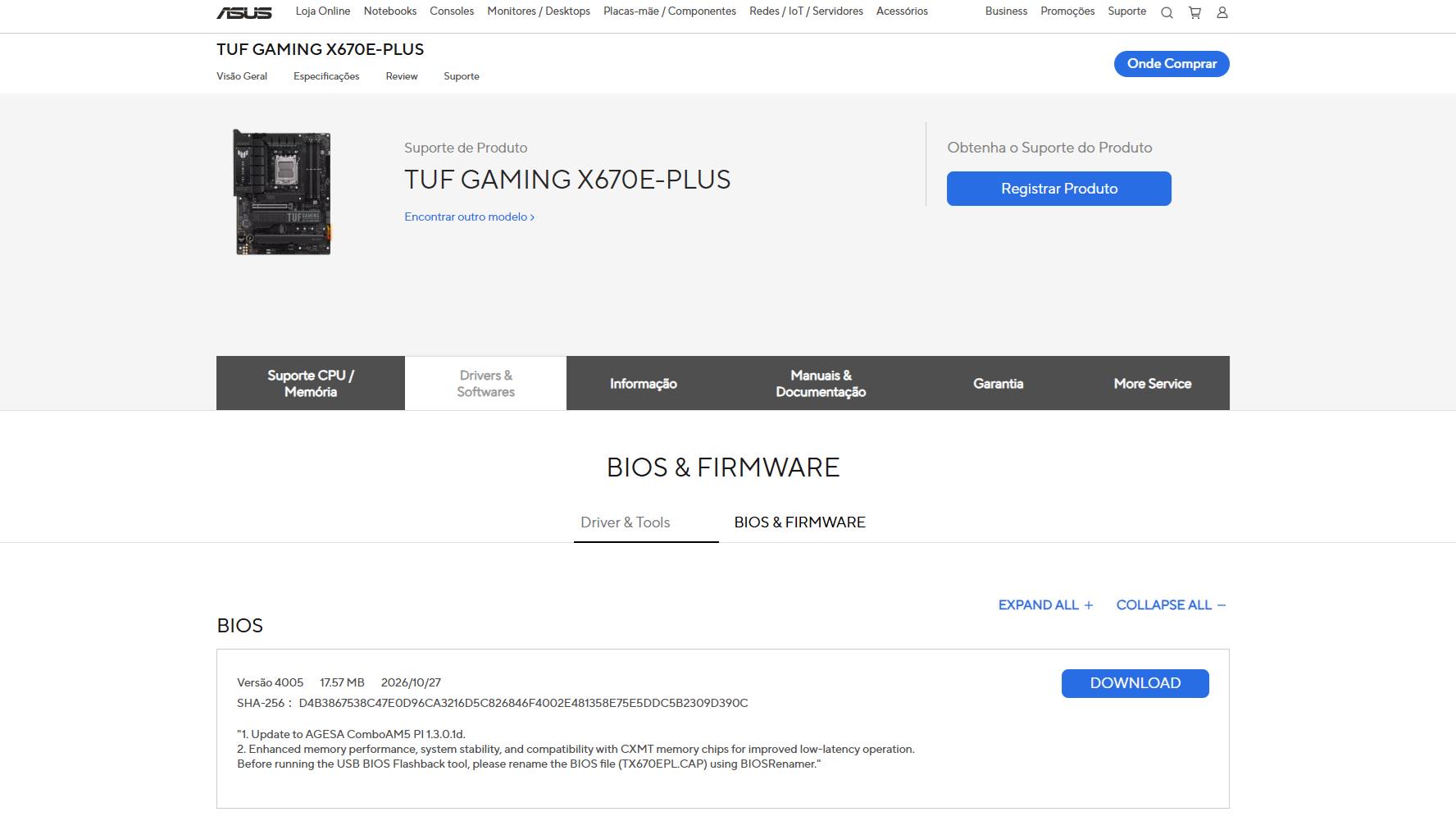
How is the latest BIOS version (4005, released on October 27, 2026, 17.57 MB) performing on the ASUS TUF GAMING X670E-PLUS? Has anyone experienced any issues or noticed improvements in stability and performance after updating?
Hi! I’ve had an ASUS TUF A15 gaming laptop for the past 5 or so years now and it has done me wonders. It runs games like Destiny 2 and Warframe faster than my dad’s PS5 actually! But recently is has become unusable and no professional can work out how to fix it (I can explain further if needed), so I need a new one.
I was considering just trying to get the same model again (I found one for 1.3k) but I figured the newer models must be better, right? I don’t know much about tech but the A18 is 1.7k on Curry’s and it looks good, but I thought I’d check with the tech gods of reddit that I wasn’t being easily fooled or scammed.
I like ASUS and ideally want to stay with the brand, so whats the best gaming laptop to get in terms of quality & price??
I have the same fault on two RT-BE90U units (the original and an Amazon replacement), both factory reset and set up fresh with default settings. 2.4GHz and 5GHz are fine. 6GHz is "up" in the driver log but invisible to clients for hours after boot, then appears and disappears seemingly at random.
I've now found what triggers it. Unplugging my wired PC from LAN1 brings the 6GHz SSID on air within 60 seconds. Plugging it back in kills it. Unplug again and it comes back. I logged this with a monitoring script and confirmed it on two phones. With the PC moved to LAN2, 6GHz stays up but clients associate and never get an IP address.
Every LAN link change logs this, even with IGMP snooping disabled on all bands and multicast routing off:
mcastds: MCSD interface: Error:No such file or directory
Every 6GHz start-up logs:
mlme_6ghz_update_frm_sched_cb: ic_mbss_ctx is NULL
It also explains why 6GHz used to appear at certain times: that's when my PC was switched off.
Setup:
RT-BE90U in router mode behind a FRITZ!Box (its Wi-Fi off)
6GHz on channel 37 / 160MHz / PSC / WPA3, MLO off
Wired PC: Realtek PCIe 2.5GbE Family Controller, driver 1125.29.50.202, connected to LAN1
Has anyone seen this on the BE90U or other Qualcomm-based Asus Wi-Fi 7 routers (TUF-BE9400, RT-BE88U)? Is there a workaround or a firmware version that fixes it? I've reported it to Asus and will update here..
Need help on what should i do?. These lines started appearing, i used the screen for almost 3 years, around 2 years used it on 60hz refresh rate and and around 8months on 100hz using Display Port, now these lines are appearing, i notices small flikering on left bottom of screen, when i changed refresh rate to 60 from 100hz it turned big, searched online, someone said to turn off screen keep holding power button for 30sec and keep monitor off for 2min with no cable attach, i did that monitor worked fine on 60hz, but when i changed setting to 100hz it appeared and appeared on 60hz as well. 144hz was safe but it appeared there as well. on 240hz its fine. Tried changing dp cable, also tried hdmi different ports, same issue.
Currently using CVT Blank with custom refresh rate 75hz. 85, 220hz etc. screen is good as new. but i dont know how long will this be ok?
Hoping to find out if the g614pr accepts 2 24gb modules (corsair 48GB kit). The speeds and voltage and everything matches, just concerned since 48gb is out of the norm of the regular increments.
I bought my ASUS laptop in August and didn't extend the warranty at that time. I wanted to ask if there's any way to extend the warranty now, even though it's been more than 15 days since the purchase?
The international warranty option is quite expensive (around ₹15,000), so I'm looking for a more affordable option.
Are there any referral codes, ASUS promotional offers, or alternative websites through which I can still extend my warranty? The ASUS promo website mentions that registration must be done within 15 days of purchase.
Has anyone managed to extend their warranty after the 15-day period? Any leads or personal experiences would be really helpful.
So, been checking in and out for a few hours for a 99 asus vivobook on the asus website and it says it's $99 but also that it's out of stock. The redditor who gave me the link said that it's supposed to go on sale this weekend. Any thoughts? It's just that it's not going to notify me on my lapop home page so I need to keep checking in and now i'm doing it constantly
My Asus Proart PX13 would get into sleep mode correctly, however it does NOT wake up when I pressed the keys / touchpad. The power button would be slowly pulsing, and the laptop would be hot to the touch.
To get past this, I would press and hold the power button for 30 seconds to fully shut it down. Sometimes, when I turned on my laptop after this happened, it would ask for a bitlocker recovery key, and ask to reset my laptop pin.
Other times when I pressed the power button to turn it on, the keyboard lights started pulsing, and the display remained dark. After while, I would press and hold the power button to shut it down. Then, many times I would be entirely unable to turn the laptop on again, and the battery charging light would not turn on when I charged it. Then, I had to take off the back cover and manually reseat the battery.
I replaced my battery, because I originally thought that my battery life was somehow causing the issue. However, this did not help. I also made sure that everything in my laptop is updated.
I've had my 2026 Zephyrus G16 (386H, RTX 5080, 64GB RAM) for a couple of weeks now, and one thing that's been bothering me is the amount of mura/graininess on the OLED display.
I know some degree of mura is inherent to OLED panels, but I'm surprised by how noticeable it is during regular use. Reddit, YouTube, or any application with dark mode enabled is super visible if ~1.5 feet from the screen. It almost looks like a fine layer of multicolored sand over the screen.
The attached photos were taken at about 30% screen brightness, with auto brightness disabled and the laptop running on battery. Obviously, these are close-up photos, but I can still readily see the grain from a normal viewing distance of around 18 inches. It's not something I necessarily have to look for to see.
At very low gray levels, it almost looks like a starry sky. ASUS flicker-free dimming doesn't seem to improve it and arguably makes it more noticeable. There are also faint horizontal lines at 60Hz that disappear at 240Hz, although the graininess itself remains. My OnePlus 13 OLED doesn't have anywhere near this level of noticeable grain.
I'm mainly trying to figure out whether this is typical for the Samsung OLED panels used in these laptops or whether I just got particularly unlucky with the panel lottery.
For other G16 owners (2024, 2025 or 2026), how noticeable is the mura on your display? Can you see it during normal desktop use, or only when actively looking for it? Has anyone exchanged their laptop or had their panel replaced and noticed a meaningful improvement?
Hi! I recently installed a second 1TB Micron 2300 SSD in the empty M.2 slot of my ASUS TUF Gaming A17 FA707NVR. Even when the laptop is idle, the SSD reaches 69°C, while the first SSD stays at around 42°C. ASUS doesn’t list any compatible SSD thermal pads on its official website. I know I could install a thermal pad, but I’m not sure what thickness (mm) I need. I don’t want to damage anything by using one that’s wrong. What would you recommend to do? Thanks)
My main desires were full metal construction, ability to swap to different switches, good wireless performance, and decent rgb if nothing else for key legibility.
This keyboard seems to tick all the boxes but id like further opinions
Hi, recently I damaged my internal screen and I couldn't get to post anything beyond the logo on the external monitor, sadly after I switched the display to dynamic in the Bios I lost both internal and external display, I need to set it back up to dgpu blindly, is there anyone willing to help me please? Like with specific key strokes and timing, I also tried resetting the bios to default and the battery reset method and didn't work.