r/ASUS • • 13h ago

Product Recommendation NEW SKIN! ASUS ROG Strix SCAR 18 (prism edition)!!!

Thumbnail gallery
6 Upvotes

Thanks ASUS for a great 2025! I was lucky enough to be the winner for their April ASUS ROG ELITE giveaway! Their laptops are awesome!


r/ASUS • • 1h ago

Support BIOS Version

Post image
4 Upvotes

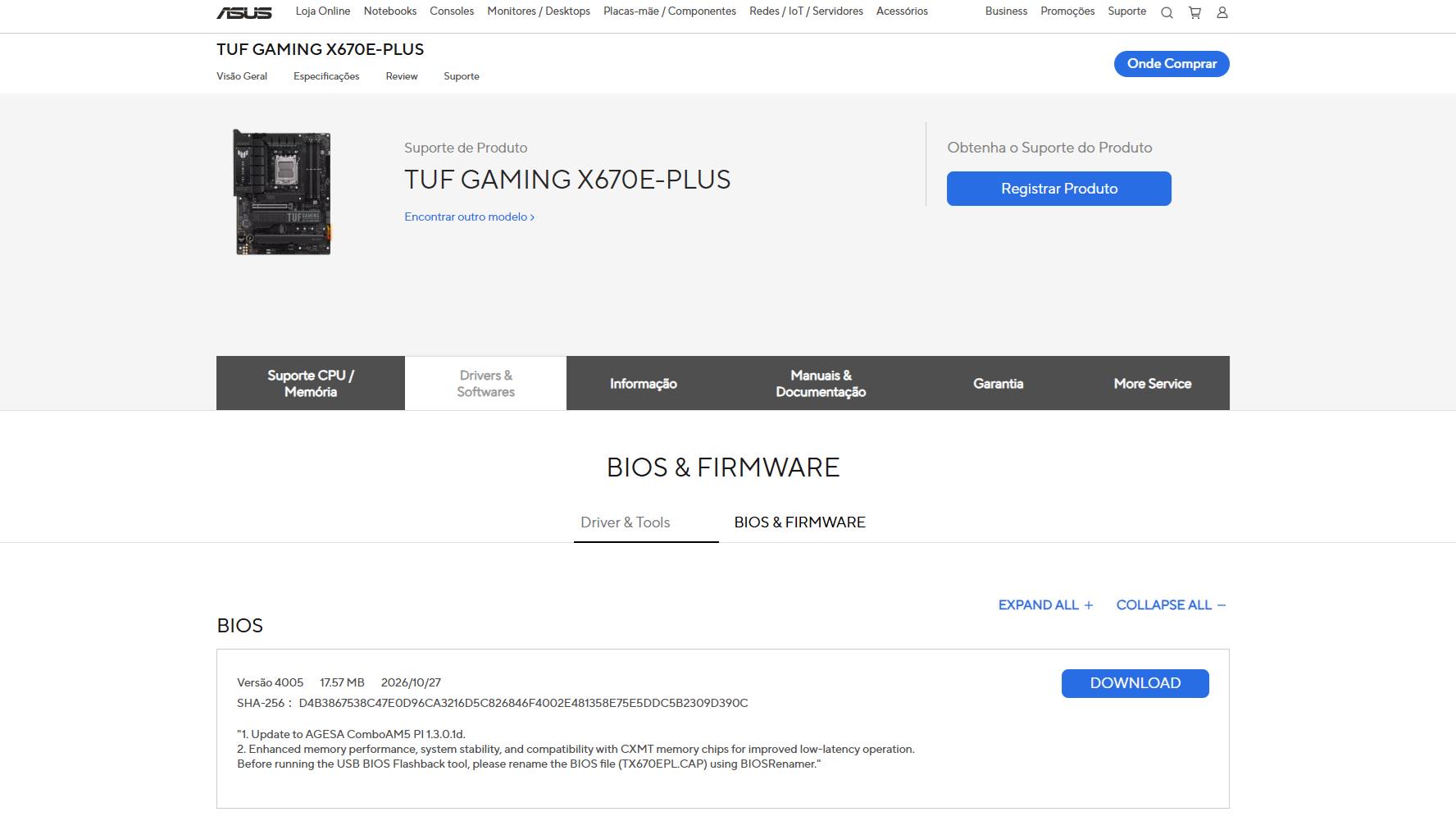
How is the latest BIOS version (4005, released on October 27, 2026, 17.57 MB) performing on the ASUS TUF GAMING X670E-PLUS? Has anyone experienced any issues or noticed improvements in stability and performance after updating?


r/ASUS • • 6h ago

Discussion This is what happened when you don't clean your laptop after 2 years of purchase 😭 Cleaning it after 2 years it all dust so much dust I can't even think how it got in here... Btw it's Asus Rog Stix G16 If Anyone want some cleaning of there laptop? I can! Contact me! 🤭

Thumbnail
gallery
4 Upvotes

r/ASUS • • 21h ago

Support Vivobook M6500QC charger cuts in and out when I plug it in, and battery capacity suddenly dropped. Anyone else?

3 Upvotes

Laptop: ASUS Vivobook M6500QC, Windows 11 24H2, BIOS 308.

Charging problem: When I plug the charger in, it starts charging and then stops a second later. This happens 3-4 times. If I switch the wall socket off and back on, it starts charging normally and keeps charging.

I ran powercfg /batteryreport and it shows the same thing. Right after I plug in, the power source flips between AC and battery every 2-4 seconds for about a minute. The charge keeps dropping even when it says AC. Once it settles, it charges normally at around 22 W.

Battery: 504 cycles. Full charge capacity is 29.2 Wh, and the design capacity is 50 Wh, so it's at 58%. It stayed around 72% for most of this year, then lost about 7 Wh in the last month. Today it went from 58% to 26% in about 5 minutes after waking from sleep. The laptop can't actually use that much power, so I'm guessing the cells drop voltage under load. I keep Battery Health Charging on (80% cap).

Questions:

  • Has anyone with an M6500 or a similar Vivobook had this on/off thing when plugging in? Did a new adapter fix it, or was it the charging port or board?
  • Could a weak battery make the adapter trip when you plug it in, or are these probably two separate problems?
  • If you're in India, what did ASUS service charge for a battery or adapter replacement? Is a genuine battery available anywhere besides service centres?

I haven't tried a different adapter or socket yet. Will update when I do


r/ASUS • • 1h ago

Product Recommendation What laptop is best?

2 Upvotes

Hi!
I’ve had an ASUS TUF A15 gaming laptop for the past 5 or so years now and it has done me wonders. It runs games like Destiny 2 and Warframe faster than my dad’s PS5 actually! But recently is has become unusable and no professional can work out how to fix it (I can explain further if needed), so I need a new one.

I was considering just trying to get the same model again (I found one for 1.3k) but I figured the newer models must be better, right? I don’t know much about tech but the A18 is 1.7k on Curry’s and it looks good, but I thought I’d check with the tech gods of reddit that I wasn’t being easily fooled or scammed.

I like ASUS and ideally want to stay with the brand, so whats the best gaming laptop to get in terms of quality & price??

Thank yoouu x


r/ASUS • • 14h ago

Support ASUS Proart PX13 NON FUNCTIONAL - does not wake up after getting into sleep mode

2 Upvotes

My Asus Proart PX13 would get into sleep mode correctly, however it does NOT wake up when I pressed the keys / touchpad. The power button would be slowly pulsing, and the laptop would be hot to the touch.

To get past this, I would press and hold the power button for 30 seconds to fully shut it down. Sometimes, when I turned on my laptop after this happened, it would ask for a bitlocker recovery key, and ask to reset my laptop pin.

Other times when I pressed the power button to turn it on, the keyboard lights started pulsing, and the display remained dark. After while, I would press and hold the power button to shut it down. Then, many times I would be entirely unable to turn the laptop on again, and the battery charging light would not turn on when I charged it. Then, I had to take off the back cover and manually reseat the battery.  

I replaced my battery, because I originally thought that my battery life was somehow causing the issue. However, this did not help. I also made sure that everything in my laptop is updated.


r/ASUS • • 17h ago

Support Having trouble switching display

Post image
2 Upvotes

1st and 2nd reasons cant be true, and ive restarted and reinstalled my graphics stuff so idk how to fix 3


r/ASUS • • 20h ago

Product Recommendation Is the ASUS Zenbook 14 OLED (UX3405CA — Core Ultra 7 255H / 16GB RAM) good enough to last 4–7 years for Reels editing & 2D Motion Graphics?

2 Upvotes

Hi everyone, I'm planning to buy a brand-new laptop for college and to learn (and eventually freelance in) short-form video editing (Reels/Shorts) and 2D Motion Graphics (After Effects, Premiere Pro, CapCut). No 3D work or heavy gaming.

​I have a great local deal on this exact model:

​Model: ASUS Zenbook 14 OLED (UX3405CA-SU157W)

​CPU: Intel Core Ultra 7 255H (with Intel Arc 140T iGPU)

​RAM: 16GB LPDDR5X (soldered)

​Storage: 512GB PCIe 4.0 SSD

​Display: 14" 3K 120Hz OLED Touch

​(A base MacBook Air M4 16/256 was my top choice, but the local deal sold out and regular prices are much higher here).

​For anyone who owns the UX3405CA (255H) or uses it for editing:

​1. How limiting is 16GB soldered RAM in After Effects 2D and Premiere Pro over the long run?

​2. How are fan noise and heat during 15–30 minute editing/export sessions.

​Thanks in advance!


r/ASUS • • 1h ago

Support RT-BE90U: 6GHz SSID toggles on/off with LAN port link changes, clients get no IP (fw 3.0.0.6.102_58501)

1 Upvotes

I have the same fault on two RT-BE90U units (the original and an Amazon replacement), both factory reset and set up fresh with default settings. 2.4GHz and 5GHz are fine. 6GHz is "up" in the driver log but invisible to clients for hours after boot, then appears and disappears seemingly at random.

I've now found what triggers it. Unplugging my wired PC from LAN1 brings the 6GHz SSID on air within 60 seconds. Plugging it back in kills it. Unplug again and it comes back. I logged this with a monitoring script and confirmed it on two phones. With the PC moved to LAN2, 6GHz stays up but clients associate and never get an IP address.

Every LAN link change logs this, even with IGMP snooping disabled on all bands and multicast routing off:

mcastds: MCSD interface: Error:No such file or directory

Every 6GHz start-up logs:

mlme_6ghz_update_frm_sched_cb: ic_mbss_ctx is NULL

It also explains why 6GHz used to appear at certain times: that's when my PC was switched off.

Setup:

  • RT-BE90U in router mode behind a FRITZ!Box (its Wi-Fi off)
  • 6GHz on channel 37 / 160MHz / PSC / WPA3, MLO off
  • Wired PC: Realtek PCIe 2.5GbE Family Controller, driver 1125.29.50.202, connected to LAN1
  • Wi-Fi clients: Galaxy S26 Ultra, Galaxy S24, Intel Wi-Fi 6E AX211

Has anyone seen this on the BE90U or other Qualcomm-based Asus Wi-Fi 7 routers (TUF-BE9400, RT-BE88U)? Is there a workaround or a firmware version that fixes it? I've reported it to Asus and will update here..


r/ASUS • • 2h ago

Support Asus Tuf Dash F15 Frame

Thumbnail
gallery
1 Upvotes

Hello, i have a asus tuf dash f15 gaming laptop and recently the hidge has been poping off as u can see in the images i sent.

i was wondering if there is replacement hidges you can buy or what seems to be the issue from these images.

The laptop works fine.

thanks.


r/ASUS • • 3h ago

Discussion HiRes Card

Thumbnail reddit.com
1 Upvotes

r/ASUS • • 4h ago

Support ce bruit est-il normal ? Asus Scar 18 5090 (2025)

Thumbnail
reddit.com
1 Upvotes

r/ASUS • • 4h ago

Support Asus tuf vg27aqml1a Horizontal Lines issue

1 Upvotes

Need help on what should i do?. These lines started appearing, i used the screen for almost 3 years, around 2 years used it on 60hz refresh rate and and around 8months on 100hz using Display Port, now these lines are appearing, i notices small flikering on left bottom of screen, when i changed refresh rate to 60 from 100hz it turned big, searched online, someone said to turn off screen keep holding power button for 30sec and keep monitor off for 2min with no cable attach, i did that monitor worked fine on 60hz, but when i changed setting to 100hz it appeared and appeared on 60hz as well. 144hz was safe but it appeared there as well. on 240hz its fine.
Tried changing dp cable, also tried hdmi different ports, same issue.

Currently using CVT Blank with custom refresh rate 75hz. 85, 220hz etc. screen is good as new. but i dont know how long will this be ok?


r/ASUS • • 5h ago

Discussion It's been about 8 months since I have got my laptop (FX608JH-RV057WS) I want to share my opinion.

Post image
1 Upvotes

r/ASUS • • 6h ago

Discussion +100 FPS in CS2 on TUF A15 FA507 (7535HS/7735HS)? Maybe, but there's a nuance. Testers wanted

Thumbnail reddit.com
1 Upvotes

r/ASUS • • 7h ago

Support Does the G614PR supports 24GB-per-slot DDR5 modules

1 Upvotes

Hoping to find out if the g614pr accepts 2 24gb modules (corsair 48GB kit). The speeds and voltage and everything matches, just concerned since 48gb is out of the norm of the regular increments.


r/ASUS • • 12h ago

Support USED OLED ON AMAZON?

Post image
1 Upvotes

r/ASUS • • 12h ago

Support How noticeable is the OLED mura on your Zephyrus G16? (2026 model)

Thumbnail gallery
1 Upvotes

I've had my 2026 Zephyrus G16 (386H, RTX 5080, 64GB RAM) for a couple of weeks now, and one thing that's been bothering me is the amount of mura/graininess on the OLED display.

I know some degree of mura is inherent to OLED panels, but I'm surprised by how noticeable it is during regular use. Reddit, YouTube, or any application with dark mode enabled is super visible if ~1.5 feet from the screen. It almost looks like a fine layer of multicolored sand over the screen.

The attached photos were taken at about 30% screen brightness, with auto brightness disabled and the laptop running on battery. Obviously, these are close-up photos, but I can still readily see the grain from a normal viewing distance of around 18 inches. It's not something I necessarily have to look for to see.

At very low gray levels, it almost looks like a starry sky. ASUS flicker-free dimming doesn't seem to improve it and arguably makes it more noticeable. There are also faint horizontal lines at 60Hz that disappear at 240Hz, although the graininess itself remains. My OnePlus 13 OLED doesn't have anywhere near this level of noticeable grain.

I'm mainly trying to figure out whether this is typical for the Samsung OLED panels used in these laptops or whether I just got particularly unlucky with the panel lottery.

For other G16 owners (2024, 2025 or 2026), how noticeable is the mura on your display? Can you see it during normal desktop use, or only when actively looking for it? Has anyone exchanged their laptop or had their panel replaced and noticed a meaningful improvement?

r/ASUS • • 13h ago

Support Second SSD running at 69°C while idle

Post image
1 Upvotes

Hi! I recently installed a second 1TB Micron 2300 SSD in the empty M.2 slot of my ASUS TUF Gaming A17 FA707NVR. Even when the laptop is idle, the SSD reaches 69°C, while the first SSD stays at around 42°C. ASUS doesn’t list any compatible SSD thermal pads on its official website. I know I could install a thermal pad, but I’m not sure what thickness (mm) I need. I don’t want to damage anything by using one that’s wrong. What would you recommend to do? Thanks)


r/ASUS • • 13h ago

Support Droplet water flow device dropping Wi-Fi on Asus AiMesh, fine on a phone hotspot. Anyone seen this?

Thumbnail reddit.com
1 Upvotes

r/ASUS • • 14h ago

Discussion Is the Azoth Extreme worth it

1 Upvotes

My main desires were full metal construction, ability to swap to different switches, good wireless performance, and decent rgb if nothing else for key legibility.

This keyboard seems to tick all the boxes but id like further opinions


r/ASUS • • 15h ago

Discussion Need Help Blind setting Bios display to dgpu only

1 Upvotes

Hi, recently I damaged my internal screen and I couldn't get to post anything beyond the logo on the external monitor, sadly after I switched the display to dynamic in the Bios I lost both internal and external display, I need to set it back up to dgpu blindly, is there anyone willing to help me please? Like with specific key strokes and timing, I also tried resetting the bios to default and the battery reset method and didn't work.

Asus Rog G16 strix 615lr


r/ASUS • • 15h ago

Discussion boreas update: cpu temperature limit on linux for asus laptops, tried it in cs2

Post image
1 Upvotes

hey guys, a while ago i posted boreas here, my control app for asus laptops on linux. small update: it can now hold a cpu temperature limit. it talks through tctl, so directly to the cpu, like ryzenadj, instead of just lowering power.

i tried it in a few games (cs2, payday 3, dying light, peak), works fine on my laptop. in cs2 with the limit at 88C i got 135 fps with fans at 60% and 153 at 70%. another time i tried with and without the limit, 224 fps without (96C) and around 196 with it. with fans at 100% it went up to 300 with no limit, and around 260 with the limit at 88C (that one was a short test).
the whole test ran a couple hours, each setting got 5 min of that.

if you run linux on an asus laptop, can you give it a try? i'm open to any suggestions and contributions, thanks in advance.

https://github.com/Yusuf-Yonturk/boreas


r/ASUS • • 15h ago

Support ASUS PRO A320M-R WI-FI – EZ Flash shows "Image Integrity Check Failed" with every newer BIOS

1 Upvotes

Hi everyone this tex is translated with chatgpt

I'm trying to update the BIOS on my ASUS PRO A320M-R WI-FI motherboard, but ASUS EZ Flash rejects every newer BIOS file with the error:

"Image Integrity Check Failed"

Current BIOS version: 2204.

I've tried:

- BIOS versions 6043 and 6062, downloaded directly from the official ASUS support page for this exact motherboard.

- Original CAP filenames and renamed files using BIOSRenamer.

- FAT32 USB drive.

- Verified the motherboard model in Windows using PowerShell.

- The USB drive successfully worked when updating from BIOS 2201 to 2204.

The error appears immediately after selecting the BIOS file. The update never starts.

I would like to know:

  1. Is there a required intermediate BIOS version?
  2. Can this motherboard be updated using AI Suite 3 / EZ Update from Windows?
  3. Is there another official ASUS flashing method?

I'm looking for a safe way to update the BIOS without bricking the motherboard because i recently got a Ryzen 5 5600g

Thanks!