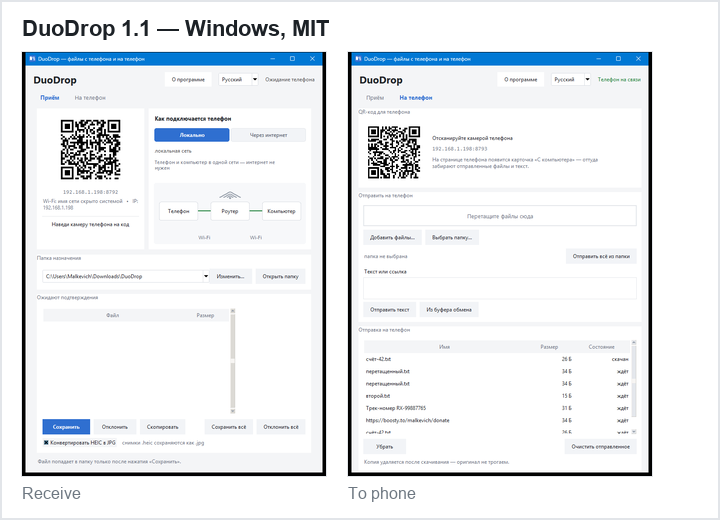
I got tired of using Telegram's "Saved Messages" or logging into cloud drives on shared/work PCs just to transfer a couple of photos, a document scan, or a long URL between my phone and computer. Existing tools either require installing apps on both devices, compress images, or break when devices aren't on the exact same subnet.
So I built DuoDrop — a free, open-source desktop utility written in Python (MIT license), packaged as a single portable executable for Windows (~38 MB, no installer, no console window). The source also runs on Linux and macOS.
How it works:
Run DuoDrop.exe on your PC.
Scan the QR code with your phone's camera.
A local web UI opens right in your mobile browser. Zero apps or accounts needed on the phone.
Key features in v1.1:
Two-way transfer (Phone ↔ PC): send photos straight from the camera, pick files from the gallery, or send text/links. On the "To phone" tab you can drag and drop files from Explorer, pick a source folder, and send text or a link — and anything in the receive queue can be copied back to the Windows clipboard (image, text or file).
Native Share button on mobile: every file sent to your phone gets both a Download and a Share button (Web Share API), so you can push it straight into WhatsApp, Signal or email without cluttering your Downloads folder.
Works across different networks: uses your local Wi-Fi by default. If your PC is on Ethernet or your phone is on cellular/isolated guest Wi-Fi, flip the "Via internet" switch — it automatically spins up a temporary cloudflared tunnel.
Original quality + HEIC to JPG: files are stored as they are, no re-encoding — EXIF and orientation stay intact. There is an optional "Convert HEIC to JPG" checkbox (on by default) that converts iPhone snapshots at save time for sites that don't accept HEIC.
Privacy & network diagnostics: no external servers (unless you toggle the Cloudflare tunnel), no telemetry, no accounts, hourly rotating access tokens with brute-force protection, a manual confirmation queue before anything is written to disk, plus built-in VPN detection and a Windows Firewall helper that can create the rule for you.
Hi all, I built one app for watching any TV shows, movies, or anime and reading/downloading/exporting your manga. As the title suggests, you can watch TV shows, movies, and anime from Stremio add-ons with a dedrib service/via torrenting or via your own Plex, Jellyfin, Emby instances. You can also read manga from any source like Paperback, Aidoku, etc.
The video player is entirely custom made for HDR10, Dolby Vision, a custom sound Equalizer, and customizable picture profiles so you can tune the color of the image how you'd like.
You can also export manga, load them onto your Jailbroken/Non-Jailbroken e-readers right from the app, and I made some cool privacy features like tracking the position of your head when you have AirPods in. If you look away, then the screen blurs. Look back at the screen, then the screen unblurs.
Currently an Android version is being developed that will have full feature parity with the iOS versions, however some features like iCloud sync and Apple TV handoff arent possible.
There's a 3 day free trial with no payment method needed, and for a 1 time purchase (no subscriptions) of $9.99 the entire app unlocks and you can use every feature in the app with updates for life. There's a testflight link in the link below:
Problem: Students keep notes, deadlines, a calendar and flashcards in four different apps; Thought Desk puts them in one fast app that stores everything on your own computer.
Comparison:
- Notion. Thought Desk is better at: working fully offline, keeping your notes on your disk instead of a server, being small and quick, and having assignments, a calendar and spaced-repetition flashcards built in. Notion is better at: team collaboration, web and mobile apps, sync between devices, integrations, templates and importers.
- Obsidian. Thought Desk is better at: databases (table, board, gallery, calendar, chart, timeline and more), a calendar with assignments, flashcards without plugins, and writing a page live with a friend. Obsidian is better at: plain Markdown files on disk (Thought Desk keeps one database file and exports to Markdown), its huge plugin library, mobile apps, sync and years of maturity.
Not there yet on Mac: export as PDF, and there is no iPhone or iPad app.
Pricing: Free and open source (AGPL-3.0). Optional Pro at $9.99 a month, only for a larger allowance of the built-in AI study assistant (it runs on Anthropic's Claude and is off until you turn it on). Everything else is free. https://thoughtdesk.org/#pricing
ratclone browses your rclone accounts and the local disk with Vim keys, in one pane or two side by side. Copy and move between them, rename and delete, and keep transfers running in the background, even after you quit or your SSH session drops.
I shared Paperweight here before. A local, open-source (MIT) desktop app that uses your inbox to map your digital footprint. It helps you find forgotten accounts, old mailing lists and personal data you’ve shared with companies over the years to take back control.
Important latest release V1.2.
Encrypting locally stored emails, account details and settings
Improved account connections, sync and reliability
Performance improvements for larger mailboxes
Various fixes and dependency updates.
Paperweight never reads any of your data and nothing ever leaves your machine. But this release also adds encryption to locally stored data to protect it from other apps or agents that have access on your device.
I'm financial analyst as my main job and I'm developing softwares since high school. (mainly Python) These days I really got tired of charting sites that put multi-chart layouts, always-on alerts and screeners behind expensive monthly tiers. In addition to that some are them holding my watchlists, drawings and trade history in their servers. So I built a self-hosted version. It's called TickerGlass.
Charts: I put 85+ indicators in it and there are many drawing tools (10 Fibonacci tools, Gann, patterns etc.) you can have up to 16 synced charts per layout and not only candlestick but also there are Renko/Kagi/P&F/Heikin Ashi candles too.
Alerts: I evaluated them server-side, so they fire with the browser closed. You can route them to deliver messages to Telegram or email, ntfy, Gotify, Apprise or webhooks too.
I've made screener and sector heatmap for stocks, ETFs, commodities and crypto. You can save screens and screen alerts
I added strategy tester too but definitely will improve that more.
There's market replay too, bar by bar with paper trading feature.
With portfolio feature you can track your holdings. Other features are time-weighted return vs a benchmark, dividends, trade journal, broker CSV import (IBKR, Schwab, DEGIRO, Trading 212) but I definitely will improve that part for better UX.
You can create custom indicators in sandboxed JavaScript
Self-hosting details
Prebuilt multi-arch images (amd64/arm64), so it runs on a Pi or NAS
SQLite by default, PostgreSQL optional
Optional password, OIDC SSO or auth-proxy (Authelia/Authentik style), multiple users with separate data
Backups from the UI, Prometheus metrics, installable PWA
Templates for Unraid, TrueNAS, CasaOS, Umbrel and Helm
No telemetry, no analytics, no account with me
AI Disclosure
During the development process, I utilized AI under personal supervision for tasks such as testing, bug fixing and problem identification. AI provided me assistance in the structural development of the Typescript part of the project.
A month ago I posted Tellyscope here as a TV debloater. Many of you tried it, reported bugs and asked for features, and it has now been approved on Google Play. Thank you.
If you're new: Tellyscope is a free, open source Android app. It connects to your Android TV, Google TV, Fire TV or Shield over WiFi ADB and lets you control it from your phone, without root or a computer.
What it does:
Remote: D-pad, touchpad or a mouse pointer for browsing, or turn your phone sideways to use it as a game controller. You can type on the TV with your phone's keyboard.
Debloat: Tellyscope matches your TV to a tested list (500+ TV devices supported), shows each app before turning it off, and can turn any of them back on later. You can also replace the bloated home screen with Projectivy, FLauncher, AT4K or Monet.
Apps: install an APK, split APKs or an .apks/.xapk/.apkm bundle from your phone, and see first whether it's new, an update or an older version. You can open, stop or uninstall apps too.
Files: send files to the TV over Wi-Fi and save them back to your phone, without a USB stick or a cable. Videos, music and pictures play straight on the TV.
Shell: run adb shell commands for anything the app doesn't cover. Anything that would change the TV asks first.
Advanced monitor: see which apps use the CPU, memory and network, with their processes, connections and the data each one has used.
All your TVs: every TV in the house in one app, with ad blocking through Private DNS, faster animations, cache clearing and an undo for every change.
I'm Pingfold's solo developer. The core is free and ad-free, with no account needed for it. This post was prepared with AI writing assistance.
It's for the middle ground between allowing every notification and muting everything. On Android, you can keep important apps or phrases Immediate, collect noisy alerts into a Digest, or Block the ones you don't want. Exceptions let you keep specific alerts, and there's Remind Later, Quiet Repeats, and a searchable on-device Inbox.
Notification content is processed on the device. Pingfold needs Android Notification Access to work, and background restrictions on some phones may need adjusting.
Optional subscription PRO adds Profiles, per-app Digest schedules, Allowed Hours, themes and exports. The main notification controls stay free. This is a proprietary Play Store app, not an open-source or self-hosted project.
I'd especially like feedback on onboarding: would starter rules for common apps be easier than configuring each app yourself? Get Pingfold on Google Play
First, to clear up the name right away: no blockchain, no crypto, no tokens, no accounts. By "dapp" here I just mean tiny, decentralized, local-first web apps whose data lives on your own devices instead of someone else's server.
The idea behind it
I've always loved pure P2P architecture — especially Syncthing — and ever since 2022 I've been building prototypes of an app framework inspired by that same model: your devices own the data, pair directly with each other, and sync without a central server.
Over the last few years I tried and tested a whole lineup of P2P and local-first stacks for this — GunJS, DXOS, Hyperbee / PearPass, Peerbit, and PouchDB — before eventually settling on Yjs CRDTs + an Ed25519-verified WebRTC mesh + plain browser IndexedDB. Over the last year, AI tools (Claude, OpenAI, and others) sped up progress dramatically and let me finally push a lot of these pieces over the finish line.
The practical itch behind it is simple: whenever I wanted a small shared app for family or friends — a meal planner linked to a shopping list, a shared expense splitter, a habit tracker, a game score keeper — the only options felt like:
Handing private household data to a SaaS app that forces everyone to create an account, or
Spinning up yet another container + Postgres + auth layer + backup job just for a 200-line CRUD app.
So I built this local-first, peer-to-peer app builder (MIT licensed) and I'm finally sharing it as a beta to get real feedback. Every app is a small HTML/JS bundle ("Code App") whose **source code, data, and files live locally in each member's browser (**IndexedDB+YjsCRDTs) and sync directly between invited devices over encrypted WebRTC.
There is no central database and no user account system. The only server involved is a tiny stateless WebRTC signaling broker that introduces peers — and you can self-host that in one Node command, or run an optional headless keeper node on a NAS/homeserver (Syncthing-style always-on peer) so devices stay synced even when phones are never online at the same time.
**Local-first storage (**IndexedDB+YjsCRDTs): All records, attachments, and the app's own HTML/JS source live locally on your device. Everything works offline out of the box and merges automatically when peers reconnect.
No accounts — cryptographic device identity: Each device generates a non-extractable WebCrypto Ed25519 keypair stored in IndexedDB. Every record write, deletion tombstone, member change, and source update is signed and independently verified by every peer.
Member-mesh whitelist (not open WebRTC rooms): Dapp documents never sync to anyone who merely knows a room password. Both peers perform a signed Ed25519 hello/proof handshake before a single document byte or file chunk is exchanged. Signaling messages themselves are AES-GCM encrypted under a room-derived key — the broker sees connection metadata (opaque topics & timing), never app content.
Sandboxed apps & owner-sealed source: Code Apps run inside opaque-origin iframes with a strict CSP (blocking external network requests, scripts, and forms) communicating over a nonce-protected postMessage bridge. Owners sign a path -> SHA-256 seal bound to the dapp's genesis so a non-owner on a modified client can't silently rewrite app code for everyone else.
Safety numbers & selective sharing: Contacts pair using safety numbers (and invite secrets stay in the URL fragment #, never hitting the host server). Apps can also share individual slices/events over sealed per-relationship channels — e.g. splitting one expense or sharing one diary entry without giving someone access to the entire app.
Documented threat model: There's a full docs/security/THREAT_MODEL.md in the repo listing both what's enforced and the honest residual risks (browser XSS boundary, signaling metadata, offline removal lag, etc.).
3 ways to run or self-host it
**Full self-hosted stack + Headless Keeper Node (**Dockerfile.headless/ Node >= 23.6): Serve the static dist/ build over HTTPS alongside node server/signaling.mjs (1 dependency: ws) and an optional headless keeper node (npm run headless or Docker). You invite the keeper into an app just like another device, and it gives you:
Always-on async sync & pin-all file replication persisted to disk (so two phones never need to be online at the same time),
Scheduled cron automations that write signed records on schedule,
A token-guarded JSON Control API +n8nwebhook integration (plus optional OpenAI-compatible LLM hook) so your local-first apps plug into existing workflows.
Zero-rebuild BYO signaling & TURN: Even on any hosted build, open Settings → Signaling and Settings → Relay (TURN / ICE) to point your device at your own server/signaling.mjs (wss://…) and/or coturn server. Those settings are device-local, never synced, and take effect immediately.
Free-tier Cloudflare deploy (docs/CLOUDFLARE.md): Includes a single-Worker deployment (cloudflare/signaling-worker/) using Static Assets + a SQLite Durable Object for signaling (strictly $0 STUN-only by default, with optional BYO TURN).
What's built in (11 editable starter apps + LLM-friendly building)
You can use or fork 11 built-in starter apps right away:
Linked kitchen suite:Recipe Book -> Meal Planner -> Shopping List (wired together locally via typed cross-app events/actions so planned meals automatically merge scaled ingredients into your shopping list)
Everyday tools:App Studio (visual schema/screen builder), Shared Expenses, To-Do List, Habit Tracker, Weight Tracker, Diary, Group Chat, and Game Score Keeper
Because apps are plain HTML/JS against a small local API ($store, $files, $share, $events), the build also publishes a concise Markdown spec (/agent-instructions.md / /llms.txt) you can hand to any local or cloud LLM to generate a custom app and import it in seconds.
Honest beta caveats & trade-offs
Since this is an early beta, here's what to expect upfront:
Hosted demo is temporary — do not rely on it:https://app.localdapp.workers.dev is only up to show the project and gather feedback — it could disappear at any time without notice. Because browser IndexedDB storage is tied to the site origin, don't put real data only on the demo URL; self-host your own instance if you actually want to use it.
Strict NAT / CGNAT without TURN: The hosted demo runs STUN-only (no shared TURN relay, to keep demo hosting strictly $0 with zero runaway bandwidth risk). Direct WebRTC connects fine across most home Wi-Fi networks, while strict corporate firewalls or symmetric mobile CGNAT will need your own coturn (or personal Cloudflare Realtime TURN free tier) configured in Settings → Signaling.
Async sync needs an overlap or a keeper: Without a headless keeper node (or two devices online at once), edits stay queued locally until peers overlap.
Key self-custody: Non-extractable device keys mean there is no central "reset password" button. Pair a second device or a keeper node for anything important, and on iOS install as a PWA to avoid Safari's 7-day storage eviction.
Early beta: MIT licensed, actively evolving — breaking protocol/storage changes are still possible before 1.0.
Quick way to test P2P sync in 30 seconds: Open the demo on your laptop + phone (or a normal browser window + an Incognito window), create one of the starter apps, open Dapp settings → Invite to send the link to your second device/window, verify the safety number, and try editing while toggling offline/online.
I'd genuinely love feedback on:
How direct STUN vs. BYO coturn behaves on your home/mobile networks,
Whether the local-first model + optional headless keeper node (Docker + n8n webhooks + control API) fits how you'd actually use it, and
What small everyday apps you'd want to build or replace SaaS with if sharing them didn't require maintaining a backend.
---
**Edit: quick visual demo:**
Two separate browser windows (**Owner** on the left, **Peer** on the right) connected directly over WebRTC, with no backend database and no page reloads.
**1. Live P2P data sync (Window 1 -> Window 2) with a small demo**
Adding a task in Window 1 signs it with Ed25519 and syncs it directly to Window 2 over the member-verified WebRTC mesh:
Window 2 adds a second task back to Window 1, and checking off a task updates both windows live:
**3. Editing the app's own source code in the browser**
Window 1 opens the built-in Code Editor and edits `index.html` (new title, banner, and CSS theme) while Window 2 keeps running the live app:
**4. Instant live code sync (zero refresh, data intact)**
Clicking **Save** signs and seals the updated source in a separate Yjs source document. Window 2 immediately re-renders with the new UI while keeping all synced tasks intact:
Dev of VoxScribe here, following up on my post from last week, because one thing in it changed.
Last week I disclosed that the Android app could fall back to Google's speech recognizer when its own model wasn't ready. Version 1.2.0 removes that completely. Speech is now recognized only by models on the phone: IBM Granite Speech for English, French, Spanish, German, Italian and Portuguese, and NVIDIA Nemotron for 15 more languages, including Arabic, Hindi, Japanese, Korean and Chinese. If the model for your language isn't downloaded yet, the button says so instead of quietly sending your audio somewhere else. It works in airplane mode.
What still uses the network, so nothing is hidden: the one-time model download from GitHub, an anonymous usage ping (event name, app version, Android version and a random id, no audio or text, and you can switch it off in Settings), and a one-time activation if you buy Pro. Settings has a privacy receipt that lists every connection the app made and what it sent.
How it works: a small floating button sits above your keyboard in any app. Hold it, talk, and the words are typed where your cursor is. It's free and open source (MIT), and there's also a Windows version where you hold a key instead.
If you run your assistant locally and want it on your phone, the usual answers are VPN or a public reverse proxy. I didn't want either, so I built a client that pairs with the gateway over a relay.
- the model and the conversation stay on your machine
- the gateway stays bound to localhost
- pairing is one line of text; no domain or port forwarding
I've been working on something called KryptoCoreLabs, and I'd like to share it with you.
The idea started with a simple question: Why should protecting our own data require trusting corporations, creating online accounts or depending on cloud services?
There are already some great privacy tools out there. I'm not trying to replace everything that exists. I just wanted to explore a different approach.
One shared security foundation, with different applications built around it. All open source, local-first and developed together with the community.
What is KryptoCoreLabs?
At the center is KryptoCore, a small encryption library written in Rust.
It uses established cryptographic algorithms like XChaCha20-Poly1305 and Argon2id, rather than inventing new encryption methods.
The idea is to reuse this foundation across different applications instead of having every tool implement the same functionality independently.
What tools are available?
KryptoCore Vault – Offline Password Manager
Local encrypted password storage
No account or cloud connection required
Windows desktop application
Firefox companion for compatible builds
KryptoCore Container – Encrypted File Archives
Encrypt files and folders
Portable encrypted archives
Local-first approach without external storage services
KryptoCore Rescue – Recovery Tools
Offline recovery functionality
Recovery exports for supported applications
KryptoCore Messenger – Experimental Communication
Exploring private communication over Tor
Experimental messaging and file transfer
KryptoCore Verify – Release Verification
Offline verification of signed releases
Helps check the authenticity of downloaded software
The project is still in early development. Some applications are experimental, and none of the security tools have undergone an independent security audit yet. Please don't rely on them for critical or irreplaceable data at this stage.
The bigger idea: One Core, Many Apps, One Community
For me, KryptoCoreLabs isn't really about building another password manager or encryption tool.
I'd like to create an ecosystem where different privacy applications share a common foundation but remain independent tools.
And I'd like the community to shape that ecosystem.
Developers could contribute code, review security decisions or build new applications. Others could help with testing, documentation, accessibility, design or simply suggest ideas.
You shouldn't need to be a programmer to benefit from privacy and security tools.
And you shouldn't need to work for a large company to help create them.
The long-term goal is to make these tools accessible to ordinary people, without mandatory subscriptions, centralized accounts or dependence on proprietary services.
Platforms and technology
Core: Rust, with Python interoperability
Desktop: Windows support for Vault
Browser: Firefox companion
Other tools: Experimental projects at different stages of development
I’m not very technically adept, so I’m not entirely sure how it works exactly, but they told me to tell you this: you can apparently create a secure environment for communities that’s safer than Matrix servers. My friend felt the need to create this because people’s Matrix and Mastodon servers keep getting hacked. They say it’s in Spring and Angular mostly, and uses all enterprise grade packages. They expect that people will probably replace different Angular layers with React, and Spring with Rust, but that’s fine- this is more of a template.
Let me know if you have any questions, and I’ll forward them over!
“This is a demo project with the expectation of being a code base for functional use, but with anticipation of copies to be made by humans and clankers. The infrastructure this tool produces should be alterable by the consumer live.
Please report any security issues immediately on our site and by any public means you find ethically necessary.”
I posted about Atomic CRM here a while ago, and v2.0 just came out, so here's a quick update. We originally made this CRM for ourselves, because we were fed up with proprietary softwares that were way too complicated, and at some point we decided to open source it.
You host it yourself, and the data stays in a database you control.
The thing I use the most now is the global search (Ctrl+K). It basically searches everything at once, contacts, companies, deals, tasks and notes. Before, finding an old note meant remembering which contact it was attached to, which was honestly a pain when all I remembered was a word like "renewal".
The search also shows the last contacts I opened, which is really handy right after a meeting when I just want to write my notes. And that list stays on your device, it never goes to the server.
Oh and the part that will probably interest you more: company logos used to come from a third-party favicon service, so that service could see which companies the team was looking at, and when. Now it just grabs the favicon from the company's own website.
Heads up for anyone running a fork though, there are two breaking changes, so check the upgrade guide before you pull.
I'm curious, for those of you who use a CRM, are you still on a proprietary one? And if so, what's actually keeping you from switching to an open-source one?
Decidecks is a task manager where your tasks are a deck of cards. You draw tasks into your hand and play them onto the board when you start working on them. From there, you move them to the done or waiting piles.
There are 3 types of cards right now:
Tasks: anything you need to get done, with extra details and a timer
Chores: recurring tasks that come back every few days or on specific weekdays. Playing one marks it as done for the day
Actions: cards that do something when played, currently a mood tracker and a pomodoro timer
You don't need an account, your cards are saved in your browser. Plus adds optional cloud sync if you want them on more devices.
iWe is a free macOS app for notes and knowledge bases. Your notes are a folder of ordinary markdown files on your own disk. There's no account, no sync service and no proprietary format, so you can open the same files in any editor or move them anywhere.
The app shows that folder as a connected graph you can navigate with the keyboard. It has quick-open, search, a graph view and a version timeline. If you want an AI assistant, it works with Claude Code or Codex on your own plan. Its edits appear live in the document, and you can undo a whole run in one step.
The video is an introduction. It's built on the open-source IWE engine (CLI and LSP), and the app itself is a free signed download from GitHub. Feedback is welcome, especially from anyone who has moved off cloud note apps.
Meta's Muse AI agent read Signal messages via normal device permissions in Reuters tests. End-to-end encryption doesn't help once the text shows up in a notification or on screen.

Quick fix: set Signal notifications to hide name and message, and audit what your AI agents can access.
Cert Doctor is a open source GUI/CLI program that helps with diagnosing connections issues (certificates) using six layers, the program is for Windows/Linux/macOS. I'm creator of the app
If there is a problem, the program will show how to fix it, but the program by iself NEVER execute the commands (security reassons). The program comes also with some nice tools like offline JWT/PEM/CRT/CSR decoder, NO_Proxy tester and more things will come in the future :-)
Oh, and we can just generate .html files with report. If you like the repo, please start it onGitHub:-)
Some features:
- Say whose problem it is - this machine, or the server. A server that does not send its intermediate certificate is named as the server's fault, with the evidence to paste into a ticket.
- One row per trust store, not per runtime - the Windows store as your account sees it and as services see it, the Linux CA bundle, every JDK and JRE separately, every git, curl, node, Python and pip it finds. On the machine it was built on, one run in November 2026 read seventeen stores, eight of them Java runtimes.
- Print the command that fixes each store - certutil, keytool with the real cacerts path of that JDK, an append to git's own bundle - and say when it needs administrator rights. It prints them. It never runs them.
- Notice TLS inspection without accusing anyone - who signed the certificate, how many stores on this machine know that authority, and the product's name when it is one Cert Doctor recognises.
- Read your proxy settings the way your programs do - the environment variables, the Windows Internet Settings that Edge, Chrome and .NET follow, and the WinHTTP settings that services follow, side by side. It runs your PAC script in a sandbox to see where your URL really goes, and asks the proxy whether it wants credentials.
- Look at DNS twice - every configured resolver asked directly, and the system resolver, with the difference classified: split horizon, a leak past a VPN, a name that resolves nowhere.
- Try every address - a TCP connection to each address the name resolves to, and the full certificate chain from each one, with fingerprints and validity dates.
- Write a report for the ticket - terminal, Markdown, one self-contained HTML page, or JSON with a schema for CI. --redact masks host names, paths and user names. Credentials are masked always.
- Change nothing and call nobody - the only file it writes is the report, at the path you name, and the window keeps one setting of its own. It connects only where you pointed it: no telemetry, no update check.
- Ship the command line as one static binary - nothing to install next to it, and it runs as it is inside Alpine and Ubuntu images.
- Show the same report in a window - certdoctor-gui, for Windows, Linux and macOS: type the address, press Diagnose, read the report and save it as HTML, Markdown or JSON. The window runs the command line next to it, so it knows nothing the command line does not.
- Decode and test offline - a JWT decoder, a certificate decoder for PEM, CRT and DER files and whole chains, a CSR decoder that says what a public certificate authority will refuse, and a NO_PROXY tester that shows which programs go through the proxy for an address. Each reads only what you give it and connects to nothing - certdoctor tool in a terminal, Tools in the window. More in Tools below.
LiteDoc converts PDFs to clean Markdown right in your browser. No install, no account, no upload. Your files never leave your device.
I just shipped v3.4. It is not new features, it is the old stuff working better:
- Arabic and corrupted fonts: broken font PDFs used to come out as garbage. Now it detects the bad font and rescues the page. This went from failing every test to passing all of them - Tables and side by side layouts read in the right order instead of mixing lines together - Repeating headers and footers get stripped, hyphenated words get joined back - Scanned pages get a second OCR attempt with different settings when the first pass looks weak - Updated the engines underneath: PDF.js 6.5 and Tesseract 7
Honest limits: it is built for daily use, lectures, papers, receipts, chapters. It is not for magazines, posters, or heavy scanned math, and it says so on the site.
Luna is a local AI agent that runs entirely on your own hardware. It’s written in Python, MIT licensed, and runs on Linux first, plus macOS and Windows.
She isn’t one model but several local ones working together:
Thinking: a chat model on llama.cpp or LM Studio, with tool calling. The installer picks one that fits your GPU.
Hearing and speech: Faster-Whisper for speech to text and Kokoro for her voice. Push-to-talk or hands free, and you can talk over her to interrupt.
Vision: your screen, plus your webcam if you turn it on.
Memory: an embedding model and a reranker pull the relevant facts and notes into each turn.
Memory and state: plain SQLite on your machine. She saves facts with dates (a change retires the old fact, and forget means gone), writes notes on past sessions, and learns lessons from her own mistakes while idle. She knows who’s talking by voice or face, and keeps each person’s memories separate.
Tools: files, shell commands, email, web research, Home Assistant, scheduled jobs and any MCP server. Every action is shown and approved first, with permissions you set. Text from a web page, an email or chat can’t quietly trigger tools.
Inspectable: every turn keeps her reasoning, her confidence in each token, and automatic flags for guesses or tools she promised but never called. A browser viewer shows all of it, live.
Optional extras: an animated Live2D or VRM portrait, phones and tablets as room stations, game playing (chess, Zork, Game Boy), reminders and alarms, and stream chat. You can also train small LoRA patches from replies you corrected (experimental).
No cloud, no subscription. Your data stays on your machine.