r/DigitalEscapeTools • u/No-Hospital5028 • 12h ago
Free Tools EdenText – Private, Open-Source Word Processor That Runs in Your Browser

23
Upvotes
r/DigitalEscapeTools • u/No-Hospital5028 • 12h ago
r/DigitalEscapeTools • u/SpyderSC • 19h ago

ratclone browses your rclone accounts and the local disk with Vim keys, in one pane or two side by side. Copy and move between them, rename and delete, and keep transfers running in the background, even after you quit or your SSH session drops.
r/DigitalEscapeTools • u/zoniix • 8h ago
Hi all, I built one app for watching any TV shows, movies, or anime and reading/downloading/exporting your manga. As the title suggests, you can watch TV shows, movies, and anime from Stremio add-ons with a dedrib service/via torrenting or via your own Plex, Jellyfin, Emby instances. You can also read manga from any source like Paperback, Aidoku, etc.
The video player is entirely custom made for HDR10, Dolby Vision, a custom sound Equalizer, and customizable picture profiles so you can tune the color of the image how you'd like.
You can also export manga, load them onto your Jailbroken/Non-Jailbroken e-readers right from the app, and I made some cool privacy features like tracking the position of your head when you have AirPods in. If you look away, then the screen blurs. Look back at the screen, then the screen unblurs.
Currently an Android version is being developed that will have full feature parity with the iOS versions, however some features like iCloud sync and Apple TV handoff arent possible.
There's a 3 day free trial with no payment method needed, and for a 1 time purchase (no subscriptions) of $9.99 the entire app unlocks and you can use every feature in the app with updates for life. There's a testflight link in the link below:
r/DigitalEscapeTools • u/wslyvh • 18h ago
Hello everyone,
I shared Paperweight here before. A local, open-source (MIT) desktop app that uses your inbox to map your digital footprint. It helps you find forgotten accounts, old mailing lists and personal data you’ve shared with companies over the years to take back control.
Important latest release V1.2.
Paperweight never reads any of your data and nothing ever leaves your machine. But this release also adds encryption to locally stored data to protect it from other apps or agents that have access on your device.
Details & download
r/DigitalEscapeTools • u/Little-Sea-9362 • 1h ago

Hey everyone,
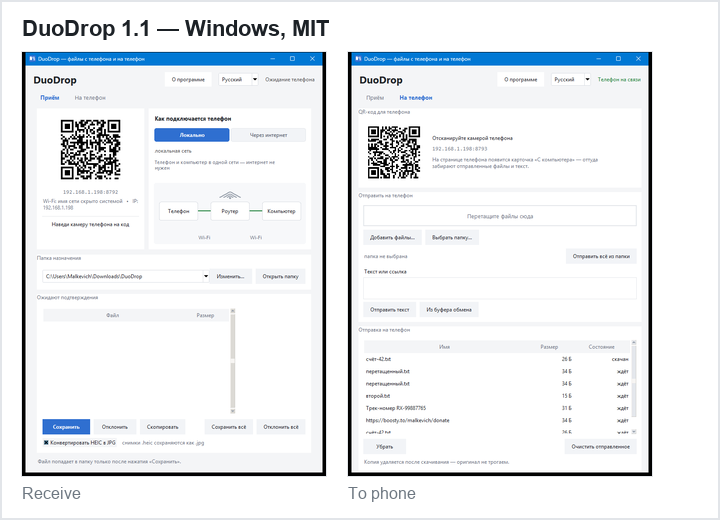
I got tired of using Telegram's "Saved Messages" or logging into cloud drives on shared/work PCs just to transfer a couple of photos, a document scan, or a long URL between my phone and computer. Existing tools either require installing apps on both devices, compress images, or break when devices aren't on the exact same subnet.
https://raw.githubusercontent.com/malkevich2-ux/duodrop/main/docs/reddit_overview.png
So I built DuoDrop — a free, open-source desktop utility written in Python (MIT license), packaged as a single portable executable for Windows (~38 MB, no installer, no console window). The source also runs on Linux and macOS.
How it works:
Key features in v1.1:
GitHub & download:
I'd love to hear your feedback, feature ideas, or bug reports!