r/FreeCAD • • 9h ago

This is the First fully design my keyboard on FreeCAD

Thumbnail
gallery
83 Upvotes

I was used Fusion to design my keybaord before, but my system is Linux Mint. About 6 months ago, Fusion on Linux didn't work on my PC. This was also how I got to know FreeCAD.

I have to say, FreeCAD is really hard to learn for me as a Fusion user. The whole workflow is completely different, and during the first week of learning, I had no idea what kind of scary software FreeCAD is.

It’s only recently that I’ve slowly gotten familiar with how it works and its rules. After practicing a few more times, I can finally use the Part Design feature to reverse engineer most of the models.

Then, based on the results of my practice, it took me about a month to design this keyboard. Next, I plan to ask a factory to help me make the PCB and the case, and then move on to soldering, writing the firmware, and assembling it for use.

I hope this process goes smoothly. If anyone here has any questions, please feel free to ask; I will do my best to answer them. Thanks!


r/FreeCAD • • 15h ago

FreeCAD 26.3 has Changed the Polyline Tool… Here’s What’s Different

Thumbnail
youtube.com
74 Upvotes

r/FreeCAD • • 3h ago

I'm working on add-ons for CAM the first one, in process stock is out now

Thumbnail
github.com
2 Upvotes

The in process stock add-on, adds a button to the toolbar that analyzes a selected job and outputs a solid model to be used as stock for subsequent jobs


r/FreeCAD • • 13h ago

I'm working on a new update for FCYBTraytracer.

9 Upvotes

Hey everyone,

I'm currently working on a new update for FCYBTraytracer.

Key Viewport Features:

Animation Engine: It will also include a simple animation engine for handling camera movements and mechanism animations (e.g., on an assembly bench).

Would love to hear your thoughts and suggestions!


r/FreeCAD • • 7h ago

Why does adding construction lines cause constraint redundancy and cause shifting lines?

2 Upvotes

I've been doing this to create sections in my sketch, a 100x2.5mm rectangle, then a construction line of 100x10mm and so on, its fine until I get down to about the 6th row, then as soon as I press enter on the first image, I suddenly get a shifted line on the 2nd image and I have no idea why.... It doesn't make any sense to me.


r/FreeCAD • • 7h ago

I would like to make robots, where should I start? and what tools to use in freecad?

1 Upvotes

r/FreeCAD • • 2h ago

Got tired of redrawing standard shaft ends from scratch, so I started building my own web CAD generator

Thumbnail gallery
0 Upvotes

r/FreeCAD • • 9h ago

how can i add dimension to 3mf files from SW

Thumbnail reddit.com
0 Upvotes

r/FreeCAD • • 1d ago

Did this in free CAD today camera mount for range finder!!

26 Upvotes

Filament petg esd static safe!!!

I use a low profile pre lubed sealed bearing so it can adjust focus and change orientation of the camera

Camera action 5 pro

Range finder intensity 1600r

If you have any questions, let me know Posting pictures below in comments. Because I can't do both


r/FreeCAD • • 1d ago

📢 FreeCAD 26.3 Release Candidate 3 Released: "This is the third release candidate for FreeCAD 26.3, and if nothing new turns up, the last one."

Thumbnail
github.com
84 Upvotes

r/FreeCAD • • 4h ago

Sorry I’m a beginner, but this isn’t making sense, even Gemini is confused…

0 Upvotes

Trying to just get the basics figured out here, it’s not helping that I’m learning on FreeCAD 1.1.3 and I guess there’s been a fair amount of change since 1.0. I want to do my first 3D printing and fortunately I belong to a pretty highly developed makerspace that has I think about 4 nice Bambu machines, just need to get about half a dozen 3MF files generated so I can figure out how far off my dimensions are. And I’ve been trying to learn from a video that supposedly is specifically for version 1.1. So I created a simple sketch, just a rectangle along one axis with a couple of fillets. I can see the tree view, there’s the body and underneath are the origin and my sketch. The sketch is showing as “fully constrained” but there’s a red exclamation point, I’m trying to get this all shipshape and the next step would be to do a pad in PartDesign. Gemini seems to be trying to say “the sketch isn’t attached to the body” and if I get it attached and recompute everything will be fine. That makes sense except I can’t make any of Gemini’s instructions make sense going forward! It keeps making reference to “if you were trying to import a part or sketch from version 1.0” but like I said I was just getting started! I guess it’s possible I overlooked some microscopic step from the video tutorial such that the sketch is NOT attached to the body, but the way it looks a simple mistake like this becomes an unforgivable error since in order to recover you have to dive headfirst into the exact place all the incompatible changes from 1.0 to 1.1 occurred. I don’t mind “learning on my own” but any “tool” in which a fairly small error leaves my drawing in a state from which it’s virtually impossible to recover from with the help of BOTH a YouTube course AND Google Gemini, frankly probably isn’t ready for prime time? Can anyone dig me out of this hole?


r/FreeCAD • • 1d ago

FreeCAD 26.3 third release candidate has posted

56 Upvotes

The third release candidate for 26.3 has been posted.

https://github.com/FreeCAD/FreeCAD/releases/tag/26.3rc3


r/FreeCAD • • 8h ago

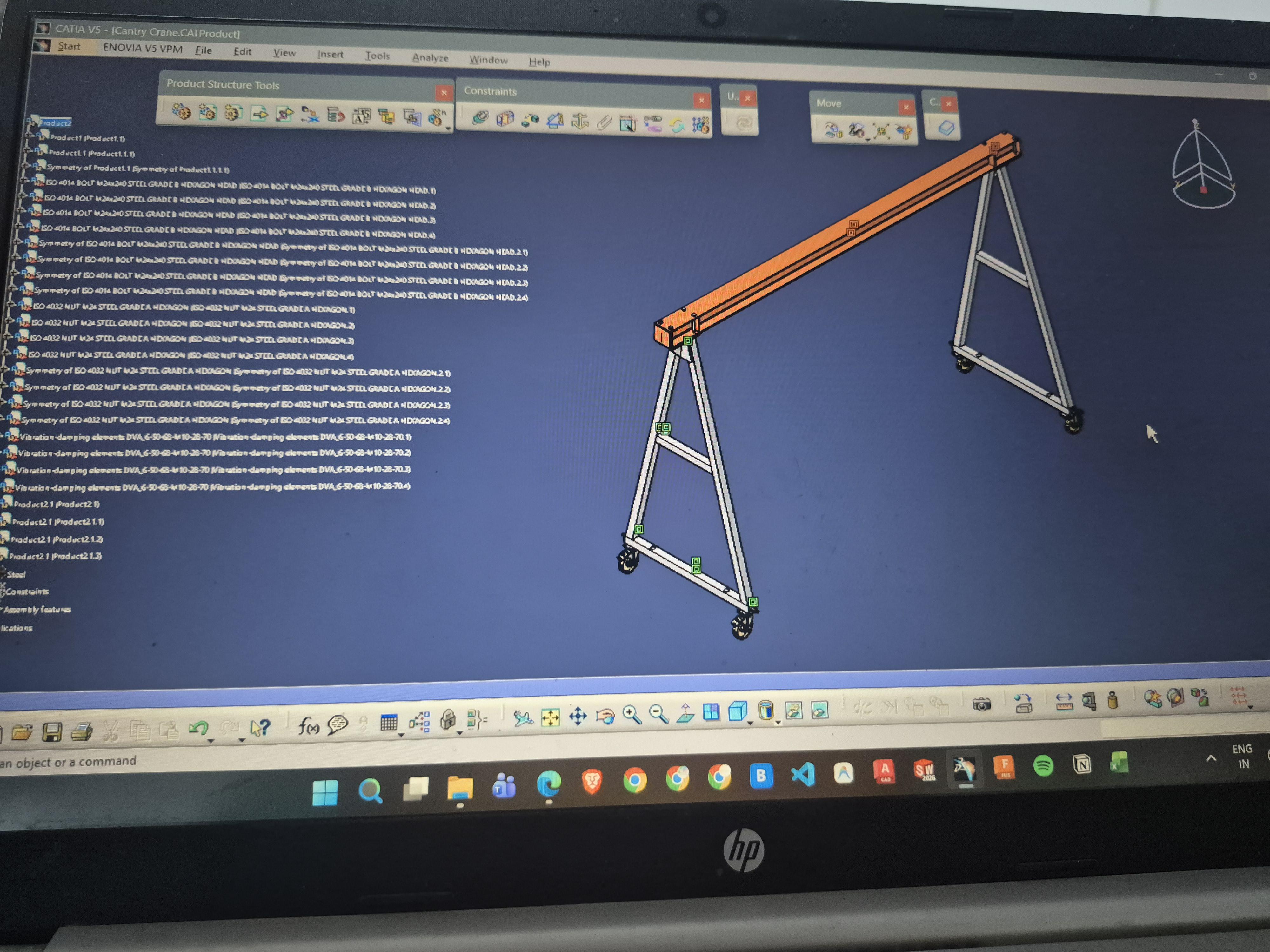
Made pantry structure assembly (my first cad after pracgising in catia v5)

Post image
0 Upvotes

But to practice more im not getting 2d drafts or drawings of assemblies like boilers,Pallets, conveyers...where do you guys find it??


r/FreeCAD • • 1d ago

What happened to #FreeCADFriday

Post image
16 Upvotes

modeled in FreeCAD, rendered in blender


r/FreeCAD • • 1d ago

How would you do this in free cad?

Post image
65 Upvotes

All I could think is put a datum plane but I dont know to properly angle it exactly like the triangular cut. I can do it in blender with no problem but in freecad it's so hard. Is there a way I could move vertices, edges, faces without doing a sketch on a face first? Please any tips?

Edit: Solved. Thanks fam! SoulWager's tip is the easiest solution for me.


r/FreeCAD • • 1d ago

Is there any way to use the transform tool on individual sketches?

2 Upvotes

I'm trying to create cross sections on an imported scanned mesh for a loft. To keep my control points oriented correctly, I'm copying the previous sketch, pasting, and then shifting its position / rotation. Doing this via the Attachment settings is nigh impossible now that I've hit a region where I need to rotate on multiple axes. I can trigger the transform tool by right-clicking on any part of the sketch's geometry and it lets me move it around and orient it correctly, but the moment I hit Ok it snaps back to its original position. :(


r/FreeCAD • • 2d ago

NaviGo V2.0 — DIY 6-DOF 3D controller with native FreeCAD support (Windows & Linux, including AppImage)

Post image
112 Upvotes

Since native 3D navigation in FreeCAD—especially on Linux and with AppImage builds—comes up often, I built native FreeCAD viewport support into NaviGo V2.0 alongside 7 other CAD, 3D, and game-engine apps.

Full specs, pinout, and software releases on GitHub (links to the STL/3MF files, illustrated assembly/wiring PDFs, and hardware waitlist are at the top of the README): https://github.com/EslamEldeknawy/NaviGo-3D-Controller

Key highlights:

  • Powered by a Waveshare RP2040-Zero in a 100% PCB-free build (2×6 stripboard 3.3V rail + generic WS2812B ring).
  • Auto-detects Analog (ADXL335 / GY-61) and 7 I2C accelerometers (ADXL345, MPU6050, MPU6500, MPU9250, LIS3DH, MMA8452Q, BMI160).
  • One-click Windows & Linux installer + EEPROM settings to flip inverted axes or swap zoom pads in software if wired backwards.

Curious to hear how FreeCAD users here prefer their 3D navigation axes mapped!


r/FreeCAD • • 1d ago

FreeCAD 1.0+ for CNC milling: any major pitfalls with TechDraw (ISO/DIN)

2 Upvotes

Hi

I’ve used FreeCAD 1.1 for making models for 3D printing. Now I’m moving on to make parts for CNC milling to sent to any local machine shop (step + techDraw in ISO/DIN standart)
I`m affraid of pitfalls can face, while preparing proper 2D manufacturing drawings in TechDraw.

So, my questions for those using FreeCAD in actual production:

  1. How painful is it to properly apply GD&T, datums, tolerances, and surface roughness symbols according to ISO/DIN?
  2. What is the main headacke for production drawings in freecad vs another tools?
  3. Any specific workarounds or add-ons you'd recommend to speed up drafting?

Trying to decide if I can stick with FreeCAD for this or if I should bite the bullet and learn Fusion/SolidWorks just for the 2D drafting part. Thanks!


r/FreeCAD • • 2d ago

Can't fillet this part

Thumbnail
youtube.com
8 Upvotes

This is a part from Too Tall Toby. It's not particularly difficult, just a Tier 4 part.

However, I'm having trouble getting the fillets right. I'm not sure whether this is a limitation of FreeCAD or simply a bug.

I know I should use as few fillets as possible, but in this particular part, some of them are simply unavoidable.

Has anyone run into something similar or found a workaround?


r/FreeCAD • • 2d ago

My first model!

Thumbnail
gallery
34 Upvotes

Second picture is the inspiration.

It is for 3D printing my in law's girlfriend's graduation sash. She's a taylor's fan, and they make friendship bracelets for concerts with song's names on them to exchange at concerts, so he asked me to 3d print a giant one with her title. I wanted to design my own 3d prints for a long time now, so this was the perfect opportunity.

I tried to make it very parametric. The radius of the fillet, the character of the letter and the depth of the letter can be adjusted. Maybe I'll need to change the radius and make it also parametric I'll see. I really liked the program :D


r/FreeCAD • • 2d ago

Added a new tool to my PimpMy FreeCAD workbench: Magic Pad!Hey everyone, I just updated my PimpMy FreeCAD workbench with a new tool called Magic

32 Upvotes

The goal with Magic Pad is to streamline your modeling workflow—it lets you handle both additive and subtractive operations (plus features like twists) all in one go, right within a single tool.

Check it out and let me know what you think!

https://github.com/sedatkrn/PimpMyFreeCAD


r/FreeCAD • • 2d ago

From 2D drafting to vibe-coded CAD: How to win the CAD War

45 Upvotes

This looks like it's going to be long. Better grab a coffee.

I've tried MitCAD, SolidCraft, and a few other vibe-coded CAD apps. I'm convinced that one of them will sooner, rather than later, become the go-to FOSS CAD software—and will likely put Dassault and Autodesk out of business, or at least force them to severely overhaul their business models. Personally, I prefer MitCAD over SolidCraft simply because of the user interface (more on that later), though the user and developer base seems significantly larger on SolidCraft. It may end up being a VHS vs. Betamax situation, where the better tool doesn't necessarily win.

I've been using AutoCAD since the days it only did 2D, so I come from that era (well, maybe even before that, but you get the "2D sketch"). The transition to 3D was painful, but I made the leap like everyone else at the time. Despite the learning curve, Inventor, SolidWorks, and Onshape were all relatively straightforward once you wrapped your head around 3D.

Fusion, on the other hand, was—and still is—extremely frustrating to use. I may be wrong, but my impression is that Fusion took off purely because it was aggressively "free." I don't remember the exact terms, but the licensing was so permissive it felt like, "Oh, you have a cat that wanted to go to a university but decided not to because it would interfere with their nap time? Not to worry, we have a license for that... and it's free!" They built up a massive user base (especially after SketchUp killed off its free desktop/hobbyist tier), universities jumped on board to offer Fusion classes, and we all know the rest of the story—for better or for worse, whichever side you're on.

For me, Fusion is horrendous for 17 million reasons. But when I meet new engineers, many of them hype how great it is—because it's what they learned at the university. Kudos to the Fusion marketers (I just wish their developers were as smart). I'll admit that behind the scenes, Fusion does some impressive things and outpaces Inventor and SolidWorks with new features at incredible speed. That still doesn't make it a good CAD system, regardless of the size of its user base. You can argue that a huge user base proves it's good (or that it has a huge user base because it's good), and I'll disagree—but I'll leave it at that.

Similar to the Fusion crowd, FreeCAD's fan base is just as rabid, if not more so. When someone says the interface feels clunky or toyish, the common refrain is that SolidWorks/Inventor users just confuse unfamiliar with bad design. In reality, many of these defenders have never touched professional CAD and have no frame of reference. While commercial tools built streamlined workflows around mechanical design, FreeCAD tried to do everything at once—cramming mechanical parts, architecture, and niche tools into a fragmented "workbench" system with a dated UI and a history tree that breaks too easily when you edit an early step.

Ultimately, the issue isn't just the interface—it's the stubborn refusal to admit that platforms like SolidWorks, Inventor, Onshape, and even Fusion converged on certain UI standards for a reason. Decades of real-world engineering proved those workflows reduce friction and save time. Like Blender before its 2.8 overhaul, FreeCAD would benefit far more from adopting battle-tested UX conventions than pretending every quirk is a feature. Because of its hard stance against modernizing its interface, I believe FreeCAD will die a sudden death—losing out to one of the new FOSS CAD apps built with far more flexible architectures and intuitive interfaces from day one, like MitCAD or SolidCraft, vibe-coded or not.

I do have a point. In the description of this subreddit, the author says that MitCAD "feels like Fusion." For that exact reason, I was very hesitant to try it out. Luckily, it felt a lot less like Fusion than I expected—and that is a good thing. I would suggest one thing to the developers: rather than coddling the Fusion crowd, build for real engineering efficiency first. Lean on the decades of experience behind professional software and take cues from traditional parametric CAD—because winning over professionals will take you a lot further than chasing hobbyists who only used Fusion because it was "free" and easily available.

MitCAD's structured tabs, assembly workflow, and configurable controls put it a lot closer to traditional parametric CAD than SolidCraft, which practically cloned Fusion's layout and bottom timeline. It's still not quite there yet, though—and that's exactly why I'm writing this. If you push it the rest of the way toward serious mechanical design, the professionals will come (just like they did for Onshape)—and the Fusion and FreeCAD fans will follow soon after.

I know many current users will say, "I agree with OP 100%, but... don't change this or that." But if MitCAD wants to survive the FOSS vibe-coded CAD war long-term, finishing that shift is the key. Some users might complain now, sure—but it's far better for them to complain today and still have an active, thriving tool later than to stay comfortable with what they have right now only to watch the project vanish in six months.

TL;DR: FreeCAD is held back by a stubborn refusal to modernize its clunky UX, while Fusion only owes its popularity to aggressive "free" licensing rather than good CAD ergonomics. Because MitCAD is already closer to traditional parametric CAD (like SolidWorks and Inventor) than Fusion clones like SolidCraft, it has the easiest path to winning over professionals—and the FOSS CAD war—if it finishes leaning into real engineering workflows instead of catering to the Fusion crowd. That said, the window is open for anyone: if FreeCAD, SolidCraft, or another contender makes the shift toward a battle-tested UX first, they could just as easily take the crown.


r/FreeCAD • • 2d ago

Converting to Linux

4 Upvotes

I run Freecad on a HP EliteDesk 800 G6 Desktop Mini PC with Win10

Not the ideal machine to run anything graphical but I have managed with some patience.

I have an older Tower computer with a an AMD RX5700 graphics card and heaps of RAM that is idle at the moment. I am considering using it as a dedicated graphics machine to run Blender and Freecad along with Orca slicer for my 3D lighting business.

AI is telling me that there could be some issues with Freecad (and Blender) using AMD graphics cards.

Does anyone run Freecad in such a setup?
If so, whats been your experience with it?
Problems?
Is it worth my troubles?

p.s. the lagging in Freecad is starting to grate on my as Im getting better at using it, which has me more and more waiting for it, rather that it waiting for me to figure out what to do next., and I dont have the money for a new computer at the moment.


r/FreeCAD • • 2d ago

machine definition vs post processor

Post image
2 Upvotes

Hey all, a bit confused here. There is a FreeCAD machine definition and post processor available for my machine - how do they relate to each other? I've installed the machine definition and can select it within FreeCAD, but doing so removes the option to select a post processor, and the post processor definition within the .fcm file is empty. Any advice?