r/HomeNetworking • • 10h ago

Have access to miles of this but is it a bad idea?

Post image
142 Upvotes

I need to run FO between 2 buildings 25ft apart but it has to be an aerial run. I know physically this cable will work. I have no terminating equipment but up for the challenge. Or should I just by buy some armored patch cable and lash it around to a steel cable. There will be Ubiquiti switches on either end. Thanks for saving me from myself!


r/HomeNetworking • • 21h ago

Hardware Mod: Upgrading my Cudy WR3000 NOR flash from 16MB to 64MB (OpenWrt + VLESS/AWG + Grafana monitoring)

Thumbnail
gallery
40 Upvotes

In a few photos, I’ll show how I replicated a hardware mod from a 4PDA forum member and upgraded the NOR flash on my budget Cudy WR3000 router from 16MB to 64MB.

This extra space allowed me to run VLESS and AmneziaWG (AWG) VPNs directly on the router (which is super relevant for bypassing restrictions in Russia and China), as well as forward metrics and logs to an external monitoring server (logger + stunnel + Grafana Alloy + Loki + Grafana).

Next up, I plan to set up log collection for LuCI and SSH logins (including failed attempts), Wi-Fi connection attempts, and bandwidth utilization metrics for WAN, LAN, and Wi-Fi—broken down per client and more. The cost is 30+3 USD or 2500+250 RUB


r/HomeNetworking • • 12h ago

TrueCable Cat6 question

Post image
32 Upvotes

Looking into True Cable Cat6 from Amazon. Ceiling drywall is down, and I have access into walls. Has anyone had any experience with TrueCable? Here is the image of the packaging. Any advice appreciated.


r/HomeNetworking • • 9h ago

NetWatch 1.0 - a free, MIT-licensed network diagnostics tool that runs in the terminal.

Post image
27 Upvotes

NetWatch, a free, MIT-licensed network diagnostics tool that runs in the terminal.

"The internet dropped again" doesn't tell you much, so NetWatch logs each outage it sees with the start time, duration and which part failed:

- gateway: your router or LAN

- internet: your ISP or beyond

- dns: name resolution only

netwatch uptime --since 30d --md > outages.md writes a report you can attach to an ISP ticket. It only covers time when NetWatch was running, so for a continuous record, run netwatch daemon. The internet check needs third-party probes turned on.

It also does:

- live packet capture with protocol decoding and PCAP export

- connections by process, where the OS and permissions allow it

- per-interface throughput, errors and drops

- traceroute and a topology view

- TLS decryption of your own traffic using SSLKEYLOGFILE

- a one-off check with netwatch diagnose run --budget 30s

It runs on Linux, macOS and Windows (Windows needs Npcap). Some features differ by platform, and capture needs elevated access.

Repo and install instructions: https://github.com/matthart1983/netwatch


r/HomeNetworking • • 22h ago

Meme Cable management fail

Thumbnail
gallery
25 Upvotes

Came to my new rack, to find that my electrician in charge of data cables has mounted cables this way, against the tack mounting rails, blocking them.

Edit to add: yes I’m sorting it out


r/HomeNetworking • • 6h ago

Advice Is this Ethernet cable good for my gaming pc setup to be connected from my modem down stairs to upstairs setup?

Post image
6 Upvotes

r/HomeNetworking • • 15h ago

Advice Mesh vs other options

5 Upvotes

I have noticed a few posts where quite a few people are “passionate” about using alternative methods to mesh WiFi. Obviously, the most stable option is hardwired, but certain devices cannot be connected via Ethernet. I’m currently using a TP-Link XE75 Pro three-node setup. It’s been fine for two years, but about a year ago, it started giving me issues. Certain devices, like my Ecobees, will just disconnect. Sometimes I can reconnect them by removing them from the wall to reset them. Other times, I have to reboot the entire network. I will also wake up to notifications that certain devices have joined the network. These are things that have been connected previously without issue. The nodes are connected via Ethernet Cat 6, rather than relying on a wireless backhaul solution.

I’m frustrated with the current setup, and have been thinking of moving over to Netgear Orbi 770. I’m reluctant as I’ve had issues in the past with Netgear routers and their support. Granted, it has been 10 or more years since I last used their products. My townhome is wired with Cat 6 to every bedroom, the living room, and the loft. Are there other options I should be considering? Spectrum is my Internet provider, and is my only option unless I want to with a cellular provider (which I do not). It’s just my 82 year old mother and me, so the biggest demand on data is her TV streaming. I have gaming systems, but do not play online. The current IoT items are limited to two Ecobees and some household appliances.

Netgear runs a bit more than a “comparable” TP-Link setup, and my biggest concern is wasting my money. The townhome is a two floor setup, and I do roam from upstairs to the outback patio with my iPad Pro and phone. For what it’s worth, I was very involved in the tech industry up until about 20 years ago. I’m not inept when it comes to networking, but life has sent me down a different path. I have been the primary caretaker of my family for the past 15 years (mother, stepfather, and sister), but the only one left is my mom. The stress of life has destroyed my health, so dealing with constant connection issues causes me to meltdown. I need something that can just do the damn job, which the TP-Link did for awhile.

Thanks in advance. I appreciate any feedback. I did try to find similar posts, but search resulted in nothing.


r/HomeNetworking • • 19h ago

Tplink wall mount EAP225

Post image
5 Upvotes

Simple question, is it alright install this in the wall?


r/HomeNetworking • • 6h ago

Router suggestions for IoT VLANs and Firewall

4 Upvotes

Hi folks. Given the uptick in hacking reports these days, I'm considering upgrading our home router.

I'm currently using a pair of TPljnk Deco M9Plus pucks, with one configured as the router and the other as a wireless access point. The router Deco connects to a 24-port unmanaged gigabit switch that feeds ethernet ports throughout the house. The AP Deco is hardwired to the switch through one of these ethernet drops on the second floor. I also have an old Archer router hardwired out in my shop to give me internet access out there.

Security on these Deco devices is basic. I'd like to find a router with more robust security built in that will let me segregate devices on separate VLANs (main LAN, IoT devices, etc). I'm good with a wired router if I can repurpose the Deco pucks as wireless access points.

Any standout recommendations?


r/HomeNetworking • • 3h ago

Need help

Post image
3 Upvotes

I am unsure if this is a frequently asked/answered question because I do not know a lot about home networking but I get very little wifi signal from my router to my work space I have 1 ethernet cord going to an ethernet switch( i think thats what it is called)which feeds my pc and gaming system but anytime I want to use my phone the wifi is terrible i think what I am looking for is an "access point" I just wanted to confirm. Thank you and I think this diagram from the FAQ is exactly my situation


r/HomeNetworking • • 3h ago

Advice How should I setup my home wifi? (concrete walls)

Post image
3 Upvotes

Hello, I need some help and I would really appreciate it if someone can help me plan the best wifi setup.

I am renovating my entire apartment before I move in. My country only has concrete walls for the apartments and wifi gets sharply cut off from room to room, and I want to now prevent that from the getgo.

I am talking to my contractor and we will be setting up an ethernet cable in the central living room where the TV is, and we will have one ethernet cable for my hone office. That’s it.

I am very new to this and despite researching, it’s still very confusing to me. I have heard of mesh wifi systems, but is this what I would want?

Up to this point I have only used the router/wifi combo provided by my ISP. Would it be best to maybe just keep the central wifi router in the living room, and then have another router setup in the office where the ethernet cable is?

Thank you so much 😊


r/HomeNetworking • • 14h ago

Advice Router Recommendation

3 Upvotes

Hello, I posted yesterday about modems and got a lot of great recommendations and I’m back hoping for router recommendations. Tbh I also can’t decide if it’s actually worth upgrading. I have xfinity 400/35 and am using a google onhub tgr1900 from like 2015. My home has a basement, main floor and upstairs and is about 3k sqft.

Currently my router is upstairs in the loft. I wouldn’t really say im having a ton of issues when using devices. Sometimes when gaming I’ll lose connection. My main issue is my doorbell camera(eufy31) takes a long time to load and is offline sometimes. I’m getting a fraction of the speed I’m paying for which seems to most likely be a modem problem since when i reset the modem my speed jumps up for a bit before declining again.

My budget for the router is probably around $220. I’m looking at the tp link deco xe75. Not sure if that’s still good in 2026. One thing im hoping for is the ability to have an IoT ssid


r/HomeNetworking • • 16h ago

unifi Flex 2.5G switched caused security alert ET EXPLOIT Possible Apache log4j RCE Attempt - 2021/12/12 Obfuscation Observed M2 (tcp) (Outbound) (CVE-2021-44228)

Thumbnail reddit.com
3 Upvotes

r/HomeNetworking • • 5h ago

Which router to buy?

2 Upvotes

Is the Asus GT-BE98, Tp-Link Archer BE900 or the Nighthawk RS700S better? I'm leaning towards getting the nighthawk but I'm not 100% sure. Thanks.


r/HomeNetworking • • 15h ago

Advice Crossing a driveway with an ethernet cable - is there a better way?

Thumbnail reddit.com
2 Upvotes

r/HomeNetworking • • 21h ago

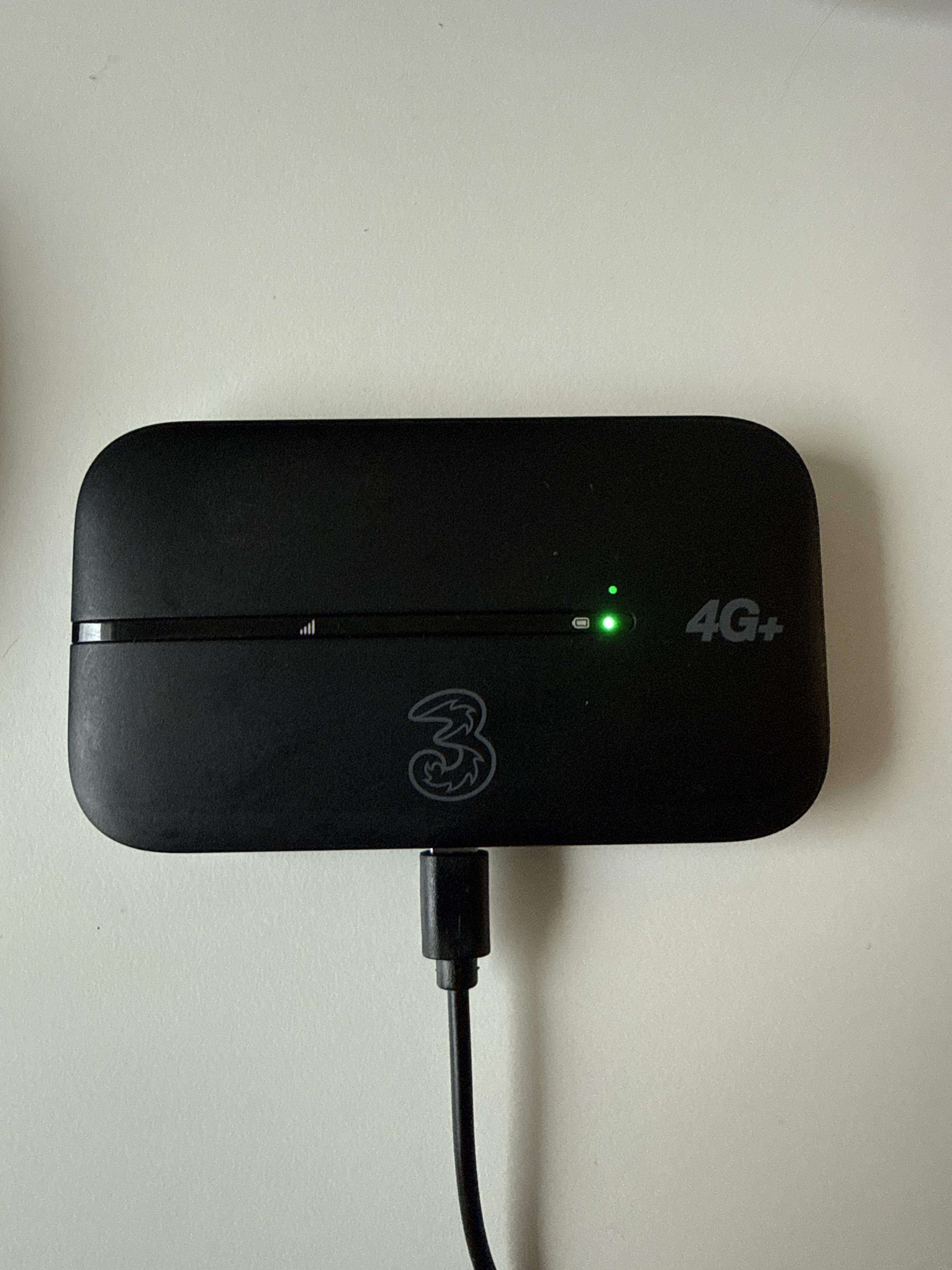
Connect portable router to home network

Post image
2 Upvotes

I have a portable 4G GSM router (the small, battery-powered type) and I would like to use it to create a separate network within my home network.
My idea is to connect it to my main home router so that I can connect a specific laptop to this separate network, while still using my existing home internet connection.
I checked the router’s configuration settings, but I couldn’t find any option to configure it this way.
Is this possible with a portable 4G router? Can it be configured to work as a secondary router/access point connected to my main router, creating a separate network (with its own subnet and DHCP) instead of using its 4G mobile connection?
If this isn’t supported by the router’s firmware, is there any alternative solution?


r/HomeNetworking • • 6h ago

Linksys Velop Mesh and Nintendo Switch 2 gaming

Thumbnail reddit.com
1 Upvotes

r/HomeNetworking • • 7h ago

Advice Hitron Coda56 vs Arris sb8200

1 Upvotes

Hello, I’ve narrowed which modem I’m looking to get to these 2. I currently have a Motorola mb7220 docsis 3.0 and my plan is xfinity 400 download and 35 upload. I know the Hitron is newer and more future proof but I’ve seen complaints about its longevity and overheating while the Arris seems like a more long term play. The arris came out in 2017 which is a slight concern but has 4.4 stars based on 20k reviews on amazon while hitron has 4.1 stars on about 1.4k. Bc of black friday the hitron is like 15 bucks cheaper. I just want what is most likely to last me several years without me having to think about it. I struggle with analysis paralysis so i appreciate any advice.


r/HomeNetworking • • 8h ago

BE700 (BE15000) slow LAN problems.

Thumbnail reddit.com
1 Upvotes

r/HomeNetworking • • 8h ago

Should I upgrade my router and/or modem? (Xfinity 1G service)

1 Upvotes

I currently have gigabit internet service through Xfinity (Western PA), and use it mostly for home office and 4k streaming. I've had very few issues with slowdowns or service, though at times (like tonight) I'm getting about 700 down & 42 up.

I received an email a few weeks ago from Xfinity noting that my modem was "no longer receiving important security updates" and that I should get a compatible device. It is an older Motorola MB7621 which I know is still running DOCSIS 3.0 and therefore is technically obsolete. Besides the Motorola, I have a Netgear Nighthawk RAX48 router which is WiFi6, which I also know is behind the times.

So overall questions:

  1. should I upgrade the modem, router, or both for optimal performance, security, and features?
  2. If yes, any recommended model for either? I'm leaning towards the Hitron Coda56 for the modem.
  3. Better to rent or purchase in the long run?

r/HomeNetworking • • 11h ago

Solved! Download speeds way lower than test indicates

Thumbnail
walmart.com
1 Upvotes

When I run an internet speed test on my browser I get around 90 mbps for download and upload. When I’m actually downloading something though I get like 8-20 mbps for my download and 15-24 for my write which is abysmal.

I have a 2.5 gbe ethernet. It plugs from my computer to a TP-Link 5 port gigabit desktop switch (Model: tl-sg105, Power: 5v, 0.6 amps)

It goes downstairs to a TP-Link 8 port gigabit desktop switch (Model: tl-sg108(UN) Power: 9v, 0.6 amps)

That plugs into my router, which is a Verizon. I’ve linked the exact model in this post.

My pc is more than capable Id imagine.
CPU: AMD Ryzen 7 7700x 8-core
GPU: NVIDIA GeForce RTX 4070 Ti Super
Ram: 32 gb DDR5 5200 mt/s
Motherboard: Micro-star PRO B660-VC WIFI (MS-7D78) version 1
Operating System: Windows 11

Our plan is a 100 mbps plan.

Why am I getting such bad speeds?

SOLVED! It was a very strange fix but here’s what i did to solve it:

1. Open start menu and search internet options
2. Click the connections tab, and then click LAN Settings
3. Uncheck Automatically detect settings

I also cleared my cache for both steam, epic games, and any other temp files i could find on my pc. Those helped a little bit, but the biggest help was the LAN Settings. Very strange. But thank you everyone for your help, and hopefully this helps someone else out in the future 🙏


r/HomeNetworking • • 11h ago

Networking advice

1 Upvotes

Bought a new home and we’re looking to add Poe cameras. I was thinking of running the cables through the attic but we had new insulation put in. I know I should have done this before the insulation.
Question is, is there a solid way to get wires through the attic without disturbing the new insulation?


r/HomeNetworking • • 11h ago

rate my setup and help me speed up my network

1 Upvotes

I recently upgraded my xfinity internet plan from 500 MB to 1 GB but it doesn't feel any faster and download speeds on large files and games are only like 70-90 mbps. No ethernet only over wifi at the moment. For my setup I have a tp link archer a7 router and a netgear cm700 modem. Being black friday, are there some affordable upgrades I should make? Also, is it possible a update could be done on either of these devices to help?

Thanks for your help,


r/HomeNetworking • • 12h ago

Can isolating HomeKit devices help prevent excessive network-related Mac wakeups?

1 Upvotes

I have a TP-Link Archer BE220W and an EasyMesh extender. Both my iMac and MacBook Pro experience excessive DarkWakes during sleep (wifibt/SMC.OutboxNotEmpty), which almost completely disappear when I disable TCP Keep Alive.
I’ve now isolated all my smart lights and my Apple TV (HomeKit hub) using TP-Link’s Device Isolation feature. Everything still works through the Home app on my iPhone, albeit with a slight delay.
Am I right in assuming that my iPhone is now controlling the lights through iCloud and the Apple TV? Does this isolation also prevent the HomeKit devices from sending local multicast/broadcast traffic to my Macs, or can that traffic still get through?
I’m trying to rule out my smart home devices as a potential cause of these frequent wakeups.