Since we can't post all links in the same post, I've broken up our different categories into a series of posts that I'll link below and sticky this post. But I'll also give you my impression of some of the best deals in this post. First things first, however:
Here are the links to our Black Friday / Cyber Monday store pages:
So what are the best deals for this year's Black Friday / Cyber Monday? While we have a lot of great deals, I'll keep it to around 15 (in no particular order):
*All prices accurate as of when this post was being put together. When multiple colors or styles are listed on the same line, the lowest price is listed.
Have you finished your BF/CM shopping already? Still planning to buy or looking for something? Let us know in the comments.
For this year's Black Friday / Cyber Monday deals, we're doing things a little different. Although you've probably seen a lot of new ROG OLEDs posted around Reddit, some people might still be on the fence about what to pick. After all, there are a lot of OLED monitors on the market currently, many at a price that a lot of people find affordable, and then you have a bunch of great deals on top of that. As a sample of where to start, take a look at some of our buying guides we've put together for BF/CM to cover a wide variety of uses:
Although there are a lot of different metrics and needs people have when selecting a monitor, here we want to cover how to pick the right OLED panel for your lighting and give you several options.
Also, we currently have a global giveaway going on over in r/Monitors. After you finish reading this post, head over there and comment to enter yourself for a chance to win one of our featured OLED displays: [Link]
Choose an OLED that best fits your room lighting
For gamers, the first factor in choosing an OLED is the environment the screen will sit in. Panel finish interacts directly with room lighting, so the right monitor can change depending on how much outside light reaches the screen. ROG displays include glossy, semi-glossy, and matte OLEDs, so there is a finish for every setup.
If you want to optimize your OLED experience and configure the best options for how you use your monitor, take a look at our monitor configurator here: https://www.asus.com/content/best-oled-monitor/
Here's a breakdown of the different types of lighting and monitors that you can find on sale right now for BF / CM* at a decent deal.
Bright room: Anti-reflective designs fight glare
A bright room is one where the monitor sits near a window, with direct sunlight falling across a large part of the screen for at least part of the day. Here, a Tandem OLED with a TrueBlack™ Glossy finish, a QD-OLED with BlackShield™ film, or a matte panel is the ideal choice, as their anti-reflective designs are built specifically to fight back against direct glare while keeping blacks deep. Examples in the ROG lineup include the ROG Strix OLED XG27AQWMG and the ROG Swift OLED PG32UCDM3.
Mixed light: Glare resistance without giving up contrast
Mixed light sees a desk farther from a window, with some ambient daylight but mostly indoor lighting. A non-tandem WOLED hits the sweet spot, providing enough glare resistance for occasional daylight without giving up the deep contrast a glossy panel delivers in a dimmer room. Matte and glossy options are both available, including the ROG Swift OLED PG27AQDP and the ROG Strix OLED XG27AQDMGR.
Controlled light: Full color punch and ultra-inky blacks
A controlled-light space is one where the lighting can be managed, such as with curtains drawn, blinds closed, or in a naturally windowless room. With outside light taken out of the equation, QD-OLED is the pick, delivering its full color punch and ultra-inky blacks without reflections working against it. Examples include the ROG Strix OLED XG27AQDMES and the ROG Strix OLED XG27ACDMS.
*Prices, stock status, and links were accurate up to the time the post was made.
Have you already picked up a monitor during our BF/CM sale? If not, what are you looking for in a display or are you waiting to see what might be announced during CES? Let us know in the comments below and don't forget to enter our giveaway over at r/Monitors [here].
I was looking to download Armoury Crate to manage my motherboard's RGB lighting when I noticed something concerning.
Two unofficial websites are appearing prominently in Google search results, even above the official ASUS website: armoury-crate[.]com armourycrate[.]com
At first glance, these websites look convincing enough that an unsuspecting user could easily mistake them for official ASUS download pages.
After further investigation, I found thatt: Neither website is affiliated with ASUS.
The hyphenated domain has been flagged by multiple security reputation providers.
One of these websites even recommends disabling antivirus protection when experiencing installation issues.
Although I haven't confirmed that these websites distribute malware, I find this particularly concerning given that Armoury Crate requires administrator privileges and installs system-level services and drivers.
I've already submitted an abuse report to Namecheap, the reported domain registrar, requesting further investigation.
Please download Armoury Crate exclusively from the official ASUS website:
Habe mir die Maus zugelegt und habe ein ein Problem damit … bei mir wird die zwar erkannt sobald ich die Dockstation direkt am Mainboard anschließe… doch wenn ich über die RF Verbindung die Maus benutzen möchte passiert gar nichts.. kurz gesagt die Maus hat einfach keine Verbindung zur DockingStation die normal auch als Empfänger dienen soll(über bluetooth und kabelgebundenen natürlich alles i.O.)
Hat wer auch das Problem ? Bzw. konnte es jemand irgendwie lösen ?
Einfach nur nervig wenn man ein solch teures Produkt kauft und es funktioniert nicht so wie es soll!
I moved from a NetDuma to an ASUS GT-AX11000 Pro running Asuswrt-Merlin, and the thing I missed most was the gaming stuff. So I wrote three add-ons that bring it back. Each one gets its own page under the Game menu of the router's web UI.
Geo-Filter: only play on nearby servers Draw a circle on a map. Game servers and players outside it get blocked for 1 hour, so matchmaking finds another lobby. Game profiles (CoD/Warzone, Fortnite, Valorant, Apex, EA FC, Rocket League, Overwatch, CS2, PSN, Xbox Live, or custom ports). Login, chat and downloads are never touched. Ping Limit, Ping Assist, spectator mode, allow/deny lists. Shows the current match server on the map with its city, distance and ping. (Screenshots use demo data.)
Line Monitor: tells you why you lagged Pings your ISP gateway, the Internet and the match server every second. Every lag spike gets a cause: your line was saturated (bufferbloat), your ISP's network is congested, or the problem is beyond your ISP. Shows which device was hogging the line at that moment and whether you were in a match. Per-match stats (ping, jitter, packet loss), 1/6/24 h history, a "worst hour of the day" chart, CSV export. (Screenshots use demo data.)
Game Mode: game packets go first HTB shaping with four priority classes (Game / High / Normal / Low), so downloads, Netflix and Windows updates on other devices stop wrecking your ping. Automatic mode: turns on when a match starts and off 90 s after it ends. Replaces the stock QoS. Heads-up: it turns off hardware acceleration while active, so above ~500 Mbps the CPU may not keep up. (Screenshots use demo data.)
Screenshots, a step-by-step Windows install guide and the code are all here: https://github.com/Uncle-Disturbo/router-geofilter Requirements: Asuswrt-Merlin 3006.102.x, with JFFS scripts and SSH enabled. I've only tested it on the GT-AX11000 Pro, so other 3006 models might work. If you try one, tell me how it goes. Limits: IPv4 only. IP geolocation isn't perfect (cloud servers are sometimes placed at the company HQ). Geo-Filter and Line Monitor send game server/player IPs to ip-api.com to look up their location. It's free and open source, and I'm not affiliated with NetDuma. "NetDuma-style" just describes the features. Feedback and bug reports are welcome, here or on GitHub.
I’ve been experiencing extremely brief, random black screen flickers on my new ASUS PG27AQWP-W. The flickers happen while gaming, watching videos, or simply using the desktop. They’re very inconsistent, sometimes disappearing for hours before happening again. My specs:
RTX 5080
Intel Core i9-14900K
64GB DDR5 RAM
Windows 11
Things I’ve already tried:
Multiple DisplayPort cables (DP54 and DP80)
HDMI 2.1
Different NVIDIA drivers and a clean installation using DDU
Firmware versions MCM104 and MCM107
Disabling VRR and G-Sync
Different DSC settings
Different refresh rates
I’ve confirmed that the issue occurs at both 270Hz and 540Hz. I haven’t noticed any flickering at 240Hz so far, but I haven’t tested it long enough to draw any conclusions. I’m starting to suspect a defective monitor, especially since I haven’t found anyone reporting this exact issue. However, I can’t completely rule out my GPU. I’m planning to contact ASUS support on Monday and potentially request a replacement. Has anyone with this monitor experienced anything similar? Particularly those using an RTX 50-series GPU?
I just reopened my old Asus laptop which I had not used in a year and a half. I stopped using it because it had become very slow (7 yo the time), not because it had stopped working. Now there's this display on the screen. What is it? Has the laptop definitely passed away from the lack of use? Thank you for any advice 😊
While we cannot post every deal, I can give you a brief idea of what we have to offer to whet your appetite to see if you might be interested in each category.
MB - Our AMD X870E and Intel Z890 Hero motherboards are on a good sale; even the BTF version is on-sale, although by a smaller discount. Beyond those boards, we have several AM5 motherboards in the B850 and B650 lineup that will give you a good platform for an upgrade in features and performance if you're still on an older motherboard.
MiniPC - We have a few options for fully-assembled ASUS NUC Mini-PCs, including the NUC 15 Pro+, which provide more than ample power for multi-taskers and provides power for those looking to move certain AI tasks from the cloud to a more local AI solution. For those looking for a portable system on the Google platform, we have Chromeboxes available at different performance levels.
Big sales are always a great time to upgrade your monitors for all of your different needs, and there's no better time than Black Friday and Cyber Monday. Our WiFi 7 networking products also demand your attention with great deals on gaming routers and great whole home mesh systems.
Here are the links to our Black Friday / Cyber Monday store pages:
While we cannot post every deal, I can give you a brief idea of what we have to offer to whet your appetite to see if you might be interested in each category.
Displays - For those looking outside of our ROG OLEDs, we have a great variety of ROG Strix and TUF Gaming displays to bring your system to a high level of gaming performance. Beyond gaming, ASUS ProArt monitors have a handful of discounts for creators looking for a calibrated display to assist them with the best color production for their pursuits. Lastly, we have some ASUS Eye Care displays for people looking for a simple monitor for a home office system or side monitor for additional displays.
Networking - It seems we've had a lot of different focuses during our sales this year when it comes to routers. We have several great gaming routers available at sizable discounts. Whole home mesh gives you a few options from entry level with the ZenWiFi BD4, to the mid-range ZenWiFi BT8, and a massive discount on our highest tier ZenWiFi BT16 routers. Lastly, we have several options available for travel routers to simplify your access and protect your devices on the go.
*All prices accurate as of when this post was being put together. When multiple colors or styles are listed on the same line, the lowest price is listed.
Have you finished your BF/CM shopping already? Still planning to buy or looking for something? Let us know in the comments.
While big upgrades can take time, sometimes you need to upgrade your cooling, change things up with a new case, or swap power supplies. Black Friday / Cyber Monday is a great time to take care of those needs.
Here are the links to our Black Friday / Cyber Monday store pages:
While we cannot post every deal, I can give you a brief idea of what we have to offer to whet your appetite to see if you might be interested in each category.
AIO / Cooling - The upper tier of our ROG lineup have some notable discounts, we also have great discounts on our affordable ASUS Prime and ASUS Max Gaming lineups for those needing a new cooler or a first upgrade. MR120 fans (and TUF Gaming fans) have solid discounts for those needing new or more ARGB, but the no-lighting ASUS ProArt fans are also on a good sale.
Cases - We have cases for every type of motherboard or situation. From our larger mid-tower cases like the TUF Gaming GT502, to our smaller mid-towers that maximize ARGB lighting like the ASUS AP304 and AP202. For those looking for smaller and more affordable options, we have the ASUS A31 and mATX AP201 chassis. Our ProArt PA602 Wood Edition is also available with a moderate discount for those looking for a classy chassis that supports up to an EATX motherboard.
PSU - We have moderate discounts on several power supplies during this sale, but they include our TUF Gaming stalwarts and our newer ROG Strix 1200W Platinum 1200 and 1000, which include the ROG Equalizer 12V-2x6 cables to protect your graphics card with a 16pin connector.
*All prices accurate as of when this post was being put together. When multiple colors or styles are listed on the same line, the lowest price is listed.
Have you finished your BF/CM shopping already? Still planning to buy or looking for something? Let us know in the comments.
While we cannot post every deal, I can give you a brief idea of what we have to offer to whet your appetite to see if you might be interested in each category.
Keyboards - Our ROG Strix Scope II 96% and full-size keyboards remain amazing options for people looking for a solid mechanical keyboard for a first foray into the field or just simply an easy plug and play option for an extra system. The ROG Azoth family remains a great upgrade into the next higher level of performance for gaming. Lastly, the ROG Falchion family provides a wide variety of high-level keyboards in different form factors, switches, and profiles.
Mice - Like our keyboards, we have a lot of options split up by their respective families. Our ROG Harpe mice cater to gamers looking for more of a ridge in full- and mini-sizes, while the ROG Keris lineup is a lineup designed for those looking for an ergonomic mouse either as an ultra-light in the Keris II or a bulkier weight with hot-swap micro-switch support. Outside of those, we also have our ROG Spatha X and ROG Gladius III mice available on sale.
Mouse Pads - We have deals between good to great in this category. Our XXL and XL pads in the ROG Hone, Scabbard, and Sheath are great for covering your desk.
Audio - Led by the ROG Kithara, this category demands your attention. If an audiophile gaming headset doesn't catch your attention, then steep discounts on our ROG Delta II and ROG Pelta gaming headsets should make you take a second look. The ROG Cetra True Wireless SpeedNova gaming earbuds are also discounted to 45% if you've been curious but waiting for prices to come down.
Controllers - If you're in the mood for a new wireless controller for your PC or gaming console, the ROG Raikiri II is at a pretty nice discount. Lastly, with all the new mobile games out, if you've been considering a controller for your Android phone or tablet, the ROG Tessen is at one of its lowest prices.
*All prices accurate as of when this post was being put together. When multiple colors or styles are listed on the same line, the lowest price is listed.
Have you finished your BF/CM shopping already? Still planning to buy or looking for something? Let us know in the comments.
This laptop is so expensive, but so are all laptops now. I would be getting this for video editing and local Comfy UI video generations. I was going to get a MacBook Pro M5, but for the same money this gets you a dedicated video card, more ram and 2x the storage. Plus, Ai is starting to become a requirement for editing jobs(Yea, I know. 😔 ) and all the local models run on Nvidia cards.
What I worry about is reliability and heat. I hear a lot of horror stories about this laptop, but I hear a lot of stories about the MacBooks. So idk what to do.
I know the Sparks are the latest version, but I’d definitely want the dedicated card as there is still a lot of compatibility issues with Spark.
Also, the laptop would be fully tax deductible, so that’s a plus during this insane markup period.
Any idea what this is or if I could fix it myself? This happens after cold boot. Glitches then screen stops but backlight stays on. Can only use hdmi now. On restart or warm boot I don’t see the glitch just screen backlight and no image.
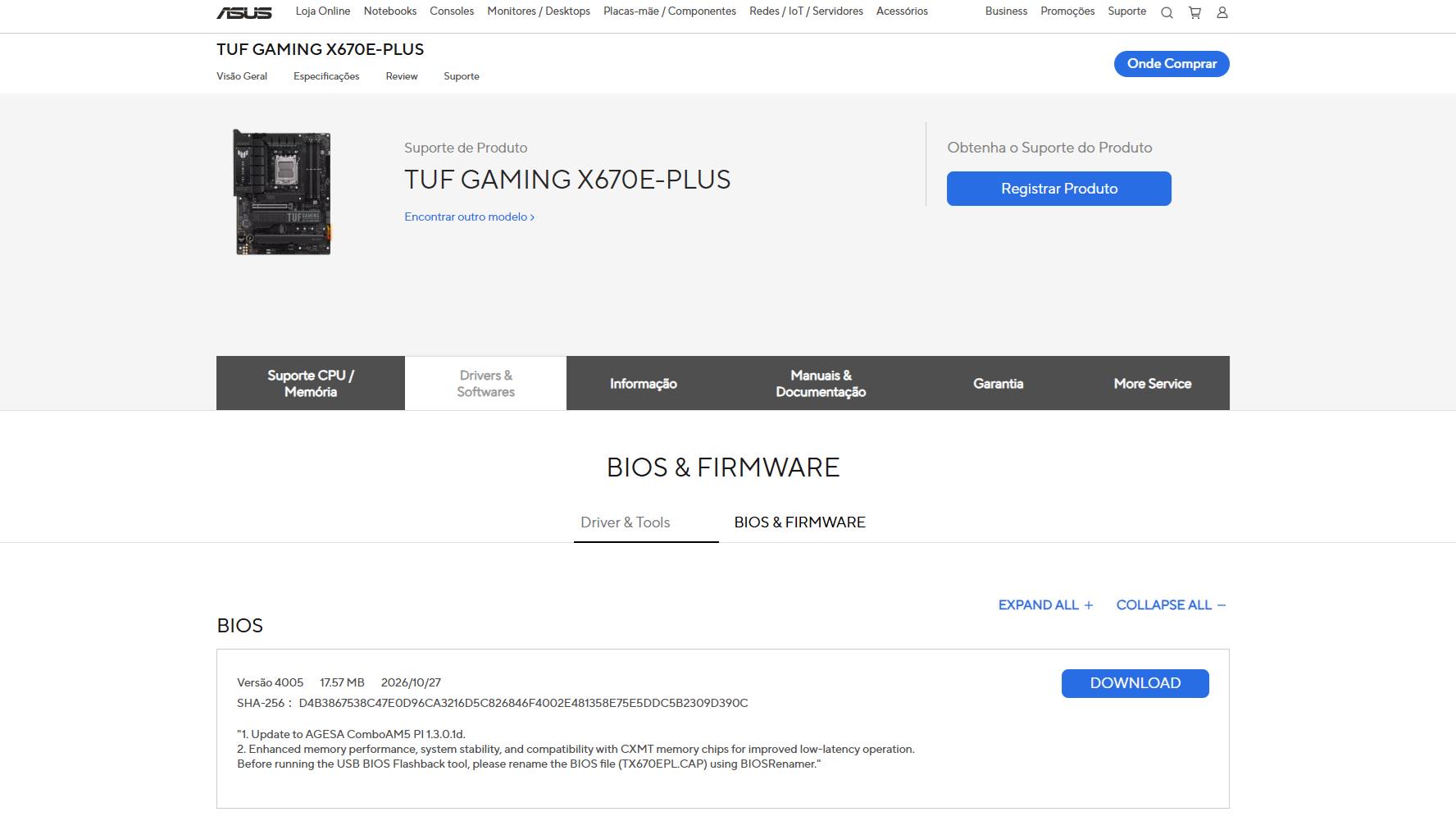
How is the latest BIOS version (4005, released on October 27, 2026, 17.57 MB) performing on the ASUS TUF GAMING X670E-PLUS? Has anyone experienced any issues or noticed improvements in stability and performance after updating?