r/audiorepair • • 9h ago

Need help on my interface/speakers popping and disconnecting!

Post image
0 Upvotes

First of all, I use an old behringer umc 404hd that my uncle gave me.

The main problems are that whenever I listen to music or output my electric guitar's sound, it will pop and cut off (disconnect) with the lightest touch on my laptop, port or even by itself regularly, and it's extremely annoying because of how often it disconnects for no reason. Usually, after it disconnects, it automatically reconnects after playing 2 poppy clicky sounds, but sometimes the sound completely goes out even when the device is shown on my speakers and I end up having to manually reconnect the usb port on my laptop, which sometimes doesn't even work anymore and I have to wait a while for it to work again:

devices shown but no sound unless i manually reconnect the usb again

In addition, it uses a printer cable (USB A-to-B) and connects to my laptop usb port.

I've made some conclusions that the problem is not the speakers, the laptop usb port, or the printer cable.

The reason why it's not the speakers is because when I connect my electric guitar's input to the interface and set the output as my headphones (which are completely fine and works well with no disconnects), my electric guitar itself disconnects the same way and reconnects after the speaker plays the 2 poppy click sounds even though there's no output set to the speaker at all.

The reason why it's not the laptop usb port is because other devices can connect to that same port fine, and it's not the cable too because I've tried multiple cables, bought new ones and the same thing happens.

I've tried researching, giving it more power, diagnosing with gemini itself, but in the end, I don't know if I should just buy a new interface, if it's the port in the interface itself, or if it's something I can fix right now.

If anyone can help, thank you!

r/audiorepair • • 12h ago

Title: Yamaha RX-V6A stuck on "Internal Error" (error 100000): fixed (solved)

Post image
10 Upvotes

I couldn't find anything on this model, so here's what worked for me.

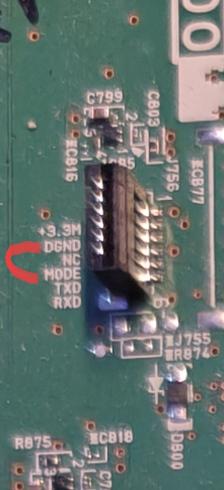
Problem: The RX-V6A went straight to "Internal Error" on power on, with no menu and no reset possible. The error code was [100000]. As far as I can tell that's Yamaha's "Model error": the model/destination data in the backup EEPROM (IC82 on the DIGITAL board) is lost or invalid.

Fix: Yamaha Technical Bulletin AV0103 (RX-V4A/V6A/A2A/TSR-700/400) says to short a solder point (J260 on the V4A). A user on badcaps wrote that this ties the MCU's MODE pin to GND. I couldn't find J260 on my V6A, but the 6-pin header next to the MCU is labeled +3.3M / DGND / NC / MODE / TXD / RXD, so I bridged DGND and MODE there with the unit unplugged, then powered on.

The display showed ModelDestError and let me pick the model and destination. I chose RX-V6A and BG (European). I removed the jumper, power-cycled, and it booted normally. I then updated to firmware 1.77 and it has worked fine since.

Notes:

• The MODE–GND connection is my inference from that forum post, not something Yamaha documents for the V6A. Check the pin order on the silkscreen, never touch +3.3M, and use at your own risk.

• Pick the destination that matches the sticker on the back.

• A TSR-700 owner only got blank ---- entries in the list, so this won't work for everyone. In that case the EEPROM probably needs an external programmer.


r/audiorepair • • 22h ago

Panasonic SA-PM03 Service Manual?

Post image
4 Upvotes

Hey Hey folks,

Just found a Panasonic SA-PM03 today with it's two speakers, but the cd drive does not seem to spin or try to read any disc, it opens and closes but just goes straight to no disc.

I found a service manual on hifiengine but of course registration are closed, and their contact page is worthless. Just points to FAQ. Anyone able to help me grab it?

https://www.hifiengine.com/manual_library/panasonic/sa-pm03.shtml

Anyone have any information on this product and where I night start with servicing the drive?