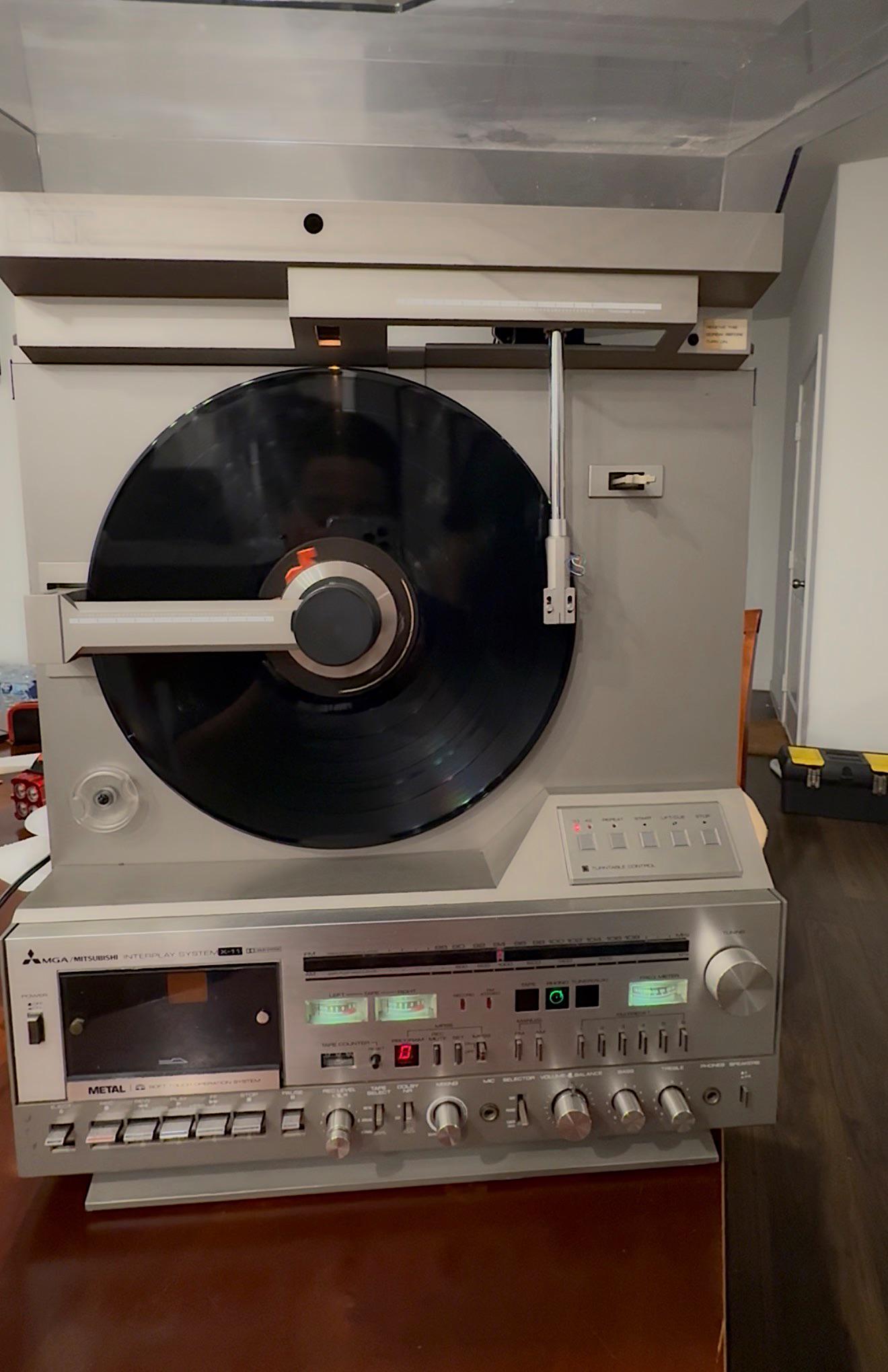
Hello everyone. I've been a long time lurker, finally joining, greetings to all. Can anyone suggest where I can obtain a service manual for the Fisher CR-4029? I found only one of eBay for $54. I don't mind paying a reasonable price for one, but can't see paying $54 for a manual to service one deck that I bought for $240. Any guidance greatly appreciated.
hello everyone! i dont know if this belongs here but i need help in fixing my home theater. last time i used this was last 4 years ago and it was working fine. but now when i plugged it in, it cant ne switched on no matter how hard i try to press the button
I just wanted to put this method of removing the tip of a ts cable from a jack on the internet because the other methods I found online didn’t work for me. I used a drill and a standard drill bit. I believe it was a 3/16 bit but the bit I used wasn’t labeled so it could be a size up or down. I put enough pressure to get it to bite while I drilled slowly for a few seconds and it came out quick and easy. Do this at your own discretion because it could potentially damage your gear if you aren’t very careful.
First of all, I use an old behringer umc 404hd that my uncle gave me.
The main problems are that whenever I listen to music or output my electric guitar's sound, it will pop and cut off (disconnect) with the lightest touch on my laptop, port or even by itself regularly, and it's extremely annoying because of how often it disconnects for no reason. Usually, after it disconnects, it automatically reconnects after playing 2 poppy clicky sounds, but sometimes the sound completely goes out even when the device is shown on my speakers and I end up having to manually reconnect the usb port on my laptop, which sometimes doesn't even work anymore and I have to wait a while for it to work again:
devices shown but no sound unless i manually reconnect the usb again
In addition, it uses a printer cable (USB A-to-B) and connects to my laptop usb port.
I've made some conclusions that the problem is not the speakers, the laptop usb port, or the printer cable.
The reason why it's not the speakers is because when I connect my electric guitar's input to the interface and set the output as my headphones (which are completely fine and works well with no disconnects), my electric guitar itself disconnects the same way and reconnects after the speaker plays the 2 poppy click sounds even though there's no output set to the speaker at all.
The reason why it's not the laptop usb port is because other devices can connect to that same port fine, and it's not the cable too because I've tried multiple cables, bought new ones and the same thing happens.
I've tried researching, giving it more power, diagnosing with gemini itself, but in the end, I don't know if I should just buy a new interface, if it's the port in the interface itself, or if it's something I can fix right now.
My Edifier S730 has developed three issues over 12 years. The newest is a gurgling or rattling sound over the bass, even at mid volume. The woofer still plays deep bass, but it used to play the same music cleanly. I can also reproduce the distortion with a steady 60 Hz tone.
Different inputs, including optical and analog PC/CD
Different sources, including a PC and phone
Different wall outlets, and playback with and without the original satellites connected
The S730 controller’s headphone jack sounds clean, including the bass
The disconnected woofer driver measured 8.6 ohms on my multimeter. I saw no tears and heard no scraping when I gently moved the cone by hand.
I looked over the boards and didn’t spot any obvious burn marks or damage. I’m new to electronics repair, no idea what can really look like a damaged component.
Timeline
2014 — Bought new.
2016–2017 — A high pitched whistle started in standby. It stops when I turn the unit on or switch it off at the rear.
2022 — The original satellites started making occasional loud buzzing bursts, sometimes through one speaker and sometimes both, even with no audio playing. The sound reminded me of an old cellphone causing interference near PC speakers. I haven’t been able to reproduce it on demand.
2026 — The woofer developed the gurgling sound. It started before I opened the cabinet.
Speakers randomly buzzing
This is weird, it never happened from 2014 til 2022 and then it was happening completely random, it did not matter whether there was any playback and it was in either both satelites or 1 at a time. I could not find any way to reproduce this issue.
Another way to describe how it was sounding was if you take the end of the 3.5mm jack and start touching it with your fingers, the speakers will make some buzzing/sparkling sounds.
What would you check next to distinguish a fault in the woofer driver from distortion in the built-in amplifier? I have a multimeter, but no spare amplifier or other specialized tools.
I couldn't find anything on this model, so here's what worked for me.
Problem: The RX-V6A went straight to "Internal Error" on power on, with no menu and no reset possible. The error code was [100000]. As far as I can tell that's Yamaha's "Model error": the model/destination data in the backup EEPROM (IC82 on the DIGITAL board) is lost or invalid.
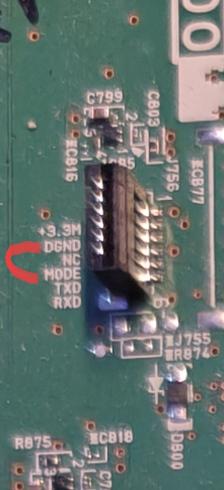
Fix: Yamaha Technical Bulletin AV0103 (RX-V4A/V6A/A2A/TSR-700/400) says to short a solder point (J260 on the V4A). A user on badcaps wrote that this ties the MCU's MODE pin to GND. I couldn't find J260 on my V6A, but the 6-pin header next to the MCU is labeled +3.3M / DGND / NC / MODE / TXD / RXD, so I bridged DGND and MODE there with the unit unplugged, then powered on.
The display showed ModelDestError and let me pick the model and destination. I chose RX-V6A and BG (European). I removed the jumper, power-cycled, and it booted normally. I then updated to firmware 1.77 and it has worked fine since.
Notes:
• The MODE–GND connection is my inference from that forum post, not something Yamaha documents for the V6A. Check the pin order on the silkscreen, never touch +3.3M, and use at your own risk.
• Pick the destination that matches the sticker on the back.
• A TSR-700 owner only got blank ---- entries in the list, so this won't work for everyone. In that case the EEPROM probably needs an external programmer.
Just found a Panasonic SA-PM03 today with it's two speakers, but the cd drive does not seem to spin or try to read any disc, it opens and closes but just goes straight to no disc.
I found a service manual on hifiengine but of course registration are closed, and their contact page is worthless. Just points to FAQ. Anyone able to help me grab it?
Anyone have any information on this product and where I night start with servicing the drive?
Just found a Panasonic SA-PM03 today with it's two speakers, but the cd drive does not seem to spin or try to read any disc, it opens and closes but just goes straight to no disc.
I found a service manual on hifiengine but of course registration are closed, and their contact page is worthless. Just points to FAQ. Anyone able to help me grab it?
Hi guys, I've owned this lil DAC/AMP combo for years, now using it on a Sundara, connected to the PC via USB.
Around 2 months ago it started with a behavior in which it would add some noise sometimes and one channel would go off, or it would vary between them, etc. What I did notice is that this behavior doesn't start as soon as I start using it, usually after one hour after it's on. Is it dying? Can anything be done about it? Thanks!
Posting this repair log in case someone else runs into the same failure on a Klipsch R-112SW. It also applies to the R-110SW, R-115SW and SPL-120, which share the same amplifier board.
Symptoms
Started with periodic rhythmic thumping every couple of seconds, then went completely silent.
The main SMPS rails were intact (+55 V and -55 V both present).
How the IRS2092 gets its VCC
The IRS2092 Class-D driver needs a floating supply of about 10-15 V between VCC (pin 12) and COM (pin 10). COM sits on the -55 V rail. The supply comes from a simple linear regulator:
GND → 4×1k SMD in parallel (250 Ω) → 820 Ω power resistor → TIP31C collector
GND → 10 kΩ → TIP31C base ← zener → -55 V
TIP31C emitter → 10 Ω → IRS2092 VCC (pin 12), electrolytic to COM (pin 10) = -55 V
This is the weak spot. With the 820 Ω, the feed totals about 1.07 kΩ, so the regulator can deliver at most about 39 mA. With full VCC and the gate drive running, my board draws about 50 mA. The gate-drive current drops as VCCdrops, so the stock board doesn't die right away. The regulator saturates and VCC settles around 10 V, just above the IRS2092's under-voltage lockout (UVLO, ~9 V). It works, but with almost no margin.
Then heat does the rest. The 820 Ω and the 4×1k resistors run hot right on the PCB, and over the years they bake the nearby electrolytics (rising ESR and leakage) and the zener. Once the margin is gone, VCC or the high-side bootstrap supply dips below UVLO, and the IRS2092 drops out and restarts over and over. That's the periodic thump. Eventually something fails completely (here, the zener shorted) and it goes silent.
Troubleshooting & measurements
IRS2092VCC(pin 12): -55 V relative to GND, so 0 V between VCC and COM. The IC was stuck in UVLO.
TIP31C**:** collector at 0 V, base and emitter both stuck at -55 V. Out of circuit, the 10 kΩ bias resistor was fine, but the zener from base to -55 V was dead shorted (0 Ω).
After replacing the zener,VCC came back and the IRS2092 woke up, but the thumping returned with the woofer connected. The high-side bootstrap capacitor (VB-VS) was dried out.
It still wasn't stable (at this point I had a 15 V zener fitted). The TIP31C collector sat at about the same voltage as the emitter (saturated), the base got dragged below the zener voltage (-44 V instead of -40 V), and VCC was only about 10 V. The giveaway: the "ground" end of the 820 Ω measured -8 V instead of 0 V. Tracing it led to the 4×1k SMD resistors in series with it. Jumpering that end straight to GND brought VCC right back.
Fix
Zener (TIP31C base to -55 V): replaced with a 12 V zener. Mine is a small 0.5 W glass (DO-35) part, which is plenty, because it only carries about 4 mA (~0.05 W). Watch polarity: cathode stripe to the TIP31C base, anode to -55 V. I first tried 15 V. It starts, but it costs the regulator 3 V of headroom and raises the gate-drive current, so it ends up saturated again. Stick with 12 V.
Bootstrap capacitor (IRS2092 pin 15 VB to pin 13 VS): 22 µF → 47 µF / 50 V, 105 °C low-ESR. Watch polarity: + to pin 15, - to pin 13.
VCCdecoupling capacitor (pin 12 to pin 10): 15 µF → 47 µF, 105 °C. Watch polarity: + to pin 12, - to pin 10.
Removed the 4 × 1 kΩ SMD resistors and connected the 820 Ω directly to GND. This gives the regulator real headroom and takes about 0.36 W of heat off the PCB.
820 Ω power resistor: replaced with an 820 Ω 5 W ceramic resistor mounted against the metal backplate, with insulated, sleeved leads, so the plate acts as a heatsink. It dissipates about 2 W. Note: my original resistor was burnt beyond reading. Most repair guides say 820 Ω (that's what the R-115SW uses), but some people found680 Ωon R-112SW boards. With the 4×1k removed, 820 Ω straight to GND is still less feed resistance than either stock version (680 + 250 ≈ 930 Ω or 820 + 250 ≈ 1.07 kΩ), so it has more headroom than factory. 680 Ω would add a bit more.
Result
Point
Value
TIP31C base (to GND)
-43 V
TIP31C collector (to GND)
-41 V
TIP31C V(CE)
~3 V (regulating, not saturated)
Current through 820 Ω
~50 mA
VCC-COM (pin 12-10)
~11 V
The sub is back up and playing cleanly.
Tips
Quick check for this fault: measure the TIP31C collector-to-emitter voltage while powered. If it's under about 1 V, the regulator is starved, no matter how good the zener looks.
Don't mount the power resistor with hot glue. It softens at about 60-80 °C and can char. Use a mica or Kapton insulator plus high-temperature neutral-cure silicone, or a clamp.
Be careful: the whole VCC section sits around -44 V relative to ground, and the rails are 110 V end to end.
I have the Edifier S350DB, currently the right side speaker is significantly quieter, and has muffled sound compared to the left. Very frustrating, what's worse is that it seems to be intermittent, the problem cropped up first over a year ago, fixed itself and then came back.
Even now when I am using my pc, the right speaker might flick back to clarity for a couple of minutes before returning to its muffled state.
The issue stays with a replacement optic cable, when I switch to bluetooth, and i've checked and rechecked the connections of the cables into the back of the subwoofer. I'm at a loss, and quite upset as I spent nearly £300 on these speakers brand new less than 2 years ago.
Or so I thought I was testing my brand new second hand speakers and was using my pioneer sc lx 56 with AirPlay and my iPhone and it made a pop and I could smell burning and noticed no sound out of the tweeter 🤦♂️
I swapped the tweeters over and the tweeter from the broken speaker worked fine in the other one
So crossover maybe ? I’ve been testing the resistance and stuff between the two and everything seems the same
Is there any other bits in the speaker anywhere All I’ve done is take out the tweeter and crossover !?
This link should lead to a video of the problem(s). If y'all want it on a specific video hosting site, let me know.
If the video doesn't work: it's a car stereo head unit set to playing the radio. There's four outputs- front right, front left, etc. Plugging one of the speakers into either front or rear right produces a very loud drone. Plugging into the rear left output gives normal (if staticky) music. And the front left output produces a rhythmic thumping, which I compare to a heartbeat.
It's part number 88 88 1 600 175. I think I can track down a more precise model number; I'll edit the post if I do. Edit: CM 5908
There's been some small modifications (you may notice the 3.5mm auxiliary cable that isn't exactly stock), but I don't think it'd cause problems on three of the four speakers.
Edit with further info: My dad (who owned this head unit before me, apparently it worked for him) said that the problem might be one or more capacitors. And when about half the ebay results for this model number are for a capacitor replacement kit, I'm starting to think it's a common enough issue to try fixing.
I own a beautiful pair of Focal JMlab Chorus 726S speakers, and I've always been in love with their sound.
Unfortunately, while I was away, my cat managed to knock one of them over, and it took quite a nasty fall. As you can see, the upper speaker has a hole on the left side and the tweeter is completely missing.
I'm planning to purchase a brand-new tweeter and repair the damaged driver, but there's also a pretty noticeable distortion coming from the speaker itself. I'd really love to figure out what's causing it and, if possible, repair it myself.
Could anyone with experience in speaker repair help me identify what might be wrong ?
Thanks in advance for any help! I'd really hate to give up on these speakers. ❤️
My pioneer recivers bluetooth,NET,usb not working it says initializing and stays there .Settings screen and setup wizard also not showing. Rest of it working hdmi, audio out atmos all working if anyone had this same issue and repaired please tell me what cause this issue.
My pioneer recivers bluetooth,NET,usb not working it says initializing and stays there .Settings screen and setup wizard also not showing. Rest of it working hdmi, audio out atmos all working if anyone had this same issue and repaired please tell me what cause this issue.
Lens popped out of its holder. I followed advice from online DIYers about reinstalling the lens using Elmer’s glue and was very careful about handling, cleaning, etc. It all looked so easy and straightforward. No success. Any advice or suggestions? Are physical/electrical adjustments needed?
Hi I’m not sure if this is the right place to ask about this, but I got a Yamaha SPX900 (a digital multi effects processing unit) recently and I’ve been trying to get the effects to work all day now to no avail. It seems like no matter what parameters I mess with, the signal just comes out dry. The balance is set to 100% and it’s not bypassed. It just feels like there’s no digital signal processing going on for some reason. I’ve also already gone through a factory reset and all the self test programs built in and it flagged the DRAM as ok, so I’m not sure what’s going on. If anyone knows anything about or has worked on this unit or any of the other SPX units and has any advice, I would be very grateful. Also if there is anywhere else I could ask about this that would be great to know too. Thank you
Okay so the sound was cutting in and out of one of my speakers so I thought I would spray some contact cleaner in the terminal and see if that would help anything. The good news is that it did fix the audio issue but I must have got some contact cleaner on the plastic housing and it just got stuck like it had melted a bunch of goo or dust inside. So now the speaker wire won't stay in the terminal. I was trying to see if I could get it moving with a pair of pliers and realized that I could screw out the terminal. I had no idea. Can I just replace this and if so can someone point me to a place I can find the part? Or have I broken a connection that will take more than just screwing back in. Thanks. I know pretty much nothing about electronic repair.
Hi I'm trying to fix my Yamaha Rx 570 I thrifted and the main issue it has is the input selector making audio cut noise in one of my speakers. I've opened it up but trying to take out the section for the input selector there is this white multi pin connector(cb312) at the end that I don't want to break, any help is very much needed.
I am tracing down a -42 DC voltage that is triggering relay protection on my Akai am 2800 vintage amplifier. It is on the left channel so i am following back to the output transistors where i found this behavior that dazzled me. The transistors had between its heatsink some mylar/micca insulator to help with heat dissipation but also, In my understanding, it should be an electrical insulator. So this shouldn't be happening, right? Or are they shorted?