r/computerhelp • • 9h ago

Software Why is all my storage used?

Post image
8 Upvotes

On my PC as you can see over 800gb of storage is used. I have no idea why as the only major programs I run on my PC are steam games which only use up about 250-300 gb of storage. I would like to install some more games as my pc is a gaming pc but for some reason like 500 gb is gone. Please help


r/computerhelp • • 12h ago

Software Hlck short i think

Thumbnail reddit.com
0 Upvotes

r/computerhelp • • 1h ago

Software FA506NC Realtek RTL8852BE Wi-Fi disappearing from Device Manager and PCIe bus for over 2 years any zero-cost software or DIY fix?

Thumbnail gallery
0 Upvotes

I honestly don't know what else to do anymore. I'm so tired, frustrated, and completely drained from fighting this laptop every single day for nearly 2 years. All I want is for my Wi-Fi to just work like a normal laptop, and nothing I try ever lasts.

I even trusted the ASUS service centre and went to them for help, hoping my nightmare would finally end—instead, they just took my money and handed the laptop back with the exact same problem still happening. No real support, no proper fix, nothing. I don't have the money to keep paying them or to buy a new Intel Wi-Fi card right now, and every time the internet vanishes in the middle of my work, it honestly makes me feel so helpless.

My Laptop & What Keeps Happening:

- Laptop: ASUS TUF Gaming A15 (FA506NC, Windows 11)

- Wi-Fi Card: Realtek RTL8852BE WiFi 6 802.11ax PCIe Adapter

- The Problem: Out of nowhere—especially after booting up or waking from sleep—the Wi-Fi icon completely disappears from my taskbar and Quick Settings. In Device Manager, the card vanishes off the PCIe bus (only showing as a faded hidden device or error). Once it stays up, it can work fine for hours, which makes it even more heartbreaking because I know the card isn't completely dead—it just keeps dropping out.

Everything I've Already Tried (For Months, With No Luck):

- Tested and rolled back multiple driver versions (6001.15.149.100, 6001.15.155.1, etc.) and cleaned old packages using pnputil

- Disabled every power-saving option on the Wi-Fi adapter and turned PCIe Link State Power Management Off

- Even set up a background PowerShell watcher script to automatically detect drops, rescan devices, and restart services

- Done endless shutdowns and 40-second power drains just to beg the Wi-Fi to show up again temporarily

Please, if anyone out there has been through this exact pain on the FA506NC and found a genuinely free software tweak, registry/BIOS setting, or safe zero-cost DIY fix (like opening it up and cleaning/reseating the card) that actually saved their Wi-Fi, please help me. Also, is there any specific place, thread, or person I can search for or reach out to for free help on this? Even one small tip that works without spending money would mean the world to me right now.


r/computerhelp • • 4h ago

Other Bizarre Pc Experience

0 Upvotes

almost lost my pc turns on fans run pc led light but no keyboard or mouse led turns on and doesn't display i then fiddle riddle diddle a bit nothing works same problem then i decide to unplug the pcs power cord from the pc the pc led flicker for half a second then plug it back in pc automatically turns on and everything works as normal as it seems what the fuck also there was this weird statistic screen or something i think when it booted it up i was on the floor when it happened didn't get a good look why did this happen and why did unplugging the power cord and plugging in back in work?


r/computerhelp • • 13h ago

Software realtek 8851 wireless lan wifi 6 pci-e nic not working

Thumbnail reddit.com
0 Upvotes

r/computerhelp • • 23h ago

Hardware So my pc just crashed on me while I was gaming and now it won't turn on.

Thumbnail reddit.com
2 Upvotes

r/computerhelp • • 10h ago

Hardware Does anyone have any idea if this is fixable? (Ideapad flex 5)

Thumbnail gallery
3 Upvotes

r/computerhelp • • 11h ago

Hardware Chinese X79 motherboard detects only one SATA drive — other drives are not detected

Thumbnail reddit.com
1 Upvotes

r/computerhelp • • 11h ago

Hardware HP desktop wouldn't boot, now it boots but no display?

1 Upvotes

So I've been trying to troubleshoot my HP desktop for the past 24 hours. Had an issue when I tried to turn it on yesterday-- pressed the power button but instead of starting up, the power LED flashed in tandem with a beeping sequence (3 long, 2 short). Most of what I've read online says this error code is related to a problem with the memory.

(I've never opened my PC up and tinkered with the RAM or any other components.)

I unplugged the power cable, held the power button for at least 20 seconds, plugged the power back in and tried starting it again. Still got the error code, won't boot.

Next, I opened it up, took the single stick of RAM out of its slot and reseated it. Plugged power back in, pressed power button ... and now it seems like it booting up without any error code except I'm not getting anything on my monitor. There's no video signal? I don't have another monitor to try and test with.

Any ideas what it could be or any other troubleshooting steps? Thanks in advance!

bold System specs - HP Pavilion TP-01, Win 11 Pro (26H2), Ryzen 7 5700G, B550A mobo, 16GB DDR4 3200 Mhz, 256 GB M.2 NVMe SSD (monitor is connected via HDMI)


r/computerhelp • • 10h ago

Other HELP

Post image
2 Upvotes

r/computerhelp • • 4h ago

Hardware Laptop very very stuck in automatic repair

0 Upvotes

Hello.. i have a victus windows 11. The hard drive is damaged, which is the source of my issues and most likely the only thing wrong… and while it doesn’t really affect anything (yet) my computer takes it personally. The last time I checked it was 99.8% healthy, which was maybe a year ago because I forgot how to check. Anyways,

I came back from vacation today and my laptop has been happily dormant for a while, picked it up to turn it on and it doesn’t go past automatic repair anymore, whereas after a few reboots I could finally log in; I put recommended commands in and my computer seemed relatively healthy. Only thing is I put in the sfc /scannow to the c drive thing and it said I had corrupted files, which it fixed, and would be fixed upon next reboot, but it says that each time I reboot to open it up again… so I don’t think it’s really doing anything. The more in-depth command where you do uhm, windir c and offboot doesn’t work, computer just can’t run it.

my very back up plan also failed, which was to just reset my PC and reinstalled windows… I cannot even reinstall windows to get out!! When I try, I can’t even get to the cloud or local option until my computer claims that it cannot reset and that no changes were made! I’m very stuck, I followed many tutorials, nothing worked, computer can’t even go into safe mode to get out,,, help,,, I need this computer to do school work and do commissions due soon,,, also, I think this might have arisen from an update my computer automatically downloaded while it was off, because the formatting and stuff changed in automatic repair. So I did try to remove recent updates, but my computer also says the task cannot be carried out and nothing changes.

last thing, I unfortunately do not have a backup USB, or hard drive; I have no other windows computer I can use, or like anything else to back up or stuff…i cannot afford to replace hard drive, or get a new laptop (though I will probably try to do that very soon because my computer has had the automatic repair issue for years now. i think it’s just burning out.)

is there anything I can do just to get back in? I don’t care about fixing it, really, I just need to log in again and work… I want to get a new laptop soon, so I’m just. Using this one until it fails me permanently :,) please help!!! I would love if this computer can last a couple more months!!

also if it helps, each time my computer restarts itself, it grants me the stop code BAD_SYSTEM_CONFIG_INFO practically every time


r/computerhelp • • 14h ago

Hardware Recommendations for a simple web browsing desktop for my 60 YR father?

3 Upvotes

I normally build my own gaming PCs but that is a world that my dad isn't too fluent in and he has asked me if I can help him get a new one. The current one he is using is at least 15 years old. I don't want to go and build him one if he is just going to browse facebook, youtube and look up NFL stats. I know some prebuilts from Best buy and the like come with W11 and at least an SSD. I was wondering if I'd be okay with just doing that for him? I am mainly familiar with flagship hardware so when I read some of these descriptions and of course the hardwares on the lower end, I'm not sure what Im getting and if itll be fine for my dad.


r/computerhelp • • 15h ago

Malware This notification is constantly coming on my laptop and when I try to do something it just vanishes.

Post image
2 Upvotes

r/computerhelp • • 15h ago

Software M15R7 problem

Thumbnail reddit.com
2 Upvotes

r/computerhelp • • 15h ago

Malware Self reproducing or auto downloading malware on my laptop

Post image
2 Upvotes

r/computerhelp • • 15h ago

Hardware GPU Fan(?) starting to make noise suddenly

2 Upvotes

Hello. I had to take my PC out of the house for a few hours and when I returned and plugged it back in, it started to make this awful noise. It was silent before. It was raining but I covered it with a blanket when I was putting it in my car. Any help is appreciated.


r/computerhelp • • 16h ago

Discussion Laptop screen randomly just cracking out of no where?

7 Upvotes

I was using it at the start of class just watching YouTube before the class got settled then closed it for the rest of class with NOTHING INSIDE”I checked on the cameras”, and placed my mouse on top of it gently. (The mouse is 80 gram, couldn’t have caused anything) then I didn’t open it until we came back from break time and when I opened it, it was suddenly just fully broken, a crack on the bottom left that spread on the entire screen randomly with no cause. I even checked the cameras with the principal and he even said,”I’ve seen people’s laptop screens been broken before but not like this where it’s just magically broken” anybody know maybe a reason as to why it broke? Faulty laptop? Repeated closing? Anything? I placed it down gently on the table and as I said it was working no less than 1 hour before.


r/computerhelp • • 17h ago

Network USB tethering stopped working on Windows 11 after disabling "Metered Connection"

3 Upvotes

I’m not sure if my PC is broken or not, but I followed a tutorial that suggested turning off "metered connection" in the Windows 11 settings to improve the internet connection. Since I use my phone’s internet. Specifically via USB tethering. I disabled the metered connection setting and restarted my computer. Now, I can no longer enable USB tethering on my phone, it simply won't turn on, and my phone vibrates whenever I try to activate it. As a result, my computer has been offline for a couple of days because I don’t know what to do. I’ve tried turning the metered connection setting back on, but nothing happens. Perhaps this is just a coincidence and not actually caused by that change.


r/computerhelp • • 17h ago

Hardware Touchpad issues

Thumbnail gallery
2 Upvotes

I'm a bit frustrated with this laptop at the moment but I'm just somewhat handy with electronics so I decided to give this a try.

My mom uses it consistently and the touchpad randomly stopped working a few weeks ago. The control panel couldn't even find it. I went through the usual troubleshooting techniques and found a quick solution by uninstalling one of the drivers. I'd reboot and the windows would reinstall it automatically.

Great right? Simple enough but no. This would last about a week and stop working again. So I repeated the steps every week until it went out completely. I checked drivers, uninstalled, reinstalled, did scans etc anything basic software related I likely tried.

So I thought it maybe a hardware issue as she loves to literally use this thing while it's sitting on her lap and it tends to get hot. I've taken it apart and as far as I can see the connections are all fine.

By maybe one of you folks can see something I can't? Help is appreciated before I take this thing to a professional


r/computerhelp • • 21h ago

Other Help with crashing computer

Post image
3 Upvotes

Can’t tell what the problem is: it’s a surface pro 7 I’ve had for a while that said it needed to restart and then once turned on it did this.


r/computerhelp • • 21h ago

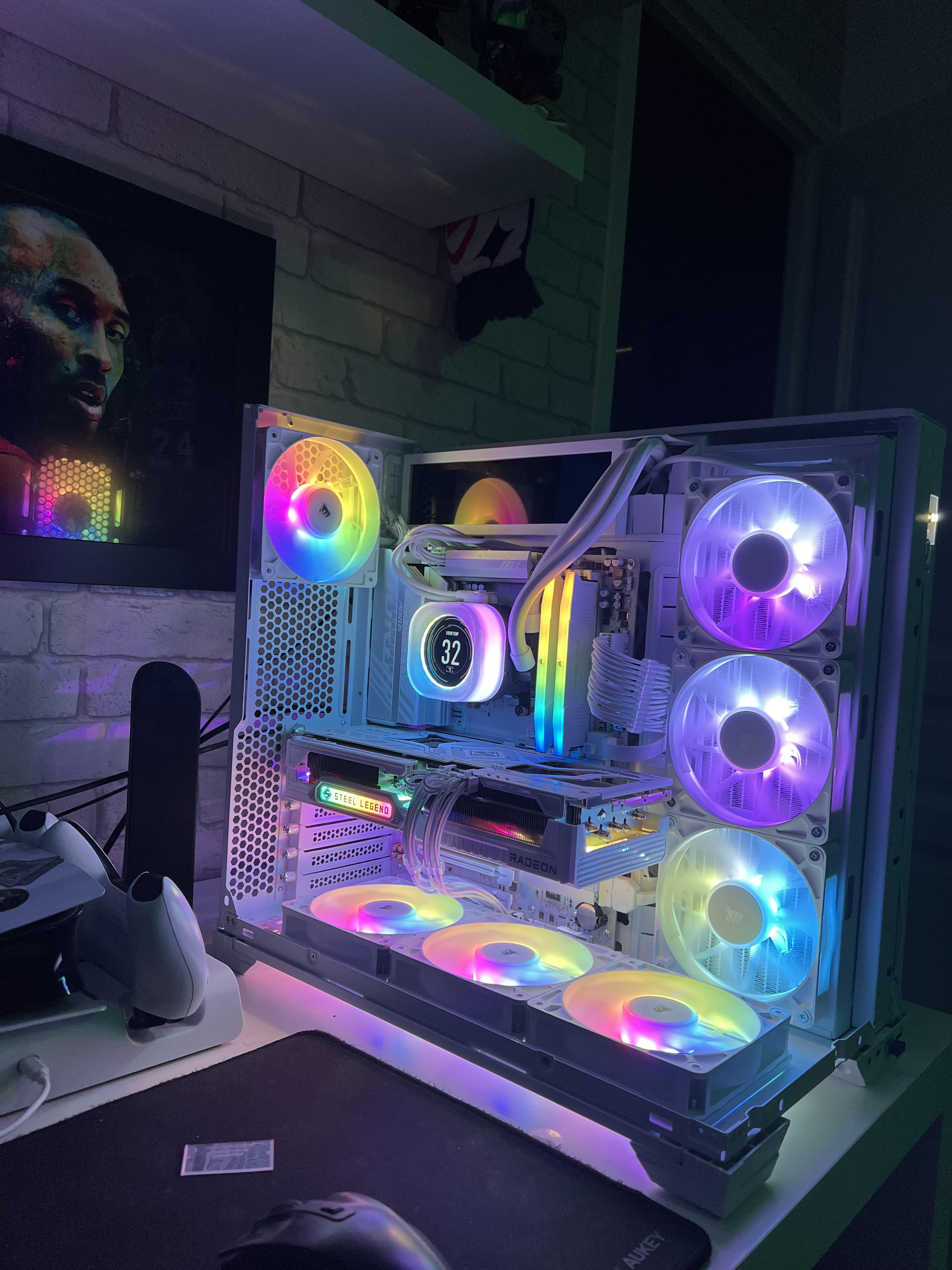
Hardware New PC build crashing when launching applications shortly after a fresh Windows 11 installation

Post image
3 Upvotes

New PC build crashing when launching applications shortly after a fresh Windows 11 installation
Hi everyone,
I recently built a new PC, and I’m experiencing a strange issue where Windows seems to work initially, but applications start crashing shortly after boot. I’m trying to figure out whether this is a Windows installation issue, a driver problem, RAM instability, or possibly faulty hardware.
My PC specs

  • CPU: AMD Ryzen 7 7800X3D
  • Motherboard: Gigabyte B850 AORUS ELITE WIFI7 ICE
  • GPU: ASRock Radeon RX 9070 XT Steel Legend
  • RAM: Corsair Vengeance RGB DDR5, 32GB (2x16GB), 5200 MT/s
  • SSD: Kingspec XG7000 1TB NVMe
  • Cooling: Corsair iCUE TITAN LX 360

What happened
During my first boot, I was able to install Windows 11 successfully. I then installed the motherboard drivers and Wi-Fi drivers, and everything seemed to be working fine initially.
After installing a Realtek driver, I started noticing issues, although I can’t say for certain that this was the exact moment the problem began.
The PC was able to run for around 5 minutes before applications started crashing when I tried to launch them.
Since then, I have experienced crashes with several applications, including:

  • GCC (Gigabyte Control Center)
  • Windows Task Manager
  • Windows components/apps such as the Windows Library

Interestingly, Windows Settings still opens normally.
What I’ve tried

  • Restarting the PC multiple times
  • Checking the BIOS
  • Confirming that the CPU, RAM (32GB), SSD and Windows Boot Manager are correctly detected
  • Checking CPU and system temperatures in the BIOS (around 32°C CPU and 28°C system temperature)
  • Attempting to run Windows repair commands, but I couldn’t get them to work properly

The RAM is currently running at 4800 MT/s, and XMP/EXPO is disabled. I haven’t enabled any memory overclocking.
My current plan
I’m considering performing a completely clean Windows 11 installation by deleting all existing partitions on my SSD and reinstalling Windows from scratch.
After that, I plan to test the system before installing any additional drivers or software, then install Windows Updates and drivers one at a time to identify whether a specific driver causes the crashes.
My questions

  • Could a corrupted Windows installation explain this behavior?
  • Could a faulty or incompatible Realtek driver cause multiple unrelated applications to crash?
  • Could this be RAM instability, even if the BIOS detects both sticks correctly?
  • What would you recommend testing first if the problem persists after a clean Windows installation?

Any help or suggestions would be greatly appreciated. I want to identify the root cause before assuming any hardware is defective.
Thanks!