r/computerhelp • • 9h ago

Software Why is all my storage used?

Post image
8 Upvotes

On my PC as you can see over 800gb of storage is used. I have no idea why as the only major programs I run on my PC are steam games which only use up about 250-300 gb of storage. I would like to install some more games as my pc is a gaming pc but for some reason like 500 gb is gone. Please help


r/computerhelp • • 16h ago

Discussion Laptop screen randomly just cracking out of no where?

7 Upvotes

I was using it at the start of class just watching YouTube before the class got settled then closed it for the rest of class with NOTHING INSIDE”I checked on the cameras”, and placed my mouse on top of it gently. (The mouse is 80 gram, couldn’t have caused anything) then I didn’t open it until we came back from break time and when I opened it, it was suddenly just fully broken, a crack on the bottom left that spread on the entire screen randomly with no cause. I even checked the cameras with the principal and he even said,”I’ve seen people’s laptop screens been broken before but not like this where it’s just magically broken” anybody know maybe a reason as to why it broke? Faulty laptop? Repeated closing? Anything? I placed it down gently on the table and as I said it was working no less than 1 hour before.


r/computerhelp • • 10h ago

Hardware Does anyone have any idea if this is fixable? (Ideapad flex 5)

Thumbnail gallery
3 Upvotes

r/computerhelp • • 14h ago

Hardware Recommendations for a simple web browsing desktop for my 60 YR father?

3 Upvotes

I normally build my own gaming PCs but that is a world that my dad isn't too fluent in and he has asked me if I can help him get a new one. The current one he is using is at least 15 years old. I don't want to go and build him one if he is just going to browse facebook, youtube and look up NFL stats. I know some prebuilts from Best buy and the like come with W11 and at least an SSD. I was wondering if I'd be okay with just doing that for him? I am mainly familiar with flagship hardware so when I read some of these descriptions and of course the hardwares on the lower end, I'm not sure what Im getting and if itll be fine for my dad.


r/computerhelp • • 17h ago

Network USB tethering stopped working on Windows 11 after disabling "Metered Connection"

3 Upvotes

I’m not sure if my PC is broken or not, but I followed a tutorial that suggested turning off "metered connection" in the Windows 11 settings to improve the internet connection. Since I use my phone’s internet. Specifically via USB tethering. I disabled the metered connection setting and restarted my computer. Now, I can no longer enable USB tethering on my phone, it simply won't turn on, and my phone vibrates whenever I try to activate it. As a result, my computer has been offline for a couple of days because I don’t know what to do. I’ve tried turning the metered connection setting back on, but nothing happens. Perhaps this is just a coincidence and not actually caused by that change.


r/computerhelp • • 21h ago

Other Help with crashing computer

Post image
3 Upvotes

Can’t tell what the problem is: it’s a surface pro 7 I’ve had for a while that said it needed to restart and then once turned on it did this.


r/computerhelp • • 21h ago

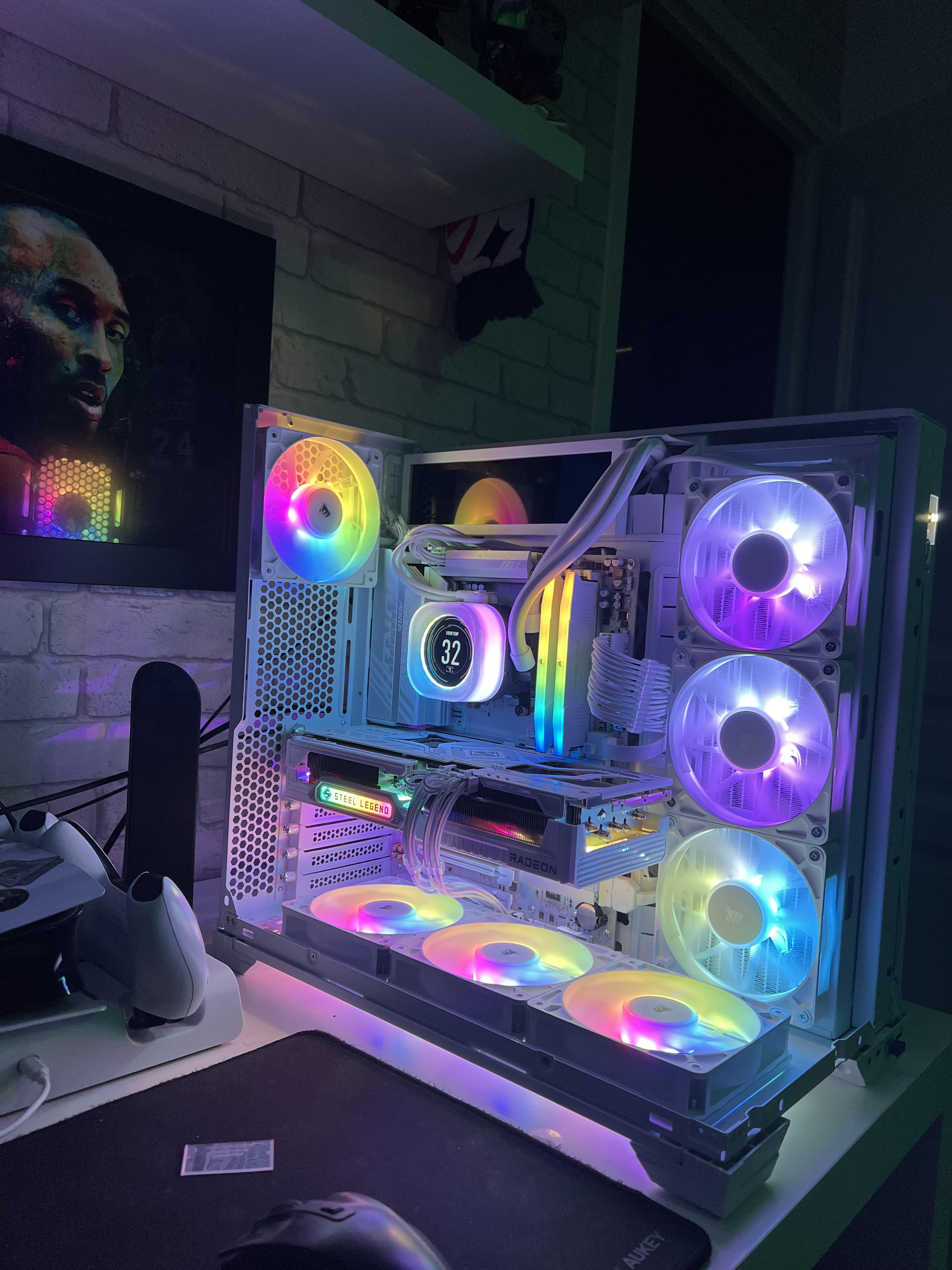
Hardware New PC build crashing when launching applications shortly after a fresh Windows 11 installation

Post image
3 Upvotes

New PC build crashing when launching applications shortly after a fresh Windows 11 installation
Hi everyone,
I recently built a new PC, and I’m experiencing a strange issue where Windows seems to work initially, but applications start crashing shortly after boot. I’m trying to figure out whether this is a Windows installation issue, a driver problem, RAM instability, or possibly faulty hardware.
My PC specs

  • CPU: AMD Ryzen 7 7800X3D
  • Motherboard: Gigabyte B850 AORUS ELITE WIFI7 ICE
  • GPU: ASRock Radeon RX 9070 XT Steel Legend
  • RAM: Corsair Vengeance RGB DDR5, 32GB (2x16GB), 5200 MT/s
  • SSD: Kingspec XG7000 1TB NVMe
  • Cooling: Corsair iCUE TITAN LX 360

What happened
During my first boot, I was able to install Windows 11 successfully. I then installed the motherboard drivers and Wi-Fi drivers, and everything seemed to be working fine initially.
After installing a Realtek driver, I started noticing issues, although I can’t say for certain that this was the exact moment the problem began.
The PC was able to run for around 5 minutes before applications started crashing when I tried to launch them.
Since then, I have experienced crashes with several applications, including:

  • GCC (Gigabyte Control Center)
  • Windows Task Manager
  • Windows components/apps such as the Windows Library

Interestingly, Windows Settings still opens normally.
What I’ve tried

  • Restarting the PC multiple times
  • Checking the BIOS
  • Confirming that the CPU, RAM (32GB), SSD and Windows Boot Manager are correctly detected
  • Checking CPU and system temperatures in the BIOS (around 32°C CPU and 28°C system temperature)
  • Attempting to run Windows repair commands, but I couldn’t get them to work properly

The RAM is currently running at 4800 MT/s, and XMP/EXPO is disabled. I haven’t enabled any memory overclocking.
My current plan
I’m considering performing a completely clean Windows 11 installation by deleting all existing partitions on my SSD and reinstalling Windows from scratch.
After that, I plan to test the system before installing any additional drivers or software, then install Windows Updates and drivers one at a time to identify whether a specific driver causes the crashes.
My questions

  • Could a corrupted Windows installation explain this behavior?
  • Could a faulty or incompatible Realtek driver cause multiple unrelated applications to crash?
  • Could this be RAM instability, even if the BIOS detects both sticks correctly?
  • What would you recommend testing first if the problem persists after a clean Windows installation?

Any help or suggestions would be greatly appreciated. I want to identify the root cause before assuming any hardware is defective.
Thanks!


r/computerhelp • • 10h ago

Other HELP

Post image
2 Upvotes

r/computerhelp • • 15h ago

Malware This notification is constantly coming on my laptop and when I try to do something it just vanishes.

Post image
2 Upvotes

r/computerhelp • • 15h ago

Software M15R7 problem

Thumbnail reddit.com
2 Upvotes

r/computerhelp • • 15h ago

Malware Self reproducing or auto downloading malware on my laptop

Post image
2 Upvotes

r/computerhelp • • 15h ago

Hardware GPU Fan(?) starting to make noise suddenly

2 Upvotes

Hello. I had to take my PC out of the house for a few hours and when I returned and plugged it back in, it started to make this awful noise. It was silent before. It was raining but I covered it with a blanket when I was putting it in my car. Any help is appreciated.


r/computerhelp • • 17h ago

Hardware Touchpad issues

Thumbnail gallery
2 Upvotes

I'm a bit frustrated with this laptop at the moment but I'm just somewhat handy with electronics so I decided to give this a try.

My mom uses it consistently and the touchpad randomly stopped working a few weeks ago. The control panel couldn't even find it. I went through the usual troubleshooting techniques and found a quick solution by uninstalling one of the drivers. I'd reboot and the windows would reinstall it automatically.

Great right? Simple enough but no. This would last about a week and stop working again. So I repeated the steps every week until it went out completely. I checked drivers, uninstalled, reinstalled, did scans etc anything basic software related I likely tried.

So I thought it maybe a hardware issue as she loves to literally use this thing while it's sitting on her lap and it tends to get hot. I've taken it apart and as far as I can see the connections are all fine.

By maybe one of you folks can see something I can't? Help is appreciated before I take this thing to a professional


r/computerhelp • • 23h ago

Hardware So my pc just crashed on me while I was gaming and now it won't turn on.

Thumbnail reddit.com
2 Upvotes

r/computerhelp • • 1h ago

Hardware This is what happened when you don't clean your laptop after 2 years of purchase 😭

Thumbnail gallery
1 Upvotes

r/computerhelp • • 1h ago

Performance My latency is shit. How do I fix it?

Post image
1 Upvotes

r/computerhelp • • 2h ago

Discussion MacBook locked out

1 Upvotes

When my iPhone got stolen I got locked out of my Apple ID and my MacBook in the end too. Apple won't help me even though I can show my receipt. Where can I go in Sydney is there a shop I can go to get a hacker to get into it? Can anyone pls help me hahaha


r/computerhelp • • 3h ago

Performance Disk and Memory at 100% constantly

Post image
1 Upvotes

r/computerhelp • • 3h ago

Software Can't turn on Secure boot without losing access to Windows

1 Upvotes

I've followed all the steps listed on the Riot website for turning on secure boot and it doesn't work. My CPU is a AMD Ryzen 7 5800X 8-Core Processer my GPU is NVIDIA RTX 3060 Ti my RAM is 16.0 GB DDR4 and I'm using and HP OMEN computer. I've played valorant on this computer last time in early 2026 and the secure boot is only being a problem now. I keep getting the error from EpicWebHelper.exe saying "The application was unable to start correctly (0xc0000005)" and VAN9003. I have UEFI enabled but I cant turn on secure boot otherwise my computer just black screens with red text that says "Secure boot Violation Invalid Signature. Check Secure Boot Policy in setup". I have my BIOS mode in UEFI and my drives are in GPT. I've been trying for 3 days and have made no progress. Any ideas on what else I can do?


r/computerhelp • • 4h ago

Software monitor help

1 Upvotes

I have a 4070 ti super and everytime i plug a second monitor to it my mouse locks into the middle of my main monitor and i cant do anything. ive tried a hard rest and for my drivers and that didnt help


r/computerhelp • • 4h ago

Hardware New GPU Won't Display to More than One Monitor

1 Upvotes

I recently upgraded to a Radeon RX 6800 XT. As soon as I plugged it in and booted my PC, The GPU only displayed to one of my two monitors. I had not problem in the past running as much as three monitors on my old GPU, which was a Radeon RX 6600 Gaming 8GB. Here are my current PC specs:

CPU: AMD Ryzen 5 2600

Motherboard: MSI B450M Gaming Plus

PSU: CX550M

RAM: 2x8GB DDR4 RAM

OS: Windows 11

Monitor 1: Sceptre E225W-FW144

Monitor 2: Acer SB220Q

To go into detail, in the Windows Display Settings, the second display shows up, and I can switch between displays in the display settings, but am unable to duplicate or extend the displays. I have tried different cables and tried switching which output the cable comes from. The issue is that I cannot display to both monitors at once. I can only display from one. So far, I have also used DDU to uninstall and reinstall AMD Radeon Adrenaline Software and AMD Drivers for the new GPU. This did not fix anything. I also tried going into the Adrenaline settings and tried enabling a clone and changing the display projection, but clicking on "Enable Clone" didn't do anything. I have also went into the registry editor to try and delete all the display drivers in case they were corrupting something. I also unplugged the power supply and monitors for multiple minutes to see if that would reset things and get the GPU to display both monitors at once, but nothing has worked. I feel like I have tried everything, but I'm hoping someone here can help me to figure out what's wrong or how to fix it.


r/computerhelp • • 4h ago

Hardware CPU overheating

Post image
1 Upvotes

Hello! I am not versed in computer builds and my pc has been overheating. a fan started running loud when opening a large game (bg3) when it hasnt before. I then downloaded and utilized open hardware monitor and cpu temps are reaching 95-100c when the game is open, idle at 40-50c.

I have a Flagship 2020 dell g5 5090 gaming pc desktop with no modifications. intel core i7 10700f, GeForce gtx.

I first opened the pc and blew out with canned air. There was some dust but no blockages or anything extreme. I brushed off the fans carefully with a paintbrush. I ended up removing the fan and cooler from the processor and cleaned off the old thermal paste with rubbing alcohol and applied new pasted and reassembled. Its my first time doing that and ending up redoing it because the problem persisted. There was adequate coverage so it cleaned it and reapplied.

Any other possible relavent info: All fans are working, all vents are clear. When I run the game without the side peice on, it still reaches 85-90c. The house is 68f. It is next to my wifes gaming pc but it has been for a long time and the loud fan hasn't kicked on before. I have no noticeable performance issues other than the loud fan and the readings from ohm.

What are my next steps?

Edit: ive played with my fan settings. With all fans on 100%, it is still in the 90s.


r/computerhelp • • 5h ago

Hardware Scrap it and get a new one, or fix it?

Thumbnail gallery
1 Upvotes

My Surface 3 Laptop is old. Got it second hand a few years back (I assume roughly three years, my battery report first says 2023-12-21)

Over the months; the old guy's had some struggles. Occasionally; I get a 'power low' notification and my laptop dies, only to be at around 40% when I boot it up.

I've checked my battery report and there's no true discrepencies other than these few things I noticed. Should I just let it slowly die, or spend about £160 getting it fixed? I'm pretty broke and this is my only device for making my indie show.


r/computerhelp • • 6h ago

Other PC constantly crashes with zero predictability as to when it is going to happen next.

Thumbnail reddit.com
1 Upvotes