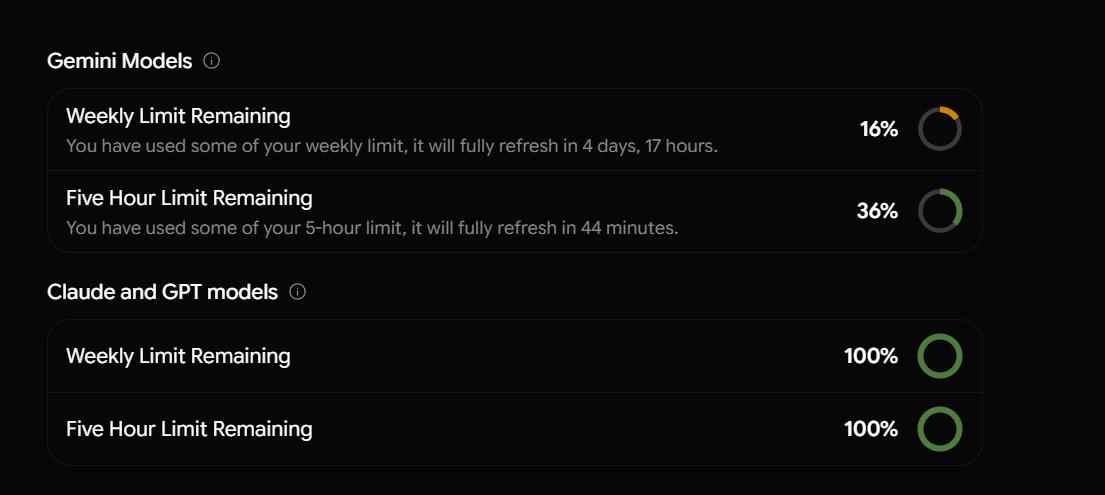
Welcome to the weekly support and known issues thread!
This is your space for all things technical—whether you've hit a quota limit or found a bug in the latest version. To keep the main feed clean, all standalone posts about these topics will be redirected here.
Update: Standalone posts regarding Jio are no longer permitted on the main feed and will be automatically redirected to this weekly thread.
To get help from the community, please use this format:
OS/Version: (e.g., Windows 11 | Antigravity v1.19.6)
Model & Plan: (e.g., Gemini 3.1 Pro | Pro Tier)
The Issue: (Describe the error, bug, or limitation you're facing)
Use this thread for:
Quotas: "I hit my limit 2 hours early today."
Bugs: "Is anyone else seeing [Error X]?"
Updates: Discussing official updates from the Antigravity Changelog.
Do not use this thread for:
General venting without technical context.
Duplicate complaints without adding new data or logs.
Requests for exploit tools or auth-bypass plugins (strictly prohibited).
I just bought google pro (paid pro) and tried using Gemini 4 Neon in Antigravity very satisfied with the results, I built 1 full app from 0 and the results are quite impressive.I didn't expect to spend so many tokens on this, but honestly it's been really satisfying and fun.
I had a small doubt. I am currently on the AI Plus plan using my student ID and also on Pro in a separate account via the promotional offer for free.
Since I cannot choose models like Neon etc, I was thinking of upgrading to Paid Pro. Will this offer that I am going to buy allow me to use all these models and act as a Paid Pro member?
Also, will I have higher usage than current plans??
Honestly didn't expect this little prompt-bar side project to get this much love, let alone its own appreciation post and skin concepts. Almost everything in this update came directly from ideas, art, and bug reports from people in this sub — everyone who contributed is mentioned on the website and GitHub (I'll also tag folks in the comments so this post doesn't get cluttered).
New default look & 5 skins: Atom V2 is now the default, alongside classic V1, base qt., Cozy Chibi (hoodie + cat ears), and Nobility — 4 outfits that automatically swap based on your active model. Shift+click cycles skins, and Alt+click moves Atom to the other side of the prompt bar.
Basic Antigravity CLI (agy) support: Put together an initial terminal setup using agy's documented plugin hooks and custom status line (no wrapping or injection). By default it sits neatly at the end of the one-line status bar, or you can hit ! in an empty prompt and run atom-toggle to switch to the big pixel Atom view.
Bug fixes & button overlap: Fixed the overlap where Atom was covering prompt-bar buttons, along with several edge cases and stability fixes people reported.
Full gallery: All 19 animated states across every skin, rendered as GIFs you can browse or save.
Community mentions: Skin designers, contributors, and testers are all listed on the site and repo.
Manga, memes & fan art: Added a short Atom vs Clawd fan-parody manga, a memes section, and a fan art wall (open to submissions via PR or GitHub if anyone draws Atom).
atom.log**:** Tucked a small recovered log (instance 0x3f2a) into the site if you feel like cracking a bit of hidden lore.
Updating / Installing
Desktop (update or fresh install): Re-run the one-liner (or git pull if you cloned it), then quit Antigravity completely and reopen it from Atom's launcher:
Linux / macOS:curl -fsSL https://raw.githubusercontent.com/Arnav8452/atom/main/install.sh | bash
Windows (PowerShell):irm https://raw.githubusercontent.com/Arnav8452/atom/main/install.ps1 | iex
(If you already have Desktop Atom installed, they share the same plugin — you only need the second line.)
Still MIT-licensed, Python stdlib only, zero telemetry, and 100% local. Thanks again to everyone who tried it out or shared ideas — let me know if anything still acts weird on your setup.
Final trick for agy is to use rust , reducing the memory usage well enough so you can abuse more than 6 windows at once , claude done it , codex will in the future i hope they will too
n old customer, I got a 50% discount on the Pro in advance. But later I upgraded to the Ultra plan. Still think the Pro offers the best value for money, especially with all the frequent resets these days.
Neon is really great. And Antigravity keeps getting better with all the frequent updates.
I couldn't see any Black Friday offer showing up on my screen. I tried checking from both my existing Pro account and a brand new account, but nothing appears on either.
Is the deal region locked, expired, or is there a specific link/promo code I'm missing? Would appreciate any help!
Finally got some newww outfits for Atom ! He literally goes behind a little red curtain to change his outfit and pops back out in a new skin ( Shift + Click )
I'm in love with this model so perfect so elegant so precise and less consuming of limts ,what the actual fuhh google made , I consider it wayy better that opus 5.5
I'm not sure if this is a bug or if there's something I'm missing, but I just opened Google Antigravity today, and I noticed that my usage is already at 96%.
The strange thing is, I haven't even used Antigravity today. I literally just opened it, and it was already showing that my usage was almost depleted.
It also says that my usage will reset in 4 hours and 58 minutes.
Has anyone else experienced this? Does Antigravity consume usage in the background, or could this be a usage tracking issue?
I'd appreciate any explanation because this is quite confusing, especially when I haven't even used it today.
basically title - I get 'disabled by organization policy' when trying to switch to auto approval mode. I searched google - but found no workarounds. Can anybody please help?
Couple of days ago I have posted some screenshots of Android app that I have made that can run Antigravity. So couple of guys said Why named it antigravity and used antigravity logo when it's not an unofficial one so I thought that was a good point and Decided to Revamp the app a bit now it's Called Android Workspace, Antigravity Testing as been completed I have used it to build python telegram bot and a Web app and a Android Music app but before the release I want to add Codex Support too ( don't have claude code sub to test that why I'll skip it) after testing it with codex I'll post an another update hopefully that will be the open source release on github
A while back I shared Markdown Folio, a VS Code extension I vibe-coded to make Markdown files actually pleasant to read and export.
Since then, I noticed a constant headache while vibe-coding: AI tools write a lot of Markdown: specs, implementation plans, docs, and reviewing them in raw text or going back and forth in chat gets messy fast.
So in v2.0.0, I built a Human ↔ Agent Review Workspace right inside the live preview (quick demo in the video above):
Leave notes directly on the preview: Highlight any sentence, or hover over a heading, diagram, table, or code block to leave a comment. Everything saves straight into your .md file as hidden comments, no extra setup needed.
Hand off in one click: Hit Copy Prompt and paste it into whatever AI assistant you use (Claude Code, Cursor, Copilot, Antigravity, Codex, etc.).
Verify what actually changed: When the AI finishes, step through the updates and toggle Before / After to see exact edits instead of guessing.
Approve & clean up: One click removes all review notes and leaves you with a clean file. (Exports to PDF, Word, HTML, and PNG also stay 100% clean.)
Would love to hear what you think or how you review AI-written docs in your workflow!
I have been using /btw for so long even when it was the very basic version that used to be immediately deleted after asking the question, it was just one of the coolest things ever when I was new to antigravity, and I saw it grow into a really great feature, now it has become a full fledged side chat / branched conversation, which is absolutely great! But the thing is, some plugins (namely /swarm) does not work inside that side chat. I understand that at this point you could fork it into a separate new conversation but in many use cases I've had for the new /btw, I didn't feel much incentive behind that, because it keeps my conversation logs more neat and organized honestly...so maybe if it's possible they should implement some kind of fix?
Or, shift of suggestion here, but maybe they could add a new way to organize our conversations, kind of like how pinning works, but instead you can customize many folders, it could be a conversation in a project and you could save it temporarily in a folder compartment (say, (active chats) for example, so you're not lost, or maybe even (temporary) or (junk) or (general questions) or (setup) which is a folder I'd definitely use a ton since I have my agent install stuff I'll use for me (aslo has been a good use of /btw))