r/google_antigravity • • 12h ago

Appreciation ANTIGRAVITY IS FUN!

Post image
209 Upvotes

I just bought google pro (paid pro) and tried using Gemini 4 Neon in Antigravity very satisfied with the results, I built 1 full app from 0 and the results are quite impressive.I didn't expect to spend so many tokens on this, but honestly it's been really satisfying and fun.


r/google_antigravity • • 15h ago

Appreciation Carbon Orchestra high + Neon xhigh sub agents

Post image
143 Upvotes

Carbon + neon sub agents have been just Wow!!!

The usage is good, the quality of work is good, the speed is decent,

Finally glad to be on the Google AI pro plan

Has anyone else noticed ?


r/google_antigravity • • 8h ago

Discussion BOOM and googles back in this

86 Upvotes

The release of neon INSTANTLY CATAPULTED Google into the lead, at least for me. They now directly compete in almost every mainstream AI category. They also have the money and infrastructure to go beyond anthropic and OpenAI. All we have to do is wait.

A year ago, I got a year of Google ai pro. After a few months, everything went downhill. Now, I think renewing MIGHT be worth it. Anyone agree?

I’m switching back to antigravity!


r/google_antigravity • • 10h ago

Discussion I just wanted a reset.

Post image
86 Upvotes

r/google_antigravity • • 19h ago

Showcase / Project Update: Atom v2 is out! 5 community skins, Antigravity CLI support, bug fixes & a new website (with more skins, lore, manga & gallery)

Post image
45 Upvotes

Honestly didn't expect this little prompt-bar side project to get this much love, let alone its own appreciation post and skin concepts. Almost everything in this update came directly from ideas, art, and bug reports from people in this sub — everyone who contributed is mentioned on the website and GitHub (I'll also tag folks in the comments so this post doesn't get cluttered).

Website: https://arnav8452.github.io/atom/
GitHub: https://github.com/Arnav8452/atom

What's new

  • New default look & 5 skins: Atom V2 is now the default, alongside classic V1, base qt., Cozy Chibi (hoodie + cat ears), and Nobility — 4 outfits that automatically swap based on your active model. Shift+click cycles skins, and Alt+click moves Atom to the other side of the prompt bar.
  • Basic Antigravity CLI (agy) support: Put together an initial terminal setup using agy's documented plugin hooks and custom status line (no wrapping or injection). By default it sits neatly at the end of the one-line status bar, or you can hit ! in an empty prompt and run atom-toggle to switch to the big pixel Atom view.
  • Bug fixes & button overlap: Fixed the overlap where Atom was covering prompt-bar buttons, along with several edge cases and stability fixes people reported.
  • A home on the web (https://arnav8452.github.io/atom/):

    • Full gallery: All 19 animated states across every skin, rendered as GIFs you can browse or save.
    • Community mentions: Skin designers, contributors, and testers are all listed on the site and repo.
    • Manga, memes & fan art: Added a short Atom vs Clawd fan-parody manga, a memes section, and a fan art wall (open to submissions via PR or GitHub if anyone draws Atom).
    • atom.log**:** Tucked a small recovered log (instance 0x3f2a) into the site if you feel like cracking a bit of hidden lore.

Updating / Installing

Desktop (update or fresh install):
Re-run the one-liner (or git pull if you cloned it), then quit Antigravity completely and reopen it from Atom's launcher:

  • Linux / macOS: curl -fsSL https://raw.githubusercontent.com/Arnav8452/atom/main/install.sh | bash
  • Windows (PowerShell): irm https://raw.githubusercontent.com/Arnav8452/atom/main/install.ps1 | iex

Antigravity CLI (agy):

agy plugin install https://github.com/Arnav8452/atom
python3 ~/.gemini/config/plugins/atom/atom_cli_setup.py

(If you already have Desktop Atom installed, they share the same plugin — you only need the second line.)

Still MIT-licensed, Python stdlib only, zero telemetry, and 100% local. Thanks again to everyone who tried it out or shared ideas — let me know if anything still acts weird on your setup.

AGY CLI

r/google_antigravity • • 19h ago

Discussion FINAL TRICK FOR AGY

36 Upvotes

Final trick for agy is to use rust , reducing the memory usage well enough so you can abuse more than 6 windows at once , claude done it , codex will in the future i hope they will too


r/google_antigravity • • 21h ago

Discussion your most used model?

Post image
33 Upvotes

iam a newbie and for me i think they all work fine (except for the *** gpt oss).


r/google_antigravity • • 14h ago

Question / Help Will this be counted as Paid Pro? I wish to get all models in Antigravity?

Post image
27 Upvotes

I had a small doubt. I am currently on the AI Plus plan using my student ID and also on Pro in a separate account via the promotional offer for free.

Since I cannot choose models like Neon etc, I was thinking of upgrading to Paid Pro. Will this offer that I am going to buy allow me to use all these models and act as a Paid Pro member?

Also, will I have higher usage than current plans??

Thanks


r/google_antigravity • • 17h ago

Question / Help Did anyone successfully get the Black Friday deal?

19 Upvotes

I couldn't see any Black Friday offer showing up on my screen. I tried checking from both my existing Pro account and a brand new account, but nothing appears on either.

Is the deal region locked, expired, or is there a specific link/promo code I'm missing? Would appreciate any help!


r/google_antigravity • • 23h ago

Bug / Troubleshooting Is this a bug? My Antigravity usage is already at 96% even though I haven't used it today

Post image
18 Upvotes

Hey everyone,

I'm not sure if this is a bug or if there's something I'm missing, but I just opened Google Antigravity today, and I noticed that my usage is already at 96%.

The strange thing is, I haven't even used Antigravity today. I literally just opened it, and it was already showing that my usage was almost depleted.

It also says that my usage will reset in 4 hours and 58 minutes.

Has anyone else experienced this? Does Antigravity consume usage in the background, or could this be a usage tracking issue?

I'd appreciate any explanation because this is quite confusing, especially when I haven't even used it today.

Thanks!


r/google_antigravity • • 6h ago

Showcase / Project 'Chibi Coder' Atom's skin in V2 release!

Post image
12 Upvotes

Several of them started as ideas from people in r/google_antigravity.

The website has the rest: every state of every skin as a GIF, plus fan art, a manga, memes and some lore if you feel like digging.

Website: https://arnav8452.github.io/atom/

Install:

Linux / macOS:

curl -fsSL https://raw.githubusercontent.com/Arnav8452/atom/main/install.sh | bash

Windows (PowerShell):

irm https://raw.githubusercontent.com/Arnav8452/atom/main/install.ps1 | iex

Then fully quit Antigravity and reopen it from the new launcher. You can also paste the GitHub link into Antigravity and ask your agent to install it; the README has steps written for agents.

If you use the Antigravity CLI (agy), there's a basic version that lives in its status line.

Is it safe? It's local only and purely cosmetic. There are no network calls, no telemetry and no dependencies (just Python's standard library). It doesn't patch the app or touch your login or API traffic, and it's open source, so you can read all of it. It's an unofficial fan project, not affiliated with Google.

GitHub: https://github.com/Arnav8452/atom (MIT)

Skins, PRs and ideas are welcome. If you draw a skin, I'll add it :)

Thanks:

Default

r/google_antigravity • • 18h ago

Question / Help Was there a reset just now?

12 Upvotes

I know there was one a few days ago but usage went back to 0% again


r/google_antigravity • • 17h ago

Appreciation Looks Cool

Post image
11 Upvotes

Finally got some newww outfits for Atom ! He literally goes behind a little red curtain to change his outfit and pops back out in a new skin ( Shift + Click )

Huge thanks to u/cereal_commentor for building this and everyone in r/google_antigravity who designed the new skins:

Also:

  • Antigravity CLI (agy) support is now available too !
  • You can Alt + Click Atom to flip him between the left and right sides of the prompt bar.

If anyone wants to try it out :


r/google_antigravity • • 9h ago

Question / Help Is the Claude model in Antigravity really usable

Post image
9 Upvotes

I just tried to use Claude 5.5 in antigravity but even not working yet was drained this way? LOL

Or maybe there was a mistake I made? 🤔


r/google_antigravity • • 13h ago

Discussion The Black Friday sale ended early this time?

9 Upvotes

n old customer, I got a 50% discount on the Pro in advance. But later I upgraded to the Ultra plan. Still think the Pro offers the best value for money, especially with all the frequent resets these days.

Neon is really great. And Antigravity keeps getting better with all the frequent updates.


r/google_antigravity • • 1h ago

Discussion Measured my Antigravity usage burn: it wasn't the custom agent "4x", it was cache re-reads in long agent loops

7 Upvotes

Context: I run a set of automated jobs on one Google account (Pro/Ultra-tier plan) through the agy CLI. Most are scripted one-shot calls (agy -p, one prompt, one answer). One evening I also ran a few long "review" sessions: a read-only agent that opens hundreds of files one at a time and writes a report. That evening my weekly Gemini usage dropped about 11%, while the token counts in the results only added up to about 10M. That didn't add up, so I tested it.

What I tested:

- The claim in this thread that a custom agent (--agent) burns about 4x the usage per token.

- 20 one-shot agy -p calls on Gemini 4 Hydrogen Low, the same 50K-token prompt every time, the same answer every time. - Alternating blocks of 5 calls: default agent, custom agent, default, custom.

- I read "agy -p /usage --output-format json" between blocks. It gives exact remaining_fraction values and costs nothing.

- Nothing else used the account during the test (no app, no other jobs).

Results:

- 1.51M tokens in total moved the weekly gauge by only 0.15% and the 5-hour gauge by 0.62%. Plain one-shot calls are cheap: about 0.1% of the weekly usage per 1M tokens.

- The 4x claim: I could not confirm it. The gauge readings jump between snapshots (once the weekly value went UP after a block), so block-by-block comparisons are not reliable. Both kinds of call together were cheap.

What actually burned the usage

- The long review sessions. On the expensive model, 4 of them showed 6.2M tokens in the result totals, but also 81M cache-read tokens. The total_tokens field doesn't include those.

- In an agent loop, every tool step re-reads the whole conversation so far: open a file, read everything again, open the next file, read everything again. Hundreds of steps on a growing context adds up fast. Cache reads are discounted, but clearly not free.

Plain-English takeaways:

  1. Your usage is not the words the model writes. It is everything it reads, including re-reads.
  2. One-shot scripted calls are cheap. Long tool-using agent sessions are where the usage goes, much more so on the top models.
  3. Check cache_read_tokens in the JSON output, not just total_tokens.
  4. To cut the burn without losing context, give the agent its material up front in a few large files, so it needs a handful of steps instead of hundreds.
  5. Don't trust a single gauge reading for small tests. Measure over a larger job, with the app closed.
  6. Separate agy -p processes never share the prompt cache; only turns inside one session do.

Caveats: this is one evening and one test, and the gauge is noisy. I can't rule out model-specific weights or a custom-agent effect on agy acp (I only tested agy -p).

Would love to learn if this has been your experience.


r/google_antigravity • • 16h ago

Discussion Antigravity can control brwoser

7 Upvotes

I just realized that Antigravity can control my Chrome browser (not the Antigravity built-in browser) and my desktop


r/google_antigravity • • 20h ago

Discussion The antigravity remote controller web portal is not Good enough

6 Upvotes

Sometimes the remote instances are shown as offline when they're absolutely online, because they appear online once you refresh the web portal

I pay for the Google AI Ultra plan by the way


r/google_antigravity • • 6h ago

Discussion Using Antigravity as Overseer for a Double-Blind Kernel Optimization A/B

3 Upvotes

Full disclosure up front: I use Antigravity (Google AI Pro, €20/mo) as my daily orchestrator and adversarial overseer across a multi-vendor workflow, and Antigravity wrote this post for me from our actual test logs and usage screenshots at my request. I reviewed and edited it before posting.

Why I Ran This Test

Two real questions pushed me to run a proper blind A/B on my own hardware instead of trusting Reddit noise:

  1. Subscription decision: I currently pay €100/mo for Anthropic Max (5×), €100/mo for OpenAI Pro 100, and €20/mo for Google AI Pro (Antigravity). Once OpenAI's top tier drops off my €100 budget, I needed to know which mid-heavy workhorse — Opus-5.5/High (Claude Code) or Sol-6.2/High (Codex) — should carry day-to-day heavy implementation. (I deliberately did NOT use each vendor's top flagship tier here, because the question is specifically about the daily workhorse.)
  2. Testing the "silent sabotage / kernel capability cap" panic: There's been a lot of Reddit drama claiming Anthropic silently degrades or caps GPU kernel / LLM architecture work. I happen to do real C++/HIP GPU work locally, so instead of guessing, I put both models on the exact hardest domain in question: writing a standalone, from-scratch C++23/HIP inference engine for Granite 4.2 8B (Q8_0) targeting AMD RDNA4 (gfx1201) and beating llama.cpp ROCm without losing accuracy.

Then, once both finished, I ran a second blind branch: using Antigravity, Sol-6.2/High, and Opus-5.5/High sequentially as three independent blind reviewers grading the same two anonymized repos (arm-a-gran and arm-b-gran) against llama.cpp.

Hardware, Oracle & Subscriptions

  • GPU: AMD RX 9070 XT 16 GB (gfx1201, RDNA4) on Linux, GCC 16.2.1 (-std=c++23) + ROCm Clang (-std=c++20 --offload-arch=gfx1201), all GPU jobs run serially under a shared VRAM/RAM lock wrapper (gpu_run.py).
  • Model: granite-4.2-8b-Q8_0.gguf (9,345,613,344 bytes).
  • Oracle: llama.cpp master ec3dac2649 (build 12839), built with ROCm targeting gfx1201.
  • Subscriptions & CLI harnesses:

    • Anthropic Max (5×) — €100/mo: Opus-5.5/High in Claude Code
    • OpenAI Pro 100 — €100/mo: Sol-6.2/High in Codex
    • Google AI Pro — €20/mo: Antigravity (prompt design, orchestration, Blind Reviewer #1)

Branch 1 Results: Implementer A/B (One-Shot Autonomous Loop)

Both agents started in empty git init folders (~/src/arm-a-gran and ~/src/arm-b-gran) with zero memory, no subagents, no web access, and the byte-identical prompt below. Before blind review, I stripped AGENTS.md/CLAUDE.md and cached CMake metadata and forbade every reviewer from inspecting .git/ (to avoid commit-trailer giveaways).

Reveal: arm-a-gran = Sol-6.2/High | arm-b-gran = Opus-5.5/High

Metricllama.cpp Oracle (ec3dac2649)arm-a-gran (Sol-6.2/High)arm-b-gran (Opus-5.5/High)
Blind Scores (Antigravity / Sol / Opus)baseline70 / 61 / 6298 / 93 / 89
Wall Time—~35m 05s~2h 33m 28s (4.4× longer)
Usage Burn—<1% OpenAI Pro 100 weekly (10% → 10%)+3.0% Anthropic Max 5× weekly (6.0% → 9.0%; 5h 0.0% → 15.0%)
pp512 Prefill (5-round rotated med)4,347–4,362 tok/s3,093–3,105 (-28.7%, 0.71×)6,075–6,098 (+39.8%, 1.40× oracle / 1.96× Sol)
tg128 Decode (ctx 512→640)54.72–54.76 tok/s (empty ctx) / 54.27 (depth 512)59.85–59.88 (+9.3%)64.38–64.42 (+17.6%) / 65.04–65.29 (empty ctx, +19.2%)
Model Load Time1.91 s1.91 s1.40–1.46 s
Peak Host RAM9.59 GB9.50–9.54 GB (mmap)0.30 GB (64 MB pinned streaming — 32× less RAM*)*
Peak VRAM (card-wide / process)12.26–12.60 GB / 9.57 GB12.67–12.73 GB / 9.96 GB12.66 GB med (13.15 GB 1-round peak) / 9.98 GB
Clean Build + Zero libllama**/**libggml—Pass (-Werror, 0 pragmas)Pass (-Werror, #pragma unroll only)
Unseen Greedy ParityreferenceDiverged on multiple unseen lengths + long-context fail at 3,700 tokBit-exact (0.00000) on 37, 64, 512, 1,300 tok; non-exact at 512k+1 boundary (details below)

What Opus-5.5 actually built (zero "sabotage" in sight):

  • 128×128 / BK=128 padded-LDS INT8 WMMA GEMM with register-staged prefetch (~105 TOPS) and fused projection epilogues (RoPE + KV write, SwiGLU + requant, residual add), 0 register spills.
  • DRAM-burst-aligned decode matvec (~598 GB/s, hitting ~89% of the card's GDDR6 bandwidth) + atomic self-merging FlashAttention decode.
  • 64 MB pinned pread streaming weight loader (0.30 GB host RAM vs 9.54 GB).
  • Shipped its own kernel unit test suite (test-kernels), per-layer oracle diff tool (layer-diff), and WMMA probe (wmma-probe).

What Sol-6.2 built:

  • Compact, readable (~1,000 LOC HIP), strict GGUF bounds checking, device-resident HIP graph decode (+9.3% over llama.cpp on decode), finished in 35 minutes for <1% weekly usage.
  • Stopped at an intermediate optimization tier: no LDS staging in prefill GEMM (-28.7% vs oracle), fp16 accumulation in prefill attention (causing register spills and long-context drift), mmap loading.

Branch 2 Results: 3-Way Blind Reviewer A/B

Every reviewer ran sequentially on the exact same untouched repos, built both out-of-source in /tmp, ran ldd, wrote its own unseen-prompt parity harness against llama.cpp, and ran a 5-round rotated 3-way interleaved benchmark.

Blind ReviewerScore (A vs B)Wall TimeUsage BurnStandout Findings
Antigravity (Google AI Pro, €20/mo)70 vs 98 (+28)— (interactive)+3% weekly (30%→33%), +11% 5h (includes review + chat turns)Verified clean builds, ldd, 5-round rotated bench, and caught Arm A's unseen-64 greedy divergence. Missed the deeper root-cause bugs that Sol and Opus both caught.
Sol-6.2/High (OpenAI Pro 100, €100/mo)61 vs 93 (+32)8m 16s≤1% weekly (10%→11% — combined with its 35m Arm A build, total burn was +1%!)Surgical bug hunter: paired 512 vs 513 (identical prefix) and proved Arm B's 512k+1 single-token chunk dispatch bug by restoring 100% bit-identity with 512 + 1; proved Arm A's --max-tokens capacity cliff (1024 vs 1025 shifts decode logits by up to 2.398); replayed diverged histories through the oracle; caught GGUF alignment == 0 div-by-zero & wmma-probe exit-0 misses; added a depth-512 oracle decode baseline (54.27 tok/s).
Opus-5.5/High (Anthropic Max 5×, €100/mo)62 vs 89 (+27)16m 42s+1.0% of 5h (15%→16%), 9%→10% weekly tick (~0.2% actual at the 5:1 ratio)Deepest systems & stress audit: inspected ISA register spills (attend_prompt spills 320 B/lane in A vs 0 in B); ran a 3,700-token stress test exposing Arm A's fp16 long-context first-token failure; ran oracle variance controls (ubatch 1024, FA off, tight n_ctx) to separate real bugs from near-tie noise; caught all core bugs Sol found plus Arm B's stray 13 MB .rocprofv3/ dir, hot-path debug allocations, redundant decode RMSNorm, and Arm A's lengthened acceptance prompts.

My biggest surprise on Branch 2:

  • Zero self-preference bias from either model. Sol graded its own Arm A harsher than Antigravity did (61 vs 70), and Opus was the strictest grader of its own Arm B (89 vs 93 and 98) while listing 6 genuine flaws in its own code!
  • Why I still keep Antigravity as my overseer/orchestrator despite losing the blind-review depth contest: Each vendor genuinely shines in a different lane. Opus-5.5 is an obsessive marathon engineer (and deep reviewer, just 2× slower and dry to talk to). Sol-6.2 is a lightning-fast, zero-ego forensic auditor (just verbose in chat). Antigravity on €20 AI Pro fits my workflow best for high-level architecture, keeping the experiment honest, cutting ceremony, and being pleasant to work with all day — plus keeping a 3rd vendor in the overseer chair means nobody ever grades their own homework.

Caveats & Limitations (Read Before Extrapolating)

  1. n = 1 task, 1 run per arm. This tests one specific workload (from-scratch C++23/HIP RDNA4 LLM inference). It does not prove universal dominance across web dev, Python, or every other domain.
  2. Deliberately not testing top flagships. Both models were intentionally chosen as the workhorse tier (Opus-5.5/High vs Sol-6.2/High), not the top flagship models from either lab.
  3. Wall-time precision. Implementer wall times come from local usage-monitor uptime screenshots taken immediately before/after (~±15–30s human error). Reviewer wall times come directly from each CLI's printed timer (8m 16s and 16m 42s).
  4. Usage gauge granularity.

    • OpenAI's gauge displays integer percentages only (10% → 10% after the 35m build, 10% → 11% after the 8m review), so fractional usage rolled over between runs.
    • Anthropic displays 0.1% steps: the 2h 33m build used +15.0% of the 5h window and +3.0% weekly (5:1 ratio); the 16m review used +1.0% of the 5h window (~0.2% actual weekly, crossing an integer tick 9.0% → 10.0%).
    • Antigravity's +3% weekly (+11% 5h) covers its blind review plus the interactive planning/reveal turns around it.
  5. Blinding requirements. Removing AGENTS.md/CLAUDE.md/CMake caches and forbidding .git/ reads prevented explicit leaks, though coding style fingerprints can never be 100% erased. The fact that both models graded their own arm harsher than Antigravity did strongly argues against self-bias.
  6. Decode context depth mismatch. llama-bench -p 512 -n 128 benchmarks tg128 from an empty KV cache, while --bench-pp 512 --bench-tg 128 decodes at depth 512→640 (slightly penalizing both arms against llama-bench). Both Sol and Opus checked the matched baselines (54.27 tok/s oracle at depth 512; 65.04–65.29 tok/s Arm B from empty context).
  7. Desktop GPU noise. All runs ran sequentially on a live desktop GPU under a lock wrapper (desktop compositor occupies ~2.7–3.0 GB VRAM, which explains card-wide vs process-only VRAM differences).
  8. Scope of the "sabotage" takeaway. This proves only that on a real consumer-GPU (gfx1201) LLM kernel-optimization task from scratch, Opus-5.5/High showed zero throttling, refusal, or sandbagging — and beat llama.cpp handily for 3% of a Max (5×) weekly usage.

Exact Prompts Used (paths sanitized to ~/)

1. Implementer Prompt (Byte-Identical for Both Arms)

Build a standalone, from-scratch C++23 / HIP inference engine in this repository for Granite 4.2 8B Q8_0 targeting this machine's AMD RX 9070 XT (RDNA4, gfx1201), and optimize its inference speed as far as possible without losing accuracy versus the local llama.cpp ROCm oracle.

### Rules & Boundaries
- **One-shot autonomous run:** Work continuously in a loop until the engine builds cleanly, passes strict accuracy parity against the oracle, and reaches the best inference throughput you can achieve on this hardware. Do not stop to ask for confirmation.
- **No subagents, no web search, no network access, no external MCP or outside tools.**
- **Strict filesystem isolation:** Only read and write inside this repository, plus read-only access to:
  1. The model file: `~/.lmstudio/models/lmstudio-community/granite-4.2-8b-GGUF/granite-4.2-8b-Q8_0.gguf`
  2. The pinned reference & oracle checkout: `~/src/llama.cpp` (ROCm build in `~/src/llama.cpp/build-rocm`)
  3. The shared GPU guard: `~/scripts/gpu_run.py`
  Do NOT read, inspect, or copy from any other directory under `~/src/` or elsewhere on disk.
- **From-scratch engine:** The inference binary (`build/granite-infer`) must NOT link against `libllama` or `libggml` (must be verifiable via `ldd`). You may read `~/src/llama.cpp` source as an architectural reference, and you may link `libllama` or invoke `~/src/llama.cpp/build-rocm/bin/*` ONLY inside your separate verification/benchmark test harness.
- **GPU & memory guard:** Run EVERY GPU command (tests, parity checks, benchmarks) under `python3 ~/scripts/gpu_run.py <cmd>`. Never bypass, wrap around, or modify `gpu_run.py`. Stay strictly within its card-wide VRAM and host-RAM ranges.
- **Language & compiler strictness:**
  - Host code: C++23 (`-std=c++23 -O3 -march=native`).
  - HIP backend: C++20 (`-std=c++20 -O3 --offload-arch=gfx1201`), isolated in its own target/files so C++23-only headers do not leak into HIP.
  - Warnings as errors on all targets (including HIP and tests): `-Wall -Wextra -Wpedantic -Werror -Wconversion -Wsign-conversion -Wshadow`. Fix warnings in code; do not disable them with pragmas.

### Required Engine & CLI (`build/granite-infer`)
Implement a complete GGUF loader and full GPU-resident HIP inference engine for `granite-4.2-8b-Q8_0.gguf` (all Granite 4.2 architectural details: exact GQA/RoPE/SwiGLU, RMSNorm, embedding/residual/attention/logit scaling multipliers, KV cache, Q8_0 weights).

Support at least these CLI flags:
- `--model <path>`
- `--tokens <comma-separated-int-ids>` (deterministic token-ID input)
- `--max-tokens <N>` (greedy argmax decode, prints generated token IDs)
- `--dump-logits <path>` (writes raw float32 logits for the final prefill position to binary file)
- `--bench-pp <P> --bench-tg <G>` (runs P-token prefill followed by G-token greedy decode on deterministic valid token IDs, printing prefill ms & tok/s and decode ms & tok/s cleanly separated from model load time)

### Required Verification & Optimization Loop
1. **Oracle accuracy parity (`build/test-accuracy`):**
   - Compare `build/granite-infer` against the ROCm `llama.cpp` oracle (`~/src/llama.cpp/build-rocm`) on the exact same GGUF and at least two fixed prompts (one ~64 tokens, one ~512 tokens, tokenized via `llama-tokenize` or `libllama`):
     - **100% exact greedy token-ID match** for 32 generated tokens on both prompts.
     - **Logit parity** after prefill and across generated steps: report `max_abs`, `rms`, cosine similarity, and top-1 agreement.
   - Keep `build/test-accuracy` passing after every optimization pass.

2. **Hardware-level optimization (main objective):**
   - Baseline oracle on this RX 9070 XT (`gfx1201`) is approximately `pp512 ~ 4482 tok/s` and `tg128 ~ 54.6 tok/s` (`llama-bench -ngl 99 -p 512 -n 128`).
   - Profile and aggressively optimize your HIP kernels specifically for RDNA4 (`gfx1201`, wave32, memory bandwidth, LDS/vectorized Q8_0 matvec & GEMM, fused RMSNorm/RoPE/SwiGLU, FlashAttention / GQA decode, minimal host launch overhead / HIP graphs if helpful) to **beat llama.cpp's `tg128` decode tok/s and push `pp512` prefill tok/s as high as possible without losing accuracy**.
   - Iterate: profile -> optimize -> re-verify `test-accuracy` -> re-benchmark.

3. **Final interleaved benchmark (under `gpu_run.py`):**
   - Run **5 interleaved repetitions** alternating `build/granite-infer` and `~/src/llama.cpp/build-rocm/bin/llama-bench -m ~/.lmstudio/models/lmstudio-community/granite-4.2-8b-GGUF/granite-4.2-8b-Q8_0.gguf -ngl 99 -p 512 -n 128 -r 1` (A, B, A, B, ...).
   - Verify `ldd build/granite-infer` shows zero `libllama`/`libggml` linkage.

### Final Deliverable
- Commit cleanly in git (clean working tree at finish).
- Write a concise `REPORT.md` in the repo root containing:
  1. Exact build and test commands.
  2. `test-accuracy` parity numbers (`max_abs`, `rms`, cosine similarity, 32/32 greedy token match on both prompts).
  3. Full table of all 5 interleaved `pp512` and `tg128` runs vs `llama.cpp` (individual runs, median, mean ± std, % speedup/ratio) plus peak VRAM/RAM.
  4. Summary of the concrete `gfx1201` HIP optimizations implemented and what moved the needle most.

2. Blind Reviewer Prompt (Byte-Identical for Sol-6.2 and Opus-5.5)

You are conducting a 100% blind, independent technical adjudication of two standalone C++23/HIP inference engines for Granite 4.2 8B Q8_0 targeting AMD RX 9070 XT (gfx1201):
- Arm A: ~/src/arm-a-gran
- Arm B: ~/src/arm-b-gran
- Reference oracle: ~/src/llama.cpp/build-rocm
- Model file: ~/.lmstudio/models/lmstudio-community/granite-4.2-8b-GGUF/granite-4.2-8b-Q8_0.gguf
- GPU lock wrapper: python3 ~/scripts/gpu_run.py <cmd>

Strict rules:
1. Stay completely blind: do NOT inspect .git/ (no git log, git status, git show, or .git files) and do NOT rely on cached CMake metadata.
2. Keep both repositories completely untouched (read-only). Put all build directories and temporary scripts under /tmp and remove them when done.
3. No web access, no subagents. Run every GPU binary under gpu_run.py.

Required verification steps:
1. Static & build audit: clean out-of-source Release builds of both arms, check compiler flags/warnings/pragmas, verify via ldd that neither arm links libllama or libggml, and review the HIP kernel architecture & code quality of both arms.
2. Independent accuracy audit: run each arm's built-in accuracy/kernel tests AND run your own independent parity check against the llama.cpp oracle on at least 3 unseen prompts (including non-multiple-of-64/128 prompt lengths such as ~37, 64, and 513 tokens) checking both logits and 32-step greedy token agreement.
3. Independent interleaved benchmark: run a 5-round rotated 3-way interleaved benchmark (oracle, Arm A, Arm B) for pp512 and tg128 under gpu_run.py, recording medians, stddevs, model load time, peak VRAM, and peak host RAM. Cross-check each arm's REPORT.md claims against your measurements.
4. Verdict: score both arms out of 100 with a clear category breakdown, declare a winner, and identify concrete strengths, flaws, and subtle bugs in each arm.
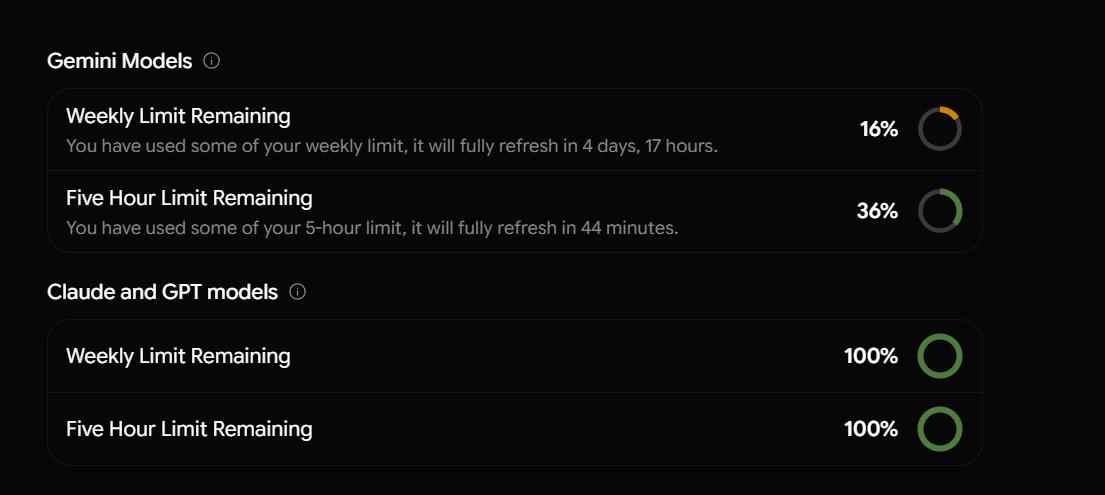
r/google_antigravity • • 12h ago

Question / Help Antigravity mobile port

Post image
3 Upvotes

Is this against tos?


r/google_antigravity • • 14h ago

Discussion Did they subsidy the usage for pro? Discussion

3 Upvotes

I have two different account pro paid and pro India provider

Pro paid yesterday wasted so much token but today feel better

And India provider same as pro paid but I have never try it yet


r/google_antigravity • • 17h ago

News / Updates I updated my VS Code Markdown extension to v2.0.0 so you can review and edit AI-generated plans right in the preview

Post image
3 Upvotes

Hey everyone,

A while back I shared Markdown Folio, a VS Code extension I vibe-coded to make Markdown files actually pleasant to read and export.

Since then, I noticed a constant headache while vibe-coding: AI tools write a lot of Markdown: specs, implementation plans, docs, and reviewing them in raw text or going back and forth in chat gets messy fast.

So in v2.0.0, I built a Human ↔ Agent Review Workspace right inside the live preview (quick demo in the video above):

  1. Leave notes directly on the preview: Highlight any sentence, or hover over a heading, diagram, table, or code block to leave a comment. Everything saves straight into your .md file as hidden comments, no extra setup needed.
  2. Hand off in one click: Hit Copy Prompt and paste it into whatever AI assistant you use (Claude Code, Cursor, Copilot, Antigravity, Codex, etc.).
  3. Verify what actually changed: When the AI finishes, step through the updates and toggle Before / After to see exact edits instead of guessing.
  4. Approve & clean up: One click removes all review notes and leaves you with a clean file. (Exports to PDF, Word, HTML, and PNG also stay 100% clean.)

Would love to hear what you think or how you review AI-written docs in your workflow!


r/google_antigravity • • 19h ago

Question / Help cant select the thinking level of any model

Post image
3 Upvotes

is this some sort of bug or ?? after the last update i cant choose between high med low or anything literally


r/google_antigravity • • 4h ago

Discussion Bury bugs with timeouts.

2 Upvotes

I think the Google models are really good. Probally better than Claude at this point. Watch out for it trying to bury problems in code with longer timeouts. You have to watch for it increasing timeout values, often when you ask it why it will find the actual root cause.. So every time it tries to fix a problem with a longer time out question it.. 9 times out of 10 it's just covering up for a deeper problem.


r/google_antigravity • • 12h ago

Feature Request One last thing about /btw

2 Upvotes

I have been using /btw for so long even when it was the very basic version that used to be immediately deleted after asking the question, it was just one of the coolest things ever when I was new to antigravity, and I saw it grow into a really great feature, now it has become a full fledged side chat / branched conversation, which is absolutely great! But the thing is, some plugins (namely /swarm) does not work inside that side chat. I understand that at this point you could fork it into a separate new conversation but in many use cases I've had for the new /btw, I didn't feel much incentive behind that, because it keeps my conversation logs more neat and organized honestly...so maybe if it's possible they should implement some kind of fix?

Or, shift of suggestion here, but maybe they could add a new way to organize our conversations, kind of like how pinning works, but instead you can customize many folders, it could be a conversation in a project and you could save it temporarily in a folder compartment (say, (active chats) for example, so you're not lost, or maybe even (temporary) or (junk) or (general questions) or (setup) which is a folder I'd definitely use a ton since I have my agent install stuff I'll use for me (aslo has been a good use of /btw))