r/kodi • u/Remarkable-Rush-2116 • 15h ago
Game Visuals: a game browser for Kodi's RetroPlayer that reads your existing gamelist.xml
I run CoreELEC on an old Phicomm N1 TV box. Kodi's RetroPlayer can already run ROMs there, but the built-in game browser only shows file names: no titles, no covers, no descriptions, and big folders take a long time to load. I couldn't find an add-on that fixed this, so I wrote one: **Game Visuals**.
It reads the `gamelist.xml` files already sitting in your ROM folders (the EmulationStation / RecalBox format), shows the artwork, metadata and trailers, and launches the game with RetroPlayer. If you have a ROM folder from EmuELEC or ES-DE, you can point the add-on at it as it is.
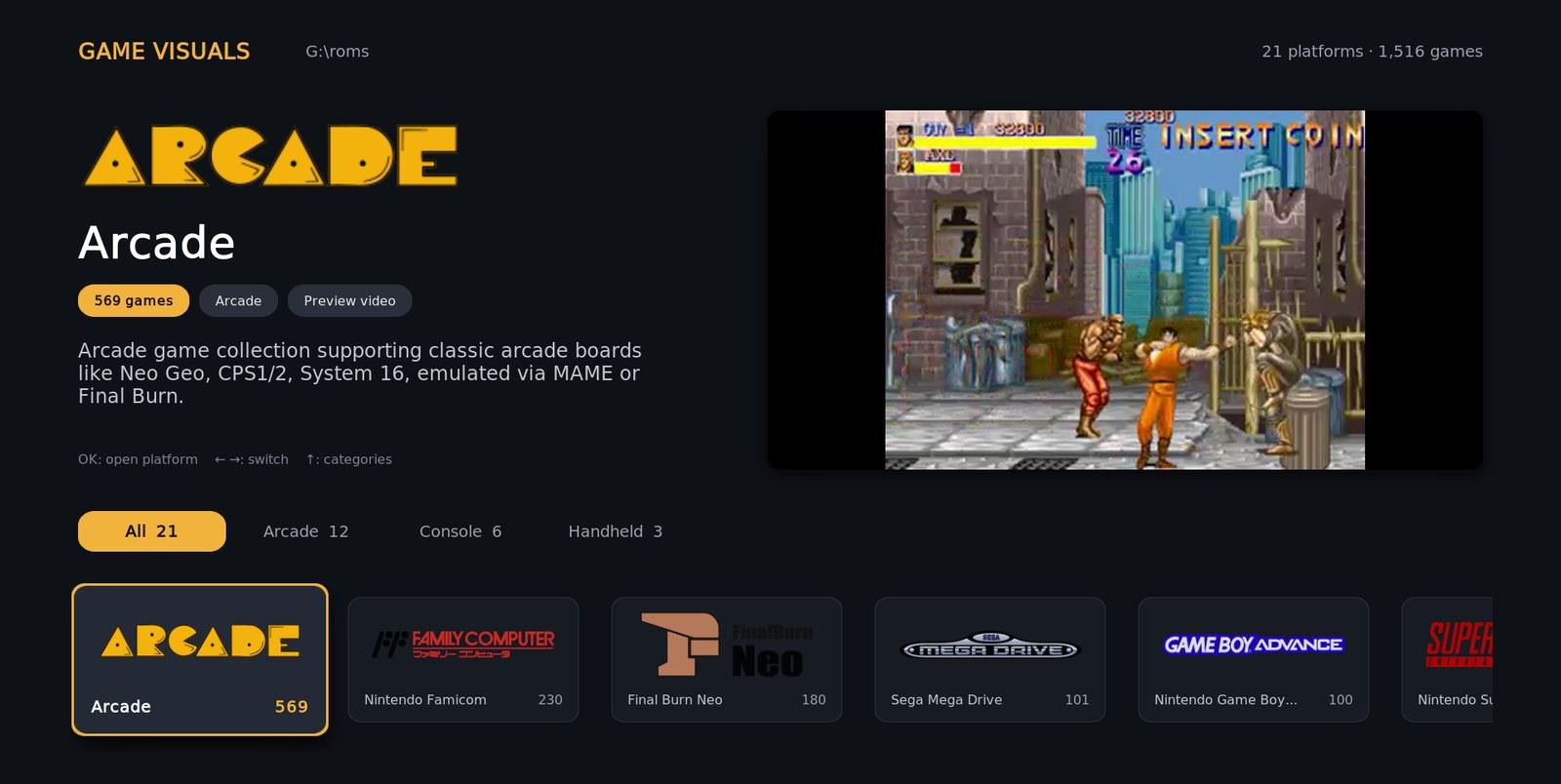
**Platform screen**
Platforms are shown as cards with logo, game count and description, grouped into arcade, console, handheld and computer. Stay on a platform and it plays a random trailer from that platform.
**Four browse layouts**
Trailers start automatically when a game stays selected for a moment.
- **A: Classic two-column** – list on the left; trailer, cover and description on the right.

- **B: Immersive hero** – full-screen screenshot with a cover carousel at the bottom.

- **C: Poster wall** – seven covers per row.

- **D: Retro TV** – trailers play inside an old CRT with scanlines; the game list looks like cartridges.

You can also keep your skin's own views with the "Kodi default list" option.
**Game details screen**
Press X or hold A on a gamepad (`I` or `C` on a keyboard) to see cover, year, genre, developer, players, rating and description on one page, with the trailer playing.

**Limitations**
- No built-in scraper. Generate `gamelist.xml` and the media on a PC with a tool such as Skraper, then copy them next to your ROMs. [Guide](https://github.com/yunnysunny/game-visuals/blob/main/docs/wiki/en/gamelist-usage.md).
- Games run in RetroPlayer, so platform support and performance depend on the cores Kodi offers and on your device.
- Needs Kodi 19 or later. I mostly test on Kodi 21 for Windows.
**Install**
Download the zip from [GitHub Releases](https://github.com/yunnysunny/game-visuals/releases) and use **Add-ons → Install from zip file**. Then open **Video add-ons → Game Visuals** and choose "Add games...". Details are in the [user manual](https://github.com/yunnysunny/game-visuals/blob/main/docs/wiki/en/user-manual.md).
Source (MIT): https://github.com/yunnysunny/game-visuals
The first version was a plain Kodi list. The current layouts were redesigned with help from an AI tool. Feedback, bug reports and requests for layouts or missing platform logos are welcome.